
ART, DFW Metroplex, Libraries, Memory Keeping, Photo Organization, Photo Organization Coach, Photography, Scrapbooking

Can FOREVER Save That?

MEMORY KEEPING 101: THE FORMATS FOREVER CAN STORE

What Do You Have and What Do You Want?

There is one question I ask a lot and this is it! It applies to many steps in the Memory Keeping process, but in our digital world, wondering what formats can be saved on FOREVER is a pretty important one.

If you are a general consumer with photos, video and audio on your devices and computer, then FOREVER is going to save pretty much anything you want it to. Here’s a list of all the things FOREVER will save.
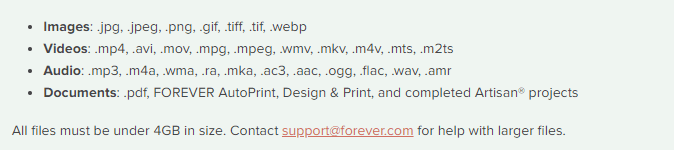
As you can see, this is a pretty comprehensive list. In fact, I don’t even know what some of those formats do. However, there are things FOREVER can’t save (yet), so let’s talk about those.

Raw Files

Many pro and hobbyist photographers take photos in Raw. This is a a generalized category which creates huge files for the purpose of file manipulation. When we were in the real estate photography business, our photographers would take their shots in raw on the HDR setting. This meant the files were huge and that basically they were in parts. Our guys would take multiple shots in a variety of exposures for each image, which would then be processed to create one data rich file for editing. The purpose was to manipulate light, so that we could take a picture of a room with the curtains open and get everything in the room and everything outside with perfect lighting. Various photographers use a variety of other methods to do the same thing, but this is the method we used and a lot of other photographers do, too.

The difficulty with this is that different cameras take different types of raw photos. Our Canon camera took .cr2 and the DGI drone took .dng. Your Nikon takes something else and other cameras will take another format. And this is why FOREVER has not yet embraced RAW in it’s suite of supported files, yet.

While FOREVER will not save all these raw files, most of the time the raw state is just a temporary destination for files which will become jpg’s. That’s what we did. General consumers don’t want to handle or store the huge, unedited files. We always converted our raw files to jpg’s as we processed the files for delivery. While FOREVER doesn’t store raw files, yet, it does realize that for some photographers, this capability is a high priority.

I have spoken with Dr. Nathan Bowers, the VP in charge of R&D and supporting these files is on the short list of development with FOREVER, but there are technical challenges associated with it. Nathan would have been happy to explain these details to me, but I wouldn’t have understood. If you would, then perhaps you should call him, but for the time being, suffice to say, FOREVER can’t store Raw files, but we’re working on it.

HEIC

Those who use and are familiar with Apple know they sort of like to be unique. If you have an Apple phone, then this is the format your photos are taken in. Not to worry! While FOREVER will not store your photos in HEIC, it will automatically convert them to .jpg as you upload them. For 99% of the population, that’s fine. They actually don’t care what extension is attached to their files, they just want to save them. There are some proponents of HEIC who want to keep their files in that format and unfortunately, at this time, FOREVER cannot save these files. I say “at this time,” because an ongoing desire at FOREVER is to never say no to any format. At this time it is not possible to store .heic on FOREVER, but that won’t be the answer forever.

Various Documents

Let me start this part of the conversation here. You can save PDF files on FOREVER. The document files on your computer are much like the raw files from a camera, because the type of file created depends on a variety of factors. That’s why PDF was created in the first place.

PDF stands for Portable Document Format. It was designed to make your files portable, whatever format they were created in. Converting most files to PDF is easy. You just change the extension to .pdf and viola, you have a PDF which can be stored on FOREVER.

So, will FOREVER store your documents? Absolutely! Just save them as jpg’s and upload.

APPS

When one of my friends bought FOREVER storage, the first thing they wanted to do was save everything on their Quickbooks. Well, for one thing, Quickbooks is already saved and backed up. Perhaps not to the extent of FOREVER, but certainly safer than the photos on your phone or the VHS tapes sitting on a shelf.

After a little discussion, I discovered that what she really needed was not the whole app, but the reconciliation she created each month. Easy peasy! The reconciliation was a PDF doc. Now she saves those to FOREVER and is perfectly happy.

The point is that while you cannot save a whole app, probably what you want to save is some document which is already in a format FOREVER can save.

Specialized Formats

The items I have covered so far in this post are the most common questions I hear, however the longer I do this, the more formats I discover. Did you know quilters have a specific format for saving their quilt patterns and genealogist have their own format? The list goes on.

If you have a specialty format that you’d like to save on FOREVER, please let them know. The development team prioritizes projects based on need and demand. I know quilters and genealogists have their own formats, because I’ve been on ZOOM calls where Dr. Bowers has mentioned these formats as items on his development list.

In the meantime, many of these formats can be converted to something like jpg or pdf, which can be saved. Or you can take a picture of the file and save the picture. It may not be the complete digital file, but it’s better than nothing, until it can be saved on FOREVER.

Summing Up

While FOREVER cannot save every type of file in the world, the list of things they can save is very comprehensive and most files can be saved with a simple conversion to PDF. FOREVER was designed for the specific purpose of memory keeping and it does that very well for the vast majority of formats in which people have captured their memories. If you have something in particular you need to save that isn’t on the list above, let’s talk. You might be closer than you realize to keeping your memories on FOREVER.


DFW Metroplex, Memory Keeping, Photo Organization, Photo Organization Coach, Photography, Scrapbooking

How to Get Your $20

MEMORY KEEPING 101: A LITTLE INCENTIVE TO GET STARTED

The $20 Welcome Coupon from FOREVER

I want you to discover FOREVER! I know I rave about it all the time, but I’m not sure you know how easy it is to get started. I probably also fail to tell you FOREVER has $20 waiting for you to sweeten the pot. Here’s how it works!

It Starts With My Link

FOREVER has assigned me a unique and specific link. They want you to sign up with an Ambassador you know. Someone who you feel comfortable with. They do not want to be an anonymous website like so many of web-based companies out there which assign you a number and talk to you through bots. They have a wonderful Customer Service staff and a great help page, but they want you to have a real live Ambassador of your very own.

This is my link: https://www.forever.com/ambassador/jane-sadek

If you prefer QR Codes, here you go:

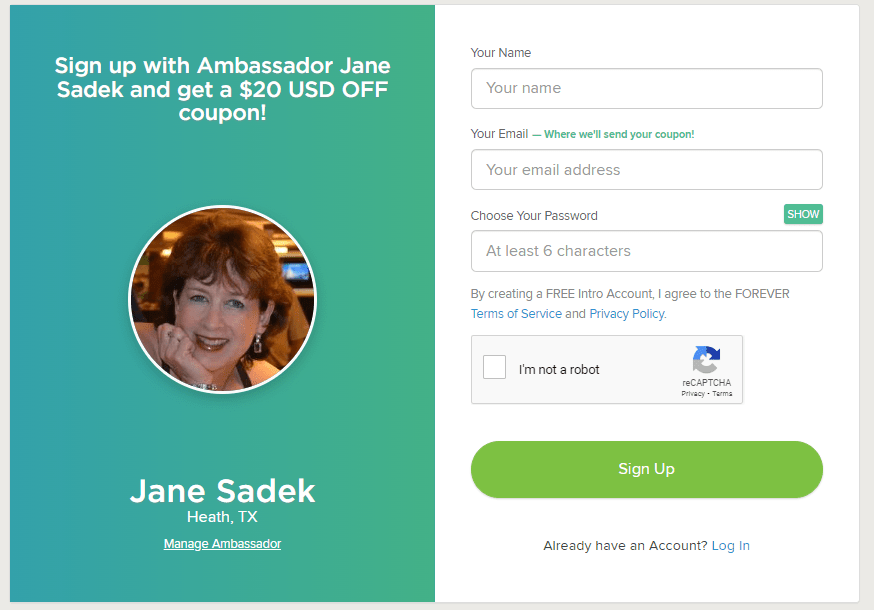
That link takes you to FOREVER. According to the device you use, you may immediately be asked to provide your email and create a password. It’s OK, it’s free. If it just takes you to the Home Page, click on Log In in the upper right hand corner and then under the green Log In button, there’s a link “Need an Account? Sign Up Free”. Click that and you will go here.

Fill it in and hit the Sign Up button. That’s it! Welcome to the wonderful world of FOREVER, but don’t stop there, because you need to claim your $20.

FOREVER Will Send You an Email

When your sign up is through, go to your email. If you don’t see an email from FOREVER then check all those spam folders. Confirm your email address and then FOREVER will send you your Welcome Coupon.

Twenty dollars is waiting for you. When you open the Welcome Coupon email I suggest you either print it out and/or save it someplace where you can find it again.

Near the bottom of that email is a code. That’s your $20. You’re going to want that when you make your first order. Many clients are ready to buy when they join. They cut and paste their code into their order and they are done. But I also have clients who aren’t ready to buy from the get go. That’s why I want you to print it out or save it somewhere you’ll be able to find it later.

In Fact, FOREVER Will Send You a Lot of Emails

So, one of the reasons FOREVER wants you to verify your email address is because like everyone else, they want to send you all their stuff – and that’s why you have an Ambassador. FOREVER stuff is great if you are about to start a bunch of projects, because the emails will keep you informed of all the great promotions which are going on. If you’re just sticking your toe in the water and aren’t interested in the stuff, when you get your first promo email, go to the bottom and click either “update your preferences” or “unsubscribe from this list.” Then you can tell them thanks, but no thanks – but wait until after you get your $20 coupon!!! I don’t want you to miss that.

Use That Coupon!!

First of all, you have 60 days to use that coupon. On Day 61, it will no longer be valid. So please find a way to use it within 60 days of signing up. The coupon will work with most things on FOREVER, with a few exceptions – gift cards, events, FOREVER Club memberships etc., but for merchandise, it’s all good.

Stack your deals!! Many, many, many companies are quick to send you a coupon, but then trying to use it is almost impossible, because you can’t use it with any other offers. That’s not so with FOREVER, except in very, very rare cases, which will be clearly marked. You can stack your $20 welcome coupon with all the deals on the Deals page, as well as with The FOREVER Club discount, which I would be happy to explain to you.

Get the best price! At the first of every month, FOREVER informs its Ambassadors about all the deals for the month. When you know what you want to buy, just give me a shout before you hit the buy button. I can let you know if you can get a better price by waiting a day or a week.

And that’s it! Twenty dollars towards your Memory Keeping project. You can also get $20 for referrals, but we’ll talk about that and The FOREVER Club another day!

DFW Metroplex, Memory Keeping, Photo Organization, Photo Organization Coach, Photography

Let’s Talk About the Library

MEMORY KEEPING 101: THE FOREVER LIBRARY, THAT IS

What’s a FOREVER Library?

OK, so FOREVER is a Digital Media resource that offers everything from Media Digitization to Video Streaming – but if you hang around me much, then you already know that.

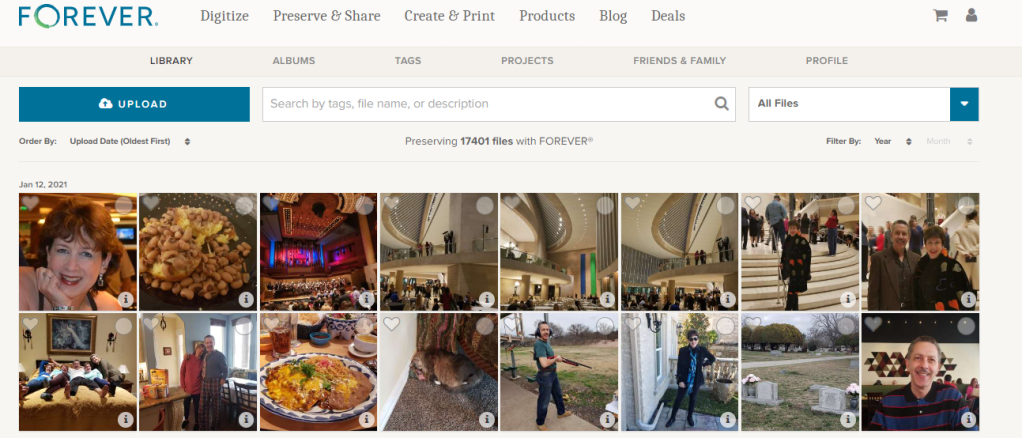
The FOREVER Library is the place where all the stuff you’ve uploaded to FOREVER hangs out. It’s not the only place. You also have albums, as well as tags for sorting and finding your photos, but the library is where everything is all at the same time. You can upload directly to the library or to your albums. It doesn’t matter.

What Can It Do?

Your library can do a lot of cool things for you, so I decided to take a few minutes to introduce you to it’s features. Obviously, the great big blue “upload” button is the one you’d use for adding photos from your computer to your storage. If you want to add photos from your phone, there’s a free app for that. If your media is hard copy, we need to talk about digitization. See last week.

Next to it is a search bar. The effectiveness of your search bar is directly related to the thoroughness of your curating. The more information you have about your photos in FOREVER, the more accurately you can search. A sampling of the search terms you could use would be dates, titles and tags, but whatever you’ve got, FOREVER will try to deliver something.

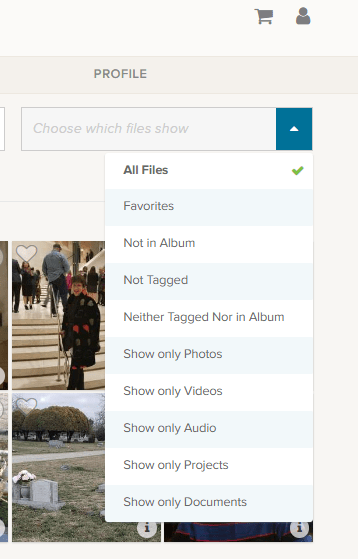
At the end of the upload and search area is a box that says “All Files”, but if you click the blue area you get these choices.

Obviously, All Files is all files. Favorites are photos you have marked with a heart. You can see an example of the heart on the left corner of the photo by the blue and white selection box.

The next are three very helpful choices as you begin to curate your images: “Not in Album,” “Not Tagged” and “Neither Tagged Nor in Album.” As you get your photos organized, labeled, tagged and such, the number of photos these choices will bring up will grow smaller.

I’m proud to say all but a handful of my photos are in Albums and all of those not in albums were taken in the last few days. I have my photos automatically added from my phone, by the app, when I take them. Then I delete them or add them to albums daily or weekly, according to the day and the week.

I’m working on the “Not Tagged”. Tagging is a great tool for searching. Some day I will have all the people and places tagged in every photos, so I can search by name or location to find any photo I want. So far, I have them all tagged as either Travel, At Home, Out & About, etc., but I have a long way to go. FOREVER recommends spending 15 minutes a day on this task and it’s a great idea.

Then there are a series of “Show Only” choices. With them you can see only photos, video or audio. You can also isolate documents in the collection. Projects are cool, because FOREVER keeps a copy of all the projects they do for you – the photobooks, photo gifts, greeting cards and such. These projects do not take up your storage space, but are always available to you.

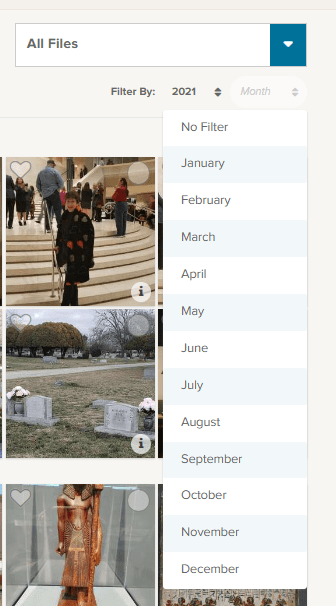
Under that selection box associated with “All Files” is a section where you can filter by both year and month. So, if you know you’re looking for the pictures of your husband’s 50th birthday, just select the year and the date of that celebration. In this image I chose 2021 for the year and have brought down the month selections.

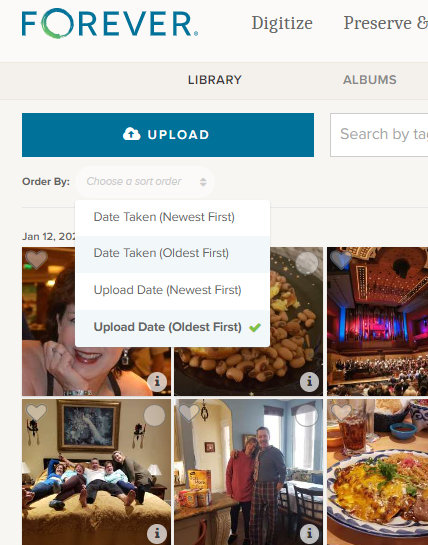
Moving to the other side, under the “upload” button, you find the “Order By” selections. I tend to leave it on Date Taken (Oldest First) because I think in chronological order, but you can reverse it and as for (Newest First) if you are looking for something taken recently.

Sometimes you aren’t as concerned with when it was taken as you are when it was uploaded and the next choices cover that.

Other Things to do in the Library

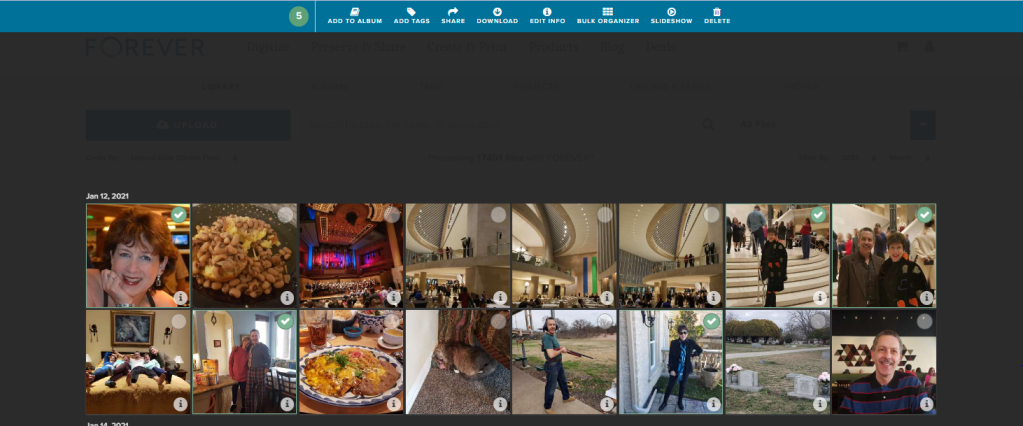
Returning to the picture at the top, you’ll notice that each individual photo has a heart and a circle at the top. The heart, as I mentioned above, allows you to mark your favorites and you can always choose to have the Library show those to you. The circle allows you to select images for curating. Let me show you.

On the main Library page, I checked a picture and the screen above opened up, giving me new choices. I went ahead and selected all the pictures I was in, on the first date available, but I could have chosen every picture of me in the library, all the pictures on that date or even just one photo at a time to work on.

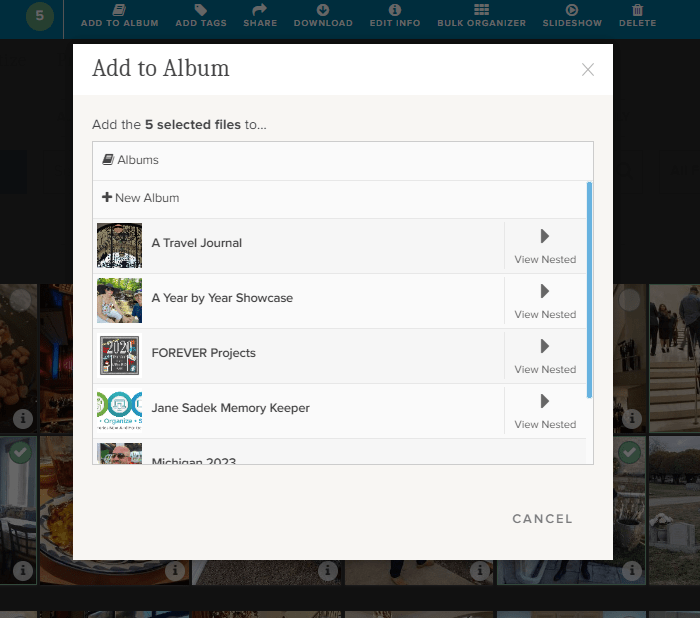
If I chose “Add to Album,” I would get this screen. It allows me to either set up a new album, add the selected photos to a top level album or with the “View Nested” arrow, I could actually add them to albums which are “nested” under the main album.

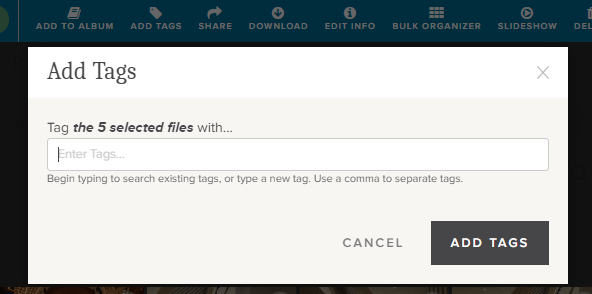
If I chose “Add Tags,” then I could add tags common to all five of those photos. Obviously, since I chose pictures of myself, I could tag them “Jane Sadek,” but you are allowed an unlimited number of tags, so people are only the beginning. And you can do more than one tag at a time, so if I had three ways of identifying all these photos, I would add all three tags. They could either be tags I had already created or I could create them using this tool.

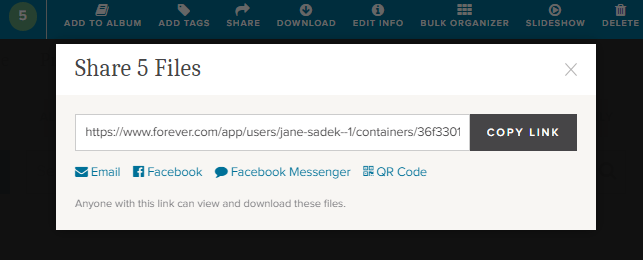
Also from the Library you can share photos with other people. You can select as many photos as you like and then either share the link which is created or create an email or a post or message for Facebook. You can even create a QR code. How cool is that!

There’s a “Download” button next and when you click it, you’ll be linked immediately to your browser. Select where you want the photos to be saved and save. You’ll have a copy of these photos on your computer.

The “Delete” button (at the far end) will bring up a screen which asks if you want to delete photos. If you do, it will put them in your FOREVER delete bin for 60 Days.

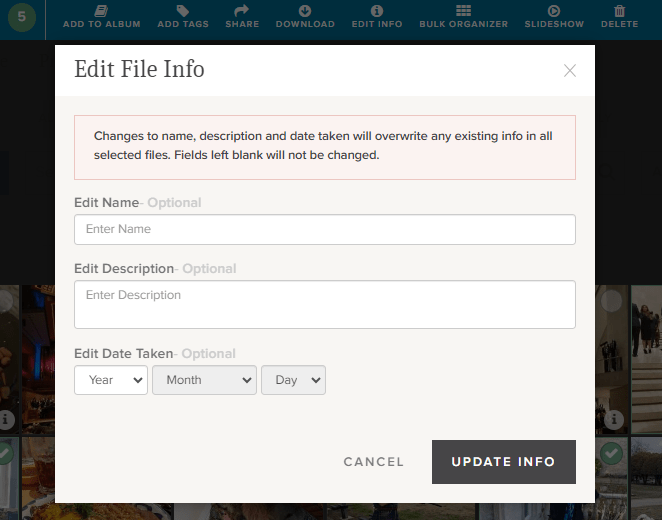
Now this is a good one. The “Edit Info” button allows you to change the basic information on a file. You know how photos come from your camera with vague names like IMG 36 or a string of numbers. Well, you can change it to a more specific title like Jane in Dallas 2021 or whatever name would be more useful.

You can also provide a description of the photo here. You could explain who Jane was, what she was doing in Dallas, what your relationship to her is – whatever you want. In fact, while the description boxes you run into with many programs have a 25 word or 100 character limit, this description can go on for as long as you’d like it to.

You can also edit or add a date. Sometimes our devices try hard to fill in blanks and provide a Date Taken which has no basis in reality.

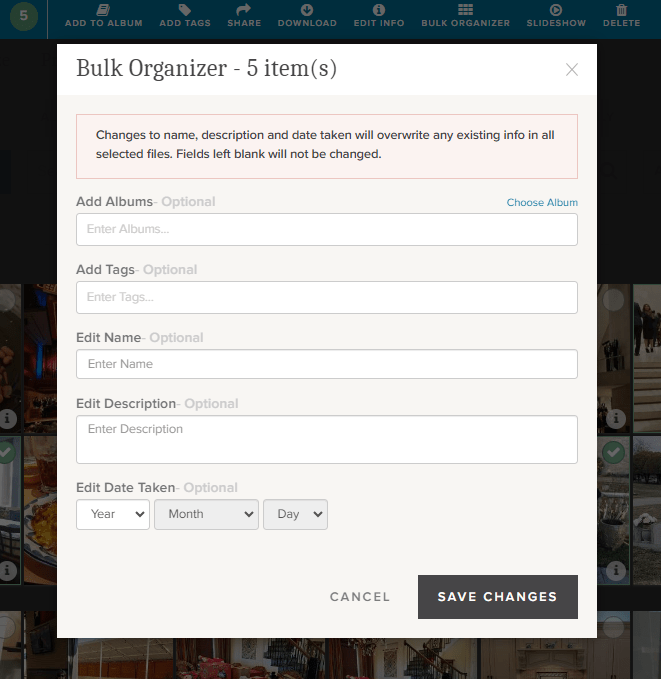
If you’re loading a whole bunch of photos to your storage, the Bulk Organizer could be your best friend. You could do the whole curating job in one fell swoop. You just have to remember that whatever you put here will override anything else you might have in the metadata.

You can make changes to all of these sections or just choose those you want.

One more choice. Perhaps you’d like to select a group of photos for a slideshow. Well, there’s a “Slideshow” button. It will autoplay whatever you’ve selected and you can even put it on “Loop” so you can play it continuously.

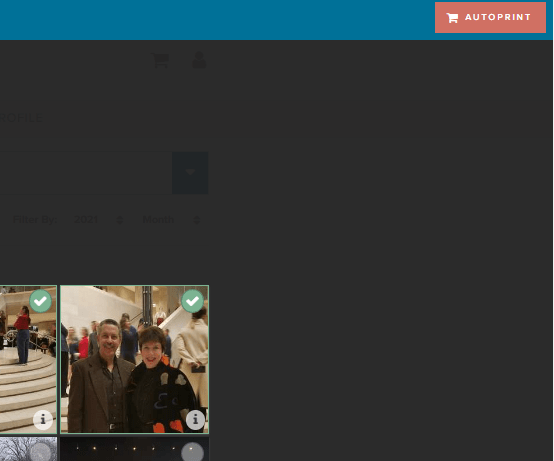
Well, there is one more thing you can do from this screen. You see that brick colored square that says “AUTOPRINT”? Well, this could be step one for your next print project. Just select all the images you want to include in a digital photobook, photogift or perhaps you’d just like to print some copies to share.

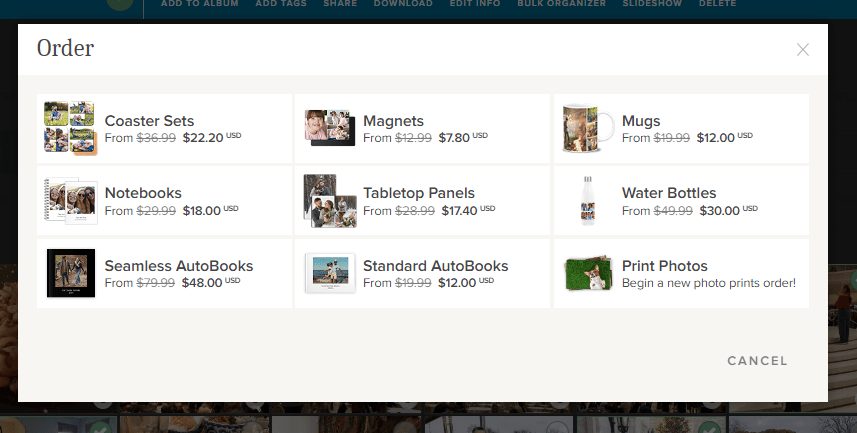
The AUTOPRINT buttons connects you directly with the various potential projects in Autoprint. That’s where FOREVER does most of the work, like magic. You select the images and the project. FOREVER will do the rest. You’ll be given the opportunity to do some minor editing, if you chose, then all you have to do is pay for it and select your delivery method and address. You can have custom projects ready in seconds!

Wrapping It All Up in the Library

Most of these same features are available in the FOREVER app, as well as on the website, as I have shown them here. You just find them in different places. Personally, I enjoy working on files in the Library when I’m at my desktop or using my laptop, but I’ve heard of people who curate their entire collection of media on their phone, sitting by the pool, drinking a cool adult beverage.

It’s up to you. If, while you are in the Library on your computer, you need a reminder about any particular images, just hover over the “i” in the bottom right of any images. A small black and white screen will pop up to show you what FOREVER knows.

And that’s all there is to it. I plan to write similar posts about Albums, Tagging and the App in the coming months, but next week we’re going to AutoPrint. Start thinking about a project you’d like to have completed quickly – like magic.

DFW Metroplex, Memory Keeping, Photography

Yes, You Can Digitize That

MEMORY KEEPING 101: JUST IN CASE YOU’RE WONDERING WHAT WE CAN DIGITIZE

We Digitize More and Better

That gray box company that you may or may not be familiar with, which has all the advertisements on the radio and social media about digitization, says this about what video formats they digitize: “We work with many video formats including VHS tapes, VHS-C, Mini-DV, Hi8, Digital 8, MicroMV, Betamax, and PAL.”

You know what? That sounds good until you compare it to what FOREVER says, “We can digitize any and all consumer videotapes including VHS, beta, Hi8, Mini DV, DVDs, and 3/4″ U-matic.” Did you see those three little words? ANY and ALL?

And our more is more. Search around the other guys website and you’ll never see statements like these, which are just everyday jobs for FOREVER:

  • We can digitize standard 12” x 12” scrapbook album pages.
  • We can digitize photos larger than 8” x 10”, historical documents, newspaper clippings, photo albums, books, oversized scans, medium and large format slides, and medium and large format negatives.
  • We can transfer content from picture CDs and data discs, flash drives, external hard drives, 3.5″ floppy discs, flash memory cards, smartphones, and digital cameras with internal memory cards.
  • We can digitize exceptionally large orders, or orders requiring an advanced level of organization and processing.

We Offer More and Better Delivery Options

When your digitization is over, the other guys do not offer permanent storage solutions for the images you’ve just paid so much money to digitize. They want to sell you DVD/CD’s, Thumb Drives or Cloud Storage.

Well, if a DVD/CD or Thumb Drive is what you really want, FOREVER is happy to deliver, but it’s not what we recommend. Why? Because those are just Memory Disasters looking to happen. DVD/CD’s and Thumb Drives are devices – devices which can fail or become obsolete. The other guys are just setting you up for the next time you need to upgrade your technology.

Oh, the other guys will happily rent you a piece of the Cloud, but which Cloud? The one that will bill you monthly or annually for as long as you both exist. The one that can compress your images, transfer them to another company and mine for advertising. The Cloud which has forced you to sign terms and agreements which say if your photos are deleted you have no recourse. The one which has told you they will delete your photos as soon as your account is not active – as in you didn’t pay for your storage or merchanides that month? That’s not FOREVER storage.

Instead, FOREVER offers permanent storage you own rather than rent. You can pay for it with a one time payment or in 24 installments, but then it is yours and your family’s forever – seriously. You’ll never have a device which can be corrupted, fail or become obsolete. You can’t lose it or destroy it. Your online images will never be compressed or deleted. They’ll never be transferred to another company. They’ll never be mined for adverting. Your photos are guaranteed safe for your life plus 100 years, in part because they are triple backed up in diverse geographical locations and protected by a fund devoted to your storage. And the best part, instead of coming back to you when technology once again renders you obsolete, FOREVER will just upgrade you to whatever the new technology is. Doesn’t that sound a lot better?

And one other small item – we’ll send you back all your originals. You are welcome to throw them away if you like, because they are digitized and safe, but most of us would like to keep at least some of them around. But the other guys, when they’re through, so is your stuff. You never see it in the physical world again. Ouch!!

So, if you are thinking about digitizing your photos, then let’s talk 972-971-5263. I want you to have a more and better experience!

DFW Metroplex, Memory Keeping, Photo Organization, Photo Organization Coach, Photography, Scrapbooking

Coming Attractions

Photo by Pixabay on Pexels.com

MEMORY KEEPING 101: WHAT THE FUTURE HOLDS!

No More Spot On Images

Last week, on Facebook and other social media channels, I made a big announcement. My husband and I sold our real estate photography business. This had been so, on paper, for about a month, but last week we drew open the curtain for everyone to see. Though I am working hard to offload all my Spot On Images duties on the new owner, we’re not quite there, yet – but I can see the light at the end of the tunnel is not the headlamp of an oncoming train.

Spot On Images was the brainchild of my husband. I was only along for the ride. I remember when Bill pitched the idea. I was not exactly enthusiastic and it hurt his feelings, but we’d been married for almost a quarter of a century by then and I knew the routine. He has great money-making ideas, but his visionary capabilities fail to embrace the drudgery and hysteria of supporting said enterprises. Though he realized it would take more than a camera and a website to make the dream a reality, he really had no clue what would be necessary.

There was a division of labor. He did the photography and managed the money. I did everything else. Everything else was not the fun part. I’ll leave it at that. A couple of years ago I hit a brick wall. Like the rest of the world I was sick and tired of masks, Zoom meetings, vaccines and social distancing. The world was beginning to open back up and I wasn’t looking forward to going back to the grind. I introduced the idea of my memory keeping side gig and Jane Sadek – Memory Keeper was born.

A Juggling Act

Perhaps starting a new business when I already had plenty to do in the one we had might not have been the smartest thing I ever did. My new business had all the growing pains of any new venture and initially I actually had more success than I could handle. That was not good for my marriage, but it didn’t hurt Spot On Images one bit. We’d created a snowball and it was barreling down the mountainside.

At that point, other people might have quit, but Memory Keeping is not just business venture for me. It is my passion. So, while I severely dialed back my Memory Keeping activities, I did just enough to keep the embers warm.

Then we arrived at a crossroad. Spot On Images had outgrown the two-man job we’d created for ourselves. Oh, we’d already hired editors and more photographers, but the company was on a trajectory that needed a five year growth plan, more personnel and more headaches. This wasn’t what we’d signed up for, so we decided to sell.

On the Other Side

As this post is being published this Thursday morning, I will be loading the trunk of our car with luggage. We’re going on a trip. Just a five day jaunt to the Detroit area for a family event, but a world of difference from a couple of years ago. That time I stayed up over night before we left, to nurse the editors through our rush jobs, so I could deliver photos by 4:30 AM and catch our flight. During that trip I missed the opportunity to enjoy one of the top picks on my itinerary, because we ran into a hiccup on an important job.

As far as I know, there’s never been a Memory Keeping emergency, which is one of the best things about my new career. A hallmark of any business related to real estate is drama. In photography we were once removed from the insanity I endured as an agent, but because we cared about our clientele, their drama our emergencies. If someone has a Memory Keeping emergency, then I’m not their Memory Keeper. I am out of the emergency business.

While I will need to support the new SOI owner during the weeks to come, my primary focus will be Memory Keeping. I have so many exciting plans. I’m in the middle of a huge sorting job for one client and will be picking up my next scrapbooking project when I get home. I’m going to offload the SOI archive out of my FOREVER account and fill it up with my personal photos and then set up my demo account to share with potential clients. There’s so much training available with FOREVER that I could spend the next year on that, but I will have to restrain myself or I won’t have time for working on my projects or getting the word out that there’s hope for your Memory Messes.

In the future, look for online training, office hours for customer support, a Memory Keeping coaching program and that’s just the beginning of the list of things I want to offer to those of you who want to tackle your Memory Mess. I am so excited, but to make this work, I’m going to need your support. Whenever you hear a friend or family member bemoan their own Memory Messes, I hope you’ll send them to me. I can fix that!!

DFW Metroplex, Memory Keeping, Photo Organization, Photo Organization Coach, Photography

Get Ready for FOREVER Valet

MEMORY KEEPING 101: THINK OF IT AS A RED CARPET FOR YOUR PHOTOS

What Do You Have & Where Do You Want It?

When I ask this question, most people have only the vaguest idea of where all their memories are and they really don’t have a really good idea of where they want them to be, but together we come up with a plan to find everything and get it someplace safe for generations to come.

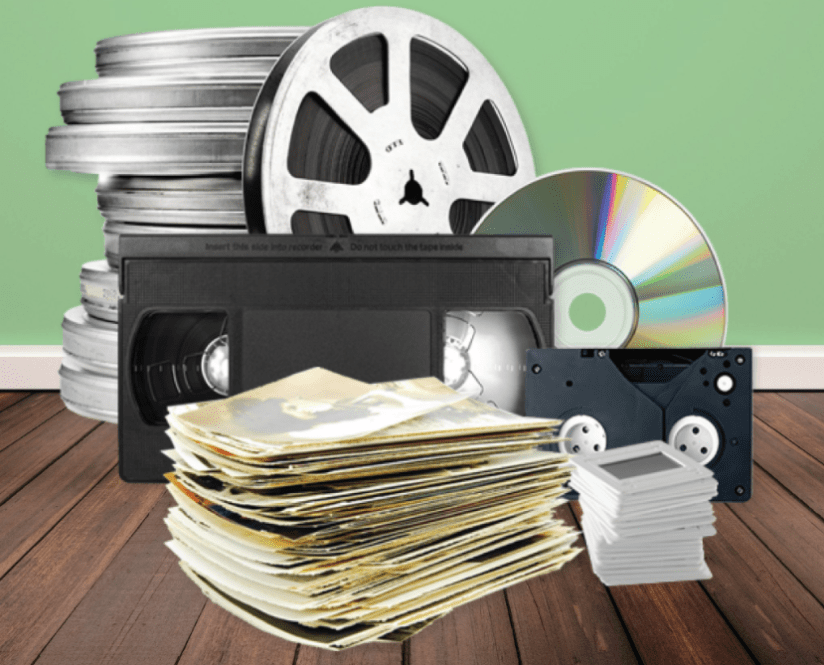
When the bulk of their memories are on traditional media, like photographs, slides, video and such, the answer is easy. It has to be digitized! While there are a number of ways to go about getting from a pile under the bed to organized folders on FOREVER, it’s a pretty straight forward process.

If those memories are on their phone instead, well that’s easy, too. The FOREVER app can upload everything on your phone to your FOREVER storage while you sleep. Then if you like, it will continue to do so into perpetuity, so you never have to worry about losing your photos, even if you lose your phone, it gets stolen or if somebody runs over it.

When those photos are on a computer or hard drive, getting all of that organized on FOREVER was doable, but could be a long drawn out procedure. In truth, the bigger your mess was, the easier it was to transfer. If everything was carefully organized, there was not really any way to transfer all of that organization to FOREVER without doing it all over again. BUT NO MORE!

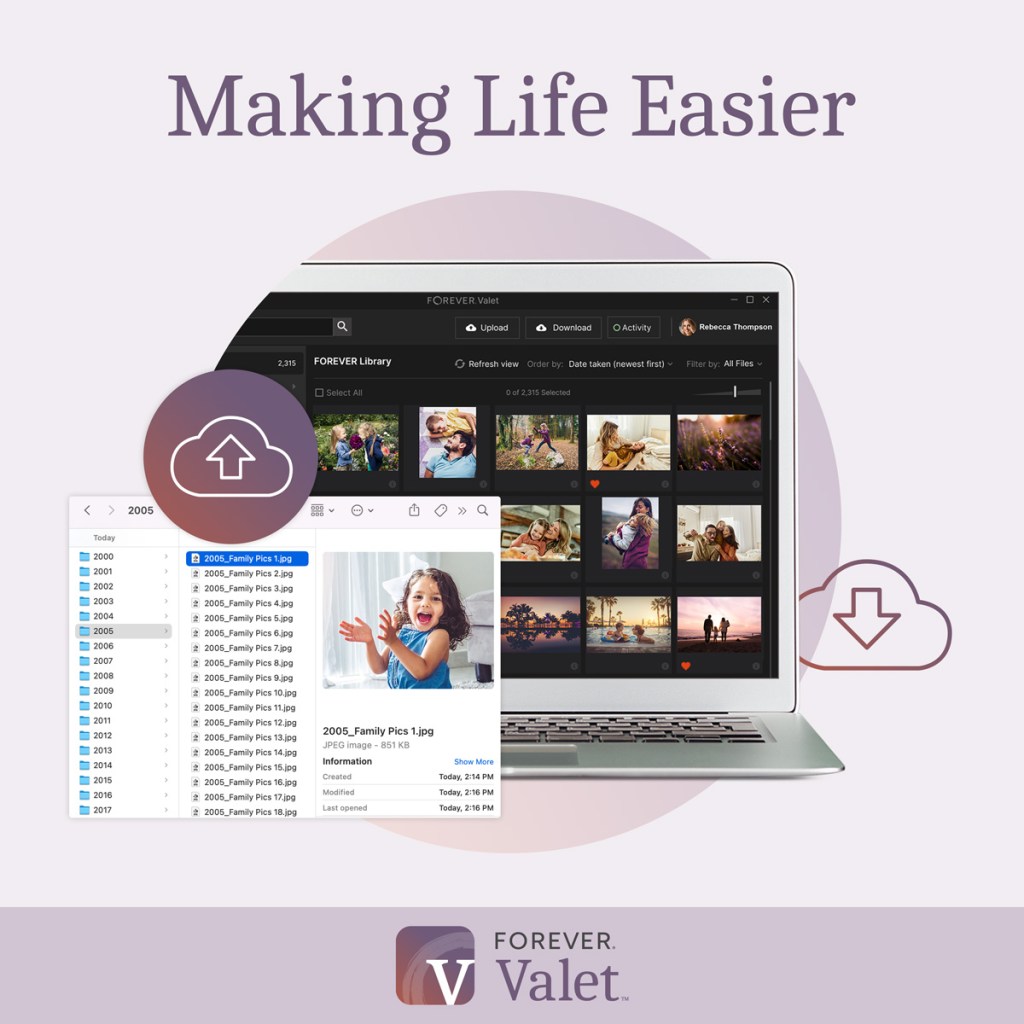
Valet Is Here!

Valet is a magic carpet ride for your photos. Thousands and thousands of photos can be moved from your hard drive, computer or laptop, with a few clicks of a button. If your photos are nothing but a great big mess, that’s great news! With Valet, they can arrive in FOREVER in nice neat folders, sorted by year and date, with all the duplicates pulled out. However, if your photos and videos are already in nice neat little folders on your device, then FOREVER will just move the whole thing – organization and all into FOREVER – BAM! It’s done!!

What’s even better is that you get to decide what kind of Valet customer you want to be:

  • Free One Month Trial – If all you want to do is a one time upload from your computer to FOREVER, then this is the route for you. There is no limit to the number of photos you can upload to FOREVER (or download from FOREVER, for that matter), you just have to do it all in 30 days. You can use it to get photos off your computer, off your husband’s computer, off your parent’s computer or wherever. The Valet Trial is associated with your FOREVER account, not a particular device.
  • Yearly Subscription – If a month is not enough, then how about a year. For only $59.99 you can do all the things mentioned above, but instead of 30 days, you have a 365 of them. That’s pennies a day.
  • Professional Subscription – If for any reason you have access to more than one FOREVER account, then perhaps you’ll need the professional version. It was designed for professional organizers, but there are other applications as well – such as if you are part of a family, team or other group using FOREVER for a project. The professional subscription is $299.99.

Here’s the good news. You can use your Club Dollars to buy it and it qualifies for the Club Discount. How can you resist?

If Valet sounds like something you’d be interested in, let’s get together and talk about how it can help you. It’s a very exciting product!!

DFW Metroplex, Photo Organization, Photo Organization Coach, Photography, Scrapbooking

How My Business Works

MEMORY KEEPING 101 – FOREVER & CREATIVE MEMORIES

Saving Your Memories, Not Selling a Business Opportunity

I remember sometime back in the late 70’s, a friend came by to share a business opportunity. It seems as if the first hour of his presentation was spent describing fantastic vacations, palatial second homes and very expensive cars we were going to have very, very soon. I guess we were supposed to overlook the fact his shoes were worn out and his car was ready for the wrecking yard. Eventually we got him to admit he was there to sign us up for a multi-level marketing company that is now a well known pyramid scheme. We said no thanks and then spent an hour trying to get him out of our house. His parting words, “I’m sorry you didn’t have the vision to understand what I was offering.” We ran into him a few months later and he sheepishly let us know he was pursuing other opportunities.

I’m sure all of us, at some point or another, have been approached by someone who wanted us to join their MLM team. I want you to know there are some great teams out there to join – Tupperware, Melaleuca, Mary Kay, Pampered Chef and so many more. While there have been some bad players in the past, this type of company provides great products, usually at a lower price and they have also been a real boon to women. When the glass ceiling was firmly in place, there were lots and lots of women who were outpacing their male counterparts through network marketing.

Back in the day, most network marketing happened out of the trunk of people’s car. They’d buy up lots of merchandise, so they’d have something to sell you and the more they bought, the more impressive their title would be. There were also lots of parties. You’d go to a friend’s house and their friend would demonstrate a product line. You’d order something so your friend could earn her free product and then a few weeks later it would be delivered, usually with a little pressure for you to have a party, too.

Then along came the world-wide web and network marketing was transformed. Network marketers didn’t have to buy up a bunch of merchandise they might or might not be able to sell. They could drop ship their products to their clients, just like Amazon and E-Bay and Walmart. While many companies still use the party format for marketing their products, there are many more that don’t and it’s not a tool I use.

Today, the biggest difference in retail marketing and network marketing is the way a company chooses to spend it’s marketing dollar. If you’re Walmart or Macy’s or Louis Vuitton, then you’re going to buy up radio and TV spots, have slick ads in print and put brick and mortar storefronts at the local mall. Companies like Mary Kay and Arbonne instead invest in their representatives to spread the word. That’s the way FOREVER and Creative Memories do it.

In spite of this transformation, there are still people who want to know if FOREVER or Creative Memories are MLM’s. So, let me tell you how my business works and then I will tell you how these companies work.

Service is my Primary Product

I am a Memory Keeper. I am offering my service and experience as a life long scrapbooker and part owner of a real estate photography company. I love helping others preserve their memories and along the way I have learned quite a bit about media, how to preserve it and how to share it. I will be happy to make scrapbooks for you and help you organize your photos. You pay me directly for those services. I will be using Creative Memory products in your album. I will also use my new Cricut, stickers from Hobby Lobby and paper from JoAnn’s if I can’t find what I need in the CM line. If we do a digital projects, I will most likely use FOREVER programs like Artisan and Historian as I work on the job, because they are my tools.

If your project is digital and you want to do it yourself, then I will recommend FOREVER products like digitization and permanent storage, to you. If you need these products, then I’m recommending to you the very thing I use for my own projects, because they are, without a doubt, the very best available. Yes, I will make some commission on those purchases, but this is my business and to continue doing what I love to do for others, I need to be able to support my habit, but if you’d rather use another company, go right ahead.

While I want to help you save your memories, I won’t be trying to recruit you to my team. There are CM advisors and FOREVER ambassadors who choose to build their businesses by building a team, but that’s not what I want to do. It takes a lot of time coaching and mentoring to be a good team leader, and your own success is determined by your leadership skills.

My business is based on my scrapbooking and organizational skills, not my recruiting skills. In addition, a team leader should also be modeling the business for your downline and very, very few people have creating scrapbooks and organizing photos for other people as their primary goal. If team building were my goal, I would not split my effort between two companies, but would pour my energies into one company or the other – in my case Creative Memories – but because many people with a memory mess need digital solutions, I offer both.

Now, if you’re going to be spending a significant amount of money (as in thousands) with either company, then I may show you how to get deeper discounts, but it’s because I want to save you money, not because I want to add you to my team. I will actually make less money with you as my team member, than I will if you are a customer, but because my ultimate goal is to preserve your memories and help you share them with others, if I can save you a little money along the way, then that’s what I am going to do.

Every once in a great while a unicorn does come along. You could join one of my companies as a representative to get the discount, fall in love with what they offer and build a very successful business of your own. That’s great! I would support your efforts, as would everyone in the company you chose. That’s why we call it network marketing. We network with our clients and our fellow representatives. The more you do for others, the more successful you become. However, I have photos to organize, scrapbooks to create and people to help save and share their memories. I don’t have time to go unicorn hunting.

Creative Memories

Creative Memories is a part of my life. Along with a lot of other people in the 90’s, I learned those adhesive photo albums I’d been using were actually destroying the very thing I was trying to save. I was soon hooked on a lot more than acid-free, photo-safe albums. I loved stickers and die cuts and paper. (Oh, did I ever love the paper!) I still love scrapbooking and after all these years I know there are no products out there better for what I love.

There have been two Creative Memories and I have been a customer and a representative of both. The first Creative Memories was an MLM. Your success depended on having parties – only they called them home classes, workshops and crops, but you also had to recruit. To keep your consultant designation, you had to purchase a certain amount of inventory you hoped to unload at your events and you had to recruit. Confession, I was dismal at both. I filled up my house with product and I never recruited a soul. That was happening to a lot of people, so for that reason and some others, Creative Memories went bankrupt.

The new CM is completely different. There are no buying quotas to meet and while I can build my own team should I desire to, they are only my team and no one else is benefitting off of them. There are various streams of income I can make based primarily on my sales and the sales of my direct team members, but that’s it. That’s all there is. It is not an MLM.

FOREVER

Forever is a little different and the teams do have various levels, but they are quite limited. The business plan is based first on my own sales to my own customers. They do not pay a membership fee, nor do they have to buy a certain amount within a certain time period. I never have to recruit anyone to promote within the company. I can reach the top commission level on my own.

Should building a team be what someone wants, that’s great and they will receive a tiny portion of sales for their own team members up to 5 levels down, but that’s it. There’s not some big dog at the top of the pyramid making his living off all the people who have ever been joined the company. There is no pyramid, only a short trapezium.

I say a trapezium, because while there are nine levels of compensation with Forever and thousands of ambassadors, a manager only qualifies for a tiny percentage of the sales within their own five level team. In fact, the Senior Executive Ambassador from whom I get most of my training and who I turn to when there’s a problem doesn’t get a penny of my sales. She just loves Forever and wants to help everyone be successful. That’s the culture.

So, if you avoid want to avoid having parties and being recruited, you’re safe with me. If you have a problem with the pyramid-like compensation plans of some of the MLM companies, you’re safe with me. I want you to be my customer, not my team member. I want to help you, not recruit you and I assure you, you can spend a whole lot of money with me and never buy a product from CM or FOREVER. If you have memories that need saving let’s talk. If not, check on my Weekend Report tomorrow and my Travel There post next week!

DFW Metroplex, Photo Organization, Photo Organization Coach, Photography

Be a Hero with Forever’s Historian

MEMORY KEEPING 101 – ORGANIZING YOUR STASH WITH HISTORIAN

Why Historian?

When it comes to permanent online storage you own, there just isn’t anything better than Forever. However, you might have wondered how to get your digital files ready for it. You don’t have to tell me Forever storage is a big investment. For most of us, our digital horde far outweighs the legacy we’d like to pass on to the future.

Historian is the answer. When you’re dealing with hard copy photos and memorabilia, your tools are tabletops, Ziplocks and boxes. You can buy a variety of fancy tools for this project, from boxes and files, to labels and dividers but I just use what I have at home with time.

Curating photos, traditionally and digitally, takes time. Facing a phone, laptop or app full of photos can seem quite overwhelming and if you think of it in view of purchasing permanent storage to hold it all, then it is not only overwhelming, it is daunting.

Historian is the halfway house for your digital stash. I’ve always struggled with organizing photos with my computer. For one thing it will let me save the same pictures in 47 places. It may notify me when I try to put it in the same file, but Historian goes further than that and will let me know when I am saving the same picture anywhere in my stash. With tagging I can find it in several different ways, without taking up valuable space saving it multiple times.

Historian also reads the time stamp from metadata and puts the photos in historical order. How wonderful is that?

Another amazing feature is face recognition. Yes, face recognition. Once you take some time to teach it the faces in your life, it will go ahead and tag them automatically for you.

And stars! You can use stars to rate each photo, which will help you when it comes time to decide what to put on Forever, what to delete and what you’ll just keep on Historian for right now.

I could go on with all the wonderful tools you have for sorting and organizing photos on Historian, but I think you get the picture (wink, wink).

It Both Saves Time and Takes Time

All these automatic time-saving tricks are great, but I’m not going to kid you. To do it right will take time. For instance, I just wanted to take my whole photo folder and dump it there. You can’t do that. You can transfer every photo from a folder, no matter how many there are, but it won’t take folders. So, getting it all in there will take time. (At least you can’t do folders right now. Valet is coming this spring and that will change everything.)

However, it’s good to take time. I decided to dump about 300 photos in there as my first bite. I individually name tagged one photo and then hit Auto Face Recognition. It took me awhile to train the program the difference between the 50 or so people I had dumped on it. If I’d taken things a little slower, it would have been easier, but I don’t do things by half measures. From now on, all I’ll have to do is confirm the faces it recognizes and straighten it out when it gets something wrong.

To be honest, I’m still just learning the program. I had been under the impression I didn’t need it, until I started doing digital sorting jobs for my clients. I didn’t want to be stuck with the limited tools in Microsoft and I didn’t want to buy enough Forever storage to hold everything a client passed on to me. Now I don’t know how I’d live without it.

The very best part is this. When it comes time to transfer your images from Historian and Forever, they are fully integrated, so everything you did to organize your photos in Historian will show up on Forever. That does not happen when I upload directly from my Microsoft files. Oh happy days!!

If you have digital mess, then you’re going to want Historian! Let’s talk about it. Give me a call at 972-971-5263!

DFW Metroplex, Photo Organization, Photo Organization Coach, Photography, Scrapbooking

Picture Perfect Prints

MEMORY KEEPING 101 – GET YOUR PRINTS WITH ME

I Remember the Good Old Days, Too

Remember when getting your printed photos was fun. You took pictures with a camera, not your phone. You used film, not an SD card. You couldn’t look at or share the photo until the film was developed. You’d gather up all your rolls of film and take them to the drug store to get printed. They took your photos and sent them to a lab and a few days later, you could have your photos. Seeing what you shot was like reliving your vacation or event. You even loved the bad photos.

Photo printing became big business and getting your photos back fast became the gold standard. Eventually, we all expected to get photos back in an hour, but instead of a technician in a lab developing your photos, you had some high school kid running the film through a machine that may or may not have been properly maintained, so those pictures might or might not be worth the paper they were printed on.

Along Came Digital

In my opinion, digital cameras were not an improvement. Suddenly, a whole new layer of challenges stood between me and my photographs. Yes, I know all about the improved photo quality and some people might like all that editing, but I liked dropping it off at the drug store and waiting a few day for the photos.

I’ve tried a lot of things since the advent of digital photography – printing the photos myself, taking a disc to the drug store or big box store and I’ve used SO many of the online photo printing services that I could not start to name them all.

An Education in Exploitation

Then a couple of years ago I discovered Forever and it has totally changed my outlook on the whole process, from where I store my images to where I get them printed and why. Have you ever wondered why so many places are so eager to print your photos and why they are willing to do it for such a cheap price? Try reading one of those terms and agreements that pop up as you fill in the blanks on your order. That would be an eye-opening experience.

Basically, when you download your photos to Shutterfly, Snapfish, MixBook, Costco, Walgreens – you name it, you sign an agreement which transfers the rights to your photos to that company. In turn, they do print photos for you on the cheap, but in return, they’ll use those photos for all kinds of things you never dream your photos would be subjected to. We’ve all heard horror stories about people seeing the photos they post on Facebook ending up in an ad campaign or on the dark web or other equally bad scenarios. The same thing happens when you upload your photos for printing.

And print quality? Once I spent a day editing a set of gorgeous vacation photos. I sent them off to Snapfish and eagerly awaited their delivery. The images I sent were sharp, crisp and beautiful. The images I got back were hazy. I’d been in the photography business long enough at that point to know something had happened to my images since I edited them and I was right. The company compressed all the photos before printing, because they could only handle up to a certain resolution. Sure it was all there in the terms and agreements, but who reads those.

So Now I Know

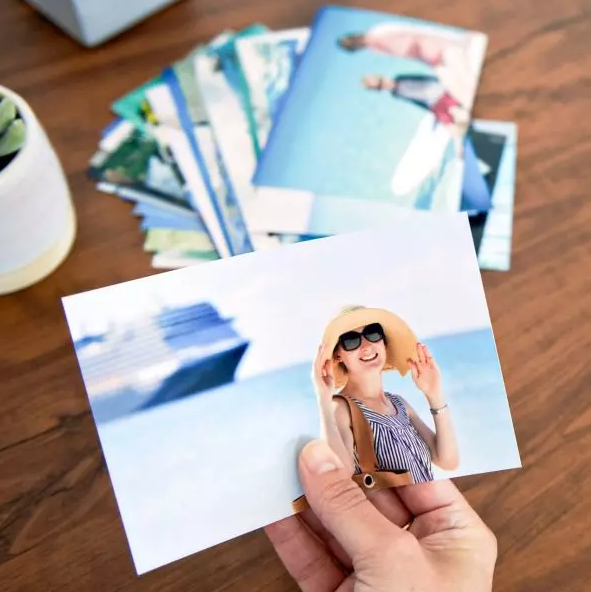
Then I found Forever. Instead of loading my photos onto a commercial site where who know what would happen to them, I load them into my very own online storage that I own. Nobody will ever mine my photos for advertising, sell them for stock photmpress them. When I want to print, I just choose the photos I want out of my account and order whatever size photo I want.

And here’s a tip. You know those letters and numbers on the back of some photos. Ever wonder who makes those up? Ever try to read them and decide what they mean. You can actually control what that says with Forever. That’s a big help.

Another Choice

So, you may be thinking to yourself, but I don’t WANT to store my photos on Forever. I just want to print them! OK, fine! But I have another option. Don’t go to the big box stores of online photo processing. You can print your photos with Creative Memories. Amazing quality, no compression, and yes you can control the print on the back of the photos.

What’s more, you’ll get your images back in these cool little plastic boxes that keeps them all nice and neat until you use them in your scrapbook. Then they are great for storing embellishments. I love them!!

Have It Your Way

So, if you want safe, secure storage along with your very affordable and convenient photo printing. You want Forever. Here’s the link: https://www.forever.com/ambassador/jane-sadek/autoprint/photo-prints

If you just want to upload your images and get them back in nice little plastic boxes, also very conveniently and affordable, then here’s your link: https://www.creativememories.com/photo-prints.html

When you are considering how you are going to handle your memory keeping, please consider me. I have all the answers you will ever need and sometime I have more than one way to do what you want. Come back next and let’s do some more memory keeping together.

DFW Metroplex, Photo Organization, Photo Organization Coach, Photography

Accessing & Preserving Your Video History

MEMORY KEEPING 101 – OFF THE SHELF AND INTO YOUR LIFE

Reclaim Your Video Memories

From old reel-to-reel home videos to moments recorded on phones, video memories have been a part of our media landscape for a long time. My family never went down the movie path, so my personal experience with them is limited. However, I have a lot of customers whose memories are more video than photograph. Forever can handle that, too.

What I usually hear first from video clients is they have a stack of tapes/reels somewhere and they don’t even have the equipment to watch them. I have both good and bad news to deliver at this point. The good news is, Forever CAN convert those tapes/reels to digital. The bad news is, there is no watching service to give you a report on what the video contains before the conversion. It is during conversion the subject matter becomes knowable.

So, whether your tapes/reels have riveting moments of well-shot action or hours and hours of poorly shot videography (which would cure insomnia), you get the good with the bad. The good news is this. Once the footage is digital, there are lots of great apps and software out there with which you can turn the yawners into jewels with just a little editing. So, while we all wish our parents, grandparents and spouses were better videographers, at least we can save the good parts for future generations.

What Does It Cost?

I’m not going to lie. Pricing digital conversions is tricky. A small Forever box is regularly priced at $60 (but there’s always some kind of deal going on, so it will never be that much). That price includes the conversion of two “items” in Forever-speak. An item can be a VCR tape or a 50 ft reel (or 25 photo/slides for that matter, but we’re talking video today). If you put two VCR tapes or two 50 ft reels or one VCR tape and one 50 ft reel in the box, digitizing them will be covered. However, the boxes will hold more than two videos, and Forever encourages you to fill them in order to save shipping, but that’s where it gets confusing.

I go over this with everyone who ships in media to be converted, but often they are so excited about the project they don’t hear me. Then we have sticker shock and I hate that. While you can fill the box to the brim, whatever you put in there beyond the first two items cost extra at the regular price of $30 per item.

So, at regular price, if you had 5 tapes/reels. You’d pay $60 for the box, $90 for the extras and then shipping and taxes would be added to that. That’s $150 to reclaim your memories (at regular price) and that’s a pretty good deal – a lot better deal than storing tapes/reels you can’t watch.

Now, the more tapes/reels you have the larger that number gets. If you’re currently storing boxes and boxes of these things, then we need to get together an discuss strategies. We can watch together for the best specials on conversion. Perhaps you have family members who would share the cost with you. You could join Forever as an Ambassador for a year and enjoy that discount on your conversions. And there’s always The Forever Club to help you budget your memory keeping expenses.

Special Considerations

Certain types of media come with certain restrictions. For instance, let’s say you sent in what you thought was your wedding tape and it was all I Love Lucy reruns. It’s always best if you have some idea what’s on your media and if you don’t, please understand our technicians need to be paid for the time they spend on your material, even if it’s not what you thought it would be.

There is nothing Forever can do about the missing wedding footage and they are not allowed to reproduce copies of copyrighted material, so you’d have a conversion mess. At least if it were blank, you could get back 50% of your money, but to pay for finding out you didn’t have the wedding tape you thought you did, that would be a really bad day. Thankfully, we don’t run into many bad days.

While it might be obvious I Love Lucy or Batman Returns are copyrighted, there are other things that might not be as obvious. Take wedding videos by a professional videographer or game clips from your child’s team or video you bought at a dance competition or swim meet. Because you paid for these tapes, you might think that you own the rights to them, but in most cases you do not. Technically, you are supposed to return to the videographer who created the original.

While this is technically true, in many cases, it could be virtually impossible to find the videographer and honor the copyright. So, if you are only digitizing the copyrighted media for your personal use, then you can sign a waiver releasing Forever from any responsibility, should you be sued for improperly use of the footage. I’m warning you though, don’t turn around and use it in a “for profit” project or you could end up in the middle of a very serious law suit.

Just, in case you are wondering, if you have documents like birth, death and wedding certificates, or census and deed records or any publicly available documents, those are not copyrighted. Digitize away!

What If There’s Something Wrong with the Video?

Forever will do the very best it can to digitize whatever video you turn over to them – even if it is broken or damaged. I’ve heard many heartwarming stories about people who doubted Forever would even be able to digitize a single frame of a tape. They thought if they could get back anything they’d be lucky. To their amazement they got back a digitized copy and they couldn’t even tell there had been any damage on the original. Forever cannot guarantee you’ll get back something that looks better than the original, but that could actually be the case in many situations.

So, How Exactly Does it Work?

Well, first choose the box you think will best fit the media items you want digitized, then let’s talk so I can be sure you’ve taken advantage of all the discounts available. You pay for your box, shipping and the covered items up front. You can also choose to get thumb drives or DVD’s if you like, but we should talk about Forever storage and streaming. Soon your box will be delivered.

Materials for packing your box, packing instructions, a worksheet and your shipping label will be inside. Follow the instructions and fill up your box. I’ll be happy to help you with this step. The worksheet will show you what’s included with the purchase of the box and give you an estimate of the amount you will need to pay for extra items. Put the paperwork in with your media and put the shipping label on the outside. The let Fed Ex know there is a pick-up or just drop it off at a box or office. You can keep an eye on the Forever Box Center to know what’s going on.

When Forever gets the box, they audit the worksheet and the items you have packed, to make sure they are correct. Then they’ll start digitizing. It’s all done right here in the good old US of A and lovingly handled by gloved humans, rather than machines. The difference is noticeable take a look at the “A step above the rest” section, on the lower part of this page to see why Forever is better: https://www.forever.com/ambassador/jane-sadek/digital-conversion

When you items are digitized, Forever will notify you that your videos are in your box center. The images will stay in your Box Center for 60 days, giving you time to add them to your Forever account, download them to your computer or whatever. They’ll also ship your stuff back, along with any DVD’s or thumb drives you’ve ordered.

And that’s it. I, of course, would love to discuss the benefits of storing these precious memories on your own Forever account. DVD’s and thumb drives are not permanent storage devices. Someday folks will look at them the way you would look at a 78 rpm vinyl record – if you do have a device to play it on, chances are it won’t sound the way you though it would.

One of the best reasons to choose Forever as your online storage provider is their video streaming service. We’ll talk about that next Thursday.