I have never talked to anyone who said, “I have no interest in memories.” I talk to a lot of people who are misguided or haphazard in their methodology of preserving their memories, but everyone wants to be able to share their images in some way. I also talk to people with a great desire to save, organize and share their memories, who keep putting it off anyway. They say – this summer, next winter, when my children are older, when I retire, when the wedding is over, when I get back from vacation, when I have more time, when I have more money,…you get the idea.
I say, “Make a commitment to yourself to get started,” and the CLUB can be that way. Any project needs tools and for Memory Keeping most people need to begin with some Storage and perhaps some Digitization. So the first thing they ask is, “How much is Storage and/or Digitization?” Then the excuses begin.
I should answer their question with another one, “What’s your budget for getting started? Do you have $30 a month to devote to this?” That’s what the CLUB can do for you. It takes your $30 every month (or $60 or $120 or whatever in intervals of $30) and helps you get your memories, saved organized and shared.
How does it help? Well, the CLUB is your Memory Keeping savings account and you earn lots of interest! Every penny you put into the CLUB remains yours, because there is no fee, and your dollars never expire, so it’s a great way to save up for what you want. But there’s more!! Your membership gets you 5% off everything you buy and it’s stackable with most deals FOREVER offers. Let’s say Digitization is 40%. Then as a CLUB member, your discount would be 45%, it’s that easy.
Another amazing feature of the CLUB is free storage which is added to your account every quarter. Say you join at $30. I did, back in 2021. Since then I’ve gotten 9 GB of free storage, which translates into approximately 1350-4500 stored photos (according to the size of my images).
The Happy Birthday Bonus
I’m taking the time to explain this to you now, because if you join this month (or add to your current membership), there’s a Bonus Double Storage Award. The quarterly award for a $30 membership is half a GB, but in September you’d get a whole GB. For $60, you get 1 GB quarterly, but in September you’d get 2. And with $120 you’d usually get 2, which with this deal would get you 4! Amazing!
So, How Much Should You Invest?
That’s a good question and it depends both on what you can afford and what you want to accomplish. FOREVER has created a couple of handouts to help you decide.
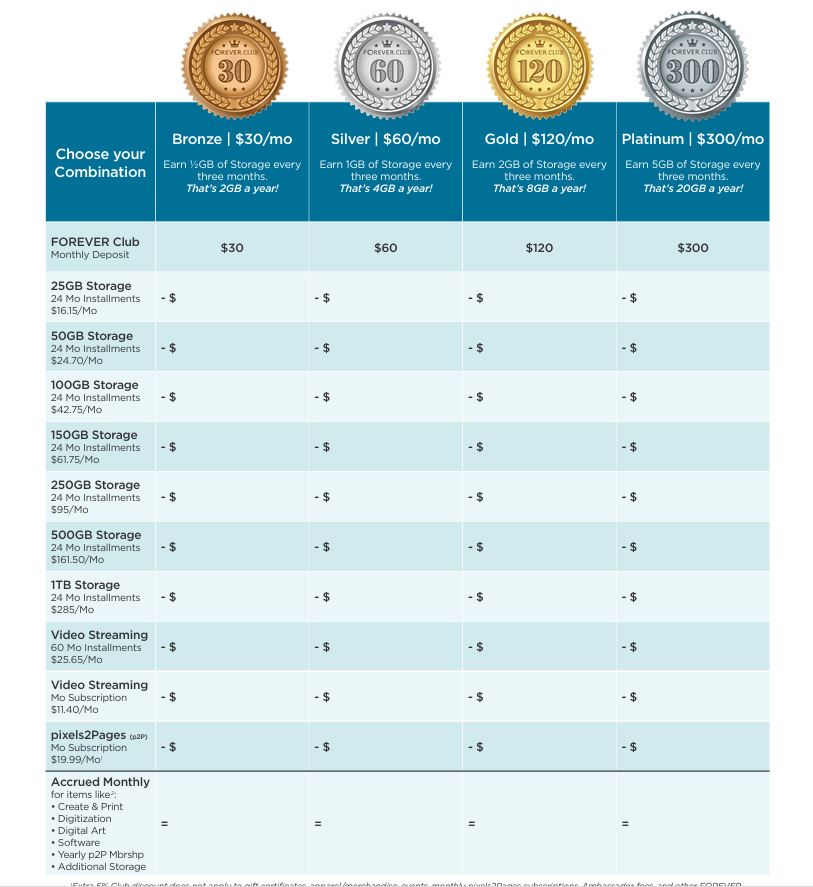
The first shows examples of four CLUB membership levels and how you could use them if your goal was to have Storage and Video Streaming. It includes how much per GB you’d end up paying for your storage and how much you’d have left in your CLUB account at the end of the month to spend or save towards other items you want.
The second is actually a worksheet for you to plug in the items you’d like to invest in and figure out the level of membership that would get you to where you’d like to be.
Join The CLUB and Start Saving Now
At FOREVER, belonging is a tool for you, not an income source for the company. How many things do you pay for on a monthly basis, just for the privilege of belonging, but you get virtually nothing back or perhaps they offer some package of gifts you can’t use unless you already spend a certain amount with them? Yes, I know it’s infuriating.
FOREVER is different in every way. It’s free to join FOREVER and you immediately get 2GB of storage FREE – that’s $50 worth of storage by the way. You also get a $20 Welcome Coupon which you can use on your first purchase for pretty much anything. You also get a free app for your phone so you can synch it with your FOREVER account.
If you go ahead and join the CLUB when you join FOREVER (which you should) you’ll also get a 5% discount on whatever you buyfrom the very first transaction. You can use the dollars you invest immediately or save them for something big. The third month you belong, you’ll get your storage bonus. There’s a whole list of other benefits you may or may not need.
Here’s another bonus for CLUB members. By using your CLUB dollars to purchase products on FOREVER’s payment plan, you avoid paying a lot of interest on your credit card. If you use your credit card to buy 10GB of Storage outright and you carry a balance on your account, you will pay interest on that purchase from day one. If instead, you use your Bronze Club Dollars, you’ll only add $30 to your credit card balance each month, making it much easier to pay off or pay down.
I have a Bronze Membership. It covers my monthly pixels 2 Pages membership. Another friend has a Bronze Memberships to pay for a storage plan and her p2P membership. Someone else pays for a video streaming plan out of her membership. What will you get with your CLUB membership?
MEMORY KEEPING 101: BUDGETING YOUR MEMORY KEEPING EXPENSES
It’s Like Layaway, but in Reverse!
Remember Layaway? I’ve got something better.
There was a time when only a few of us carried credit cards. Hard to believe, I know. But we also used paper maps rather GPS, as hard as that is to grasp. Not everything from those days-gone-by was awful. Take Layaway, for instance! You’d see something you liked, but couldn’t afford. If you put it in layaway, the store would hold it for you and give you several months to pay it off. The plans varied, but they let you stay in your budget and still get special items you couldn’t afford otherwise.
Then we all got credit cards and the debt just keeps adding up. The flip side of the coin is that when you see something you want, you can get it immediately. The downside is that you may still be paying for a purchase long after the item you bought is useful to you.
The FOREVER Club is like a mashup of credit cards and layaway. It’s a tool you can use in several ways to make Memory Keeping affordable.
The Layaway Plan
I know Memory Keeping is not cheap. It’s worth every penny and every hour, but it’s an investment you make in yourself, your family and your future. Let’s say you do want to get started, but you really can’t afford it right now. Could you afford $25? Especially if that $25 would spend like $26.25. Sounds better doesn’t it.
So, join the Club! Invest $25 a month. Charge it to your credit card or put it on your debit card. Forget about it for a few months and soon you’ll have paid for a lot of Memory Keeping. In fact, in about a year, you’ll have saved up enough money for a large digitization box, one that holds 20 VCR tapes or 500 photos. During the year you can be organizing your media, so that when your box comes, you’ll be ready.
Don’t need digitization, just a safe place for all your digital images. Great, start putting that $25 a month away and in a year, instead of a large digitization box, you’ll have enough saved for about 25 GB. What will that hold? Up to 25K digitized images. Would that help?
Using The Club as a layaway plan can help get you to any of your Memory Keeping goals without getting into deep debt. You want Artisan 6 Scrapbooking software – less than 6 months of savings. The same with Historian. Save up for Family History Research or Video Streaming. You don’t get the 5% discount on Family History Research, but you can use the Club to save up for it.
The Credit Card Plan
If delayed gratification is outside your wheelhouse, then The Club can still help you. Not everything in FOREVER can be purchased today and paid out over time, but some of the large ticket items can. Take that Video Streaming Plan for instance. You can get it now with the 60 month Payment Plan and use the The Club to cover your payments. That way, instead of incurring $1600 on your credit card today, you’ll be charged about $26 a month and can cover it with the Club. Imagine the interest you’ll save.
Or how about that storage? Step up to 50GB and pay it off in 24 months, covering your payments with The Club. You could even join Pixels 2 Pages, the amazing online community of digital scrapbookers and let The Club cover your monthly payments.
The Automatic Discount Plan
So, perhaps you don’t need to save up for your Memory Keeping Purchase, but don’t believe you should pay a penny more than you need to for anything. You want a TB of storage, a video streaming plan and a large digitization box. Cool. You’ll need to spend about $7800, but with The Club you can save about $300. Just join The Club, invest your $25 and get 5% off everything you buy. After your shopping spree is over, just get out of The Club and enjoy your purchases. Or stay in for future purchases. It’s up to you.
The Budgeting Plan
Another great way to use The Club is as a budgeting tool. Let’s say you’ve got several Memory Keeping Projects you need to do, but you don’t want to spend more than $100 per month on your projects. Welcome to the Club!
You sign up for The Club and choose the $100 level. Job one is digitizing some precious memories which are at risk, so you invest in a small FOREVER Box. Using your Club Membership and your $20 Off Welcome Coupon, you order your box and use about $35 of the money you invested in the Club, leaving you about $65 in the Club.
You get your photos and videos together while waiting for your box. When it arrives, you’ve got 2 VCR tapes and 100 photos you want to have digitized. The 2 VCR tapes are covered by the price of the box, but with your Club Discount the photos would be just under $69. You go ahead and return the box to FOREVER, who will audit the box and verify the price of your extra items. In the meantime a month has passed, you’ve put another $100 in The Club and when the $69 comes out, you’ve still got $96 in The Club.
When your items have been digitized, you have 60 days to decide what you want to do with them, but you’ve always known you wanted them to go into your FOREVER storage you own rather than rent. After your third Club payment is made, you’ve got $196 dollars to spend and that easily covers the price of 10GB of storage. You buy the storage you need for your images and still have money left over for your next FOREVER purchase and because it’s the third month of the plan, you’ll get 2 extra GB of storage – something you’ll get every third month you belong to The Club. At this point, you probably also have plenty of room for the hundreds of images you’ve got stored on you phone.
Using this example, let’s say that you spend a couple of months curating the images you’ve uploaded to FOREVER. You’ve also been sharing them with your family and friends through FOREVER’s connections and a few times you even shared some on social media, which is so easy with FOREVER. Then things get crazy at work, you go on vacation and a couple of months pass where you don’t get anything done in your account.
Don’t worry! Club Dollars never expire and while your back was turned you got another 2GB of storage. When you get back to your projects you have about $440 waiting for you. You’re ready to start getting creative with Artisan 6 and you want to join the Pixels 2 Pages Digital Scrapbooking Community Online. Go for it and you’ll not only have the software and belong to P2P for a year, but you’ll have plenty of money left to shop for some digital art to go with all the free art you got with Artisan and with your P2P membership.
Getting Even More Creative
These are just a few of the scenarios I’ve seen with The Club. I’m surprised every day by the way people discover to use it. Remember the client who saved $300 on a $7800 purchase. Well, some people make the whole purchase with Club Dollars to also get free storage.
So, they know they need to stay in The Club for 3 months to earn free storage. They divide the $7500 they need to spend into a three month investment, buying $2500 worth of Club Dollars (i.e. that’s 10 $250 memberships). At the end of the 3 months, they buy the things they wanted and they get 50 GB of free storage – a value far above $600 on top of the $300 they saved on their purchases and their savings are near $1000!!
The Club comes with other benefits. Free shipping for print projects on Club Weekend, Quarterly Zoom Calls with the Founder and even a CLUBload contest every month, where you can win gift certificates for uploading the most images! Specials offered only to Club Members. The list goes on.
I know few people will be stepping up to buy $7600 of Memory Keeping at one time, but whatever your project and your budget, share that information with me and I’ll help you get the very best deals possible. With Christmas just around the corner, you may need to touch base immediately, but I’m always here to help you with your Memory Keeping.
MEMORY KEEPING 101: DON’T LET THE MESS GET IN THE WAY
Are you looking for Photo Organizing or Memory Keeping?
Where is your mess? Is it in a box, on a shelf, in a closet, under the bed, in a crate or is it actually in all of those places. For many people, that mess is the main reason they don’t want to talk (or think) about memory keeping. They think they need to go through it first, but that’s like cleaning the house for the maid to come!
I do this all the time, you don’t. I know the cues to look for. I’m not slowed down by emotions. This is my job. I’m going to get your photos sorted faster and that’s better than never. I don’t know all the details, but that’s the beauty of it and my ultimate goal is focused on providing completed projects which allow you to SHARE your photos. Curating the photos is just the first step in that process.
Perhaps you’ve heard of professional organizers and the the huge fees they charge for organizing photos. That’s not me. I’m a Memory Keeper. My primary product is not a downloadable file. Getting the photos organized is just step one. Saving and sharing your photos with future generations is my focus.
I embrace both traditional and digital solutions to Memory Keeping. I partner with FOREVER and Creative Memories, because they already have easy-to-use, affordable products, that will do a better job for you than anyone, including me, can do.
If what you want is a traditional scrapbook, then I am a scrapbooking artist. I’ve been doing it since I was nine years old and the results are beautiful. I can make them as simple or as ornate as you like. If you need your photos organized before I can start on the album, then I can do that. too.
If you prefer digital, then I have the best solutions in the industry. You need digitization? That’s what FOREVER does at the newest, largest and most state-of-the-art facility in the world. If you need your images to be organized before or after you digitize, well I do that, too, but as with the traditional albums, organizing is just a part of the job.
I don’t want you to just have organized images, I want those images to be on safe, permanent, online storage you own rather than rent. Believe me, that’s not iCloud or Google Photos or Facebook or Dropbox or Amazon or any of the other companies which force you to sign terms & agreements which limit their liability and put your memories at risk. And it’s certainly not your phone, computer or laptop. I want you to put them on FOREVER, where you you can access them from any device and you’re guaranteed your photos will be there for your lifetime, plus100 years and you rather than than some anonymous executive decide what will happen to them in the future.
I don’t want to give you a disc or a drive that can be corrupted, lost or destroyed. I don’t isolate your memories on your laptop or computer where no one but you will ever see them. I want your digital images on FOREVER, so they can be shared now and in the future without incurring monthly or annual charges for whoever comes after you.
So, I don’t tag myself as a Professional Photo Organizer. I am a Memory Keeper. I’ll do your Memory Keeping tasks for you or I’m happy to share all my secrets with you and help you enjoy being a Memory Keeper, too.
Let’s talk about your mess. Let’s figure out your budget – both time and money. Let’s talk about your audience and what will be good for future generations. Then let’s decide how we’re going to get it done – by you, by me or by both of us working together. My number is 972-971-5263. Let’s get started today.
Memory Keeping 101: Always Save Money with FOREVER Deals
There’s Always a Deal at FOREVER
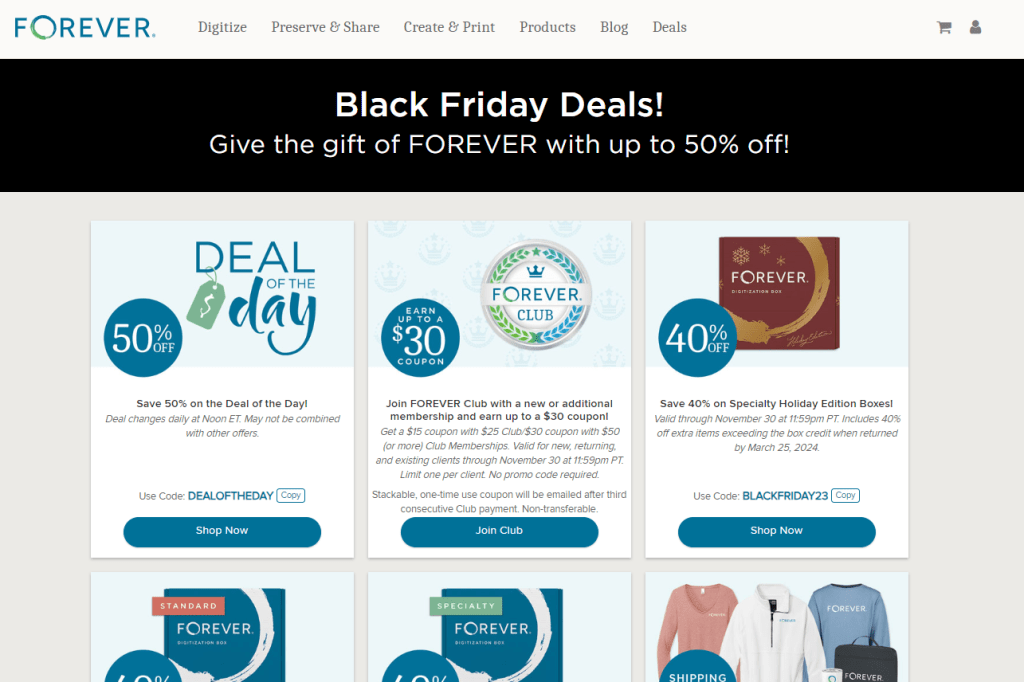
It’s November, so FOREVER has Black Friday deals happening all month long, but FOREVER has deals every month. Here’s how to find out what they are!
If you’re a FOREVER customer then chances are you’ve noticed the daily emails you get from them. (You can shut them off if you want. Just go to preferences in your account.) Someone in the marketing department has run their algorithms and decided which deal will entice the most people to make a trip over to their website. That’s the first place a deal might get your attention, but if you’re like me I get so much stuff in my inbox that sometimes I don’t see these love notes until a week or two later. Besides, this is just a teaser and doesn’t cover the whole spectrum of what’s being offered at a discount.
If you follow my business pages on social media, then perhaps you’ll see my daily posts about current deals. Or then again, maybe you won’t, because social media has algorithms and while they seem as if they read your mind, they also keep you from seeing a lot of things you really might be interested in. If you’re really looking for a certain item to go on sale, then don’t count on social media to deliver the post to you.
The best way to see what’s on sale at FOREVER every day is FOREVER’s Deal Page. To begin with, FOREVER has a Deal of the Day every day. Their target is digital scrapbookers who are always hungry for new digital art. Some Pixies I know (Pixies are members of the Pixels 2 Pages Online Community of Digital Scrapbookers) start their morning ordering the Deal of the Day every day. You may not be a Digital Scrapbooker, but it doesn’t hurt to keep an eye on the daily deal, because sometimes it’s free. I love free, even when it’s not really something I want!
But that’s only the beginning of what’s offered. The day I wrote this blog there were 27 deals on the page, from a free coupon for new CLUB Memberships to 50% off Print Orders to Gift Ideas, Events and even FOREVER logo-wear. From the deals page, you can click directly to what you want to buy.
If you bypass the Deals page and just go to the merchandise you’re interested in, you don’t have to worry that you’ll miss a deal, because each item will be marked with both the retail price and the current deal. Just be sure that when you order you check to see that the deal has made it to your cart. It usually will, but it is the internet and things happen or don’t happen at the whim of a byte.
And Then There’s Me
Let’s face the facts! It really doesn’t matter how many places the deals are posted, most of us are too busy to go track deals down and because of that, there’s a chance you will miss the one you really want. And that’s why you have me!
While it’s not your job to keep up with what’s on sale at FOREVER, it is mine. I keep a list of what my clients want and when I know it’s going to be on sale, I let them know. How do I know what’s going to be on sale? Well, I’m an Ambassador, so on the first day of each month I get a spreadsheet that lays out everything that will be on sale for the month. The first thing I do with it is match it up with the deals up with my clients’ wish lists and let them know the window for getting that deal.
Even though I am an Ambassador, I am not privy to the specific deals of each month until they are announced, but I do know the rhythm of our business. I know there will be special offerings for Black Friday in both November and May. I know we have Christmas in June every year. I know the seasons when greeting cards are most affordable and when there will be a deal on calendars. So when you and I sit down and map out your Memory Keeping priorities and agenda, then I can help you base your schedule on when the best deals will be coming around.
Let’s Do Lunchor Coffee or Drinks or…
So, when you look at your Media Mess, remember you do not have to tackle it alone. I am happy to be your ally in the war against lost memories. Even if you don’t have time right now to tackle the job, let’s get together and talk about it. Learn your options, set your budget and let me help you get it done. I not only have access to the monthly deals as soon as they come out, I also know which tools will help you with your projects and how to use the CLUB to get the best deals.
Whether you’d like to chat memories over margaritas or you only have time for a quick Zoom, the first step in any project is to get started! Give me a call or at 972-971-5263 and let’s get started.
In my career as a FOREVER Ambassador, there was one thing I really hated and it was the way their prices were moving targets. The decision to invest in Memory Keeping is an important one and when someone decides to do it, they shouldn’t have to hurry up or wait to make their basic purchases, but the way FOREVER handled some of their pricing made me crazy.
Nobody loves a bargain better than me, so I love FOREVER print deals. I’ve always got a project on my mind and yes, I save them for the 50% off deals and Club Weekends free shipping. That just makes sense. However, some deals just didn’t.
To me, the pricing for much of the FOREVER services were counterproductive to my efforts. When I first started with FOREVER (almost 3 years ago!) the pricing for storage would fluctuate wildly. I get it – they were trying to match what the competition was doing and the competition, those fishes, flies and boxes, use slashed prices to lure in customers, but we had things the competitors didn’t, so why were we slashing those prices?
Obviously, I wasn’t alone. I was a mere newbie, what did I know? But behind the scenes the Executive Ambassadors were saying the same thing I was.
Few people buy permanent online storage or private video streaming on a whim. Most people don’t even realize it exists. They think you have to pay for storage month by month for the rest of their lives. They think their personal videos have to be posted to some social media giant to be shared. FOREVER isn’t a household name, yet.
So, Ambassadors go around letting people know they have a choice, but figuring out what that means usually takes some getting used to and some serious consideration about budget. When the price changed for those unique services week by week and day by day, trying to offer your customers the best value for their dollar was a game of chance.
It Got Better
I am not privy to everything that went on behind the scenes, but at the first of this year, they made a change to the pricing on storage. They set a price that was the price, but they weren’t quite to where I wanted to be, because the price was consistently marked down the same percentage. It wasn’t what I wanted, but at least I wouldn’t be faced with telling anyone the 50% off storage was last week and now they had to pay full price.
In recent months, they tried something with a few of our other premiere products which, like our storage and video streaming, you can’t get anywhere else. When Valet, the file migration software beloved of the professional photo organizers, was introduced, they didn’t kick it off with bargains. They said here’s this unique software and you can try it free for a month, but then this is the price. Nobody waited for a deal, because there wasn’t going to be one. They just purchased it with glee.
That went so well, FOREVER made a change with our other unique software programs, Artisan and Historian. Instead of juggling the price with deals from month to month, they announced the price was the price and that was it. Guess what, sales continued at the same rate they had before. People weren’t buying because of the deals. They were buying because they understood the value and uniqueness of what we offer.
It’s Going to Get Even Better
So, come January, the same thing is going to happen with storage and streaming. The price is going to be the price. The “deals” which have been going on all year are going away, because when something is permanently 25% off, that isn’t much of a deal. I’ve got to tell you there will be a slight (very slight) rise in the price of storage and streaming from the net price you’d pay today, but it will be the price and I am so happy.
So, if you have storage you need to buy or have been considering streaming, the price you can get it for, through the end of December, is the cheapest you are ever going to see it. Come January 1, 2024, the new prices will be announced and that’s going to be the price. The only deal you can get is the 5% off you get with The Club or the $20 off with Welcome and Referral Coupons. That’s it! My job will be easier and I believe our clients will be less confused.
While We’re on the Subject of Deals, Let’s Talk About Our Print Deals
While I think FOREVER has been a little frustrating with some of their deals, I have always been very impressed with their print deals. Just like you, I used to think my only options for photo printing were the fish and the fly. While I was always a traditional scrapbooking fan and didn’t delve into the world of digital photo books (or digitization with the box for that matter), I did go their for Holiday Cards and photo printing. I’d be all excited about a deal and then when I’d made all of my selections, I’d be aghast at the final price. It would seem awfully high.
Well, let me tell you about those slashed prices at the fish, the fly and the box. Their bargains are offered on a particular portion of the sale and then they get you on everything else. If you were buying Christmas cards, for instance, you’d get the reduced price on the basics, but if you did anything beyond that, like a different finish or shape, fees would be added which were not marked down. If you were creating a photobook, the standard number of pages would be discounted, but every page after that had a hefty per page price. And those other digitization people? Who cares if they were going to give you 60% off on the initial items, because they’d always charge you full price on the rest of them.
When FOREVER has a deal, the deal applies to the whole product. If your digitization box is 40% off, then your extra items are going to be 40% off. If your photo book is 50% off, then the extra pages, matte finishes and anything else added to that book will be 50% off. And of course, the same applies with your holiday cards. Now that’s what I call a deal.
I know Memory Keeping is a big investment, however, the returns on your investment are immeasurable. How can you put a price on creating and sharing a heritage which will reach generations you will never even know? I don’t think you can, but with FOREVER and their new pricing policies, you won’t be playing a game of roulette. The price will be the price for the basics and you’ll enjoy true savings on the rest. Call me today at 972-971-5263 to talk about your memory mess.
There are no hard and fast rules for creating albums in your FOREVER storage. You determine how you want them set up. You can set them up based on the subject matter, the time frame or the people. You can have as many or as few albums as you want and you can nest albums under the top level album for as deep as you’d like.
Some people keep photos strictly by date – with each year being an album, with nested albums for each month inside that and then an album for each day/event within the month. Others focus more on families, having one album for their immediate family, one for their own extended family and another for their spouse’s family. Perhaps the nested albums inside that would be by years or it could be broken down by people.
My choice is to have one album for travel and another for day-to-day activities. In the travel album, I have an album for each vacation. In my day-to-day album, the nested albums actually correspond to the various traditional scrapbooks I have created on a annual basis, but according to the scrapbook, it could be one year or multiple years. Then I have an album for all my completed FOREVER Projects and another for my Memory Keeping business.
I’m sorry this post is so long, but I wanted to include all the pertinent information in the same place and there’s a lot of it.
The Top Bars
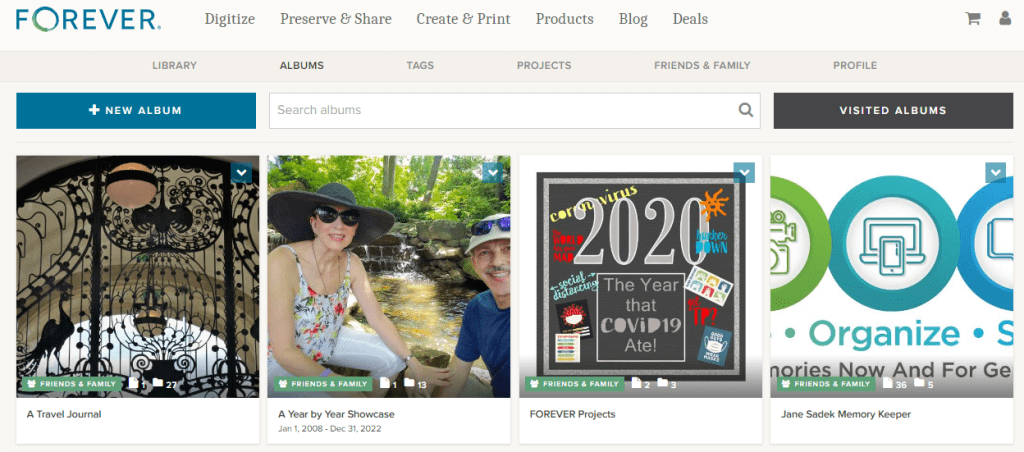
Looking at my album page above, you can see that it’s easy to access any place on the FOREVER site with the click of a button. Click “FOREVER” and you will be on the FOREVER Home Page. You can shop FOREVER by clicking Digitize, Preserve & Share, Create & Print, Products or Deals. “Blog” will take you to the FOREVER Blog, which has an encyclopedic reference library of posts dealing with everything from new products to how-to’s. You can go to your shopping cart and also take a look at your account.
In the row below that, you have access to your Library, your Tags and your Profile. There’s also a link to your “Friends & Family.” Friends & Family are the folks you have chosen to share your photos with. We’ll talk about that more later.
Finally, you get to items specific to Albums. You can add a New Album, Search the Albums you have or take a look at Visited Albums. We’ll take a deeper look at Visited Albums later, also.
In the middle of the bar below these options is a Search Bar which allows you to use keywords, names and such to find specific images in your storage.
+ New Album
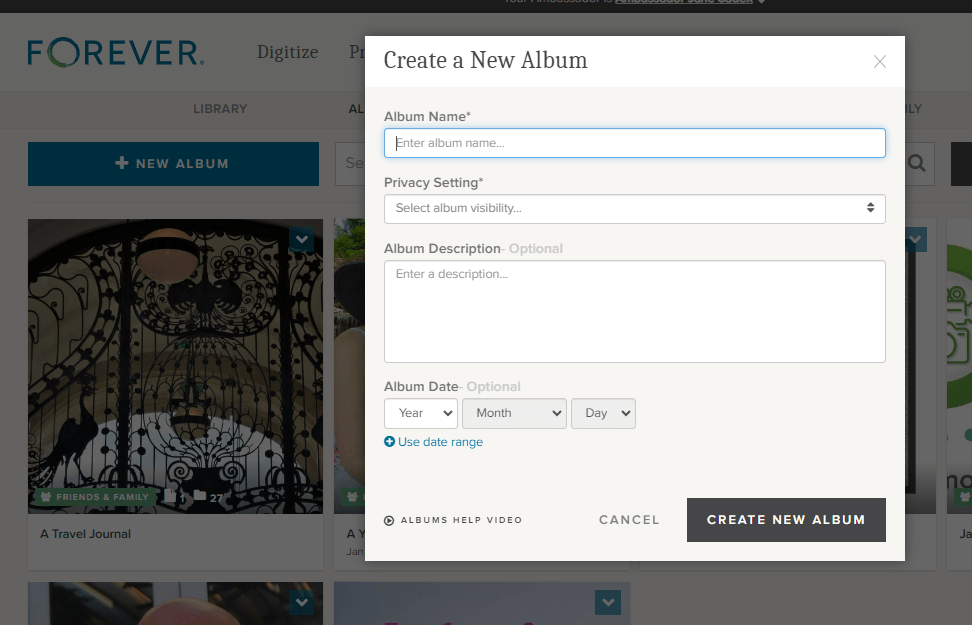
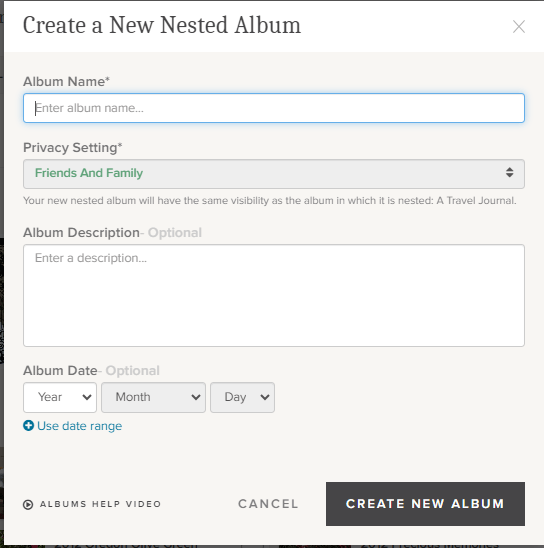
Hit the blue “+New Album” button and this “Create a New Album” dialog box will pop up. “Album Name” is the title you want for your album. You must create this name and it will show up below the photo you choose as a cover image for your file. For instance, below the photo with the ornate iron gate, I named my album “A Travel Journal.”
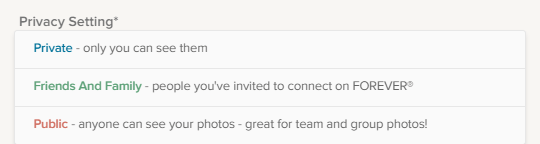
There are three Privacy Settings available and you must select one for each album. This will indicate who can see these albums in your storage. The privacy setting you chose for the top level album will apply to all the nested albums.
“Private” means for your eyes only. The only people who will be able to see these files is you, someone you have allowed to sign in with your credentials or anyone you have designated as a manager for your account, if you have chosen for your manager to have that sort of access. You can create a link and share the file, but it will not automatically be available to anyone else unless you decide to.
“Friends and Family” are people you want to have access to the images in your storage. They are completely under your control. You can invite them when you want to and take them out of Friends and Family at your discretion. However, if you would like for them to collaborate on an album with you, you must share the file with them, using the “Share” button. Then they can add photos to a file, but they still cannot modify the photos. They would need to be a manager for that.
“Public” means your files are accessible to anyone on the internet. This is not what most people want, but it could be what you want. You could set up a portfolio of projects you wanted the public to have access to or training films for your customers or even, like one of our users, a historical album of his service in WWII. The WWII Vet did not have any family who was interested in his photos, but he thought they had historical significance, so he wanted them to be available to anyone who was interested.
“Album Description” gives an overview of what’s in the album. You don’t have to put anything here, but if you are giving access to other people or you are setting up an archive which will be used for generations to come, then the more you include the better.
“Album Date” can be a single date or a date range. You do not need to fill this in at all, but as with the description, this information could be invaluable to future generations.
So, remember when I said you could share your albums with others and allow them to collaborate in those albums. There are a wide variety of uses for this feature, from a network of family albums to a team, club, business or other organization which uses a central FOREVER account. If you are a FOREVER customer with this type of access to other accounts, then this is where you would go to visit those albums which you had looked at before.
Individual AlbumOptions
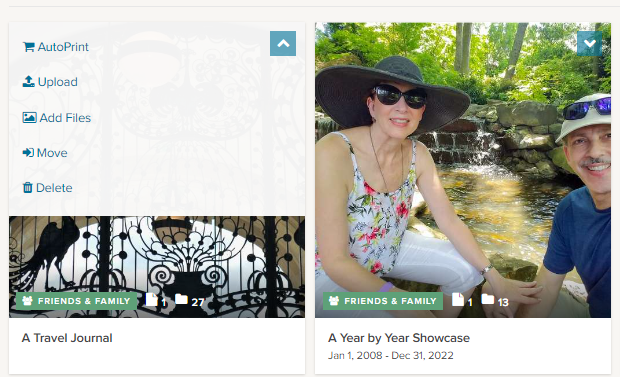
If you have already added files to an album, then it will select an image for the preview. It can be changed to whatever you want. If the album is new and there are no photos in the album, then the preview will be a blue box, but as soon as you add photos, one will be automatically selected. The green box at the bottom of the box tells you the level of privacy chosen for that album, how many images are in that album and how many albums are nested below it.
Each individual album on your Album page has a small blue box in the corner. If you click on that, a drop down box gives you several choices of things you can do with that album.
The first is “AutoPrint.” A few weeks ago I published a post about AutoPrint, which creates easy, quick projects almost like magic. If you select AutoPrint here, FOREVER will start building a project with the items in this album.
“Upload” allows you to upload images from your device directly to this albums.
“Add files” will take you to the Library so you can add images already on FOREVER to this particular album. It does not duplicate the photo, filling up your storage. All your photos live in the Library and are merely displayed in the various albums you create.
“Move” takes a photo out of an album and moves it to another one. As with Add Files, the images live in the Library. You’re just asking FOREVER to let you view this image in a a specific place.
“Delete” deletes the image. FOREVER will remind you the image is being moved to the delete bin and will be deleted in 60 days.
More Individual Album Options
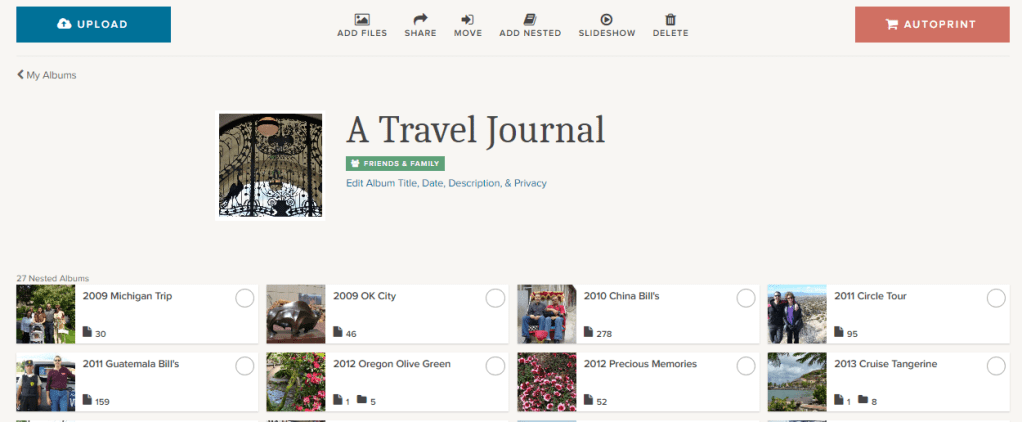
If instead of clicking on the arrow as we did above, you click on the preview, you are given a peek at all the nested albums in the album and given many options, some you had on the outside of the album, but others as well.
You’ll find Upload, AutoPrint, Add Files, Move and Delete, which do the same thing as I described above, but you’ll find other options as well.
Click the “Share” button and this dialog button comes up. You can use it to share the entire album with someone with a share link. If you’d like for the person you share it with to be a collaborator, this is where you designate them.
The “Add Nested” button will add a new nested album to the album you are in. You will need to name it, but the Privacy Setting will automatically be the same as the album you are working in. You can add the other information as desired, but as I always say, the more info the better.
The “Slideshow” button will create a slideshow of all the images in the album, but will bein the slideshow, but it does not include the images in the nested albums within that album.
If you want to change the cover photo, click it and change it, but the image has to be in this album, not one of the nested album. You can also edit anything about the album with the “Edit ” button below the green box identifying the Privacy Setting.
If you click the circle on the left side of any of the nested items, you can then use any of the buttons I described above to perform that action in the nested items you’ve chosen. If you click anywhere else on the nested album, you will enter that nested album.
The only thing I have in my Top Level Albums are nested albums and the one image which is used as the cover photo. However, if you have multiple images in your album, you have more choices. Above this view are all the buttons I have previously described.
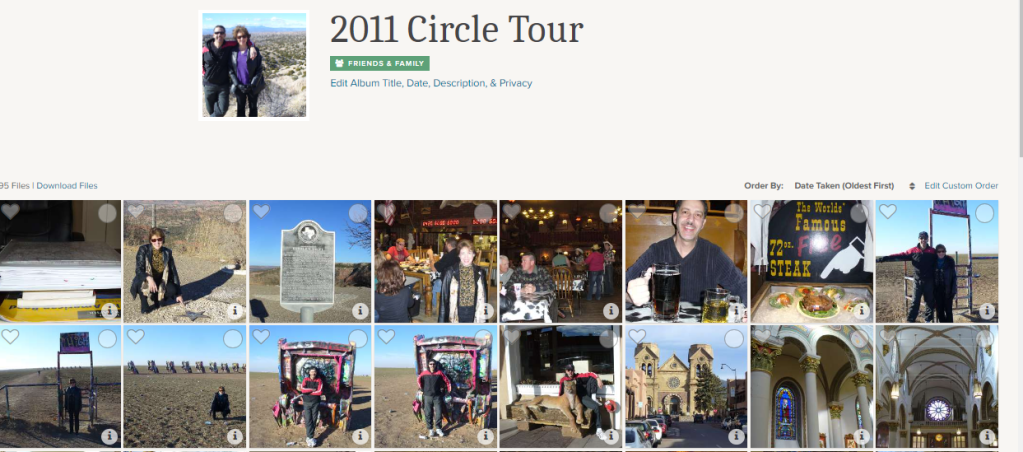
Notice on the right side, above the photos , it says “Order By.” When you click it, it allows you to choose the order based on the Date Taken or the Date Uploaded and you can select “Oldest First” or “Newest First.” That’s all the same as it is in the Library, but in your albums, you can also custom order the files according to your own preferences.
If you click on “Edit Custom Order,” you get a page like this that theoretically allows you to select the photos you want to move, then drag and drop them where you want. I say theoretically, because I’ve never been able to do that. I just click on a picture and try to drag it. I eventually get it to work, but I hope you have more luck. I am probably not holding my tongue right!
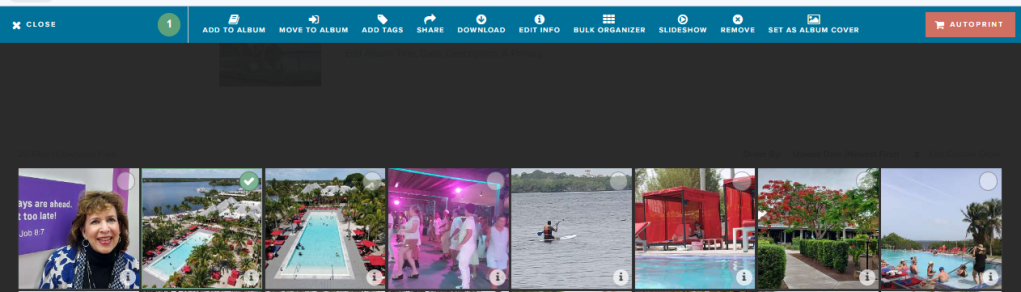
Whenever you are inside an album, you can chose favorites, by clicking the heart on the right side of a photo. If you use the circles on the left side, you are taken to a screen which will allow you to choose multiple images for a variety of operations shown below.
When you are in this screen you have access to many of the operations we have covered both a few weeks ago in the Library post and in this one, as well as some we haven’t seen before:
Add to Album will allow you to go get images from other albums you’d like to include in this album.
Move to Album takes the selected images out of this album and puts them in another.
Add Tags allows you to put shared tags on multiple images which you have selected.
Share is your tool for sharing a selection of photos with someone via a link.
Download is for adding photos from the album to your device.
Edit Info is a great place to change the name, description and/or date for selected image.
The Bulk Organizer is marvelous for quick curating of a number of photos at once. It will give you access to add the photos to another album, add tags, edit the names of a series of images, give a series of photos a description or change the dates of the photos. It is important to remember that what you do in bulk organizing overwrites whatever else you had input about the images, however, if you leave a section blank, it makes no changes. So, you could, for example, add tags and change dates, but leave everything else intact.
Slideshow lets you select images to include in a slideshow.
One of the more important buttons is Remove and this is the only place you’re going to find it. If you do not want to delete an image and it is already residing in other albums, then this button just takes it out of this nested album
Finally, Set as Album Cover allows you to choose an image to use as the cover of the album.
A Few Closing Thoughts
Though I have described the items in this post and the previous post on the Library from the standpoint of someone using FOREVER on a computer or laptop, most of these features are available on the app, just not in the exact format shown here. That means you can curate your albums on the go – waiting in the line to pick up your kids, sitting in a doctors waiting room, stuck in line at the grocery store or hanging at the pool.
Whether you are in the Library or in an Album, if you double click on an individual image you will be taken to a page on which you can provide info for that image. There is a lot of options there, so I will be covering those tools in a later post.
Finally, always remember I am here and happy to discuss your projects and challenges with you. If we need to ZOOM about something or sit down at your computer together (for local clients), let’s do it. Having access to your own Ambassador is part of what makes FOREVER so unique.
I’m here for you and so is the wonderful customer care staff at FOREVER. There is a comprehensive Help Center you can reach by scrolling to the bottom of any of the pages on the FOREVER site. Or you can just call or email. FOREVER’s Blog is a wealth of knowledge. Videos sprinkled throughout your Library, Albums and Tags will walk you though many processes. Or, like I said, I’m here, so just call me at 972-971-5263.
MEMORY KEEPING 101: A LITTLE INCENTIVE TO GET STARTED
The $20 Welcome Coupon from FOREVER
I want you to discover FOREVER! I know I rave about it all the time, but I’m not sure you know how easy it is to get started. I probably also fail to tell you FOREVER has $20 waiting for you to sweeten the pot. Here’s how it works!
It Starts With My Link
FOREVER has assigned me a unique and specific link. They want you to sign up with an Ambassador you know. Someone who you feel comfortable with. They do not want to be an anonymous website like so many of web-based companies out there which assign you a number and talk to you through bots. They have a wonderful Customer Service staff and a great help page, but they want you to have a real live Ambassador of your very own.
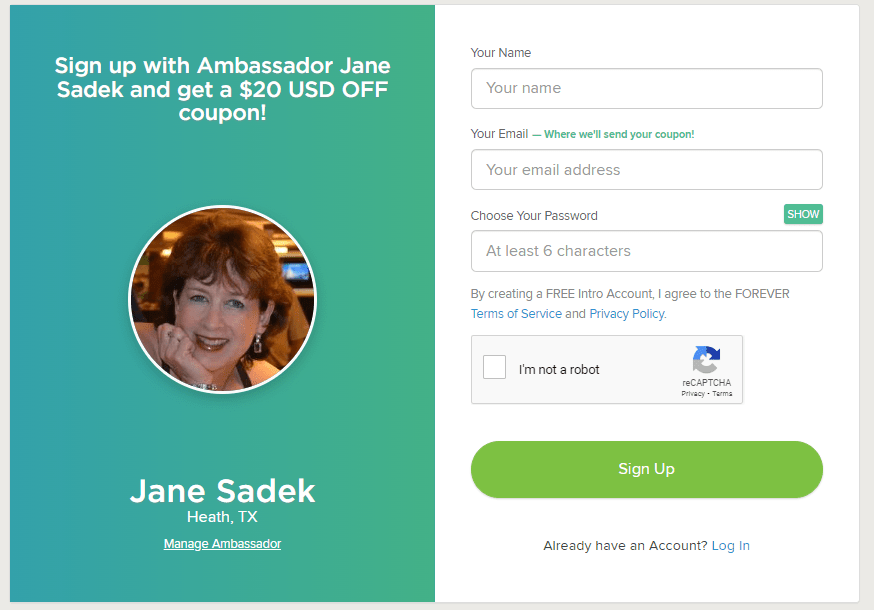
That link takes you to FOREVER. According to the device you use, you may immediately be asked to provide your email and create a password. It’s OK, it’s free. If it just takes you to the Home Page, click on Log In in the upper right hand corner and then under the green Log In button, there’s a link “Need an Account? Sign Up Free”. Click that and you will go here.
Fill it in and hit the Sign Up button. That’s it! Welcome to the wonderful world of FOREVER, but don’t stop there, because you need to claim your $20.
FOREVER Will Send You an Email
When your sign up is through, go to your email. If you don’t see an email from FOREVER then check all those spam folders. Confirm your email address and then FOREVER will send you your Welcome Coupon.
Twenty dollars is waiting for you. When you open the Welcome Coupon email I suggest you either print it out and/or save it someplace where you can find it again.
Near the bottom of that email is a code. That’s your $20. You’re going to want that when you make your first order. Many clients are ready to buy when they join. They cut and paste their code into their order and they are done. But I also have clients who aren’t ready to buy from the get go. That’s why I want you to print it out or save it somewhere you’ll be able to find it later.
In Fact, FOREVER Will Send You a Lot of Emails
So, one of the reasons FOREVER wants you to verify your email address is because like everyone else, they want to send you all their stuff – and that’s why you have an Ambassador. FOREVER stuff is great if you are about to start a bunch of projects, because the emails will keep you informed of all the great promotions which are going on. If you’re just sticking your toe in the water and aren’t interested in the stuff, when you get your first promo email, go to the bottom and click either “update your preferences” or “unsubscribe from this list.” Then you can tell them thanks, but no thanks – but wait until after you get your $20 coupon!!! I don’t want you to miss that.
Use That Coupon!!
First of all, you have 60 days to use that coupon. On Day 61, it will no longer be valid. So please find a way to use it within 60 days of signing up. The coupon will work with most things on FOREVER, with a few exceptions – gift cards, events, FOREVER Club memberships etc., but for merchandise, it’s all good.
Stack your deals!! Many, many, many companies are quick to send you a coupon, but then trying to use it is almost impossible, because you can’t use it with any other offers. That’s not so with FOREVER, except in very, very rare cases, which will be clearly marked. You can stack your $20 welcome coupon with all the deals on the Deals page, as well as with The FOREVER Club discount, which I would be happy to explain to you.
Get the best price! At the first of every month, FOREVER informs its Ambassadors about all the deals for the month. When you know what you want to buy, just give me a shout before you hit the buy button. I can let you know if you can get a better price by waiting a day or a week.
And that’s it! Twenty dollars towards your Memory Keeping project. You can also get $20 for referrals, but we’ll talk about that and The FOREVER Club another day!
Most people in the world wouldn’t recognize this car, yet it’s one of the best there is. It also is not a Ford, Chevy or Chrysler. Companies and politicians hustle for name recognition, because when most of us are in a pinch, we go for what we know. But I ask you – is that the best way to make a decision? Not if you want a luxury sports car. And certainly not if you’re about to digitize your memories.
If someone would deliver this car to your home, would you quibble over what the label said? Chances are you wouldn’t. You’d just want to grab the keys and roll. If you can get the best digitization service for the same price as a mediocre one, wouldn’t you want the best? When it comes to Memory Keeping, there are a lot of names which might immediately come to mind, but does that mean they are the best or does it just mean they have the biggest advertising budget?
The digital memory keeping company I work with, Forever, is not a household name. When it comes to digitization, there is another company which is on the radio and TV all the time with their boxes. Most people would recognize their name, but I’m not going to say it. There’s also another company which promotes their boxes as being in the same league, but are they? (And what about that company you saw in a strip center or some guy in your networking group that turns your photos into video? Talk about not in the same league!)
So, when these other digitization box companies are more familiar to most households, why should you go with Forever? I’m glad you asked!
Level of Care
While we’re on the subject of cars, think about the Mercedes Benz AMG line. You may not even know it stands for Aufrecht, Melcher and Großaspach, but chances are you have a clue those letters mean you’re looking at a Mercedes Benz superior to those which don’t have that designation. Among the reasons it’s better is the tag which shows who built your car over a matter of days, as opposed to other cars which are built on an assembly line by multiple people.
When it comes to digitization, those other guys are one-and-done. They slap a video or film in the machine, run it through and move on to the next one. That’s not the case at Forever. Eric Napier, Forever’s Director of Digitization explains the difference, “FOREVER will run each tape or film 2-3 times to get the best capture possible, edit the dead spots, clean up the tracking, video and audio as much as possible. We also provide editing, batch color correction and photo repair services that other companies don’t offer.”
Sounds kind of like the difference in a MB AMG and a Ford Pickup doesn’t it. A Ford Pickup is a great vehicle. It’s just not made with the level of care of a MB AMG. And here’s where my analogy falls apart. Regardless of which vehicle you might want, most of us can’t afford an MB AMG, but we might squeeze together enough for the Ford Pickup. But if you could pay the same for both, which would you choose? (Yes, if you own a ranch or a farm, you’ll go for the pickup truck, but you know what I mean.)
In the world of digitization, the sticker price of our small digitization box is virtually the same as the one-and-doners – in fact, there was a two cent difference on the day I checked. Now which digitization box would you prefer? Prices are subject to change and there are different specials going on at any given time, but generally, you are going to find that FOREVER and those guys are going to be in the same ballpark price wise, but FOREVER will always be a world apart in the level of care they offer.
Where’s My Stuff?
On the front end of the service, all the box services look a lot alike. They ship you a box. You fill it and send it back to them. Then your stuff is digitized. Each service does things a little different. Some include bags, some don’t. Some use a list, while others use barcodes. PaTAYto, PaTAHto. It doesn’t really matter.
As I’ve already mentioned, the prices are pretty much the same, including the shipping, but here’s the difference. FOREVER’s shipping price includes sending your stuff back to you – theirs doesn’t. That means if you want any or all of your hard copy items back, you’re going to have to pay extra, if you can get them back at all.
So, shipping differences aside, where does your digitized content end up. Well, all the companies are happy to provide you with a DVD or thumb drive, but is that what you want? I can tell that’s what the other guys want you to have. That’s because they are building a book of business for the future. Just as DOSS, Fortran, VHS, floppy discs and Betamax have all gone obsolete, the day will come when those DVD’s and thumb drives are a thing of the past. They’re banking on being around to “digitize” you all over again. Not FOREVER.
We’re hoping you’ll buy your own little piece of the Cloud, so when obsolescence sets in, you can enjoy the promise FOREVER makes to you. They will reformat your images to whatever format comes along when jpg, png, mp4 and their friends are a thing of the past. Never heard of anything like that? That’s because nobody else offers it!
Now, those other guys offer a piece of the cloud, too, but all they are going to do is rent it to you. We’ve all gotten so used to paying for online services by the month or by the year that many people assume that’s what FOREVER is offering and wow, do our prices look ridiculous. Take a second look, those guys are offering to lend you a little space with all the compressing, deleting, sharing, mining and selling that’s comes with that. In this case, it’s FOREVER that’s one-and-done. You pay us once for storage and you’re done forever!!
Look What I Found!!
There’s yet another reason you’ll prefer FOREVER over everyone else. If you have a shoebox of snapshots and a few VHS tapes, anybody can do those. Maybe not as well as FOREVER, but they can do them. Now, what if what you want digitized is larger than 8.5X11 or it’s 16mm or audio or it’s a scrapbook or you’d like to get your DVD’s uploaded. Fuhgeddaboutit! If it’s not plain and simple (see “Level of Care”) they aren’t interested. See the more kinds of things you want to digitize the more kinds of equipment you need and your staff will have to be trained on them.
One of the members of my team told a story one evening. FOREVER called her to apologize, because they were going to be behind schedule delivering an order. The reason for the delay was the fact that the object was so obscure they didn’t have the right machine. Who else but FOREVER would find out what they needed, find the right thing and buy it – at no additional cost to the customer? Everybody else would just say, “Gee, I’m sorry,” but that’s because they are in the digitization business and FOREVER is in the memory keeping business. It’s just what we do!!
Get the Best for Your Memories
So, FOREVER is like an exotic sports car, but it costs about the same amount as that family sedan in your neighbor’s drive way. I’d be driving the MB AMG, wouldn’t you? The color of your digitization box does matter.
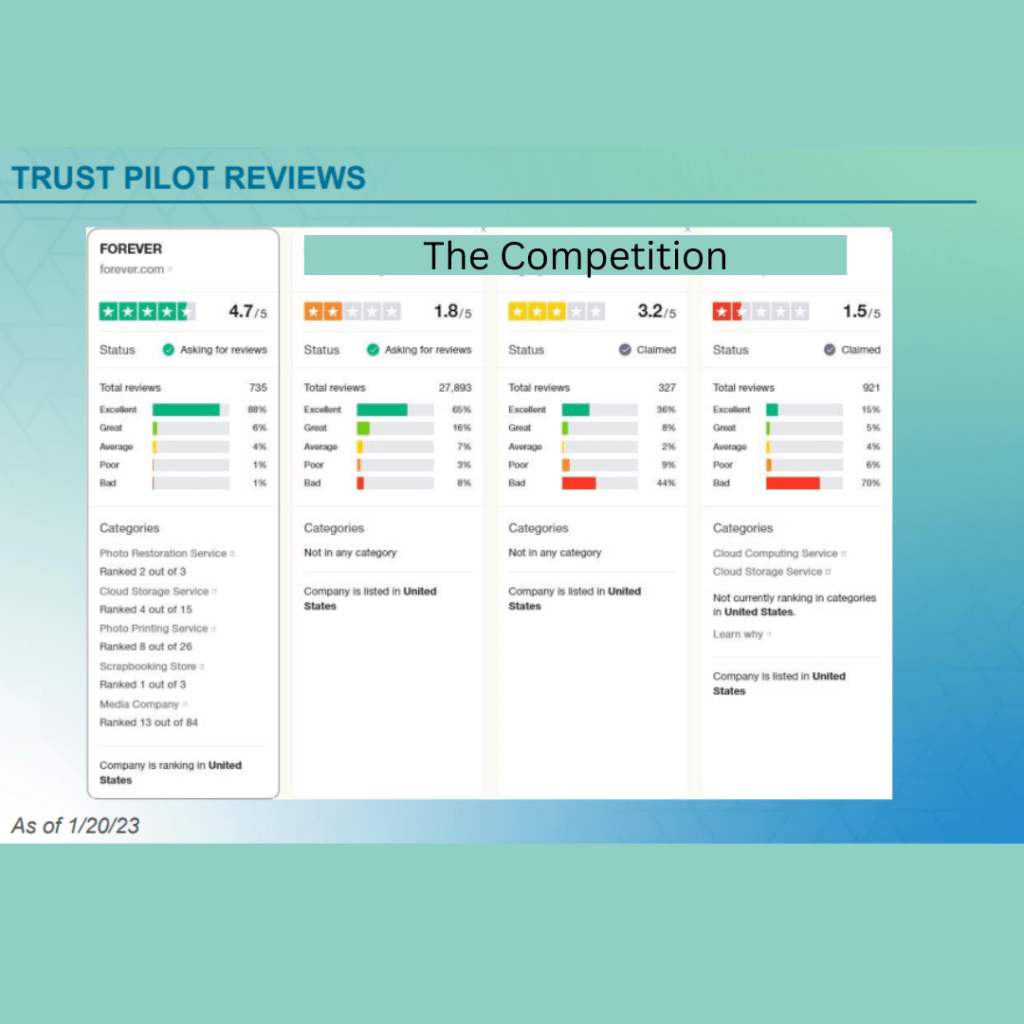
So, perhaps you’re still wondering about what I’ve said. Maybe you don’t think you can believe me. Well, how about Trust Pilot? Do you think you can trust them?
Here’s what they have to say about FOREVER and the competition. I’ve blanked out their names, so as to avoid finger pointing, but no one comes near to us.
Since the color of your box does matter, let me help you get the Blue FOREVER box for your digitization needs.
Thanks for coming by. Drop in next week for more NYC, more Memory Keeping 101 and another Weekend Report.
MEMORY KEEPING 101 – ORGANIZING YOUR STASH WITH HISTORIAN
Why Historian?
When it comes to permanent online storage you own, there just isn’t anything better than Forever. However, you might have wondered how to get your digital files ready for it. You don’t have to tell me Forever storage is a big investment. For most of us, our digital horde far outweighs the legacy we’d like to pass on to the future.
Historian is the answer. When you’re dealing with hard copy photos and memorabilia, your tools are tabletops, Ziplocks and boxes. You can buy a variety of fancy tools for this project, from boxes and files, to labels and dividers but I just use what I have at home with time.
Curating photos, traditionally and digitally, takes time. Facing a phone, laptop or app full of photos can seem quite overwhelming and if you think of it in view of purchasing permanent storage to hold it all, then it is not only overwhelming, it is daunting.
Historian is the halfway house for your digital stash. I’ve always struggled with organizing photos with my computer. For one thing it will let me save the same pictures in 47 places. It may notify me when I try to put it in the same file, but Historian goes further than that and will let me know when I am saving the same picture anywhere in my stash. With tagging I can find it in several different ways, without taking up valuable space saving it multiple times.
Historian also reads the time stamp from metadata and puts the photos in historical order. How wonderful is that?
Another amazing feature is face recognition. Yes, face recognition. Once you take some time to teach it the faces in your life, it will go ahead and tag them automatically for you.
And stars! You can use stars to rate each photo, which will help you when it comes time to decide what to put on Forever, what to delete and what you’ll just keep on Historian for right now.
I could go on with all the wonderful tools you have for sorting and organizing photos on Historian, but I think you get the picture (wink, wink).
It Both Saves Time and Takes Time
All these automatic time-saving tricks are great, but I’m not going to kid you. To do it right will take time. For instance, I just wanted to take my whole photo folder and dump it there. You can’t do that. You can transfer every photo from a folder, no matter how many there are, but it won’t take folders. So, getting it all in there will take time. (At least you can’t do folders right now. Valet is coming this spring and that will change everything.)
However, it’s good to take time. I decided to dump about 300 photos in there as my first bite. I individually name tagged one photo and then hit Auto Face Recognition. It took me awhile to train the program the difference between the 50 or so people I had dumped on it. If I’d taken things a little slower, it would have been easier, but I don’t do things by half measures. From now on, all I’ll have to do is confirm the faces it recognizes and straighten it out when it gets something wrong.
To be honest, I’m still just learning the program. I had been under the impression I didn’t need it, until I started doing digital sorting jobs for my clients. I didn’t want to be stuck with the limited tools in Microsoft and I didn’t want to buy enough Forever storage to hold everything a client passed on to me. Now I don’t know how I’d live without it.
The very best part is this. When it comes time to transfer your images from Historian and Forever, they are fully integrated, so everything you did to organize your photos in Historian will show up on Forever. That does not happen when I upload directly from my Microsoft files. Oh happy days!!
If you have digital mess, then you’re going to want Historian! Let’s talk about it. Give me a call at 972-971-5263!
Remember when getting your printed photos was fun. You took pictures with a camera, not your phone. You used film, not an SD card. You couldn’t look at or share the photo until the film was developed. You’d gather up all your rolls of film and take them to the drug store to get printed. They took your photos and sent them to a lab and a few days later, you could have your photos. Seeing what you shot was like reliving your vacation or event. You even loved the bad photos.
Photo printing became big business and getting your photos back fast became the gold standard. Eventually, we all expected to get photos back in an hour, but instead of a technician in a lab developing your photos, you had some high school kid running the film through a machine that may or may not have been properly maintained, so those pictures might or might not be worth the paper they were printed on.
Along Came Digital
In my opinion, digital cameras were not an improvement. Suddenly, a whole new layer of challenges stood between me and my photographs. Yes, I know all about the improved photo quality and some people might like all that editing, but I liked dropping it off at the drug store and waiting a few day for the photos.
I’ve tried a lot of things since the advent of digital photography – printing the photos myself, taking a disc to the drug store or big box store and I’ve used SO many of the online photo printing services that I could not start to name them all.
An Education in Exploitation
Then a couple of years ago I discovered Forever and it has totally changed my outlook on the whole process, from where I store my images to where I get them printed and why. Have you ever wondered why so many places are so eager to print your photos and why they are willing to do it for such a cheap price? Try reading one of those terms and agreements that pop up as you fill in the blanks on your order. That would be an eye-opening experience.
Basically, when you download your photos to Shutterfly, Snapfish, MixBook, Costco, Walgreens – you name it, you sign an agreement which transfers the rights to your photos to that company. In turn, they do print photos for you on the cheap, but in return, they’ll use those photos for all kinds of things you never dream your photos would be subjected to. We’ve all heard horror stories about people seeing the photos they post on Facebook ending up in an ad campaign or on the dark web or other equally bad scenarios. The same thing happens when you upload your photos for printing.
And print quality? Once I spent a day editing a set of gorgeous vacation photos. I sent them off to Snapfish and eagerly awaited their delivery. The images I sent were sharp, crisp and beautiful. The images I got back were hazy. I’d been in the photography business long enough at that point to know something had happened to my images since I edited them and I was right. The company compressed all the photos before printing, because they could only handle up to a certain resolution. Sure it was all there in the terms and agreements, but who reads those.
So Now I Know
Then I found Forever. Instead of loading my photos onto a commercial site where who know what would happen to them, I load them into my very own online storage that I own. Nobody will ever mine my photos for advertising, sell them for stock photmpress them. When I want to print, I just choose the photos I want out of my account and order whatever size photo I want.
And here’s a tip. You know those letters and numbers on the back of some photos. Ever wonder who makes those up? Ever try to read them and decide what they mean. You can actually control what that says with Forever. That’s a big help.
Another Choice
So, you may be thinking to yourself, but I don’t WANT to store my photos on Forever. I just want to print them! OK, fine! But I have another option. Don’t go to the big box stores of online photo processing. You can print your photos with Creative Memories. Amazing quality, no compression, and yes you can control the print on the back of the photos.
What’s more, you’ll get your images back in these cool little plastic boxes that keeps them all nice and neat until you use them in your scrapbook. Then they are great for storing embellishments. I love them!!
When you are considering how you are going to handle your memory keeping, please consider me. I have all the answers you will ever need and sometime I have more than one way to do what you want. Come back next and let’s do some more memory keeping together.











 jane sadek