
DESTINATIONS, Road Trips, TRAVEL, United States

Destination: Detroit

TRAVEL THERE: THE BEST LAID PLANS OF MICE, MEN AND WOMEN ARE AT THE MERCY OF THE AIRLINES

Why Detroit?

So, with a world of destinations to choose from, why go to Detroit? The short answer is family. Another short answer would be Great Niece/Nephew Gender Reveal. My answer would be, take me anywhere, I’ll find something to do.

Anyway, our nephew and his wife in California are having a baby, most of Bill’s family have immigrated from Egypt to the Detroit area and many others immigrated to Canadian cities not far from Detroit. We do have some family here in Dallas, but we are few. Instead of taking everyone out to California, the expecting parents joined everyone else in Michigan.

Anxiety Free Departure

I love to travel, but for the last few years, leaving home meant taking along our business. The added stress before we left, and managing things remotely while we were gone, took a real dent out of my fun, but just before this trip we sold our real estate photography company. There’s a certain amount of stress that comes with travel for anyone, but compared to those days when I also had to carry the burden of the business, I was blissfully un-harassed.

The day of the trip, we discovered our flight was running about 30 minutes late, but that didn’t faze us. In fact, it gave us just a little extra wiggle room. Things went like clockwork at the Park N Fly lot and their shuttle delivered us at the terminal. We dropped off our one checked bag and strolled up to security. Things were great!

At security, something went awry and they closed down our line. They gave us two choices. One was to go outside, walk 10 minutes to the next entrance, go through security and then walk back down to our gate, which would be about another 10 minute walk. Or we could wait. They weren’t sure what the hold up was or how long it would take, but we had time and we were next in line, so we took our chances.

In less time than it would have taken us to walk down to the next entrance, they opened things back up and we sailed through security. So, we were running into some problems and issues, but they were so minor they didn’t even count. We grabbed some lunch at Smash Burger and by the time we were through, our flight was boarding.

The Real Trouble Begins

One we were in our seat, we discovered the flight was having some maintenance issues. They started with an announcement that it should be about 10 minutes before we would take up, but they kept pushing that further until we were about an hour later than scheduled. We’re not thrilled at this point. I had hoped for a little sightseeing in the Riverfront area when we got to Detroit, but we’d still be fine, right?

As we sat at the gate, Bill tries to set up the free wi-fi on his phone, so he can watch the a movie. I was a little concerned at this point. A young man behind me was helping out a couple of older ladies get their phones set up to do the same and their experience was not sounding at all like Bill’s. His connection was asking for a credit card and when the first one didn’t work, he put in another one. Very, very bad move.

Almost immediately, he gets a text from one of the credit card companies letting him know his credit card had been compromised. This is not good. It was even worse when we got to our hotel room and they informed him the second card had been hacked. While this was inconvenient and would interrupt our bookkeeping, we were OK. I had another credit card with me which I use for limited special transactions, so we were still in business and even if that were not so, we had debit cards.

The worst thing was yet to come. The message boards in baggage claim were not working and by the time we figured out where we were supposed to be, the only thing riding around on the carousel was one purple bag, but it wasn’t MY purple bag.

The Lost Luggage Saga

There were three individuals at the Lost Luggage Desk. One was a young man who had already pissed Bill off with his cavalier attitude about the deceiving message boards. We had been standing by the carousel which promised to deliver our bag, but of course, it was not the right one. Bill was not happy, at all, that we’d been wasting our time waiting at the wrong carousel, but the guy didn’t even pretend to care. In sort of a sing-song nanny-nanny-poo-poo voice he chided Bill for not hearing the multiple announcements they made. In Bill’s defense, there were some announcements, but they’d sort of sounded like, “mwah bwah napa bwah mwah nwah…” You get my drift.

The second person, a woman, pissed me off. Because all that was left on the carousel was a piece of purple luggage about the same size as mine, it led us to assume mine had been picked up by mistake. At first, the lady took several appropriate steps to contact the owner of the bag. That made me feel better.

Then she started in on her everything’s-all-right mantra. The first 10 or 12 times she tried to convince me of that, I figured it was just her job, but it became irritating. My luggage was a virtually new American Tourister bag. What had been left behind was a beat-up off-brand. When she said, “They don’t want your stuff,” I figured she had no clue. I have good stuff and whenever I do leave an item behind in other situations, it is way gone, even when I return fairly quickly. Comparing the left behind bag to mine, I thought there was a good chance they might actually want my stuff.

The third person came along about the time I was ready to punch Ms. Everything’s-All-Right. She talked to the lady whose contact information was on the bag and discovered it was her son who had picked up the wrong bag, but he was somewhere on an Uber and his phone was out of juice.

Ms. Number Three acknowledged that everything was not alright and gave me a form which entitled me up to $3500 worth of replacements, were they unable to connect me with my bag before the evening was over. She suggested we go ahead and get our rental car while they figured out how to contact the young man in the Uber.

And that’s where I will leave you for now. Come back next week to discover if I actually got my luggage back or whether I went on a shopping spree with my $3500 replacement money!

DFW Metroplex, Memory Keeping, Photo Organization, Photo Organization Coach, Photography, Scrapbooking

Tag Along for Organizing

MEMORY KEEPING 101YOUR FOREVER TAGGING TOOL

Three Levels of Organization

With your FOREVER Permanent Storage you have three ways to organize your media. I have told you about two in recent weeks, the Library and Albums. By way of review, your Library is where all the photos in your account reside. Whether you upload them to the Library or an Album, the actual photo will be stored in the Library and your Albums are merely a way of accessing them. For that reason, you can add a photo to as many albums as you like without taking up more storage.

Your Library has a variety of tools you can use to sort, filter and order the images. You can also use the search bar to find images by tags, file name or description. Some people find this to be all they really need and they never get around to using the Albums or Tagging. Most of us love having other tools for curating.

I find Albums to be my favorite curating tool. I choose the categories I want for my top level Albums and then nest related albums beneath them. I can continue to nest other albums under those secondary albums for as deep as I need. It is important to note the images are not “in” the albums, they only show up there. (I will confess that initially I thought I was supposed to “move” images into albums and then I could delete them out of the library. Thankfully, the images remain in the Delete Bin for 30 days and I was able to rescue them, but then I had to repopulate my Albums.)

So Why Tag?

Until I found FOREVER, I was never happy with the way any program, app or service wanted me to organize my photos. Some people identify with organizing by year or with pre-designated categories. I didn’t. If creating your own album names is threatening to you, I will be happy to help you set up something, but for me, the ability to set up my own system was pure heaven.

If you want to know more about how I set up my account, see my post about Albums. It works for me, but I was even happier when I discovered the cross-referencing power of tagging. I’m not always interested in looking at a photo in the context it was taken. Instead I want to find a photo for a certain purpose.

One of the best examples of why you might need tagging involves other people. Let’s say there’s a birthday or anniversary coming up and your family/friends want to gather up great photos of the honoree. Without tagging, you’d have to recall what years or events or places you were with that person to find the images of them. If you’ve tagged your photos with the name of the people in your photos, then all you have to do is go to the Tags section of your storage and find the file for that person. Then enjoy choosing from all the images you have of that person. FOREVER even allows you to show them in a variety of orders to assist in your search for just the right photos. You can also click the hearts as you find those you like.

Multi-Level Tags

But that’s only one reason why you might want to use tags. You can use them for lots of things besides identifying people. The most important photos in my account are my travel photos, so I created a tag called “Travel.” That way, if I’m just in the mood to see a variety of travel photos, I can go to my tags and choose travel. I created a tag for “Cruises” and also for each country, state and/or city I have visited. If I want to see all the photos from my trips to Egypt – boom. I have a “Museums” tag, but also other tags for favorite museums so I can go directly to those.

When it comes to people, I have a tag for “Family” and for “Jane and Friends”, as well as for family members and close friends of which I have lots of photos. I have a Tag for “Bill and Jane” in case I just want photos which have both of us in them.

See, I can have as many tags as I want, so I don’t have to be stingy. If I think I might need to find something using a certain tag, I create it – but that’s me. Some people would be overwhelmed by all those tags. Well then, you do it your way!

So How Do You Do It?

There are many ways to go about tagging. I will go through those I use most often, but there is no wrong or right way to do it.

From the Library

If you want to do some high level tagging, like “Travel” or “Family” then the easiest way is to go to the Library and instead of “All Files”, select to see “Not Tagged”. From that view, start clicking the circle on all the photos you want to include in a tag. (You can do up to 500 at a time.)

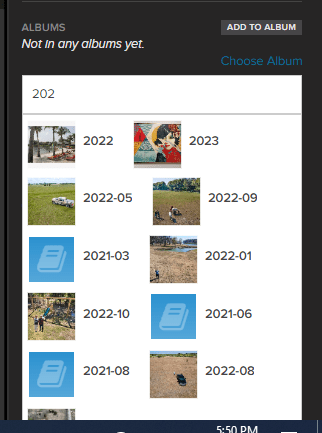
As you click you’ll be taken to an area where you have a choice of actions including “Add Tags”. Once you have chosen all you want to include, clicking “Add Tags” will take you here.

Then you just start typing in the tags you want. You can either add new tags or as you type, FOREVER will match what you have typed with available tags. Hit the “Add Tags” button and you are done.

From Albums

If you want to tag from an Album, you have to go deep enough to be in a file with photos in it. You cannot tag the Albums. Then you do exactly what you did in the Library. Start clicking and you will be in an area where you had the same choices you did above and you will do exactly the same thing.

From Individual Images

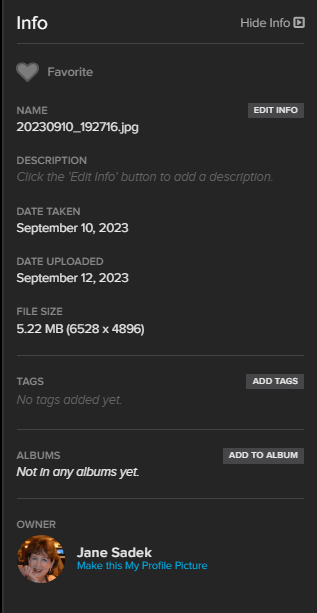
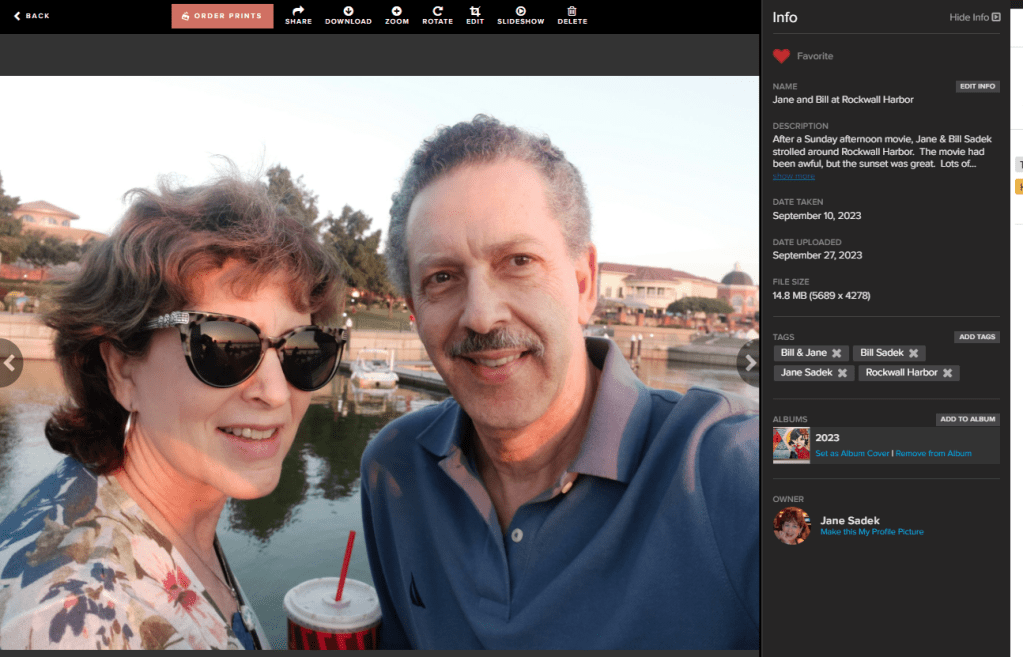
Whether you are in the Library or the Albums, you can always choose to click on an individual image (not the selection circle) and you will end up on a page like this. On the right side in the middle is the tag section. Click on the “Add Tags” button.

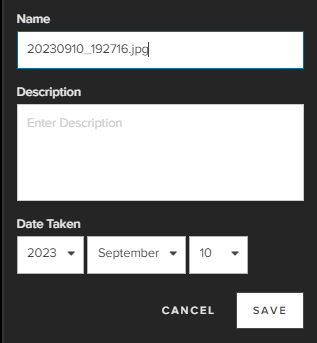
This box opens up and you can start typing, just as you did in the “Add Tags” box from the Library and the Albums section.

Go Give It a Try

If you already have a storage account, go online and give this handy tool a try. If not, it’s free to join FOREVER and you get your own 2GB trial account. Upload some photos and try tagging. I promise you can’t hurt FOREVER!

DESTINATIONS, Road Trips, TRAVEL, United States

Turning Toward Home

TRAVEL THERE AND BRING IT HOME

So, I was away from home for five days and attended a Christian Women’s Conference for three of them. Sure, I discovered an amazing restaurant in Little Rock, saw a presidential library and ate the best BBQ in St. Louis (maybe the world?). But did I bring anything home with me from the conference which would change my life.

Hope

The best thing I brought home with me was hope. I confess my summer had been rough and it had shredded my hope. Just getting out of the house and away from the business was a blessing, but it was more than that.

Everybody makes mistakes. I know that, but in the day to day of it, I sometimes feel like the stupidest person alive. How exactly did I get here? Why do I keep making the same mistakes over and over? Where is my joy?

The first night of the conference Joyce faced this issue. She confessed her own mistakes in life, but also pointed out there are hidden treasures in what we may consider our mistakes.

If someone like Joyce Meyer can own up to her mistakes, then I’m encouraged to own up to mine. The next morning Lisa Harper and Christine Cline chipped in and confessed their own ability to screw up royally. Now I was feeling even better. I was reminded all us humans can make mistakes. I could leave that burden and guilt right there on the floor of America’s Dome.

Then Lisa Harper talked about the God of second chances and third chances and fourth chances – in fact, as many chances as I need until heaven comes. God’s not even counting. He created a clean slate for all of us on the day His Son died on that cross. All I have to do is get over myself and accept it. I knew that, but Satan does everything he can to keep that fact from being in the forefront of my mind. There was another burden to leave behind me.

Just in case I had not gotten the message, Christine Caine got up there on Saturday morning and told me the pandemic was over. How many times have a blamed something on the pandemic or wished for the good old days? If I don’t keep my face and my heart directed toward what God has ahead of me, I am in danger of being as useless as the pillar of salt Lot’s wife turned into. So, I left my pandemic mindset in the trashcan and headed home.

The Imagination Station also gave me hope. At the ripe old age of 67 you begin to feel as if the best things in life are behind you. I dared to write dreams on a piece of cloth and tie it to the grid on the wall. It felt kind of silly and I almost didn’t do it, but I figured I had little to lose and everything to gain. I was barely home when God gave me a taste of what He could do when I let go of wishing and turned my hopes into prayers. Lesson learned – my best days ARE still ahead; it’s not too late.

Merchandise

The most important thing I bought at the Joyce Meyers’ Love Life Conference 2022 was tickets for Love Life Conference 2023. It’s going to be in San Antonio – one of my very favorite places in the world – October 19-21 in the Alamo Dome. I bought two tickets, because this is my bestie’s birthday month and I couldn’t imagine a better present. If you’d like to come too, here’s the link: https://brushfire.com/joycemeyer/wc2023/537511.

I also bought some books. I’d never read Battlefield of the Mind, which is her classic work, so I picked it up. It is so good I think I may read it annually or perhaps quarterly. It’s not anything I didn’t already know, but everything I need to be reminded of on a daily basis. If you are looking for something good to read, start there!

Great Memories!

God has blessed me in many ways, but one of his best gifts is my best friend, the sister of my heart, Deborah Shera. We tell folks we could go to a mud puddle and have fun. The hotels we stayed in during this trip probably prove that point. Instead of being aghast and bawling me out for choosing such awful hotels, we laughed. But it wasn’t all bad hotels by any stretch. We shared great food, cherished some of our best memories, created some new ones and came home with our hearts stitched together a little tighter – if that is at all possible.

So today is Wednesday, October 3, 2022 as I write this post for Wednesday, September 7, 2023. As of today, the only travel plans I have are for Joyce’s conference in San Antonio which I just mentioned.

Will the travel gods grant me another trip before that? I have no idea, but I hope you will come back next week and find out!! I promise there will be something there to entertain you!

DFW Metroplex, Memory Keeping, Photo Organization, Photo Organization Coach, Photography, Scrapbooking

The FOREVER App is FREE with Storage

MEMORY KEEPING 101: ACCESS IMAGES WITH YOUR PHONE INSTEAD OF HAVING THEM ON YOUR PHONE

Having Images on Your Phone

Let’s face it! Smartphones have spoiled us! Some people do their whole life with their phone. They don’t have a desktop and their laptop might have dust on it, but their phone goes with them everywhere and they use it for everything.

Of course, you want to be able to share images with your phone, but you don’t have to have them on the phone to do that. In fact, having your photos on your phone creates all kinds of problems. What if the phone is stolen, you lose it, you run over it with your car or whatever other disaster might happen. Are the photos on your phone backed up? All of them? Or just some of them? Do you know how to access them?

Losing your phone, however that happens is awful. I know, because I left my phone on top of my car one time and drove away. I only thought of it when it sailed off my car onto the highway and was run over by multiple vehicles – it wasn’t pretty.

You know what else is awful? When I hear someone say, “I can’t take any photos because my phone it full. Phones come with free storage, like a drug dealer gives away free drugs. The point is to get you hooked and once you are, they’ve got you. Breaking away can seem overwhelming, but once you have the ease and security of FOREVER, you’ll discover it’s worth it.

Sure, there are lots of solutions available. You can rent storage or more storage, according to your situation, and upload to the cloud. You can go through and delete a bunch of photos. You could download the images to your computer or move them to some service like Google Photos. Yeah, but chances are you really don’t want to do any of those. You’d just like some sort of magic to happen.

Accessing Photos With Your Phone

So, what you’d like to have happen is for the photos on your phone to be somewhere safe, magically. Well, I can kind of do that for you. It will still suck if your phone gets lost, stolen or destroyed, but with everything else you’ll have going on, you’ll know your photos are safe, that monthly storage charge will disappear and you won’t get that darned notification your phone is full every time you turn around.

When you buy storage from FOREVER, you pay for it once and you get a free app to access the images on your phone. You can buy more when you need it, but paying for it will not be something you have to do the rest of your life. You’re not getting dinged every month for some little (or large) payment for your rented cloud space. In fact, your photos are guaranteed safe for your lifetime plus 100 years, so whoever comes after you won’t have to pay that annoying little fee either.

With the app, you can back-up whatever images you have on your phone and then you can set it to synch with FOREVER every time you take a photo. If your phone says you can’t take anymore photos, just laugh and hit the delete button. How good does freedom feel?

More Than Backing-Up & Synching

The FOREVER App does a whole lot more for you than back-up and synch with the photos you take. You get all the power of the FOREVER Library, Albums and Tagging Features, as well. Most of the things you can do on the FOREVER website, you can also do in the app. If you want to find out about the Library, then see THIS post. If you want to find out about the Albums, see THIS post. If you want to find out about Tagging, come back next week.

If you’ve ever scrolled and scrolled and scrolled to share a photo, then you’ll love the tools FOREVER has to organize, show and share your images. With a few clicks, instead of random scrolling, you can find that beach pic from years ago. And whether your sharing with some across the coffee table or across the world, it’s easier than you can imagine.

So, if your phone is holding your photos ransom, charging rental fees which will never go away (even if your photos do), then lets talk about FOREVER.

Attractions, DESTINATIONS, Restaurants & Bars, Road Trips, TRAVEL, United States

Sugarfire in St. Louis

TRAVEL THERE – REMARKABLE BBQ

Playing Hookey!

OK – I confess. We didn’t make it to every single session of the Love Life Conference. For instance, we totally blew off Friday night. We were praise-music-ed out. Even though it would mean missing one of Joyce’s teachings, we just couldn’t face a “CELEBRATION” and concert. Can I pay less to get less music? Or could I pay more and get less music? Asking for a friend…

We also skipped Joel Olsteen. My theology doesn’t line up 100% with Joyce, but I just overlook those places where we diverge and enjoy the rest. Anytime I hear Joel Olsteen, he’s so far down another path I want to throw things. I’ve been known to talk back to the TV when he’s sharing his opinion on something. I didn’t trust myself to behave.

What We Did Instead

So, walking back and forth between our parking lot (remember the BROWN level) and America’s Dome, I noticed a trailer with an amazing aroma coming out of it. Then I figured out that it must be the smoker for the restaurant next to it. The name of the restaurant was Sugarfire.

Deb loves BBQ with a passion, so as they prepared the stage for Joel to come out, Deb and I scooted to the streets, headed for BBQ. Little did we realize we were about to enter epicurean heaven.

It had barely turned 11 and there was already a line of locals waiting to order their ‘cue, as Sugarfire calls it. It was obvious everyone was a frequent flyer and as the server chatted with the regulars, he would do a little upselling, giving them samples of the more upscale meat choices. Then he saw us, obviously not regulars, with our women’s conference badges on. So, he gave us samples, too.

The sample worked and Deb was all about some French Dip style Brisket sandwich. If it’s BBQ, I want ribs, but most places want to sell me a half rack, which I can’t eat on my own, so I either end up eating far too many ribs or I just get something else, which wasn’t what I wanted. Sugarfire sells a Four Rib plate and I could get excited about that. I also got excited about the cornbread, which was more dessert than bread, and the cold beer.

Deb’s judgement? Best BBQ brisket she’d ever had. I don’t know if I’d go quite that far with the ribs, but they were pretty darned good and certainly rated up there among the best.

The Sugarfire has long community tables in the center of the restaurant and booths around the edges. If you sit at the community tables, you’ll be cheek to jowl with the regulars and as far as I am concerned that’s part of the fun.

Shortly after we were seated, huge waves of ladies from the conference began to line up for their ‘cue. Was Joel’s talk that short or are there others who have a problem sitting quietly while he’s talking? The line went all around the restaurant and then out the front door and down the sidewalk. CRAZY! Well, not so crazy. It is really good ‘cue.

I would like to remind Christian ladies they are a witness, good or bad, of their Savior at all times, but particularly when they have a huge sign around their neck proclaiming they are attending a Christian Women’s Conference at the Ameridome next door. With the huge crowds it draws, Sugarfire has numerous signs requesting patrons get their food BEFORE they start taking up spaces at the tables. As we sat having our lunch, a lady got up several times to make that announcement.

Then a Love Life Conference attendee plopped down at the table next to me with about five handbags wrapped around her arms. Thinking she may have missed the signs and/or the announcement I said, “They are requesting you wait until you have food to sit down.” Her response was not nice. I don’t think Joyce or Joel would have approved.

After lunch, it was time to head back to the convention center, because Lisa Harper was up and no way I was missing her. While we’d been in Sugarfire, it had started to rain. I have very independent hair and if it gets rained on, it begins to protest. I found a book bag down in my tote and used it as a rain hat. Not my best look, but I headed off the frizz, which would have been my ‘do, had my hair gotten wet.

Lisa was great, as I had anticipated she would be. There was another break before the evening’s “CELEBRATION” & concert, but we headed out for our second dose of hooky. Come back next week and I’ll let you know how that went!

DFW Metroplex, Memory Keeping, Photo Organization, Photo Organization Coach, Photography, Scrapbooking

What Is The FOREVER Club & What Does It Do?

MEMORY KEEPING 101: 5% OFF EVERYTHING & FREE STORAGE

What the Club is not!

People are wary of getting signed up for stuff and I don’t blame them. Too often we are promised the world and all we get is a monthly charge for something and we can’t get rid of it.

One minute a friend is telling you about some miracle cosmetic and the next you discover you’ve joined their “team.” Or you sign up for some sort of discount, only to discover you suddenly have both a membership fee and a quota. I hate that.

FOREVER is different. It is always free to sign up and there is never an obligation to buy anything. FOREVER does not want you to join my team. Being a FOREVER Ambassador is a serious career path, not a discount program. Various discounts are available all the time without being anything except one of my FOREVER customers.

What the Club is!

However, if you are a frequent flyer with FOREVER or you’ve got a big purchase you want to make, then the Club could be something you are interested in. It is really a budgeting tool. You choose the amount of investment you want to make on a monthly basis, for as long as you want to make it and then you get out of the Club – easily by the way. You don’t have any hoops to jump through to end the membership. Just go online, access your account and stop the club, whenever.

When you use the Club to budget your Memory Keeping expenses, then FOREVER will reward you two ways. First, they’ll give you a 5% discount on virtually everything and you’ll get a gift of storage anytime you stay in the Club for 3 consecutive months.

Ways to Save

There are a number of ways to go about using the Club.

Dribblers like me

I myself am a dribbler. I invest $25/month each month, primarily so I can get that extra 5% off whatever I buy. You know how you can go into a store with a great coupon, but you can only use it on full price merchandise or there are so many other restrictions the coupon is not worth the paper it’s printed on. Or the company’s ongoing promotions without the coupon are a better value than the coupon. That’s not happening in FOREVER.

With FOREVER, I can spend my $25 whenever I want to and only a very few items are excepted from the 5% discount. I also get to stack it up with whatever other deals and discounts are going on – including welcome coupons and referral coupons. That makes it a true bonus, not a come on.

And you know what else, on top of saving 5% on virtually everything, I like that 1/2 GB added to my storage every quarter. It might not be much, but it’s something and if I get it every three months like clockwork, it does add up.

Strategic Savers

Other people are more strategic in their investment plan. When they want something specific, they set a budget for their expense and save up for it. Let’s say someone wants to get a FOREVER BOX and pack it full of scrapbook pages. I’d sit down with them and estimate how much they’d need to spend for their box credit and overage to digitize all their pages.

Just for this discussion, let’s assume they have 500 page sides to digitize at the retail price of about $2 each and they want to invest $100 a month until they’ve saved up enough. Well, first we’d plan on them waiting until there was a 40% off deal going on, because that’s the biggest discount that’s ever offered for digitization. That takes the $1000 price tag down to $600 and their 5% discount would take it down to $570. $570 divided by $100 Club payments equals 6 months and that means they’d save up for that amount of time. During this period, they’d get 2GB of storage every 3 months, so after 6 months they’d have 4 GB.

Want to know something else? We’d make sure they bought their box on Club Weekend when Club Members can get free shipping, which would save them another $30 or so. So, this customer using monthly deals and the Club would get approximately $1078 worth of FOREVER for $600. That is value!

The Club Installment Plan

Some folks like instant gratification and don’t want to wait a six months to buy what they want. Let’s say someone has the same $100.00 a month, but they want to go ahead and buy 250 GBs of storage right now, on the installment plan.

Well, first they’d join the Club and invest their first $100. Forever storage rarely (if ever) has anything more than a 25% discount, which is available virtually all the time. So, they wouldn’t need to wait on a sale. The retail price is $2499 and with the 25% discount, it would be $1875. Then the Club discount would take it down another 5% to $1782 and they would choose the 24 month installment plan (about $75/mo). They’d set their monthly Club investment to go towards the future payments of their installment plan and each month, FOREVER would charge $100 to their credit card.

Since each month they’d pay in $25 more than they needed for a month’s installment, after 18 months they’d have enough to pay off the other 6 months. They would have earned 2 GB of storage every quarter for a total of 12. So, for $1800 they spent, they would have gotten $2600 worth of value.

These are just a few basic ways of using the Club. People who want to make really large investments, such as permanent streaming or Terabyte Storage packages, sometimes get very fancy in their maneuvering.

Review the Basics

So, your monthly investment can be as low $25 and the largest is $250, but nothing is stopping you from stacking up as many Club Memberships as you want. If you only have one purchase to make and all you want to do is get 5% off, you’ll want to get in and then get out as soon as your purchase is made. However, I do recommend staying in the Club for 3 months at a time so you can earn the free storage and take advantage of deals like free shipping. If you decide to stop investing, your dollars never expire, so you can never lose them, but your discount is only good during the months when you are actively paying into the Club.

If that’s no clearer than mud, I’ll be happy to answer whatever other questions you may have. Just give me a call at 972-971-5263.

Attractions, DESTINATIONS, TRAVEL, United States

Joyce Meyer’s Love Life Women’s Conference Words

Travel There – From God’s Mouth to Our Ears

If you read my last post about my dissatisfaction with the musical offerings at this conference, then you might expect me to pick apart the rest of it and you’d be wrong. I loved the messages delivered by the speakers: Joyce Meyer, Lisa Harper and Christine Caine.

Though I had been worn out by the drive and beat up by the music, when Joyce came to the stage she had words which were formed in her mind by the heart of God just for me. I had come looking for healing and encouragement. By the end of the first night’s teaching, I knew I had come to the right place.

Joyce started off in Genesis with our old friend, Abram. We all know his story. Abram had received great promises from God and things weren’t so bad, but they didn’t exactly match up to what God said there would be. “Then the Lord took Abram outside and said to him, “Look up…” She encouraged us to get outside our tent and look up.

She shared the difficult things in her life that she would change if she could, but reminded us, none of us can, no matter how much we may want to. However, she also guided us to Isaiah 45:3, “I will give you hidden treasures, riches stored in secret places, so that you may know that I am the LORD, the God of Israel, who summons you by name.” From one of her greatest challenges, Joyce eventually received and continues to receive great blessings. She encouraged us to get out of our tents and look up, so God could reveal those hidden treasures to us.

Joyce Meyers was talking to me. I’d been so busy in my tent I’d been failing to consider God’s many blessings in my life, because I was distracted by the drudgery and the challenges in the tent. By getting out of my tent and driving for two days I found a star-filled sky. My hope for hidden treasures, riches which were stored up for me, broke through and joy seeped once again into my heart.

Joyce’s Guests

Friday morning Joyce took the stage with her speaker friends and talked about the mistakes and hard places in life with them. I loved the format and it fleshed out what Joyce had said about getting outside our tents, looking up at the stars and being aware of the hidden treasures. The time was like a balm on my heart.

That afternoon, Lisa Harper taught us with humor and Scripture about our God of second chances. She reminded me that no matter how much I mess up, I have a God who can use my mess to to be blessing to others. Since I seem to have a lot of messes at my disposal, it’s nice to know God can even use our mistakes to His glory.

Christian Caine, with her lovely Aussie brogue took one of the shortest Scriptures in the Bible, “Remember Lot’s wife!” Luke 17:32 and turned it in to a battle cry against our post-Covid doldrums. No matter what your life was like before Covid – good or bad – Covid has come and gone. Lot’s wife looked back and was turned into a pillar of salt who lost both her past and her future. She urged us to embrace what was ahead and I walked out of the conference ready to do just that. I was out of my tent, looking at the stars.

Imagination Station

During one of the breaks I went down to see why people were standing in line in a certain part of the arena. There was an area called the Imagination Station and if that wasn’t it, it was something along that line.

The idea of it was to imagine something you wanted God to do for you and tell Him about it in a tangible way, by writing the thing you imagined on a strip of cloth and then tying it to a grid on the wall.

Confession, I am horrid at goal setting and vision boards are a craft to me, not an inspiration. I tend to have hopes, not tangible goals. I can set a goal for activities, but saying I am going to sell a certain amount of product or raise my profit X%. It’s beyond me. I can easily tell you places I want to go and things I would like to buy, but translating them into measurable goals, it just doesn’t happen.

For these reasons, I was a bit threatened by this exercise. I was tempted to walk right through the display area. Then I remembered. This was between God and me. There wasn’t going to be a quarterly review. I wasn’t going to be graded on it.

I got a strip, wrote three wishes on it and tied it on the grid. Then I walked through the rest of the display area and was encouraged by the verses displayed there. Especially this one, since being in my later 60’s could be construed as a reason to go sit quietly on the bench.

Now I can tell you how God works. I tied my wishes to the grid on the wall and while I fully believe that with God I can do anything, I was in no way sure my love of scrapbooking and my desire to pursue it more aggressively professionally had any interest to God.

I left the conference the next day and went on with my life. I thought from time to time about the strip I had tied to the grid, but I told myself, I left that in God’s hands, not going to worry about it. Within a week and a day, I had gotten an email, virtually out of the blue, from a potential customer who needed my scrapbooking assistance.

This new client was not magic. I had done the things I should. I am signed up as a consultant with both a traditional and a digital scrapbooking company. I have a website. I have social media to tell people I am a memory keeper. When I go to networking meetings, I mentioned it, even though Spot On Images, by necessity was the focus.. However, most days of my life all that goes unnoticed. That is until I turn one of my wishes over to God.

So that’s how Joyce and her guests impacted my life at the Love Life Conference in St. Louis and propelled us into selling SOI and making Memory Keeping my priority., but I hope you’ll come back next week, because we are going to play hooky during some of the conference’s sessions and I’d like you to come along.

Decorative Arts, DFW Metroplex, Gardens, Memory Keeping, Photo Organization, Photo Organization Coach, Photography, Scrapbooking, Shopping

Pre-Designed (But Flexible) Photo Projects

MEMORY KEEPING 101: DESIGN & PRINT PROJECTS

AutoPrint vs. Design & Print

Last month I walked you through a couple of easy, peasy AutoPrint projects step-by-step. AutoPrint is what you want to use to create very quick projects. The layouts are very simple and while you can make some edits, the primary goal is done.

Design & Print is the next level of (shall we say) fussiness. You want more in the way of decoration and more opportunities to add your own touches, but you also want the heavy of lifting of design to have been done by someone else.

Available Projects

While AutoPrint and Design & Print offer many of the same projects for you to choose from, there are some differences. I have compared the AutoPrint Offerings with the Design & Print Options.

  • Photo Books (In AutoPrint you have all these choices with each photo boo. In Design & Print, options for size, binding and style depend on design chosen, but all of these can be found in various designs.)
    • Sizes 8X8 -12X12
    • Softbound & Hardbound
    • Standard & Layflat
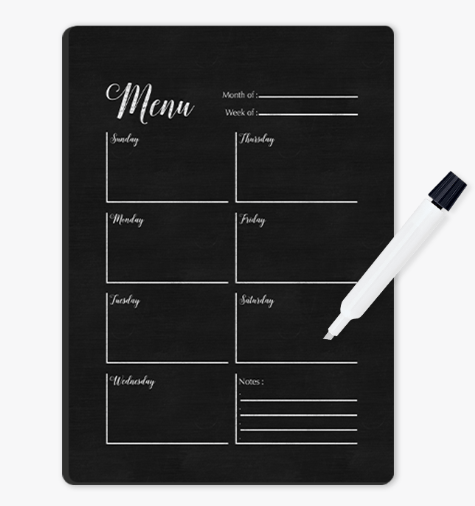
  • Photo Gifts (Varies)
    • Coaster Sets (Both)
    • Tabletop Panels (Both)
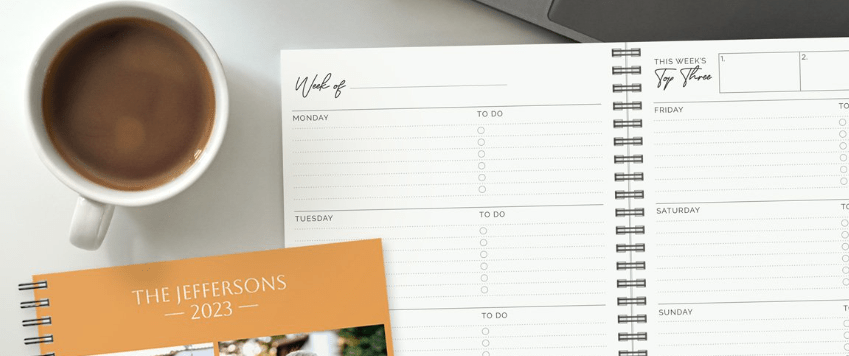
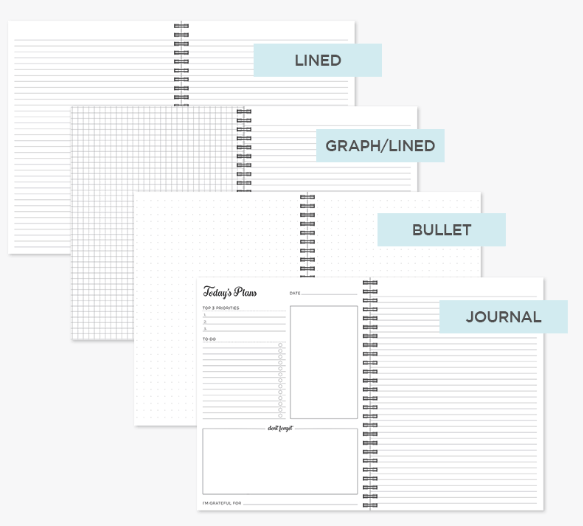
    • Notebooks (AP Only)
    • Magnets (Both)
    • Ornaments (D&P Only)
    • Puzzles(D&P Only)
    • Blankets (D&P Only)
  • Drinkware (Varies)
    • Water Bottles (Both)
    • Photo Mugs (Both)
    • Frosted Glasses (D&P Only)
  • Wall Decor (D&P Only)
    • Canvas Prints
    • Metal Panels
  • Cards (D&P ONly)
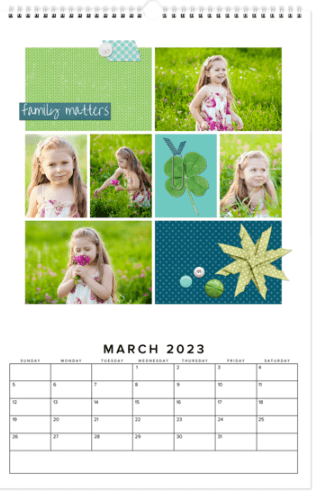
  • Calendars (D&P Only)
  • Photo Prints (AP Only)
    • Glossy & Lustre
    • Sizes 4X6 – 11X14

Selecting Your Photos and Your Design

When you have a project you want to do in Design & Print, I suggest you first go to your albums and set up one for the project. Then add all the photos you want to include in your project into the album. It’s also a good idea to get them into the order you want them to be in the project. This will not only get you prepared for making the project, but it could help you decide which design to use.

Then it’s time to choose the design for your project. According to your point of view, this part is either your favorite thing about the project or your biggest headache.

If you like shopping online, this part is fun. You can go in and browse around, checking available options for size, style, material and etc.. You can put together your whole project and then decide you want to change the design or the layout. You’ll love it.

I’ll admit it makes me a little crazy. In prepping for this post, I went in to find a coaster set project to walk you through and hit a brick wall. Artisan is my favorite way to design in FOREVER because I like to start with a blank page, but many people find a blank page daunting. They want a design template. FOREVER offers three design options because different people like different things.

Let’s Make a Blanket

Since I’m definitely not in the mood for coasters, let’s make a blanket. I’ll use the photos I have tagged as Floral for the images on the blanket. On FOREVER I would hover over the “Create & Print” Tab and a selection box comes up offering AutoPrint, Design & Print and Digital Scrapbooking & Deign. Under Design & Print, Photo Gifts are in the center and Blankets are at the bottom of that list. Click “Blankets.”

There are many, many design to choose from, but for this project I wanted to include as many floral photos as possible, so I used the “# Of Photos” filter to find the blanket designs which included the most images. I got two choices. (Ignore the pricing. The image I included shows the deals available on the day I wrote this post, not the day you are reading it)

When I clicked on the Photo Grid Blanket, here’s the screen I got. It advises me of all the options I have. There are two sizes, two orientations and two materials available to me and there is a big PERSONALIZE button. Let’s do that.

So, I went in and added a photo for each space and chose a Bible verse as my text. If I clicked on “Layouts,” the designer offered four options, but this was the one with the most spaces, so I chose it. I could still select my size, orientation and material. Then I could add it to my cart and order it!

I like this a lot, but honestly, I would prefer a design without text and I’d probably choose a different background color. And that’s why I love Artisan, but that lesson will be next month. Here’s the link to the project so you can take a look at it: https://www.forever.com/app/users/jane-sadek–1/containers/c7f1ebef-e74c-4069-9d00-0c75dfd7daf8/6ao6nbcgjnp7v0b3adq7j2lrt

ART, DESTINATIONS, Music, Performing Arts, Road Trips, TRAVEL, United States

Joyce Meyers and Love Life 2022 Music

TRAVEL THERE – LOOKING FOR THE BLESSING

The excitement inside America’s Dome was palpable. We were among the last few people showing up for the 7 PM opening session. We picked up our intro packet and stopped at the concession stand for something to eat. Minutes after we found seats the music started and I confess I was not ready for it.

Disclaimer – I am not a big fan of praise and worship music. I am on Team Hymnal. I don’t stand with my eyes closed and wave my hands in the air. If you do, that’s great, but it makes me think more about me than I do Him, so I don’t like to go there. Love Life was locked and loaded for praise and worship: Chris Tomlin, Tauren Wells, Phil Wickham and Brandon Lake. On Thursday night at 7 PM, the kickoff for the Joyce Meyers’ Love Life Women’s Conference, I was wrung out.

The musicians on the other hand were wound up. At 7 PM they blew on the stage and blew up the sound system. They were jumping and dancing and rocking and rolling, while I just needed to bow down. I knew they weren’t doing anything wrong, but for me, they weren’t exactly putting me in the right frame of mind for worship. For a few minutes I resented it and then the Lord made me aware of the fact that this was my problem, not theirs.

I bowed my head and asked for the power to worship, in spite of my preferences and my exhaustion. Almost as if I had communicated directly with the performers on stage, the atmosphere stilled. On the stage were Phil Wickham and Brandon Lake. Though I would still have preferred to turn the volume down, I could tell powerful worship was going on.

Too Much Music for This Old Woman

If I had one criticism of the Love Life Conference it would be that I felt there was entirely too much loud music. I’m probably one of three women out of the entire crowd that felt that way, but it was what I walked away with.

The opening ceremonies had been loud and frenetic. Then some crazy DJ guy would warm up the crowd before each session and you had to go early or you’d be sitting in a corner. Each performer got time during each session and then Friday night there was a concert. Needless to say, I did not go Friday night. It was just too much for this old lady. If some of that music had been quiet and peaceful, if there had been a hymn or two, if a lot of things, I might have been happier, but as it was I wished there had been a lot less music and a lot more teaching.

Is It Really Praise & Worship?

I have actually found a church in my area that sticks to traditional hymns and classical worship music for Sunday mornings. I love it. The lyrics are rich in Scripture, they profess the glories of God and the miracle of salvation. I feel worshipful and reverent as I join in with this music. I would welcome a couple of praise and worship choruses to round out our musical offerings, but I don’t see that happening.

I have also attended a whole lot of services with a praise and worship band. I watch others stirred to near frenzy while singing this music. Obviously, it moves them. I remain awkward and self conscious. I see band members who seem to only lack go-go boots and a cage to complete their performance. They’re up there waving their arms, shuffling their feet and sometimes thrusting their hips. That’s OK for Elvis in concert, but is it really worship?

I do not want to be Mrs. Morrison. During my teenaged years, occurring in the late sixties and early seventies, Mrs. Morrison was still giving lectures on the dangers of Rock and Roll. By then Rock and Roll was here to stay. I thought she was a nut case. Then during a service at what I call the Rock and Roll church, I understood why she was upset. Rock & Roll didn’t feel very worshipful to me.

I really wanted to be open-minded, but I knew I couldn’t worship when I was moments away from starting a Conga Line. As I have said before, if that does it for you, more power to you, but how about me? Are you as willing to spend time worshipping with traditional hymns and classical worship music for my sake? The resounding answer in modern churches is ‘NO!’

Since I was at the conference for spiritual renewal and what I was served was, for the most part, very loud Rock & Roll, I spent some time in quiet reflection. Had I become Mrs. Morrison?

My Conclusion

Music either honors God or it doesn’t. While I still might have turned the volume down, before the conference was over, I was a fan of Phil Wickham and Brandon Lake. Their music was all about the glories of God and the mercies of Our Savior. Their lyrics were right off the pages of Scripture.

To me, and I will confess this is my opinion, not a condemnation of the other singers, their music is not worshipful. To begin with it is very repetitive. The same words over and over and over. Matthew 6:7 says, “When ye pray, use not vain repetitions, as the heathen do: for they think that they shall be heard for their much speaking.” Along about the 20th time I say, “I love you Jesus,” it has lost all real meaning and is just sounds I am matching to notes.

It also seems very self centered to me. As I listened it focused on what the “worshipper” wanted to tell Jesus, not on the glories of God or the salvation of Christ and it had nothing to do with Scripture. “I love You, I worship You. I bow down. I lift my hands. I serve You. I need You.” As my mom used to say, “The emPHAsis seemed to be on the wrong sylLAble. “

So, if Joyce called me tomorrow and asked me what changes I would make, I’d tell her to cut down the time devoted to music, to bring traditional music to the stage and keep away from the vain repetitions. Someone else might tell you the music was the most meaningful part of the whole conference, but this is my blog, so I get to share my own opinion.

Come back next time and we’ll talk about what I did like. The preaching and teaching was powerful.

DFW Metroplex, Memory Keeping, Photo Organization, Photo Organization Coach, Photography, Scrapbooking

Digital Albums in FOREVER

MEMORY KEEPING 101: NO BIRDS IN THESE NESTS

Using Online Albums to Organize Your Photos

There are no hard and fast rules for creating albums in your FOREVER storage. You determine how you want them set up. You can set them up based on the subject matter, the time frame or the people. You can have as many or as few albums as you want and you can nest albums under the top level album for as deep as you’d like.

Some people keep photos strictly by date – with each year being an album, with nested albums for each month inside that and then an album for each day/event within the month. Others focus more on families, having one album for their immediate family, one for their own extended family and another for their spouse’s family. Perhaps the nested albums inside that would be by years or it could be broken down by people.

My choice is to have one album for travel and another for day-to-day activities. In the travel album, I have an album for each vacation. In my day-to-day album, the nested albums actually correspond to the various traditional scrapbooks I have created on a annual basis, but according to the scrapbook, it could be one year or multiple years. Then I have an album for all my completed FOREVER Projects and another for my Memory Keeping business.

I’m sorry this post is so long, but I wanted to include all the pertinent information in the same place and there’s a lot of it.

The Top Bars

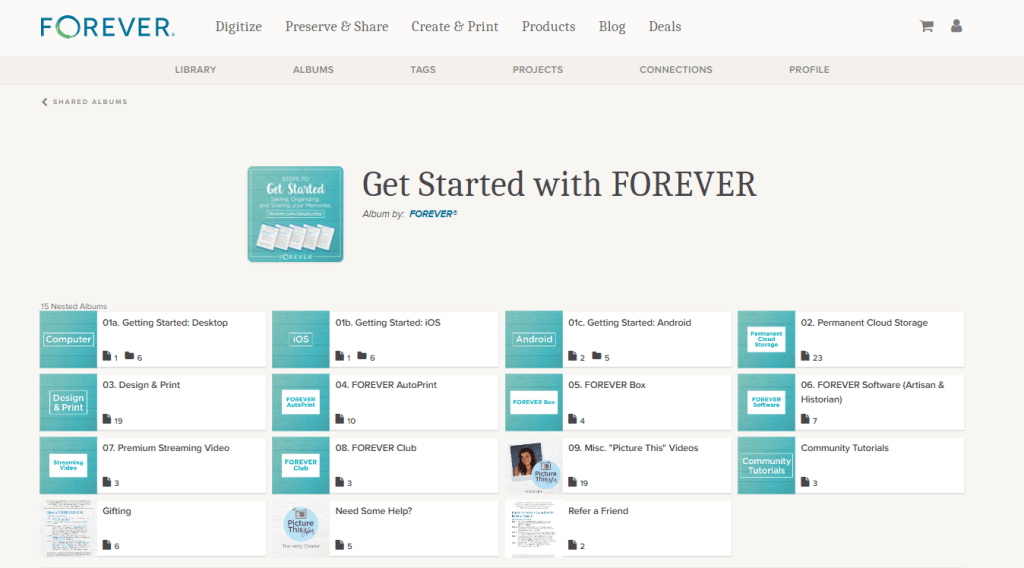
Looking at my album page above, you can see that it’s easy to access any place on the FOREVER site with the click of a button. Click “FOREVER” and you will be on the FOREVER Home Page. You can shop FOREVER by clicking Digitize, Preserve & Share, Create & Print, Products or Deals. “Blog” will take you to the FOREVER Blog, which has an encyclopedic reference library of posts dealing with everything from new products to how-to’s. You can go to your shopping cart and also take a look at your account.

In the row below that, you have access to your Library, your Tags and your Profile. There’s also a link to your “Friends & Family.” Friends & Family are the folks you have chosen to share your photos with. We’ll talk about that more later.

Finally, you get to items specific to Albums. You can add a New Album, Search the Albums you have or take a look at Visited Albums. We’ll take a deeper look at Visited Albums later, also.

In the middle of the bar below these options is a Search Bar which allows you to use keywords, names and such to find specific images in your storage.

+ New Album

Hit the blue “+New Album” button and this “Create a New Album” dialog box will pop up. “Album Name” is the title you want for your album. You must create this name and it will show up below the photo you choose as a cover image for your file. For instance, below the photo with the ornate iron gate, I named my album “A Travel Journal.”

There are three Privacy Settings available and you must select one for each album. This will indicate who can see these albums in your storage. The privacy setting you chose for the top level album will apply to all the nested albums.

Private” means for your eyes only. The only people who will be able to see these files is you, someone you have allowed to sign in with your credentials or anyone you have designated as a manager for your account, if you have chosen for your manager to have that sort of access. You can create a link and share the file, but it will not automatically be available to anyone else unless you decide to.

“Friends and Family” are people you want to have access to the images in your storage. They are completely under your control. You can invite them when you want to and take them out of Friends and Family at your discretion. However, if you would like for them to collaborate on an album with you, you must share the file with them, using the “Share” button. Then they can add photos to a file, but they still cannot modify the photos. They would need to be a manager for that.

Public” means your files are accessible to anyone on the internet. This is not what most people want, but it could be what you want. You could set up a portfolio of projects you wanted the public to have access to or training films for your customers or even, like one of our users, a historical album of his service in WWII. The WWII Vet did not have any family who was interested in his photos, but he thought they had historical significance, so he wanted them to be available to anyone who was interested.

Album Description” gives an overview of what’s in the album. You don’t have to put anything here, but if you are giving access to other people or you are setting up an archive which will be used for generations to come, then the more you include the better.

“Album Date” can be a single date or a date range. You do not need to fill this in at all, but as with the description, this information could be invaluable to future generations.

Then there in small print is access to “Albums Help Video.” You’ll find these helpful videos all over FOREVER. Anytime your stuck, just look around and chances are you will see a link like this. https://www.forever.com/app/users/jane-sadek–1/albums/travel/4x8ql6f7rc4gm8z183zp34r17

“Visited Albums”

So, remember when I said you could share your albums with others and allow them to collaborate in those albums. There are a wide variety of uses for this feature, from a network of family albums to a team, club, business or other organization which uses a central FOREVER account. If you are a FOREVER customer with this type of access to other accounts, then this is where you would go to visit those albums which you had looked at before.

Individual Album Options

If you have already added files to an album, then it will select an image for the preview. It can be changed to whatever you want. If the album is new and there are no photos in the album, then the preview will be a blue box, but as soon as you add photos, one will be automatically selected. The green box at the bottom of the box tells you the level of privacy chosen for that album, how many images are in that album and how many albums are nested below it.

Each individual album on your Album page has a small blue box in the corner. If you click on that, a drop down box gives you several choices of things you can do with that album.

The first is “AutoPrint.” A few weeks ago I published a post about AutoPrint, which creates easy, quick projects almost like magic. If you select AutoPrint here, FOREVER will start building a project with the items in this album.

Upload” allows you to upload images from your device directly to this albums.

“Add files” will take you to the Library so you can add images already on FOREVER to this particular album. It does not duplicate the photo, filling up your storage. All your photos live in the Library and are merely displayed in the various albums you create.

“Move” takes a photo out of an album and moves it to another one. As with Add Files, the images live in the Library. You’re just asking FOREVER to let you view this image in a a specific place.

“Delete” deletes the image. FOREVER will remind you the image is being moved to the delete bin and will be deleted in 60 days.

More Individual Album Options

If instead of clicking on the arrow as we did above, you click on the preview, you are given a peek at all the nested albums in the album and given many options, some you had on the outside of the album, but others as well.

You’ll find Upload, AutoPrint, Add Files, Move and Delete, which do the same thing as I described above, but you’ll find other options as well.

Click the “Share” button and this dialog button comes up. You can use it to share the entire album with someone with a share link. If you’d like for the person you share it with to be a collaborator, this is where you designate them.

The “Add Nested” button will add a new nested album to the album you are in. You will need to name it, but the Privacy Setting will automatically be the same as the album you are working in. You can add the other information as desired, but as I always say, the more info the better.

The “Slideshow” button will create a slideshow of all the images in the album, but will bein the slideshow, but it does not include the images in the nested albums within that album.

If you want to change the cover photo, click it and change it, but the image has to be in this album, not one of the nested album. You can also edit anything about the album with the “Edit ” button below the green box identifying the Privacy Setting.

If you click the circle on the left side of any of the nested items, you can then use any of the buttons I described above to perform that action in the nested items you’ve chosen. If you click anywhere else on the nested album, you will enter that nested album.

The only thing I have in my Top Level Albums are nested albums and the one image which is used as the cover photo. However, if you have multiple images in your album, you have more choices. Above this view are all the buttons I have previously described.

Notice on the right side, above the photos , it says “Order By.” When you click it, it allows you to choose the order based on the Date Taken or the Date Uploaded and you can select “Oldest First” or “Newest First.” That’s all the same as it is in the Library, but in your albums, you can also custom order the files according to your own preferences.

If you click on “Edit Custom Order,” you get a page like this that theoretically allows you to select the photos you want to move, then drag and drop them where you want. I say theoretically, because I’ve never been able to do that. I just click on a picture and try to drag it. I eventually get it to work, but I hope you have more luck. I am probably not holding my tongue right!

Whenever you are inside an album, you can chose favorites, by clicking the heart on the right side of a photo. If you use the circles on the left side, you are taken to a screen which will allow you to choose multiple images for a variety of operations shown below.

When you are in this screen you have access to many of the operations we have covered both a few weeks ago in the Library post and in this one, as well as some we haven’t seen before:

Add to Album will allow you to go get images from other albums you’d like to include in this album.

Move to Album takes the selected images out of this album and puts them in another.

Add Tags allows you to put shared tags on multiple images which you have selected.

Share is your tool for sharing a selection of photos with someone via a link.

Download is for adding photos from the album to your device.

Edit Info is a great place to change the name, description and/or date for selected image.

The Bulk Organizer is marvelous for quick curating of a number of photos at once. It will give you access to add the photos to another album, add tags, edit the names of a series of images, give a series of photos a description or change the dates of the photos. It is important to remember that what you do in bulk organizing overwrites whatever else you had input about the images, however, if you leave a section blank, it makes no changes. So, you could, for example, add tags and change dates, but leave everything else intact.

Slideshow lets you select images to include in a slideshow.

One of the more important buttons is Remove and this is the only place you’re going to find it. If you do not want to delete an image and it is already residing in other albums, then this button just takes it out of this nested album

Finally, Set as Album Cover allows you to choose an image to use as the cover of the album.

A Few Closing Thoughts

Though I have described the items in this post and the previous post on the Library from the standpoint of someone using FOREVER on a computer or laptop, most of these features are available on the app, just not in the exact format shown here. That means you can curate your albums on the go – waiting in the line to pick up your kids, sitting in a doctors waiting room, stuck in line at the grocery store or hanging at the pool.

Whether you are in the Library or in an Album, if you double click on an individual image you will be taken to a page on which you can provide info for that image. There is a lot of options there, so I will be covering those tools in a later post.

Finally, always remember I am here and happy to discuss your projects and challenges with you. If we need to ZOOM about something or sit down at your computer together (for local clients), let’s do it. Having access to your own Ambassador is part of what makes FOREVER so unique.

I’m here for you and so is the wonderful customer care staff at FOREVER. There is a comprehensive Help Center you can reach by scrolling to the bottom of any of the pages on the FOREVER site. Or you can just call or email. FOREVER’s Blog is a wealth of knowledge. Videos sprinkled throughout your Library, Albums and Tags will walk you though many processes. Or, like I said, I’m here, so just call me at 972-971-5263.