ART, DFW Metroplex, Libraries, Memory Keeping, Photo Organization, Photo Organization Coach, Photography, Scrapbooking

Can FOREVER Save That?

MEMORY KEEPING 101: THE FORMATS FOREVER CAN STORE

What Do You Have and What Do You Want?

There is one question I ask a lot and this is it! It applies to many steps in the Memory Keeping process, but in our digital world, wondering what formats can be saved on FOREVER is a pretty important one.

If you are a general consumer with photos, video and audio on your devices and computer, then FOREVER is going to save pretty much anything you want it to. Here’s a list of all the things FOREVER will save.
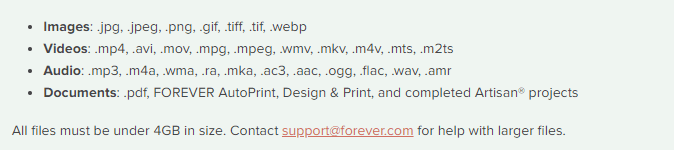
As you can see, this is a pretty comprehensive list. In fact, I don’t even know what some of those formats do. However, there are things FOREVER can’t save (yet), so let’s talk about those.

Raw Files

Many pro and hobbyist photographers take photos in Raw. This is a a generalized category which creates huge files for the purpose of file manipulation. When we were in the real estate photography business, our photographers would take their shots in raw on the HDR setting. This meant the files were huge and that basically they were in parts. Our guys would take multiple shots in a variety of exposures for each image, which would then be processed to create one data rich file for editing. The purpose was to manipulate light, so that we could take a picture of a room with the curtains open and get everything in the room and everything outside with perfect lighting. Various photographers use a variety of other methods to do the same thing, but this is the method we used and a lot of other photographers do, too.

The difficulty with this is that different cameras take different types of raw photos. Our Canon camera took .cr2 and the DGI drone took .dng. Your Nikon takes something else and other cameras will take another format. And this is why FOREVER has not yet embraced RAW in it’s suite of supported files, yet.

While FOREVER will not save all these raw files, most of the time the raw state is just a temporary destination for files which will become jpg’s. That’s what we did. General consumers don’t want to handle or store the huge, unedited files. We always converted our raw files to jpg’s as we processed the files for delivery. While FOREVER doesn’t store raw files, yet, it does realize that for some photographers, this capability is a high priority.

I have spoken with Dr. Nathan Bowers, the VP in charge of R&D and supporting these files is on the short list of development with FOREVER, but there are technical challenges associated with it. Nathan would have been happy to explain these details to me, but I wouldn’t have understood. If you would, then perhaps you should call him, but for the time being, suffice to say, FOREVER can’t store Raw files, but we’re working on it.

HEIC

Those who use and are familiar with Apple know they sort of like to be unique. If you have an Apple phone, then this is the format your photos are taken in. Not to worry! While FOREVER will not store your photos in HEIC, it will automatically convert them to .jpg as you upload them. For 99% of the population, that’s fine. They actually don’t care what extension is attached to their files, they just want to save them. There are some proponents of HEIC who want to keep their files in that format and unfortunately, at this time, FOREVER cannot save these files. I say “at this time,” because an ongoing desire at FOREVER is to never say no to any format. At this time it is not possible to store .heic on FOREVER, but that won’t be the answer forever.

Various Documents

Let me start this part of the conversation here. You can save PDF files on FOREVER. The document files on your computer are much like the raw files from a camera, because the type of file created depends on a variety of factors. That’s why PDF was created in the first place.

PDF stands for Portable Document Format. It was designed to make your files portable, whatever format they were created in. Converting most files to PDF is easy. You just change the extension to .pdf and viola, you have a PDF which can be stored on FOREVER.

So, will FOREVER store your documents? Absolutely! Just save them as jpg’s and upload.

APPS

When one of my friends bought FOREVER storage, the first thing they wanted to do was save everything on their Quickbooks. Well, for one thing, Quickbooks is already saved and backed up. Perhaps not to the extent of FOREVER, but certainly safer than the photos on your phone or the VHS tapes sitting on a shelf.

After a little discussion, I discovered that what she really needed was not the whole app, but the reconciliation she created each month. Easy peasy! The reconciliation was a PDF doc. Now she saves those to FOREVER and is perfectly happy.

The point is that while you cannot save a whole app, probably what you want to save is some document which is already in a format FOREVER can save.

Specialized Formats

The items I have covered so far in this post are the most common questions I hear, however the longer I do this, the more formats I discover. Did you know quilters have a specific format for saving their quilt patterns and genealogist have their own format? The list goes on.

If you have a specialty format that you’d like to save on FOREVER, please let them know. The development team prioritizes projects based on need and demand. I know quilters and genealogists have their own formats, because I’ve been on ZOOM calls where Dr. Bowers has mentioned these formats as items on his development list.

In the meantime, many of these formats can be converted to something like jpg or pdf, which can be saved. Or you can take a picture of the file and save the picture. It may not be the complete digital file, but it’s better than nothing, until it can be saved on FOREVER.

Summing Up

While FOREVER cannot save every type of file in the world, the list of things they can save is very comprehensive and most files can be saved with a simple conversion to PDF. FOREVER was designed for the specific purpose of memory keeping and it does that very well for the vast majority of formats in which people have captured their memories. If you have something in particular you need to save that isn’t on the list above, let’s talk. You might be closer than you realize to keeping your memories on FOREVER.
DFW Metroplex, Memory Keeping, Photo Organization, Photo Organization Coach, Photography

Let’s Talk About the Library

MEMORY KEEPING 101: THE FOREVER LIBRARY, THAT IS

What’s a FOREVER Library?

OK, so FOREVER is a Digital Media resource that offers everything from Media Digitization to Video Streaming – but if you hang around me much, then you already know that.

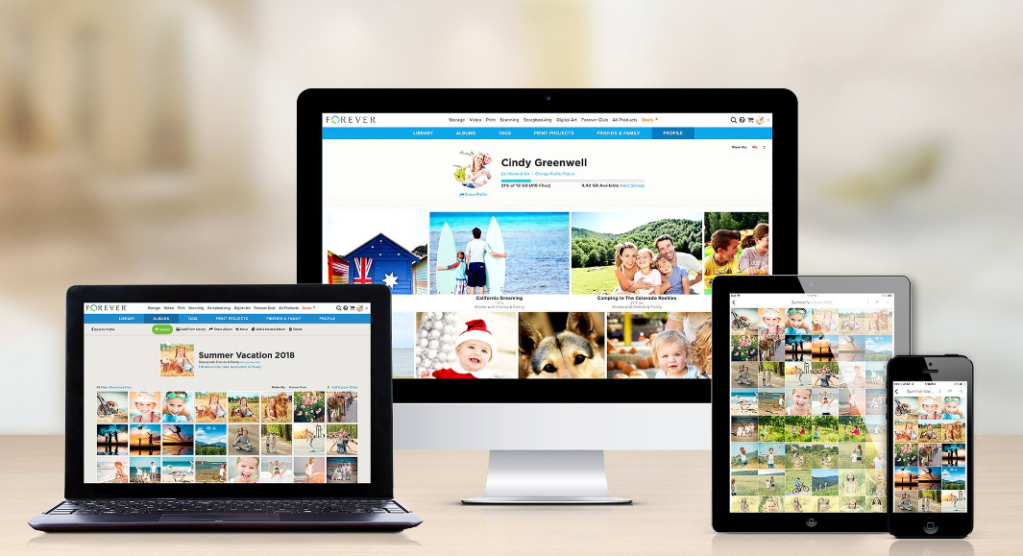
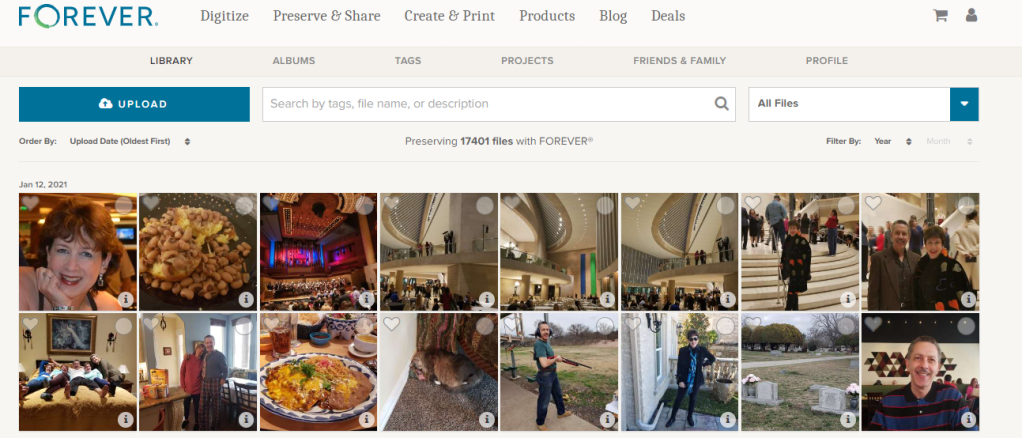
The FOREVER Library is the place where all the stuff you’ve uploaded to FOREVER hangs out. It’s not the only place. You also have albums, as well as tags for sorting and finding your photos, but the library is where everything is all at the same time. You can upload directly to the library or to your albums. It doesn’t matter.

What Can It Do?

Your library can do a lot of cool things for you, so I decided to take a few minutes to introduce you to it’s features. Obviously, the great big blue “upload” button is the one you’d use for adding photos from your computer to your storage. If you want to add photos from your phone, there’s a free app for that. If your media is hard copy, we need to talk about digitization. See last week.

Next to it is a search bar. The effectiveness of your search bar is directly related to the thoroughness of your curating. The more information you have about your photos in FOREVER, the more accurately you can search. A sampling of the search terms you could use would be dates, titles and tags, but whatever you’ve got, FOREVER will try to deliver something.

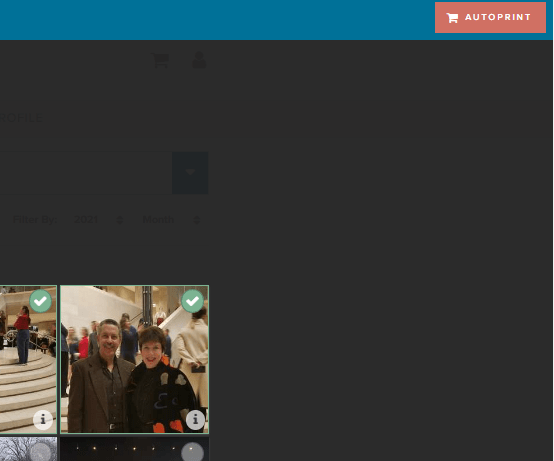
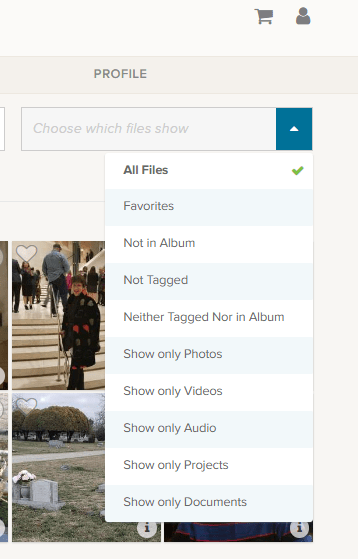
At the end of the upload and search area is a box that says “All Files”, but if you click the blue area you get these choices.

Obviously, All Files is all files. Favorites are photos you have marked with a heart. You can see an example of the heart on the left corner of the photo by the blue and white selection box.

The next are three very helpful choices as you begin to curate your images: “Not in Album,” “Not Tagged” and “Neither Tagged Nor in Album.” As you get your photos organized, labeled, tagged and such, the number of photos these choices will bring up will grow smaller.

I’m proud to say all but a handful of my photos are in Albums and all of those not in albums were taken in the last few days. I have my photos automatically added from my phone, by the app, when I take them. Then I delete them or add them to albums daily or weekly, according to the day and the week.

I’m working on the “Not Tagged”. Tagging is a great tool for searching. Some day I will have all the people and places tagged in every photos, so I can search by name or location to find any photo I want. So far, I have them all tagged as either Travel, At Home, Out & About, etc., but I have a long way to go. FOREVER recommends spending 15 minutes a day on this task and it’s a great idea.

Then there are a series of “Show Only” choices. With them you can see only photos, video or audio. You can also isolate documents in the collection. Projects are cool, because FOREVER keeps a copy of all the projects they do for you – the photobooks, photo gifts, greeting cards and such. These projects do not take up your storage space, but are always available to you.

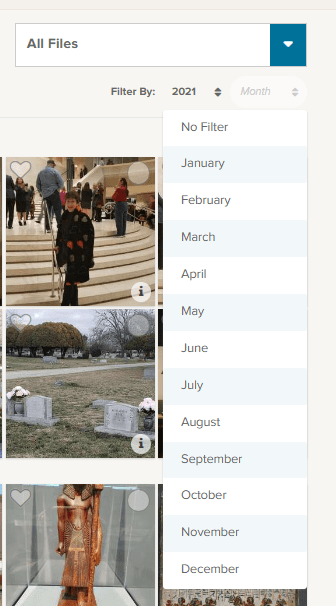
Under that selection box associated with “All Files” is a section where you can filter by both year and month. So, if you know you’re looking for the pictures of your husband’s 50th birthday, just select the year and the date of that celebration. In this image I chose 2021 for the year and have brought down the month selections.

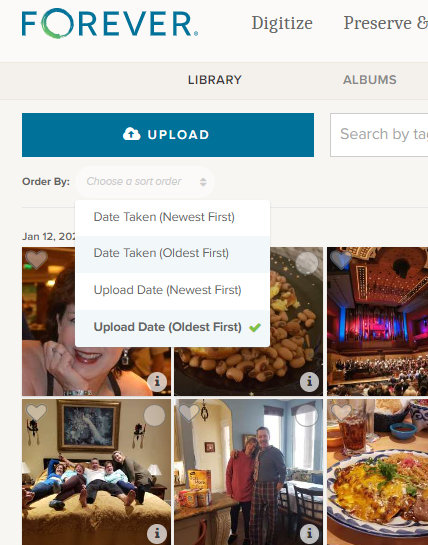
Moving to the other side, under the “upload” button, you find the “Order By” selections. I tend to leave it on Date Taken (Oldest First) because I think in chronological order, but you can reverse it and as for (Newest First) if you are looking for something taken recently.

Sometimes you aren’t as concerned with when it was taken as you are when it was uploaded and the next choices cover that.

Other Things to do in the Library

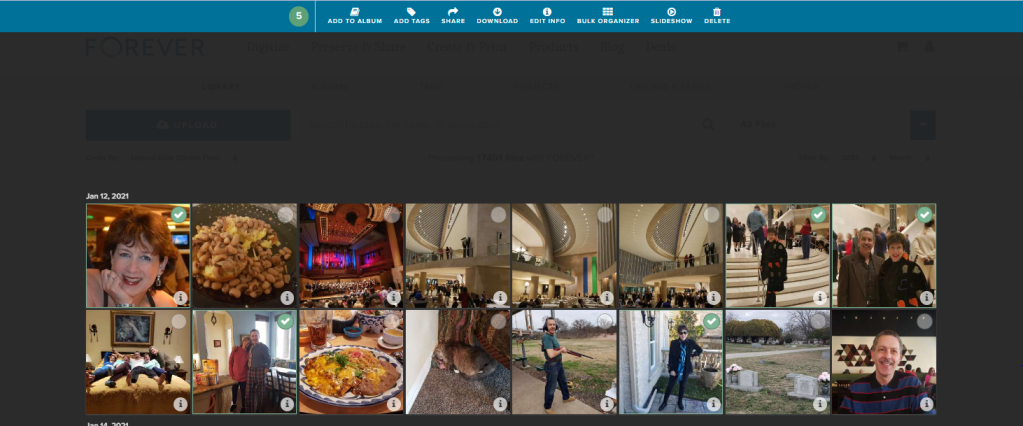
Returning to the picture at the top, you’ll notice that each individual photo has a heart and a circle at the top. The heart, as I mentioned above, allows you to mark your favorites and you can always choose to have the Library show those to you. The circle allows you to select images for curating. Let me show you.

On the main Library page, I checked a picture and the screen above opened up, giving me new choices. I went ahead and selected all the pictures I was in, on the first date available, but I could have chosen every picture of me in the library, all the pictures on that date or even just one photo at a time to work on.

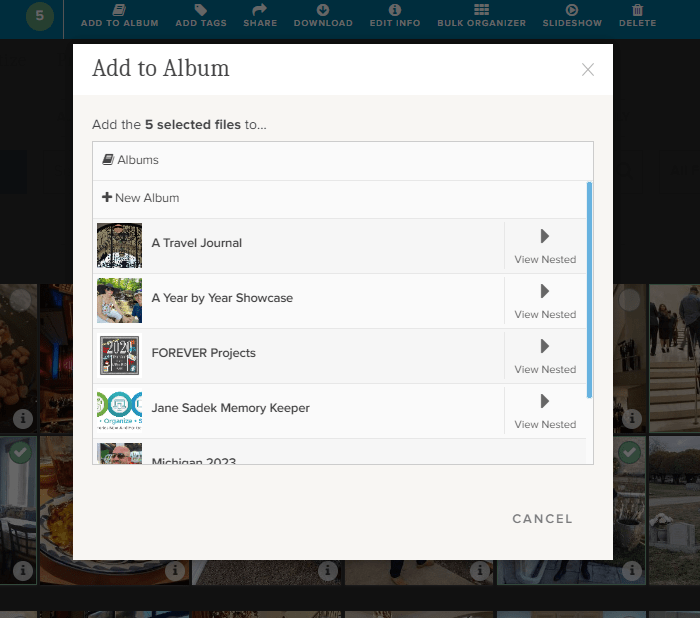
If I chose “Add to Album,” I would get this screen. It allows me to either set up a new album, add the selected photos to a top level album or with the “View Nested” arrow, I could actually add them to albums which are “nested” under the main album.

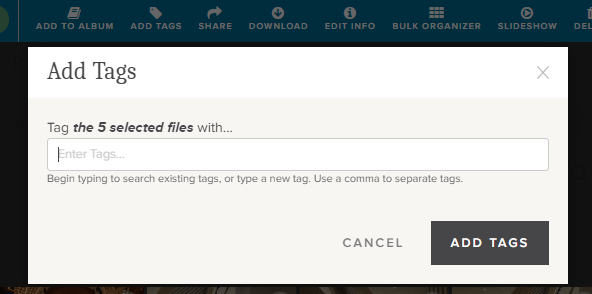
If I chose “Add Tags,” then I could add tags common to all five of those photos. Obviously, since I chose pictures of myself, I could tag them “Jane Sadek,” but you are allowed an unlimited number of tags, so people are only the beginning. And you can do more than one tag at a time, so if I had three ways of identifying all these photos, I would add all three tags. They could either be tags I had already created or I could create them using this tool.

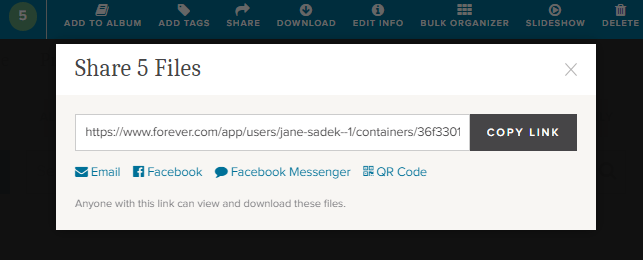
Also from the Library you can share photos with other people. You can select as many photos as you like and then either share the link which is created or create an email or a post or message for Facebook. You can even create a QR code. How cool is that!

There’s a “Download” button next and when you click it, you’ll be linked immediately to your browser. Select where you want the photos to be saved and save. You’ll have a copy of these photos on your computer.

The “Delete” button (at the far end) will bring up a screen which asks if you want to delete photos. If you do, it will put them in your FOREVER delete bin for 60 Days.

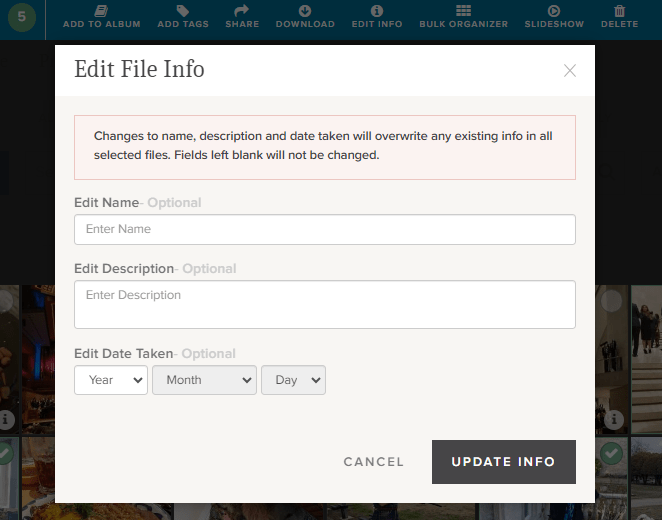
Now this is a good one. The “Edit Info” button allows you to change the basic information on a file. You know how photos come from your camera with vague names like IMG 36 or a string of numbers. Well, you can change it to a more specific title like Jane in Dallas 2021 or whatever name would be more useful.

You can also provide a description of the photo here. You could explain who Jane was, what she was doing in Dallas, what your relationship to her is – whatever you want. In fact, while the description boxes you run into with many programs have a 25 word or 100 character limit, this description can go on for as long as you’d like it to.

You can also edit or add a date. Sometimes our devices try hard to fill in blanks and provide a Date Taken which has no basis in reality.

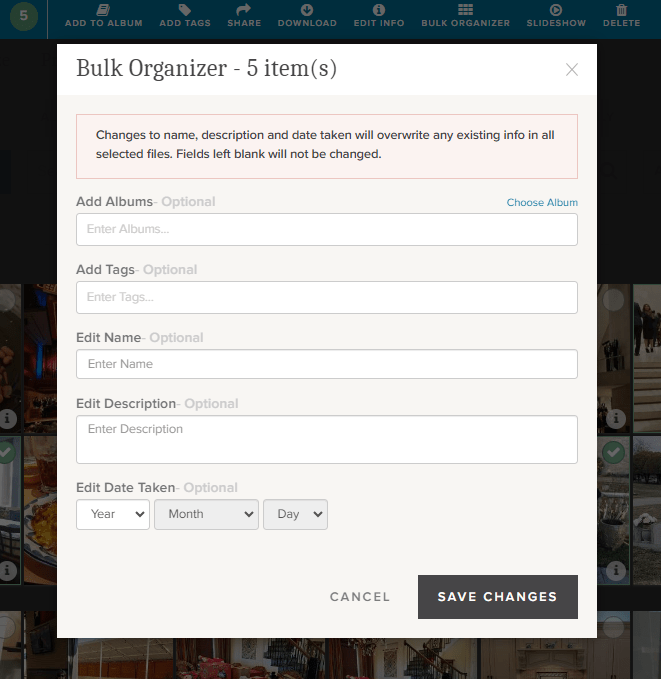
If you’re loading a whole bunch of photos to your storage, the Bulk Organizer could be your best friend. You could do the whole curating job in one fell swoop. You just have to remember that whatever you put here will override anything else you might have in the metadata.

You can make changes to all of these sections or just choose those you want.

One more choice. Perhaps you’d like to select a group of photos for a slideshow. Well, there’s a “Slideshow” button. It will autoplay whatever you’ve selected and you can even put it on “Loop” so you can play it continuously.

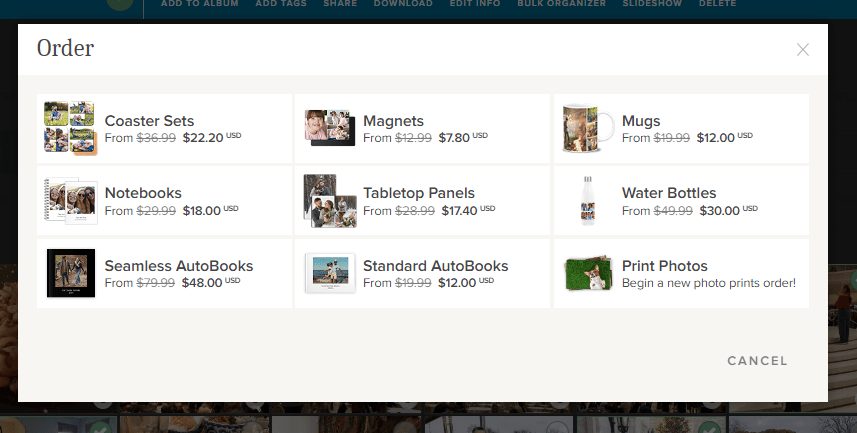
Well, there is one more thing you can do from this screen. You see that brick colored square that says “AUTOPRINT”? Well, this could be step one for your next print project. Just select all the images you want to include in a digital photobook, photogift or perhaps you’d just like to print some copies to share.

The AUTOPRINT buttons connects you directly with the various potential projects in Autoprint. That’s where FOREVER does most of the work, like magic. You select the images and the project. FOREVER will do the rest. You’ll be given the opportunity to do some minor editing, if you chose, then all you have to do is pay for it and select your delivery method and address. You can have custom projects ready in seconds!

Wrapping It All Up in the Library

Most of these same features are available in the FOREVER app, as well as on the website, as I have shown them here. You just find them in different places. Personally, I enjoy working on files in the Library when I’m at my desktop or using my laptop, but I’ve heard of people who curate their entire collection of media on their phone, sitting by the pool, drinking a cool adult beverage.

It’s up to you. If, while you are in the Library on your computer, you need a reminder about any particular images, just hover over the “i” in the bottom right of any images. A small black and white screen will pop up to show you what FOREVER knows.

And that’s all there is to it. I plan to write similar posts about Albums, Tagging and the App in the coming months, but next week we’re going to AutoPrint. Start thinking about a project you’d like to have completed quickly – like magic.

DFW Metroplex, Memory Keeping, Photography

Yes, You Can Digitize That

MEMORY KEEPING 101: JUST IN CASE YOU’RE WONDERING WHAT WE CAN DIGITIZE

We Digitize More and Better

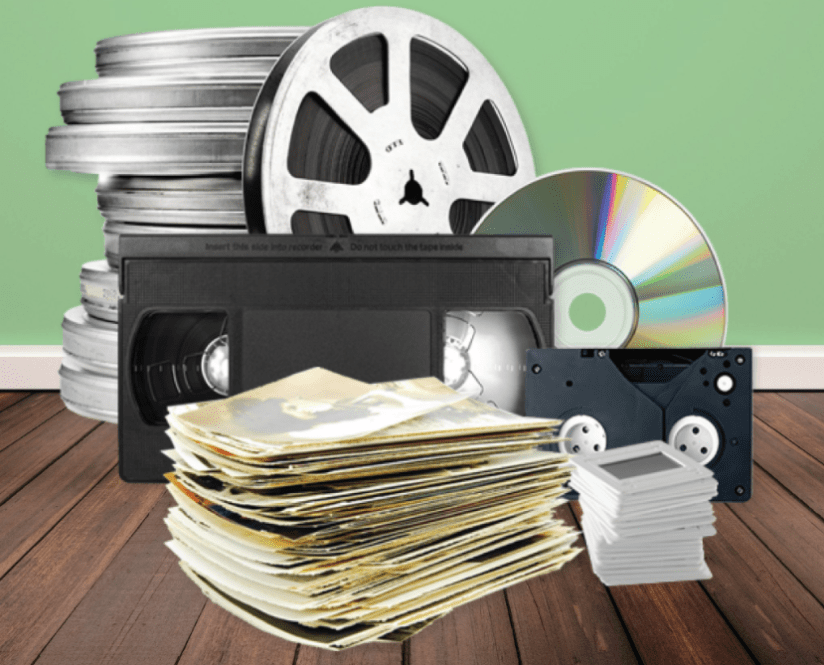
That gray box company that you may or may not be familiar with, which has all the advertisements on the radio and social media about digitization, says this about what video formats they digitize: “We work with many video formats including VHS tapes, VHS-C, Mini-DV, Hi8, Digital 8, MicroMV, Betamax, and PAL.”

You know what? That sounds good until you compare it to what FOREVER says, “We can digitize any and all consumer videotapes including VHS, beta, Hi8, Mini DV, DVDs, and 3/4″ U-matic.” Did you see those three little words? ANY and ALL?

And our more is more. Search around the other guys website and you’ll never see statements like these, which are just everyday jobs for FOREVER:

  • We can digitize standard 12” x 12” scrapbook album pages.
  • We can digitize photos larger than 8” x 10”, historical documents, newspaper clippings, photo albums, books, oversized scans, medium and large format slides, and medium and large format negatives.
  • We can transfer content from picture CDs and data discs, flash drives, external hard drives, 3.5″ floppy discs, flash memory cards, smartphones, and digital cameras with internal memory cards.
  • We can digitize exceptionally large orders, or orders requiring an advanced level of organization and processing.

We Offer More and Better Delivery Options

When your digitization is over, the other guys do not offer permanent storage solutions for the images you’ve just paid so much money to digitize. They want to sell you DVD/CD’s, Thumb Drives or Cloud Storage.

Well, if a DVD/CD or Thumb Drive is what you really want, FOREVER is happy to deliver, but it’s not what we recommend. Why? Because those are just Memory Disasters looking to happen. DVD/CD’s and Thumb Drives are devices – devices which can fail or become obsolete. The other guys are just setting you up for the next time you need to upgrade your technology.

Oh, the other guys will happily rent you a piece of the Cloud, but which Cloud? The one that will bill you monthly or annually for as long as you both exist. The one that can compress your images, transfer them to another company and mine for advertising. The Cloud which has forced you to sign terms and agreements which say if your photos are deleted you have no recourse. The one which has told you they will delete your photos as soon as your account is not active – as in you didn’t pay for your storage or merchanides that month? That’s not FOREVER storage.

Instead, FOREVER offers permanent storage you own rather than rent. You can pay for it with a one time payment or in 24 installments, but then it is yours and your family’s forever – seriously. You’ll never have a device which can be corrupted, fail or become obsolete. You can’t lose it or destroy it. Your online images will never be compressed or deleted. They’ll never be transferred to another company. They’ll never be mined for adverting. Your photos are guaranteed safe for your life plus 100 years, in part because they are triple backed up in diverse geographical locations and protected by a fund devoted to your storage. And the best part, instead of coming back to you when technology once again renders you obsolete, FOREVER will just upgrade you to whatever the new technology is. Doesn’t that sound a lot better?

And one other small item – we’ll send you back all your originals. You are welcome to throw them away if you like, because they are digitized and safe, but most of us would like to keep at least some of them around. But the other guys, when they’re through, so is your stuff. You never see it in the physical world again. Ouch!!

So, if you are thinking about digitizing your photos, then let’s talk 972-971-5263. I want you to have a more and better experience!

DFW Metroplex, Photo Organization, Photo Organization Coach, Photography, Scrapbooking

Picture Perfect Prints

MEMORY KEEPING 101 – GET YOUR PRINTS WITH ME

I Remember the Good Old Days, Too

Remember when getting your printed photos was fun. You took pictures with a camera, not your phone. You used film, not an SD card. You couldn’t look at or share the photo until the film was developed. You’d gather up all your rolls of film and take them to the drug store to get printed. They took your photos and sent them to a lab and a few days later, you could have your photos. Seeing what you shot was like reliving your vacation or event. You even loved the bad photos.

Photo printing became big business and getting your photos back fast became the gold standard. Eventually, we all expected to get photos back in an hour, but instead of a technician in a lab developing your photos, you had some high school kid running the film through a machine that may or may not have been properly maintained, so those pictures might or might not be worth the paper they were printed on.

Along Came Digital

In my opinion, digital cameras were not an improvement. Suddenly, a whole new layer of challenges stood between me and my photographs. Yes, I know all about the improved photo quality and some people might like all that editing, but I liked dropping it off at the drug store and waiting a few day for the photos.

I’ve tried a lot of things since the advent of digital photography – printing the photos myself, taking a disc to the drug store or big box store and I’ve used SO many of the online photo printing services that I could not start to name them all.

An Education in Exploitation

Then a couple of years ago I discovered Forever and it has totally changed my outlook on the whole process, from where I store my images to where I get them printed and why. Have you ever wondered why so many places are so eager to print your photos and why they are willing to do it for such a cheap price? Try reading one of those terms and agreements that pop up as you fill in the blanks on your order. That would be an eye-opening experience.

Basically, when you download your photos to Shutterfly, Snapfish, MixBook, Costco, Walgreens – you name it, you sign an agreement which transfers the rights to your photos to that company. In turn, they do print photos for you on the cheap, but in return, they’ll use those photos for all kinds of things you never dream your photos would be subjected to. We’ve all heard horror stories about people seeing the photos they post on Facebook ending up in an ad campaign or on the dark web or other equally bad scenarios. The same thing happens when you upload your photos for printing.

And print quality? Once I spent a day editing a set of gorgeous vacation photos. I sent them off to Snapfish and eagerly awaited their delivery. The images I sent were sharp, crisp and beautiful. The images I got back were hazy. I’d been in the photography business long enough at that point to know something had happened to my images since I edited them and I was right. The company compressed all the photos before printing, because they could only handle up to a certain resolution. Sure it was all there in the terms and agreements, but who reads those.

So Now I Know

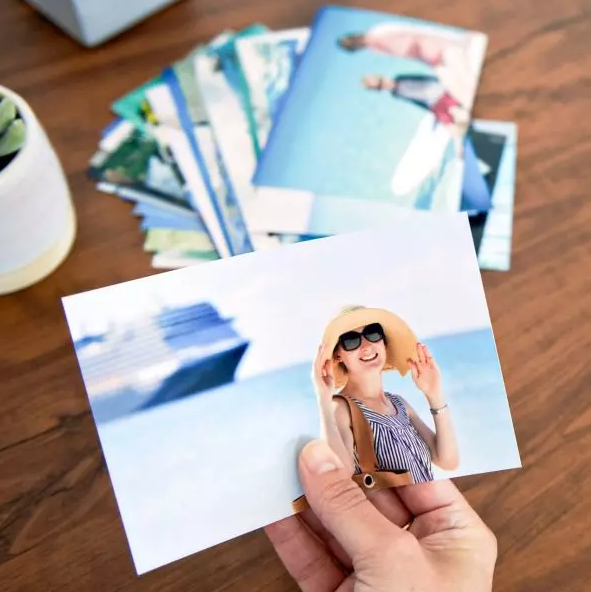
Then I found Forever. Instead of loading my photos onto a commercial site where who know what would happen to them, I load them into my very own online storage that I own. Nobody will ever mine my photos for advertising, sell them for stock photmpress them. When I want to print, I just choose the photos I want out of my account and order whatever size photo I want.

And here’s a tip. You know those letters and numbers on the back of some photos. Ever wonder who makes those up? Ever try to read them and decide what they mean. You can actually control what that says with Forever. That’s a big help.

Another Choice

So, you may be thinking to yourself, but I don’t WANT to store my photos on Forever. I just want to print them! OK, fine! But I have another option. Don’t go to the big box stores of online photo processing. You can print your photos with Creative Memories. Amazing quality, no compression, and yes you can control the print on the back of the photos.

What’s more, you’ll get your images back in these cool little plastic boxes that keeps them all nice and neat until you use them in your scrapbook. Then they are great for storing embellishments. I love them!!

Have It Your Way

So, if you want safe, secure storage along with your very affordable and convenient photo printing. You want Forever. Here’s the link: https://www.forever.com/ambassador/jane-sadek/autoprint/photo-prints

If you just want to upload your images and get them back in nice little plastic boxes, also very conveniently and affordable, then here’s your link: https://www.creativememories.com/photo-prints.html

When you are considering how you are going to handle your memory keeping, please consider me. I have all the answers you will ever need and sometime I have more than one way to do what you want. Come back next and let’s do some more memory keeping together.

ART, DFW Metroplex, Museums, Photo Organization, Photo Organization Coach, Photography, Restaurants & Bars, Scrapbooking, Shopping

The Weekend Report

TRAVEL HERE: FAVORITE PEOPLE, PLACES & THINGS

Friday Favorites

On Friday night I met some of my favorite people at a place which is destined to become one of my favorites, Rosini Vineyards. Friday night usually finds me safely tucked away at home, but this week I was invited to join a group of girls from my real estate world at Rosini’s, a couple of our favorite agents and some folks from the lending and title world. Names and stories will be forever a secret, but I can tell you about Rosini’s.

I have no idea why I haven’t been there before. I have been invited to several occasions hosted there, but I’ve always had more demanding things on my schedule. I added it to my list of things I wanted to do, but hadn’t gotten there, yet. Now I want to go every Friday. The thing is, the space is small and you need to make reservations and making reservations is one of my challenges. Hubby likes spontaneity and doing things by the seat of our pants. In his defense, when we do make plans ahead, something usually comes up and we’re scrambling to get to whatever plans we made.

Do plan on making a visit, however. Get out your phone and make a reservation, because it is so worth it. The ambiance is great, the food is good and so is the wine. They had a musician entertaining and he was smart enough to play in the background so there was good (and hysterical) conversation around the table.

I ordered a Charcuterie Board for us and it was both lovely and tasty. Most of my friends were sharing bottles, but I wanted to taste more than one wine. They don’t show it on the menu, but they also offer tastings. I’d hoped to be served a flight, but instead you have to keep going back to the bar to get the next taste. I didn’t buy up cases of anything to take home, but most of the selections I tried were quite nice.

Favorite Things on Saturday

I woke up early on Saturday (big surprise, right) and hit the scrapbooking studio (another big surprise). I’m doing my travel album for 2022 and the best news there is that there was travel. Covid kept us close to home. We weren’t afraid of the disease. We just didn’t want the hassle or the travel photos with of masks. I’d finished up New York and set out on our Club Med Sandpiper Bay trip and before the weekend was over, I had worked my way to St. Louis for Joyce Meyer.

But that was just the tip of my Memory Keeping iceberg. FOREVER was having their Family History Online Event. I wanted to watch it live, because if I didn’t, where else was I going to find three hours in my schedule. Some friends and customers were planning to come join me, but a variety of things got in the way. Still I hooked my laptop up to the TV and settled down for a wave of ideas.

There was a lot of good information there, but most of it really wasn’t applicable to my own memory keeping journey. I’m not a genealogy enthusiast, I no longer have an older generation to video and I haven’t quite embraced video as my own media. I get it. FOREVER’S Family Research Services are amazing and video freaks need their own streaming service. I’m not those people. At least not yet.

However, there was more. They walked through the digitization process and the advantages of their storage. They also dug deep into the Auto Print products, which are amazing, but just not in my thing. What I did walk away with was a new appreciation for QR codes. I’m always challenged by which photos and words to put on a Christmas Card. With QR codes, I can not only put a QR code which will lead to an entire file of photos (or a video), but I can actually add an audio file which would allow me to say what I wanted to say without having to fit all the words on the card. Watch this space later this year and see if I do it!

My ever faithful bestie did come by after her dance lesson for the final sessions of the Family History Online event and we shared a pizza. The information relit her desire for memory keeping which is the whole purpose of the event in the first place. It would be hard to get my fire to burn any brighter.

Amazing Sunday

Sunday was an orgy of things I love to do. It started with Bill and I visiting my next door neighbor’s church. She is very active at First United Methodist Heath. While attending church is one of my favorite things, church shopping is not, but that’s what we’re doing now – again.

FUMAH is a happening place. I thought their photo-focused Lenten activities were genius and they have an active Women’s Group. There were several other things I really liked about it, but it’s not exactly the right fit for me. It’s a little on the liturgical side of things and the sermon was expository and topical, rather than exegesis. The music was lovely and they mix contemporary with traditional music, but they also broadcast the words on the wall without any music. I hate trying to follow some song I don’t know without being able to look at the music. I know this is the direction most churches are going, both in teaching style and music, but I’m looking for the unicorn.

From there we went for coffee and Bill wanted to try Dunkin Donuts. We both get tired of Starbucks, but Dunkin is not the answer. They don’t have a coffee fixing place. They just add the sugar and cream themselves, but not to Bill’s taste. The hot chocolate was a mix and they don’t have low fat or skim milk. However, the conversation was great and I did love my sausage and cheese kolache.

Next up was a visit to the Dallas Museum of Art and a stroll around Klyde Warren Park. We’d almost gone to the museum last Sunday, but had gotten distracted wandering around Deep Ellum and Uptown. Probably a good thing, because a new exhibition was opening and it might have been crowded.

I’m a member of the museum at the Ambassador level, but I’m not much of an Ambassador, because they’ve gone digital and I never know what’s going on. There was a time when my mailbox was full of all kinds of invitations and magazines from the museum. I loved it – but now everything comes to my email and email is just a lot of noise. They send me too much, so I just delete most of it and then when I want to know something, I have to go looking for it. If a subject line does catch my eye, then I have to print it out and it’s going to be in black and while and then it’s going to get lost on my desk, because it looks like everything else. So, the DMA & I aren’t really friends anymore.

Anyway, I did go and for some reason, they wanted to scan my membership card when I came in. I wonder what they scan if you aren’t a member. Then I had to go stand in line to get my tickets to the new exhibition. That is one good benefit of membership. I can take several people a day to the museum and get them into the exhibition free. You should call me and I’ll take you to this new exhibit, it’s gorgeous.

The name of the exhibit is Saints, Sinners, Lovers, and Fools: 300 Years of Flemish Masterworks. While I loved the art, I thought the first half title was hyperbolic. There are images related to all those nouns in the exhibit, but it is Flemish Masterworks, so there is no scandal. To my disappointment, the information on the wall is fairly sketchy and they have no audio tour or QR codes for more information. So, if you are not a fan of classical artworks, you’re going to have a hard time connecting the title to the artwork. You’ll be strolling through quickly and heading somewhere else.

However, if, like me, you love to see gorgeous figurative art from the past, you’re gonna love this one. Breathtaking altarpieces, intriguing portraits and even some vanitas. We went through it, double back to see it again and then enjoyed the third view also. After a quick stop in the gift shop we headed out to the park.

It seems there have been changes every time I go – probably because I don’t visit it often enough, but they’ve actually added new fountains at one end and upgraded the playground at the other. There are still lots of food trucks, but the restaurant is now Mi Cocina. Our visit was leisurely, but we didn’t really linger very much, because NorthPark was up next.

I love NorthPark. I wish I had a life that allowed me to go every day. I want to shop all the stores, look at all the plants and art and eat at all the places. Bill never wants to go, because it’s impossible to find a parking spot, but this time was different. They have reserved parking for low-e and hybrid cars. Bill has a hybrid. We parked next to a handicapped space and were right in front of an entrance.

I had a birthday gift card to spend and I wanted to go to Pandora. I upgraded my basic bracelet, because the arthritis in my thumbs just didn’t like the one I had. Now, I can get it off and on easy peasy. It will get a lot more wear. Their new thing is rose gold, but thank you, I’ll stick with my silver.

We enjoyed our stroll through NorthPark, especially the kid’s art they had on display in front of Macy’s, but I was dismayed to discover few things are where they used to be. It’s a big game of fruit basket turnover and while I didn’t recognize many of the new players, I fear some of my favorites my be out of the game, because something called Blue Nile is going up in the Brighton spot and I can’t find Brighton on the directory.

I came home from NorthPark very happy with my weekend. Next week we’ll have more New York, more Memory Keeping and another Weekend Report. Please come back to see me!!

DFW Metroplex, Photo Organization, Photo Organization Coach, Photography, Scrapbooking

Digital Scrapbooking with Creative Memories

MEMORY KEEPING 101 – A TOTALLY DIFFERENT DIGITAL

There’s more than one way to skin a cat. We’re not talking animal cruelty here, I’m referring to the old saw which pointed out most jobs have more than one way to go about them. You say po-TAY-to and I say po-TAH-to. Same veggie, different pronunciations.

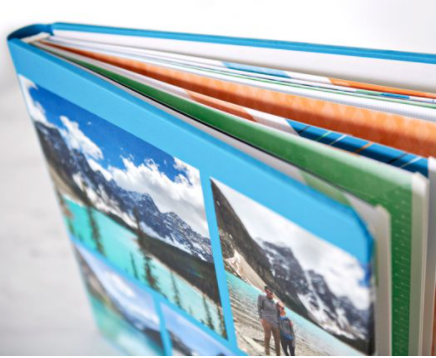
Well, Creative Memories has their own interpretation of digital scrapbooking and it’s not a photobook at all. It really is a scrapbook. The coverset is the same coverset you’d use for their traditional albums, but instead of a solid bookcloth or one with decoration embossed on it, your album can have your own photos on it, just like a photobook.

The Best of Both Worlds

My scrapbooking hit a bump in the road when digital came along, because Creative Memories hit a bump in the road. At the time, it just looked as if management was abandoning the traditional scrapbookers who had made them the premiere memory keeping company in the world, but it turned out they had abandoned a whole lot of stuff. We’ll just leave it at that. They went bankrupt and have been totally reorganized and refocused, but those were rough days in the scrapbooking world.

At the time, it seemed as if you had to stay on the traditional scrapbooking road or take the exit to digital everything. There were no solutions which embraced both formats.

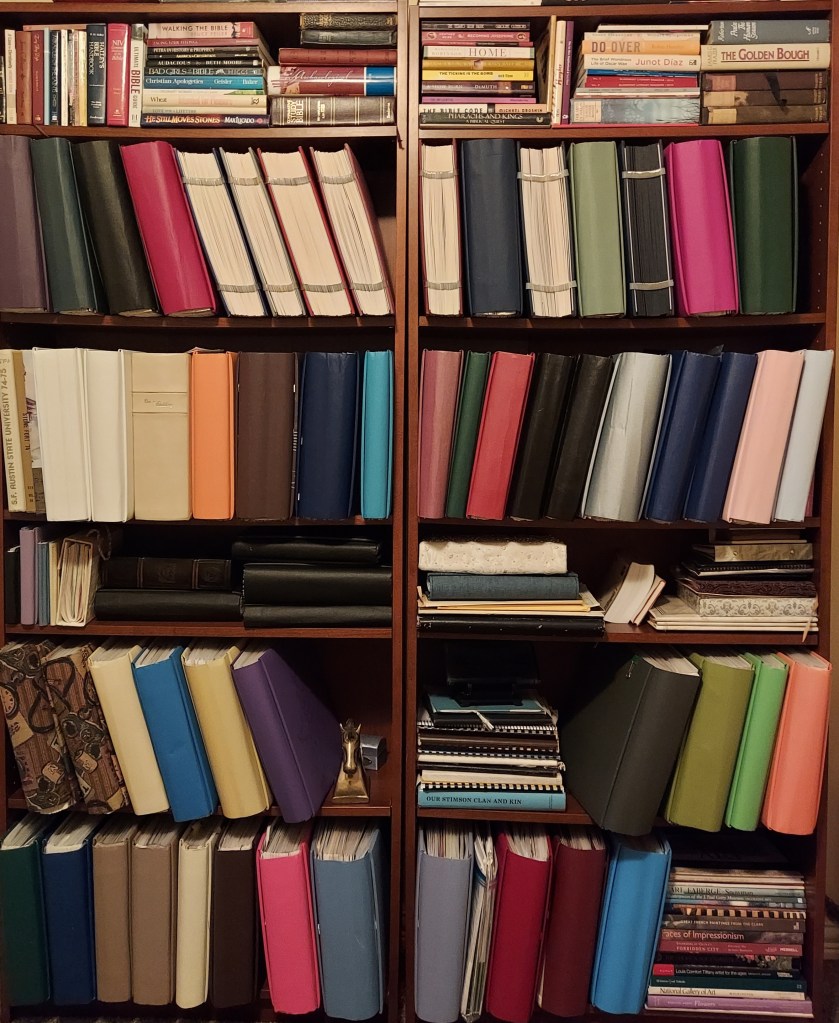
I wasn’t ready for digital back then, so I stayed with traditional scrapbooking, but there was no good source for traditional scrapbooking supplies (except the huge stash of CM supplies I had bought up to meet the quarterly quota, which thank goodness is no longer a thing!) I eventually found another scrapbooking supplier which had the same style pages and coverset as CM, so that period of photographic unrest is not apparent on my scrapbook shelves.

Then CM returned and it felt like coming home. At first, I still wasn’t ready for digital, but these days I heartily embrace the CM solution for both traditional and digital scrapbookers. At first glance it looks like a traditional scrapbook. The construction of the coverset and the format of the pages is the same as the CM traditional album, but a closer look reveals the personal images printed on the coverset, just like they are on a photobook.

But wait there’s more! You can create a digital coverset for your traditional album if you want to stick with traditional pages, but want a personalized coverset. Or you can select a beautiful traditional coverset for your project, but all of your pages can be designed and printed digitally. And you have to know where I’m going now. No matter which coverset you choose, your pages can be both traditional and digital. The point is, you don’t have to choose.

Making It Work for You

Now, if you are a scrapbooker yourself, then your mind is exploding with possibilites. If you’re not a scrapbooker, then let me tell you why this is such a good idea. The photos and memorabilia for a Baby Boomer are going to be primarily analog. Generation Z is going to be totally digital. Generation X-er’s are going the start out analog and melt into digital, while Millenials might have anything.

I do custom albums for all generations. Baby Boomers and Millenials are easy. Baby Boomers generally want a traditional album, because that’s a more straightforward way to address their photo mess – even if they turn around and have the album pages digitized, it’s just simpler to work with what they have. Millennials go for online albums, because that’s how their brain works and they don’t want to kill trees.

With Generation X and Millennials, what they have in the way of photographs and memorabilia depends a lot on which direction their parents leaned. If like me, their parents had a hard time letting go of their analog camera and printed photos from the drug store, then the record of their lives, at least at the beginning, will be analog. Then there will be a period where some items are digital, but others are still analog. If their parents instead embraced the digital age from the very beginning, then they generally go the route of the Millenials, but they might print a photobook for their parents. (And that’s what Forever’s for!)

Since Gen X’ers and Millennials have both traditional and digital items, they might feel it would be necessary to make a choice, between scrapbooks and photobooks, but they don’t. It’s not necessary to digitize all the analog stuff to go in a photobook or print all the digital items, so for a traditional scrapbook. With CM digital, you can have a traditional scrapbook with both traditional pages for analog and printed pages for digital. Some people even get their digital items printed and add traditional photos or decoration to the printed page. There are no rules!! Only solutions and I can bring you all of them.

What Do You Have and What Do You Want?

I started the Memory Keeping 101 series the same way I begin my conversations with a custom scrapbook client. What do you have and what do you want? You answer may be that you have a little of everything and you’d like a solution to embrace both analog and digital. Well, here’s your solution. No matter what you have, CM has a scrapbooking system which will do either or both. Just give it all to me and let me at it. Or you can do it yourself. I’m here to help either way.

Come back tomorrow for The Weekend Report if you need suggestions for your weekend and on Wednesday, Travel Talk will be focused on NYC. On Thursday, we’ll be back to digital solutions from Forever.

DFW Metroplex, Photo Organization, Photo Organization Coach, Photography, Scrapbooking

That’s Too Expensive!

MEMORY KEEPING 101 – THE VALUE OF MEMORY KEEPING VS THE COST OF YOUR MESS

What Are Your Memories Worth?

Let’s talk worst case scenarios. Your house has burned down. Your family and your pets are safe, but everything you had is smoke and ash. You are grateful beyond measure to be able to hug your kids, but in the days to come, it’s not the new sofa or your smart TV you’ll regret losing most. It will be that box of photos under the bed.

While there are many families who face this scenario and other tragedies every day, I’ll agree with you, you’re odds are good. You probably won’t be a victim of a worst case scenario. You’ll probably go on living with your mess for decades to come. Along the way you may toss out those slides and home movies, because you don’t even have the equipment to access them anymore. You promise yourself someday you’re going to go through the photos in the box under the bed or in your phone, someday.

The real deal is most people don’t. They kick the can down the road until they retire, until they have more time, until they have more money, until the kids move out, until they hand the mess over to their kids or until they are dead and the mess is someone else’s problem. I have a challenge for you. If these photos and memorabilia aren’t important to you and you’re never going to do anything with them anyway, why not just throw them away or delete them now. Oh, you’re still with me, huh?

I know you have the best of intentions, but the tyranny of the urgent has a way of keeping us from addressing what is important to us. And then, too often, it’s too late. Your kids are looking for a decent picture of you on their phones, because the funeral is in a couple of days and they need a photo to put in the program.

Now, let’s talk best case scenarios. There was no fire, you have no mess and your memories are totally curated, tagged, captioned and safe for generations to come. Can you actually put a dollar amount on what that would be worth to you and to your family? The price of a vacation, of a boat, of your Starbuck’s habit, of a bigger TV, newer phone? You’re probably thinking nothing is more valuable than your memories, but you might still be reluctant to do anything about your mess.

Turning your mess into safe, shareable memories isn’t something that can happen overnight, but it can happen and it can happen more quickly than you might realize. However, it’s probably going to cost more than you want it to, in both time and money. Heck, these days everything costs more than you want it to and it usually takes longer than you want. When it comes to your mess the longer you wait, the longer it will take and the more it will cost.

What’s It Going to Be – Time or Money?

If you’d like to defeat the tyranny of the urgent and start doing something about what’s important, let’s do something about your mess. I’m not going to sugarcoat it. There’s a sliding scale between time and money. The faster you want it, the more money it will cost. The more of your time you’re willing to invest, the less money it will take.

If spending money is the least painful solution, I’ll curate your mess it for $15 an hour and put it in the format of your choice for as little as $500 an album (an album is 24 two-sided pages). If you’re going digital, then you’ll need to also purchase storage, but I have a permanent solution you’ll love.

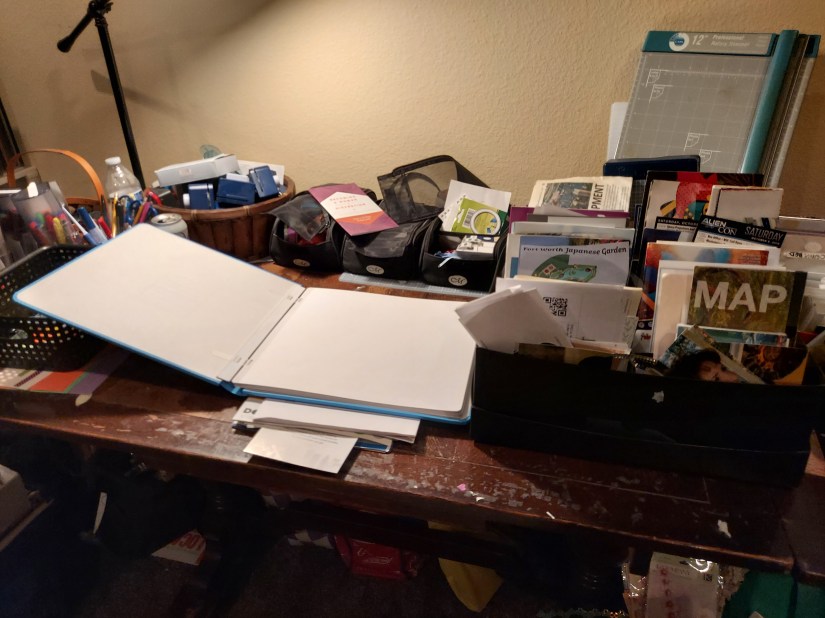
If you’d rather do it yourself, just because you want to, or to save some money, then get ready to start sorting. That’s where it all starts, whether I do it or you do. Starting is free. I’ll be happy to give you lots of free advice, too. Like don’t buy fancy sorting equipment. Nothing works better than Ziplocks and shopping bags – and if you don’t have any, you can borrow some of mine.

You can spend a fortune on memory keeping tools and supplies, whether you’re going digital or you prefer more traditional solutions, but it is worth every penny. Believe me, I know. Ask my husband how much money I’ve spent creating these scrapbooks to hold all our memories. If you really want to get him going, ask him how much profit I’m making in this campaign to preserve your memories. But be warned, you might make him cry. He’s figured out I do this for love, not money. It’s my passion. In the end, all we have left are our memories or a mess. I don’t want you or your family to be stuck with a mess.

Next week, I’m going to explain help you decide whether you want your memory keeping to be a hobby, a craft or a service you buy from someone else.