ART, DFW Metroplex, Museums, Photo Organization, Photo Organization Coach, Photography, Restaurants & Bars, Scrapbooking, Shopping

The Weekend Report

TRAVEL HERE: FAVORITE PEOPLE, PLACES & THINGS

Friday Favorites

On Friday night I met some of my favorite people at a place which is destined to become one of my favorites, Rosini Vineyards. Friday night usually finds me safely tucked away at home, but this week I was invited to join a group of girls from my real estate world at Rosini’s, a couple of our favorite agents and some folks from the lending and title world. Names and stories will be forever a secret, but I can tell you about Rosini’s.

I have no idea why I haven’t been there before. I have been invited to several occasions hosted there, but I’ve always had more demanding things on my schedule. I added it to my list of things I wanted to do, but hadn’t gotten there, yet. Now I want to go every Friday. The thing is, the space is small and you need to make reservations and making reservations is one of my challenges. Hubby likes spontaneity and doing things by the seat of our pants. In his defense, when we do make plans ahead, something usually comes up and we’re scrambling to get to whatever plans we made.

Do plan on making a visit, however. Get out your phone and make a reservation, because it is so worth it. The ambiance is great, the food is good and so is the wine. They had a musician entertaining and he was smart enough to play in the background so there was good (and hysterical) conversation around the table.

I ordered a Charcuterie Board for us and it was both lovely and tasty. Most of my friends were sharing bottles, but I wanted to taste more than one wine. They don’t show it on the menu, but they also offer tastings. I’d hoped to be served a flight, but instead you have to keep going back to the bar to get the next taste. I didn’t buy up cases of anything to take home, but most of the selections I tried were quite nice.

Favorite Things on Saturday

I woke up early on Saturday (big surprise, right) and hit the scrapbooking studio (another big surprise). I’m doing my travel album for 2022 and the best news there is that there was travel. Covid kept us close to home. We weren’t afraid of the disease. We just didn’t want the hassle or the travel photos with of masks. I’d finished up New York and set out on our Club Med Sandpiper Bay trip and before the weekend was over, I had worked my way to St. Louis for Joyce Meyer.

But that was just the tip of my Memory Keeping iceberg. FOREVER was having their Family History Online Event. I wanted to watch it live, because if I didn’t, where else was I going to find three hours in my schedule. Some friends and customers were planning to come join me, but a variety of things got in the way. Still I hooked my laptop up to the TV and settled down for a wave of ideas.

There was a lot of good information there, but most of it really wasn’t applicable to my own memory keeping journey. I’m not a genealogy enthusiast, I no longer have an older generation to video and I haven’t quite embraced video as my own media. I get it. FOREVER’S Family Research Services are amazing and video freaks need their own streaming service. I’m not those people. At least not yet.

However, there was more. They walked through the digitization process and the advantages of their storage. They also dug deep into the Auto Print products, which are amazing, but just not in my thing. What I did walk away with was a new appreciation for QR codes. I’m always challenged by which photos and words to put on a Christmas Card. With QR codes, I can not only put a QR code which will lead to an entire file of photos (or a video), but I can actually add an audio file which would allow me to say what I wanted to say without having to fit all the words on the card. Watch this space later this year and see if I do it!

My ever faithful bestie did come by after her dance lesson for the final sessions of the Family History Online event and we shared a pizza. The information relit her desire for memory keeping which is the whole purpose of the event in the first place. It would be hard to get my fire to burn any brighter.

Amazing Sunday

Sunday was an orgy of things I love to do. It started with Bill and I visiting my next door neighbor’s church. She is very active at First United Methodist Heath. While attending church is one of my favorite things, church shopping is not, but that’s what we’re doing now – again.

FUMAH is a happening place. I thought their photo-focused Lenten activities were genius and they have an active Women’s Group. There were several other things I really liked about it, but it’s not exactly the right fit for me. It’s a little on the liturgical side of things and the sermon was expository and topical, rather than exegesis. The music was lovely and they mix contemporary with traditional music, but they also broadcast the words on the wall without any music. I hate trying to follow some song I don’t know without being able to look at the music. I know this is the direction most churches are going, both in teaching style and music, but I’m looking for the unicorn.

From there we went for coffee and Bill wanted to try Dunkin Donuts. We both get tired of Starbucks, but Dunkin is not the answer. They don’t have a coffee fixing place. They just add the sugar and cream themselves, but not to Bill’s taste. The hot chocolate was a mix and they don’t have low fat or skim milk. However, the conversation was great and I did love my sausage and cheese kolache.

Next up was a visit to the Dallas Museum of Art and a stroll around Klyde Warren Park. We’d almost gone to the museum last Sunday, but had gotten distracted wandering around Deep Ellum and Uptown. Probably a good thing, because a new exhibition was opening and it might have been crowded.

I’m a member of the museum at the Ambassador level, but I’m not much of an Ambassador, because they’ve gone digital and I never know what’s going on. There was a time when my mailbox was full of all kinds of invitations and magazines from the museum. I loved it – but now everything comes to my email and email is just a lot of noise. They send me too much, so I just delete most of it and then when I want to know something, I have to go looking for it. If a subject line does catch my eye, then I have to print it out and it’s going to be in black and while and then it’s going to get lost on my desk, because it looks like everything else. So, the DMA & I aren’t really friends anymore.

Anyway, I did go and for some reason, they wanted to scan my membership card when I came in. I wonder what they scan if you aren’t a member. Then I had to go stand in line to get my tickets to the new exhibition. That is one good benefit of membership. I can take several people a day to the museum and get them into the exhibition free. You should call me and I’ll take you to this new exhibit, it’s gorgeous.

The name of the exhibit is Saints, Sinners, Lovers, and Fools: 300 Years of Flemish Masterworks. While I loved the art, I thought the first half title was hyperbolic. There are images related to all those nouns in the exhibit, but it is Flemish Masterworks, so there is no scandal. To my disappointment, the information on the wall is fairly sketchy and they have no audio tour or QR codes for more information. So, if you are not a fan of classical artworks, you’re going to have a hard time connecting the title to the artwork. You’ll be strolling through quickly and heading somewhere else.

However, if, like me, you love to see gorgeous figurative art from the past, you’re gonna love this one. Breathtaking altarpieces, intriguing portraits and even some vanitas. We went through it, double back to see it again and then enjoyed the third view also. After a quick stop in the gift shop we headed out to the park.

It seems there have been changes every time I go – probably because I don’t visit it often enough, but they’ve actually added new fountains at one end and upgraded the playground at the other. There are still lots of food trucks, but the restaurant is now Mi Cocina. Our visit was leisurely, but we didn’t really linger very much, because NorthPark was up next.

I love NorthPark. I wish I had a life that allowed me to go every day. I want to shop all the stores, look at all the plants and art and eat at all the places. Bill never wants to go, because it’s impossible to find a parking spot, but this time was different. They have reserved parking for low-e and hybrid cars. Bill has a hybrid. We parked next to a handicapped space and were right in front of an entrance.

I had a birthday gift card to spend and I wanted to go to Pandora. I upgraded my basic bracelet, because the arthritis in my thumbs just didn’t like the one I had. Now, I can get it off and on easy peasy. It will get a lot more wear. Their new thing is rose gold, but thank you, I’ll stick with my silver.

We enjoyed our stroll through NorthPark, especially the kid’s art they had on display in front of Macy’s, but I was dismayed to discover few things are where they used to be. It’s a big game of fruit basket turnover and while I didn’t recognize many of the new players, I fear some of my favorites my be out of the game, because something called Blue Nile is going up in the Brighton spot and I can’t find Brighton on the directory.

I came home from NorthPark very happy with my weekend. Next week we’ll have more New York, more Memory Keeping and another Weekend Report. Please come back to see me!!
DFW Metroplex, Photo Organization, Photo Organization Coach, Photography, Scrapbooking

Digital Scrapbooking with Creative Memories

MEMORY KEEPING 101 – A TOTALLY DIFFERENT DIGITAL

There’s more than one way to skin a cat. We’re not talking animal cruelty here, I’m referring to the old saw which pointed out most jobs have more than one way to go about them. You say po-TAY-to and I say po-TAH-to. Same veggie, different pronunciations.

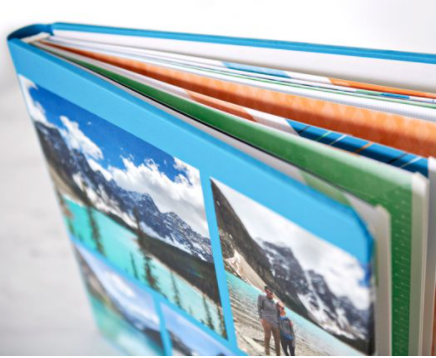
Well, Creative Memories has their own interpretation of digital scrapbooking and it’s not a photobook at all. It really is a scrapbook. The coverset is the same coverset you’d use for their traditional albums, but instead of a solid bookcloth or one with decoration embossed on it, your album can have your own photos on it, just like a photobook.

The Best of Both Worlds

My scrapbooking hit a bump in the road when digital came along, because Creative Memories hit a bump in the road. At the time, it just looked as if management was abandoning the traditional scrapbookers who had made them the premiere memory keeping company in the world, but it turned out they had abandoned a whole lot of stuff. We’ll just leave it at that. They went bankrupt and have been totally reorganized and refocused, but those were rough days in the scrapbooking world.

At the time, it seemed as if you had to stay on the traditional scrapbooking road or take the exit to digital everything. There were no solutions which embraced both formats.

I wasn’t ready for digital back then, so I stayed with traditional scrapbooking, but there was no good source for traditional scrapbooking supplies (except the huge stash of CM supplies I had bought up to meet the quarterly quota, which thank goodness is no longer a thing!) I eventually found another scrapbooking supplier which had the same style pages and coverset as CM, so that period of photographic unrest is not apparent on my scrapbook shelves.

Then CM returned and it felt like coming home. At first, I still wasn’t ready for digital, but these days I heartily embrace the CM solution for both traditional and digital scrapbookers. At first glance it looks like a traditional scrapbook. The construction of the coverset and the format of the pages is the same as the CM traditional album, but a closer look reveals the personal images printed on the coverset, just like they are on a photobook.

But wait there’s more! You can create a digital coverset for your traditional album if you want to stick with traditional pages, but want a personalized coverset. Or you can select a beautiful traditional coverset for your project, but all of your pages can be designed and printed digitally. And you have to know where I’m going now. No matter which coverset you choose, your pages can be both traditional and digital. The point is, you don’t have to choose.

Making It Work for You

Now, if you are a scrapbooker yourself, then your mind is exploding with possibilites. If you’re not a scrapbooker, then let me tell you why this is such a good idea. The photos and memorabilia for a Baby Boomer are going to be primarily analog. Generation Z is going to be totally digital. Generation X-er’s are going the start out analog and melt into digital, while Millenials might have anything.

I do custom albums for all generations. Baby Boomers and Millenials are easy. Baby Boomers generally want a traditional album, because that’s a more straightforward way to address their photo mess – even if they turn around and have the album pages digitized, it’s just simpler to work with what they have. Millennials go for online albums, because that’s how their brain works and they don’t want to kill trees.

With Generation X and Millennials, what they have in the way of photographs and memorabilia depends a lot on which direction their parents leaned. If like me, their parents had a hard time letting go of their analog camera and printed photos from the drug store, then the record of their lives, at least at the beginning, will be analog. Then there will be a period where some items are digital, but others are still analog. If their parents instead embraced the digital age from the very beginning, then they generally go the route of the Millenials, but they might print a photobook for their parents. (And that’s what Forever’s for!)

Since Gen X’ers and Millennials have both traditional and digital items, they might feel it would be necessary to make a choice, between scrapbooks and photobooks, but they don’t. It’s not necessary to digitize all the analog stuff to go in a photobook or print all the digital items, so for a traditional scrapbook. With CM digital, you can have a traditional scrapbook with both traditional pages for analog and printed pages for digital. Some people even get their digital items printed and add traditional photos or decoration to the printed page. There are no rules!! Only solutions and I can bring you all of them.

What Do You Have and What Do You Want?

I started the Memory Keeping 101 series the same way I begin my conversations with a custom scrapbook client. What do you have and what do you want? You answer may be that you have a little of everything and you’d like a solution to embrace both analog and digital. Well, here’s your solution. No matter what you have, CM has a scrapbooking system which will do either or both. Just give it all to me and let me at it. Or you can do it yourself. I’m here to help either way.

Come back tomorrow for The Weekend Report if you need suggestions for your weekend and on Wednesday, Travel Talk will be focused on NYC. On Thursday, we’ll be back to digital solutions from Forever.

DFW Metroplex, Photo Organization, Photo Organization Coach, Photography, Scrapbooking

Digital Scrapbooking with Forever

MEMORY KEEPING 101 – Artisan, Scrapbooking, but Digital

Digital Photo Gifts and Photobooks

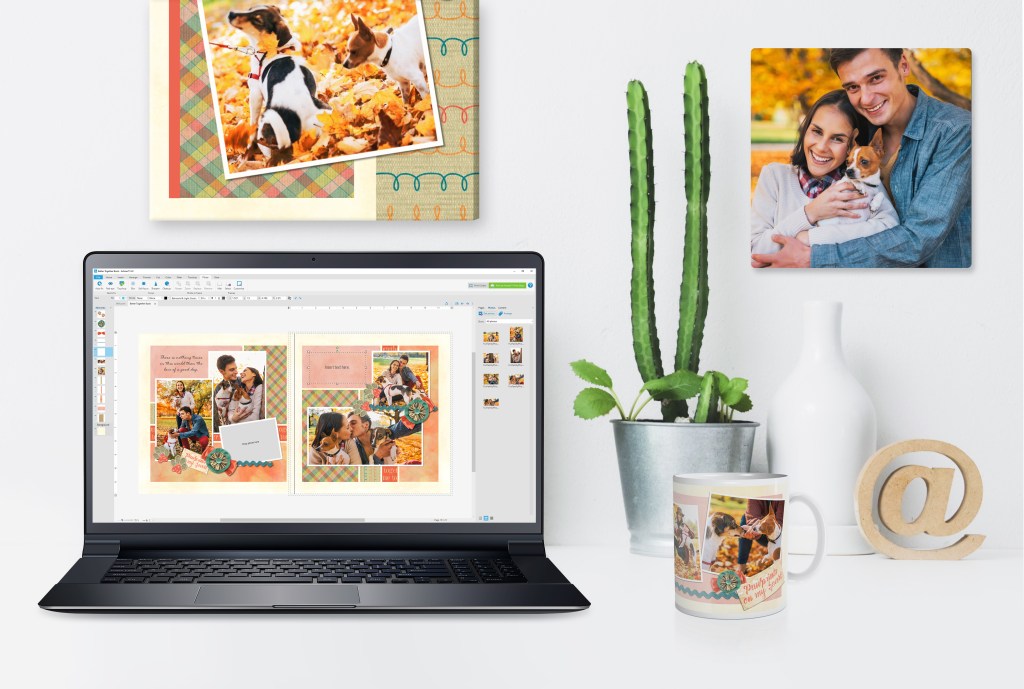
You know the names – Snapfish, Shutterfly, Mixbook, SmugMug, etc. etc. etc. You go there. You drop your photos into a template. Maybe you can edit some, maybe you can’t. You can make gifts with photos, like blankets, coffee mugs, calendars and ornaments. You can also make bound photobooks.

Ever try to contact their customer service? I have chatted online. Either you’re talking to someone with a name five miles long that you can’t pronounce or it’s a bot. Doesn’t matter. They can’t help you, because if it is a real problem they don’t have a script for it. So they elevate your problem and good luck with that. I’m still waiting for my email from my elevated customer service call concerning a Christmas Card order a few years ago.

Quit that!! You can do all of that and more on Forever. Highest quality images, best quality products, quick turnaround and amazing selection. Here’s the difference. Those other guys are the big box store. Forever is me. Now I’m not doing all the work, but you have me so you never have to chat with a bot. I have Forever, so whatever it is that you want to do with your photos, I can get it done.

Since the main focus of my business is custom scrapbooking, I don’t spend much time trying to transform Snapfish customers into Forever customers. In fact, if you’re already memory keeping, then good for you. That’s what I want. I’m happy to tell you why I believe Forever is a better way to go, and I would love for you to buy these services from me instead of them, but my real target is people who just have a mess and want me to fix it. I would love it, if next time you go to print photos or make a calendar/coffee mug/photobook/blanket, you gave Forever a try, but what I want most is for you to keep on memory keeping.

And Then There Was Artisan

I’ll be honest with you. I don’t do all that photo gifting stuff for my own purposes. Perhaps that’s because I don’t have kids, grandkids or pets, but I think the real reason is because I’m a scrapbooker. I want my photos and memorabilia in an album, not on my coffee mug.

Because I’m a scrapbooker, I’m used to starting with a blank page, so all those photobook templates frustrate the heck out of me – even Forever photobook templates. I tried. I really tried and I ran, not walked, back to my traditional scrapbooks.

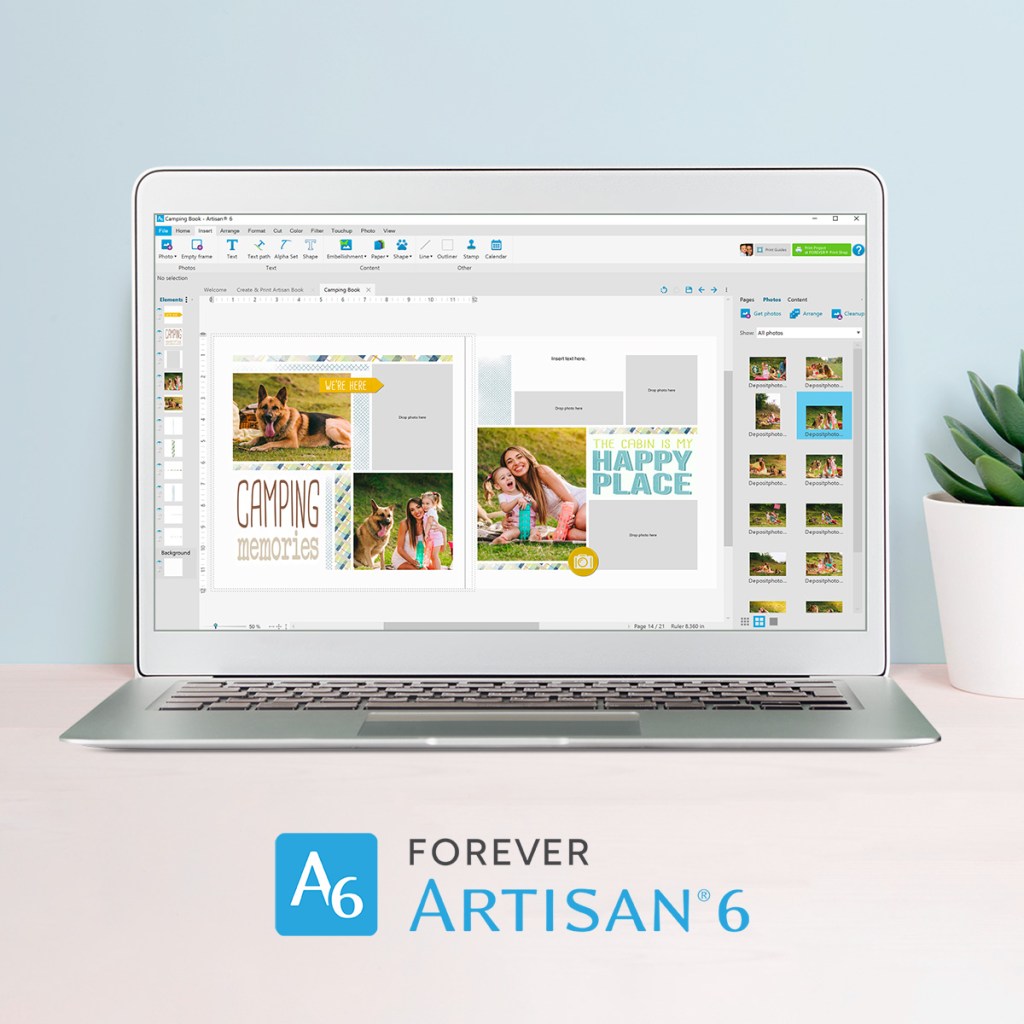
Then I discovered Artisan! With Artisan I can start with a blank page. Oh, they have all the templates in the world, if you want them. In fact, the training videos assume you want to use templates and teach from that standpoint, so my learning curve was pretty steep. However, after a few sessions, I skipped to the part where they just told me what the various buttons did, without telling me how they worked with templates. I haven’t looked back.

I still prefer traditional scrapbooking. Perhaps you know my husband and I own a real estate photography company. I sit at a computer all day long managing photos – downloading, uploading, receiving and delivering. When my real estate photography day is over, I would prefer to move to the scrapbooking table and do things manually. Don’t get me wrong, I will do digital photobooks, for my clients, for gifts and occasionally just for myself, but it’s just not my first love.

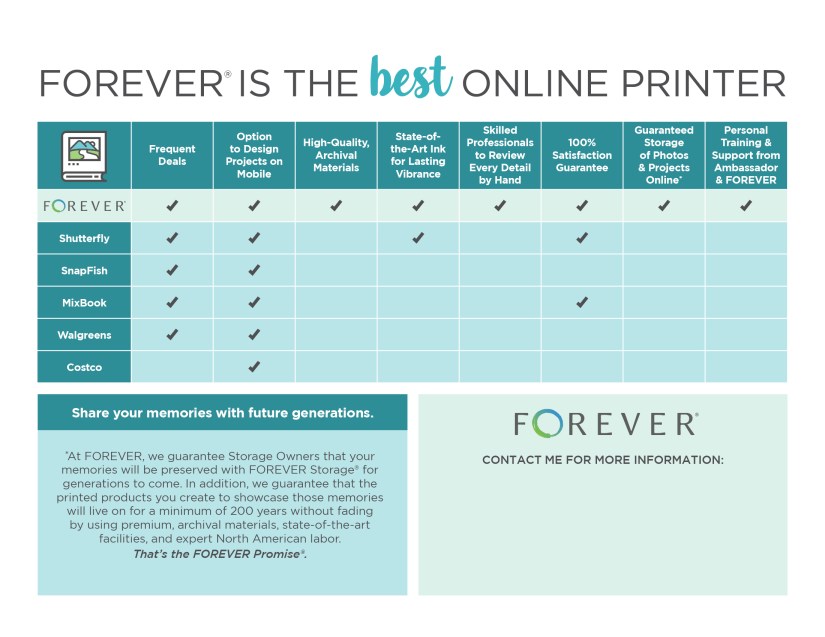
If like me, you just want to keep doing traditional scrapbooks, then you should at least allow Forever to print your photos. Here’s why they are the best:

Taking It to the Next Level

If digital scrapbooking is your thing, then before I go, I should tell you about Pixels 2 Pages. It’s an online community of digital scrapbookers. These people are serious about it. They even have retreats where they get together with their computers, either virtually or in person, to scrapbook. You can try it out for free for a month.

Online communities are not my thing, but they might be yours. I have met some of these people in person and they speak a language I don’t even understand. I think it’s easy to learn, but again, I’m primarily a traditional scrapbooker. I’d rather talk about the latest Border Maker or Punch, but, as I said, that’s me. I just wanted you to know it was there if you wanted it.

That’s all for today! We’ll visit the Metroplex tomorrow and go to NYC on Wednesday, but on Thursday, we’ll get back to Memory Keeping 101.

DFW Metroplex, Photo Organization, Photo Organization Coach, Photography, Scrapbooking

The Forever Pricing Game

MEMORY KEEPING 101 – NEVER EVER PAY FULL PRICE

A Sign of the Times

I’m old fashioned. I think the price of something should be a definite thing, but it’s gotten a lot more complicated than that. Whether you’re shopping online or at the grocery store or the local department store, there’s the price that’s marked, the price that’s advertised and the price you can get it for. Unfortunately, though I love everything Forever has to offer, I hate the way they do their pricing. Younger people might understand it all better, but I get confused.

The Welcome Coupon

Joining Forever is free. I send you a link: https://www.forever.com/ambassador/jane-sadek/. You fill in a few details and you’re in – all the wonders of Forever at your finger tips. But it’s better than that. To thank you for signing up, Forever gives you a $20 Welcome Coupon. They’ll send you an email to thank you for joining, but don’t delete it, because there’s a code there you’ll need to redeem your $20. With just a few minor exceptions, it can be used for anything.

The Forever Club

Remember Layaway? That’s an old selling strategy where a store will put your purchase in their storeroom and you pay for it over time. You’ll still see it every once in awhile, but these days most people just charge it. Back in the day, we weren’t so free with our credit cards, so the stores would help you buy their merchandise. I have a beautiful silver service my favorite aunt paid for piece by piece year by year with layaway. It’s one of my favorite treasures.

The Forever Club is like layaway in reverse – like a savings account. You go ahead and put a little aside for a few months and suddenly you have enough to get video streaming, a terabyte of storage, the big Forever box or whatever else you’d like to get, without putting a burden on your credit card. And unlike the bank, where they’ll charge you service fees for holding your money, the Forever Club is free and your Club dollars never expire. That’s a nice tool to have when you are planning a digital project.

5% Off Everything and Stacking

But there’s more! When you belong to the Club, you get a 5% discount on everything. So even if you don’t want to save up for a big purchase – I never have – belonging to the Club is worth it. You may only put in $25, but you’re going to get $26.25 worth of merchandise. Your shopping cart will just have that 5% taken off every time, whether you’re scoring a Deal of the Day for Digital Scrapbooking Art or getting photos printed or buying more storage.

Stacking is a thing at Forever. You know how you get a coupon from some companies and the rules for using it are so restrictive it’s almost impossible to use. Well, you can use your Welcome Coupon and your 5% Club discount together on virtually everything and then stack them with other deals I will talk about later.

Free Storage

And, like the vegetable cutter at the state fair, that’s not all. Every three months you belong to the Club you get free storage. The amount you get is based on the level of membership you buy. And this isn’t one of those Clubs you get into, but can’t get out. You don’t have to go through a bunch of hoops or spend hours on the line waiting for a customer service rep. You go into your account and cancel it yourself. I know, because I start and stop all the time, but I always be sure to stay in for 3 months to get my free storage.

When I am working on digital projects, I know I am going to be spending dollars with Forever. Like I said, the Forever dollars can be used on everything and they never expire. Why wouldn’t I want a 5% discount. So, when I start the project, I join the Club at the lowest level, $25 and I be sure my membership goes for at least 3 months. During that period of time, whatever I am doing from buying storage and printing photos, to creating print projects or even buying up digital art, I get that 5% off and I am also earning half a GB of storage. Believe me, the way I eat up storage, I’ll take every half a GB I can get.

But some people are more aggressive. They want it all and they want a lot of it – a TB of storage, video streaming, several Forever boxes – you can quickly stack up thousands of dollars. For the sake of this post, let’s say they’ve set a budget of $7500 for their project and they want to get it all within a 3 month period. They’d join the Club at the $2500 level for 3 months, but they’d end up with $7875 to spend and 50 GB of free storage. Yep, that’s a good deal.

The Deals Page

For me, the deals page is the good news and the bad news. The good news is that there is always a deal. You will never pay what Forever lists as their full price. However, the problem is that the deals are always changing. If you asked me today what you’d spend on any given project, I can tell you the full price and what it would be if you bought it now, but I can’t tell you what the price will be if you buy it later. It might be better, it might be worse. I try to help people get the best deals, but there is no published schedule of deals to come.

Most of the deals are just a percentage off the list price – usually ranging from 10% to 50%, but keep an eye out, because crazy things can happen. They also come up with specials that you can only get with the Club, which is a nice bonus. You can get free tickets to online events, membership to the Digital Scrapbookers Group (Pixels 2 Pages) and even deals on shipping.

There’s also the Deal of the Day, which is usually something for digital scrapbooking, but sometimes they throw us a curve ball, so it wouldn’t hurt to check it everyday. I look anytime I go on the website

Then there are the bundles. Perhaps you can get free storage if you buy video streaming, for instance, but they put all kinds of things together. They also get more creative, but the more creative they get, the more complicated they also get. During the madness of Black Friday, you could get $100 and $200 gift certificates with a bonus coupon which would give you amazing discounts off various things, but while the gift certificate would not expire, the coupon had to be used by the end of December and it had rules about what you could stack it with. More good news/bad news in my opinion.

You Need Me

This is why you need me. While Jenga is a game where you pull out blocks, Forever is a game where you have to stack the deals to get the best price. I wish it were easier, but the days of easy seem to be over.

There’s another reason you need me. I have a 5% discount in my pocket that only I can give you. It’s only good for certain products, but if you are buying something which qualifies we take off all the other coupons, discounts and deals, and then I take 5% off the top. Let’s say you were buying that TB of storage. With my pocket discount I could take hundreds of dollars off the bottom line.

When You Fall in Love

If you become a member of Forever, which is always free to join, you might have a little period of adjustment, but at some point you are going to fall in love. Maybe it will be the joy of owning your own piece of the cloud or taking boxes of photos digital or maybe it will be the first photobook you print, but at some point, you’ll say, I’m so glad I did this. That’s when you start sharing.

Now, in this social media heavy world, sharing usually means putting a post on your channel and your reward is clicks, likes and comments. You get more with Forever. If you share my page and the person you shared it with joins Forever, they’ll get that $20 Welcome Coupon and you’ll get a $20 Thank You Coupon. There’s no limit! Share away! You don’t even have to involve me. Just go to your Forever account, hit the share button in the upper right hand corner and you’ll get a link to text or email. Done!

The Ambassador Opportunity

While we are talking about saving, I have to tell you about one more opportunity. You can become an Ambassador for $119 annually. Instead of just getting 5% off with the Club, you can also get at least 20% paid back to you for everything you buy. This is not for everyone. You’ll need to spend at least $600 to breakeven on this deal, if you’re just buying in for the discount.

My business is photos and memory keeping, so being an Ambassador just makes sense. I have people with Forever Club memberships who yield me a few dollars every month. I have other clients who pay big purchases out over a year’s time and I get a few dollars every month from them. Sometimes I make a big sale and get a huge commission. But most importantly, whatever I buy, I get 20% back and there are no minimums and I don’t hold any inventory.

If you’re a serious memory keeper, it might make sense for you or if you are looking for a business opportunity you can have fun with, look no further. Let’s talk about how it would work in your life.

Never Ever Pay Full Price

I know, that’s a lot of information, but I wanted to put it all in one place, if for no other reason than to remind myself of all the ways I can save money or save you money on your digital memory keeping. Wanna know more. Keep reading my Thursday posts or just give me a call.

Photo Organization, Photo Organization Coach, Photography

Digitize Your Memories

MEMORY KEEPING 101 – PUT ALL YOUR MEMORIES ONLINE WITH FOREVER

Forever Boxes Make Digital Easy

Unless you’re quite young, you’ve watched the world go from analog to digital. One set of grandparents used a Brownie Hawkeye camera to take photographs, while another set grandparents opted for slides. An uncle wandered around all of your family gatherings filming reels and reels of movies. Then maybe your dad showed up with a huge camera on his shoulder to take VHS tapes and you may remember when he changed over to the Hi8 format. Then you went digital, but you’ve got photos on your computer, more on dvds, others on a hard drive, perhaps some on the cloud, but a whole lot on your phone, for sure!

A lot of that media you can’t even look at, because you no longer have the equipment it needs and if a photo you want to find is on your phone, then you might have to scroll and scroll and scroll and scroll to find it. Last week I told you how wonderful Forever’s storage is and obviously moving all your digital images from wherever they are to your own digital storage space will be easy. But what about the photos, the slides, the movies and all the rest. Well, Forever can convert it all to digital – including the piles of photographs.

Well, that’s easy, too. You put it all in a box and send it to Forever. Not just any box, a Forever box and I’ll be happy to help you.

Your Forever Box

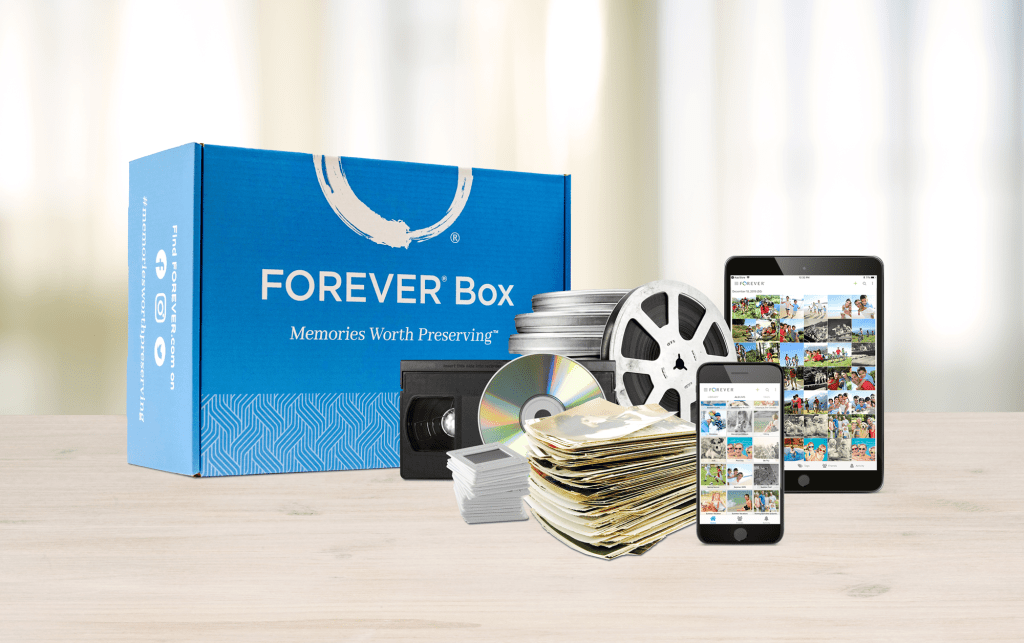
Here’s how it works. We decide which box(es) is/are going to hold all your stuff and order what you need from Forever. Forever sends you an empty box to fill up with all the items you would like to be converted to digital. When the box comes, you fill it up and send it back to Forever. Forever digitizes it and puts it online. Then they’ll send your stuff back to you, but if you don’t want it, you can just dump it in the trash, because all your stuff is online.

When Forever digitizes your material, it goes into a temporary storage account for 60 days, so you can decide what you want to do with it. They’ll also be happy to produce a dvd or thumb drive. But the very best thing you can do, in my opinion, is get your own permanent storage from Forever and put your memories there. Those memories will be there to be enjoyed by generations to come and you can rest easy.

Organizing Your Online Memories

Once you’ve gone to the trouble and expense of getting your memories online, you’re going to want to share them and Forever makes that easy, but somewhere along the way, you really need to do some organizing – or get me to do it for you.

Many Forever customers want to do the organizing before they send their memories off to Forever or they get me to do it for them. This is the most economical way, because you won’t be digitizing things you’re not interested in keeping. Your empty boxes will come from Forever with plastic bags and labels to keep your memories in order. If your memories have already been organized, at that point we can put notes on your bags and Forever will use those notes to name your online images. Your organized memories will be ready to share.

However, some of my clients say, “Jane, I don’t even know what’s on these videos!” Or they say, “It will be easier for me to sort through them once they are online.” Some even say, “Once they’re online, my family is going to help me sort them.” In this case, we can get your stuff all packaged up, as is, and send it off to Forever. Then you’ll have 60 days in your temporary account to decide what will go on Forever, what you’ll download and what you’ll just delete.

Curation for the Generations

Anything is better than nothing. If all you manage to do is send your stuff off in your Forever Box and move it over to your own online storage account once it’s digitized, then you’ve already done more than most people manage to get done. Too often, the next generation, faced with a cache of slides, reel to reel tapes, VHS videos and a pile of analog photos, will just toss them into the trash. And why wouldn’t they? If you haven’t organized your memories and taken the time to identify who is in them, then exactly how are those who come after you supposed to know what it’s all about?

Now, imagine notifying your family and friends they can peruse their memories online, at their leisure, with the click of a link. That will be great news for them, even if the images are helter skelter, but imagine how much more excited they will be if the memories are organized by date and event and tagged for cross-referencing by name. With a few clicks, your Uncle Joe can see all the photos you have of him in one place. You get to decide which of your photos you want to share, whether you want your family and friends to download from your cache and even if you want someone to be able to upload new photos or add notes.

I’m There for Whatever You Need

If you like, you can do all of this yourself. It’s easy and I am happy to show you how. Or, if you’d just like to turn it all over to someone and wake up one day with a totally organized online storage account, I’ll be happy to take over for you.

How much does it cost? Well, that depends on a lot of things. How much do you have, what does it consist of, is it organized or do you need me to sort it? Here’s the link to the digital conversion page, which has the cost of the various boxes https://www.forever.com/digital-conversion/, but first timers can find it very confusing. You’ll need to understand what an item is and how overages work, to begin with. So, give me a call at 972-971-5263, and we’ll get you started.

When it comes to pricing with Forever, there can be a little sticker shock along the way, but there are also a lot of different ways to save, save, save. During November’s Black Friday Sales, you could get $1000’s worth of storage for less than $400, but you needed to know all the money saving tools available from me and from Forever. So, while I encourage you to browse the Forever site and learn all the exciting things you can do with Forever, don’t let sticker shock scare you away. I’ve got offers you’ll be excited about.

In fact, why don’t we talk about those money-saving plans next week. You’ll love all the ways there are to save with Forever.

DFW Metroplex, Photo Organization, Photo Organization Coach, Photography

Back to Digital

MEMORY KEEPING 101 – STORING AND CURATING YOUR PHOTOS ON FOREVER

Why Forever?

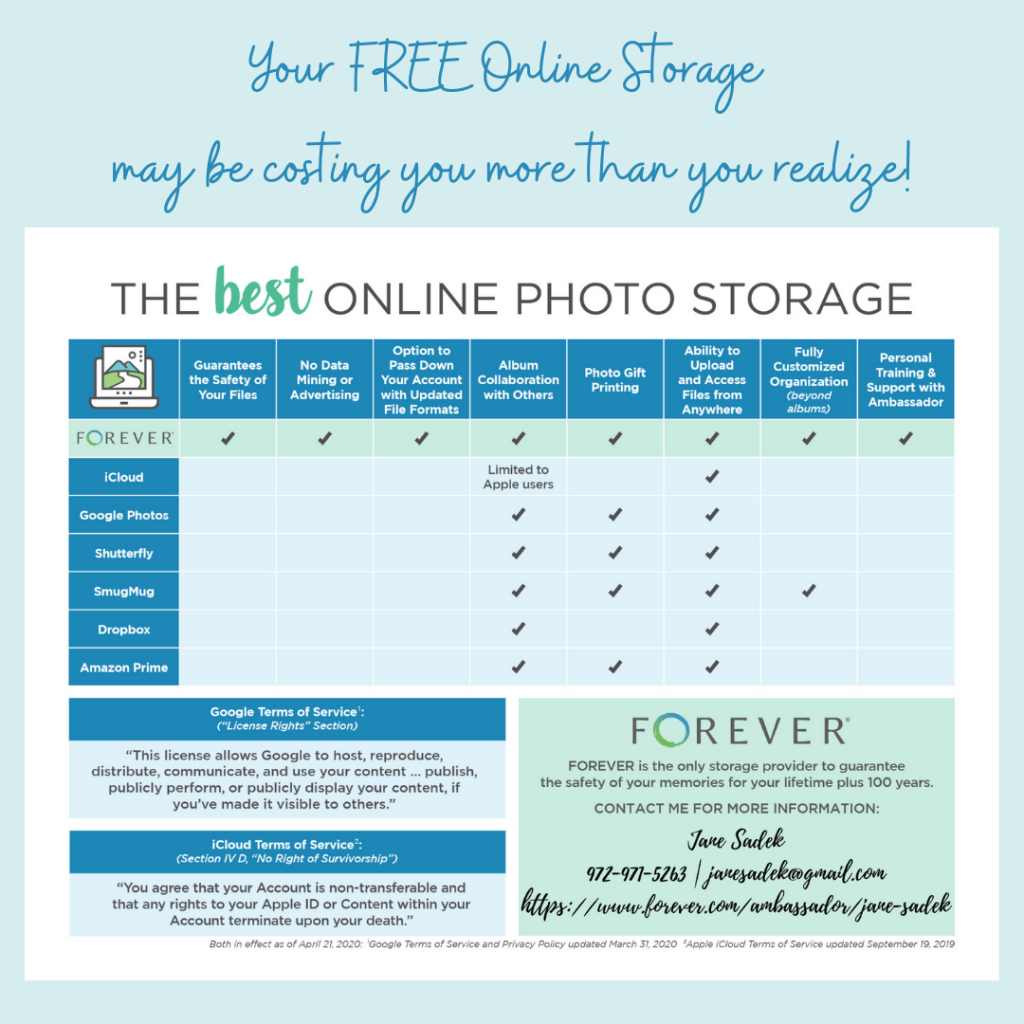
Back in November I introduced you to Forever Storage and the reasons I think it is best way to store your photos online. If you would like to review that post, click here, but here’s a chart that spells it out.

Perhaps the best part of a Forever account is that you buy your storage rather than rent it. Think about the difference in a landlord and a tenant. With other storage systems, your photos are merely tenants on someone else’s property. The landlord makes the rules. The landlord has a right to enter the property. The landlord is responsible for maintenance and you’re screwed if they don’t do it. If the landlord changes the rules, you either have to live with it or you’re stuck with the new rules. The list goes on.

At Forever, you own the property your photos are stored on. You make the rules about your photos. No one can go in there without your permission. No one can change the rules without your permission. You can do as much or as little as you like with your photos. It’s yours.

When you’re renting space for your photos, if you don’t make your rent payment, you lose access to your photos and what’s more, they don’t even have a plan for you to pass on your space, even if you want to. At Forever, you buy your space, so it belongs to you and whoever comes along after you.

Fully Customized Organization

I’ve used a lot of different online storage products in my life and while they will give you all the space in the world for a small monthly fee, your options for setting up your library are always limited. When I first started using Forever, I didn’t even know how to appreciate the flexibility I was given. It took me a while to create a system that worked for me, because it’s not just a matter of fill in the blanks.

It didn’t take long for me to get the hang of it and now I love it. Forever keeps a library of everything you upload to the site and with a few query words you can get to exactly what you want, You also get to set up whatever albums you want and then nest albums under there to as many levels as you want. Each album you access quickly tells you how many photos are in that album and how many nested albums you have within that album.

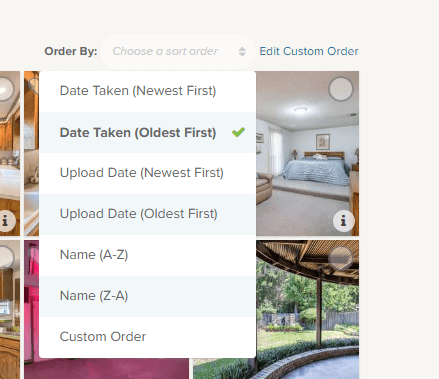
Within any album, you get to chose the order you want them in and if none of the automatic choices work, you can create your own.

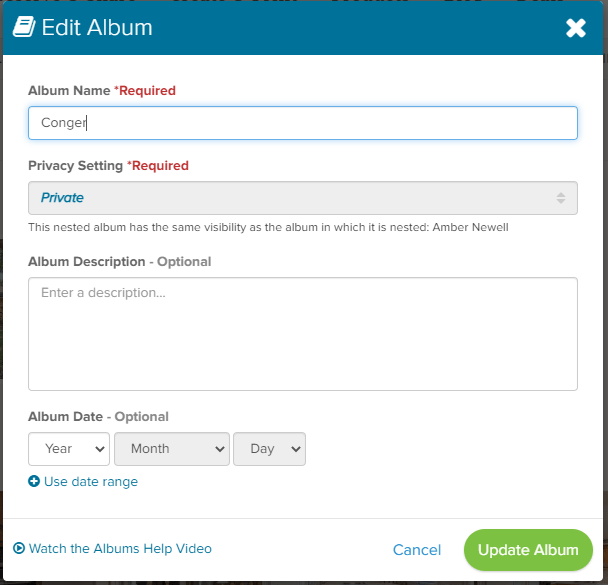
As you set up your albums and nested albums, you can create a name for them and then you can fully describe what the album is about and if you want, put a date or date range on it.

Tagging is a breeze, but that’s only the beginning of the ways you can identify your photos with Forever.

Most online photo storage picks up information from your metadata and you’re stuck with whatever is there. Not with Forever. You have total control.

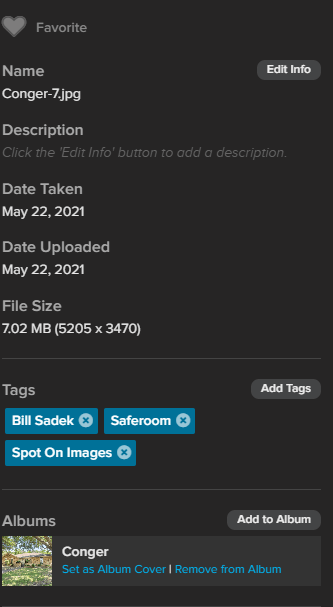
Just because it was Conger-7 wherever you got it from doesn’t mean it has to stay that. If the date taken is really just the date you uploaded it, you can change it to the real date.

Want that photo to be in other albums? That’s easy and it doesn’t take up more of your storage to do that.

And the description? None of that 25 words or 100 character stuff. Tell the whole story. Don’t want to key it in, fine, go to the app and use voice to tell the story. You’re not going to run out of space.

Sharing

While Forever will stay out of your storage and diligently protect it from others who shouldn’t be in there, it’s got all kinds of ways to share your images when you want to do so. You can share a single shot or an entire album or even your whole account. You can also set a level of sharing for the top level of each album. You might have some items you want to stay private, just for you. Friends and Family could have their own level of access to other albums. Then you could even have public items you opened up to whoever wanted to see them, so it’s great for all kinds of applications like teams, schools or other groups.

There are other ways to give the people you want access to your files. You can collaborate with others in you albums and decide what level of collaboration you want them to have. You can set up a manager and allow them to act as you if you want. You can also designate who you want to have access and control of your files and which files after you. Try that with icloud!

Auto Uploading

Have you ever wished that every photo you took on your phone or added to Facebook could be captured permanently somewhere so you never have to worry about losing them? Forever can do that. Or you can do one or the other of them. Up to you!

So What’s the Bad News?

If you’ve been using a free service or have been paying $1.99 per month for 100 gigabytes of storage, the bad news at Forever is sticker shock. The first time you hear how much 100 GB of storage costs at Forever it is going to be a difficult pill to swallow.

I must be honest with you. While I love Forever storage, I have to admit I don’t like all the rigmarole it takes to figure out how much you have to pay. On the day in November I wrote this post, with all the various deals and discounts available, you could get 100 GB of storage for $387.98 or something close to that (according to how you stacked the deals). However, the retail price for 100 GB of storage is $1000. I think that’s crazy, but someone smarter than me dreamed up this pricing and if you’ve ever shopped at Macy’s or Kohl’s, it will seem familiar. (This dress is $400, but today with a coupon you can get it for $19.99.)

So, while $387.98 is a lot, it’s really not fair to compare it with the $1.99 a month at Google, for instance. Google can rent that space for that price, because they owe you nothing in the way of privacy or security. They also know they will be able to make money off your photos with data mining and advertising. If they lose all your pictures, that’s OK. They can compress your photos anytime they want, so they will take up less space. If they want to delete your photos, all they have to do is send you an email and if you miss it, that’s tough. They also have your permission to use it for whatever else they want to.

On the other hand – all you will ever pay for your Forever storage is $387.98. After 16 years, when you’ve paid Google that much (if they don’t raise the price, which they most likely will) you’ll still have to go on paying something every month and if your kids take over the account, then they will have to keep paying as will your grandkids, great grandkids or whoever of your decedents is still around – if Google is still around. Remember VCRs? Which reminds me, that you Forever account will be upgraded for free to whatever formats come around after .jpg or whatever has disappeared.

Chances are at this point I have confused you more than I have helped you, so give me a call and lets review this. Whenever you decide you want to purchase your storage, I will research the deals at the time and make sure you get the best of them.

Come back next week and we’ll dig beyond mere storage and see what else Forever has to offer.

Photo Organization, Scrapbooking

Custom Scrapbooks By Me

MEMORY KEEPING 101 – LET JANE DO IT!

Save Money & Time with Custom Scrapbooking

If you love scrapbooking yourself, then the cost and the time are nothing, but most people have no idea what it takes to produce a photo-safe album with attractive themed pages, so their jaw drops when I tell them the price and then they tell me they have to think about it. The people who do have a clue of what is involved can’t hand their projects over to me fast enough.

I’ve spent several weeks of posts introducing you to scrapbooking, because until you understand what it takes to create a scrapbook, you can’t appreciate what I do. If I just tell you, “Custom scrapbooks start at $500,” and you have no idea of the time, money and effort involved in creating that scrapbook, then you’re going to think I am out of my mind.

The Bare Bones Album

Last week I told you newly minted scrapbookers will spend about $450 dollars and 72 hour on their first album. My most basic album will cost $500, if the photos and memorabilia have already been curated. That’s because I already have all my tools, I have decades of experience, I get a discount on what I do have to buy and most of all, because I have been doing it for so long, I’m going to do it a lot faster than you!

The Bare Bones album will not include embellishments, but your photos and memorabilia will be attractively displayed on wallpapered pages with mats behind selected photos. You can be very proud of theses albums and your investment includes all materials and labor.

The Basic Album

While the Bare Bones Album is good for someone on a budget or anyone who would prefer a minimalistic look, most people really enjoy embellished pages. They want festive borders, fun stickers and other elegant embellishments to create themed pages and a rich look.

As I’ve said before, the more embellishments there are, the more it will cost to in time and money to complete the album. My primary style is simple and quick, but with a lot more decoration than what I put in a Bare Bones album. The emphasis is still on the photos and memorabilia, not the decoration, so there are more of your memory items on each page, than you would find on a more elaborate album. This is the album most of my clients prefer. My Basic Album, is $750 and like all my albums includes materials and labor.

The Fancy Album

While my personal style is to create simple pages so I can have completed albums, some people want more. They may just like the look of highly decorated pages with only a few memory items or perhaps it is a really special album, like a wedding or a new baby and so they want something that is obviously out of the ordinary. I have all the tools and experience required to create these heirlooms and I would love to do it for you. Fancy albums start at $1000, but according to the level of decoration desired, the sky can be the limit.

I use the same techniques and tools I would use for any album, but instead of various decorative elements being spread throughout the albums, I pour everything I’ve got into every page and the results are breathtaking. One popular look is to have heavily-decorated matching pages throughout the book, while another is to create a heavily embellished theme for each page. Bring your desires and I will pour on my creativity. Together we’ll create a masterpiece.

Curating Your Photos & Memorabilia

Some people are naturally organized and while they haven’t gotten as far as creating an album, their memories are sorted and just waiting for memory keeping. I’m happy to take over at that point and put together a wonderful album for you.

The truth is, most people just have a mess. There are photos under the bed, their shelves are full of movies, videos and slides they don’t even have the equipment to show and their phones are overloaded with images. They have tickets and programs from their kids performances, items left over from a vacation and all manner of other items of memorabilia.

Don’t fret! I can help. Even if I know nothing about you, your family and/or your friends, one of my greatest gifts is the ability to find order out of chaos. I will need to know a few things about the photos and memorabilia before I start and during the process I may shoot you a text and ask what something is, but I can sort your stuff. I also know how to tell the story without using every single item. I’ll return what’s leftover to you, but most people look at the album and throw away the excess.

It’s great if you can provide enough information to create a detailed timeline, but many times people have inherited a pile of family photos and they haven’t got a clue of the time frame and locations. They may not even know everyone in the photos. Albums do not have to be chronological. So don’t worry! I can turn your mess into something beautiful, even if you’re at a loss about what you actually have.

I will sort and curate your photos and memorabilia for $20 an hour. That scares some people, because they’ve been trying to sort it all out for years. My sorting and curating is completely different than yours. For one thing I don’t know your tribe, so I’m not going to get caught up in reminiscing. I won’t stop every 15 minutes to show something to my husband, to text someone I saw in the photos or to cry. Oh, I do cry every once and awhile, but I’ll be crying a lot less than you. It’s also my job. I don’t have to squeeze it in between all the other things in my day. I sit down in my scrapbooking studio and work, un-interrupted for hours on end.

Only it’s going to take me a lot less hours than you might think. My favorite story is the attorney who had photos spread out on her dining room table for two years. I took them to my studio and had them sorted in six hours. She was flabbergasted, but that’s what I do. I turn messes into memories.

So, while I would love for you to become a fellow scrapbooker, if that’s not going to work for you, I still want your mess to be memories, so let me be your memory keeper!

If digital is more your thing. I will be talking about that over the next few weeks. Keep coming back!!

Photo Organization, Photo Organization Coach, Scrapbooking

What It Costs to Build a Page

MEMORY KEEPING 101 – YOUR STYLE CONTROLS YOUR COSTS

More Is More

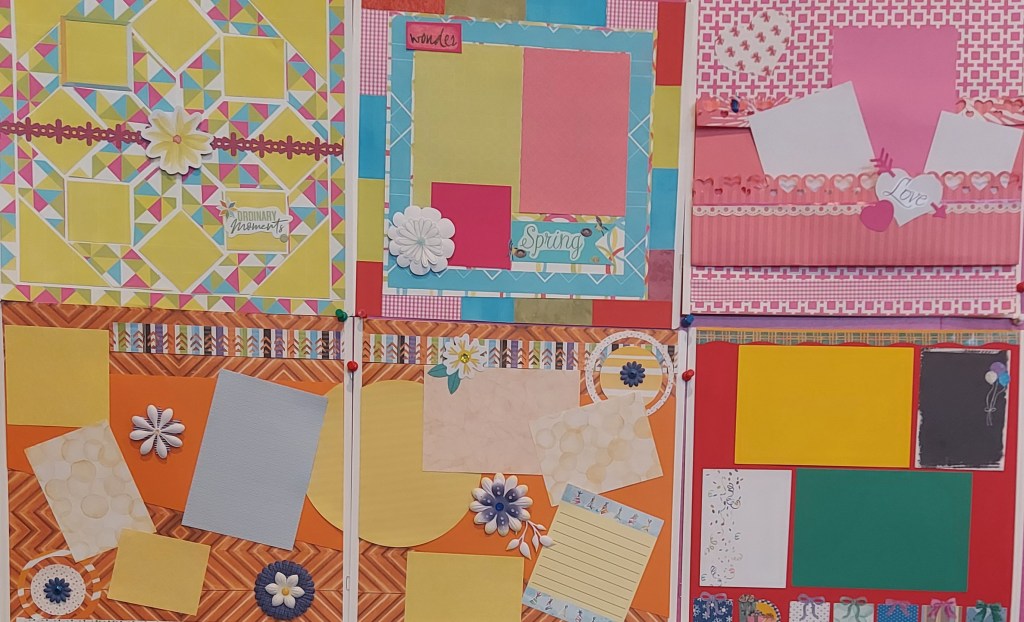
Above you can see several pages I created during an online crop. Creative Memories has them every month and they are a lot of fun. You can use the time to drill down and get pages done with virtual friends from all over the world or you can be crafty. During this particular crop I got crafty, so I haven’t done very many since then. Perhaps one more.

Don’t get me wrong. This is a great place to learn a lot of things, try things you might have never tried to do before and you could win something. The problem for me and maybe you is the temptation to get all caught up making pages which might have no relation to photos you actually want in your album. That’s what happened to me. I made these pages and several others. Then I gave them away. They weren’t my style and I couldn’t figure out what of mine I wanted to use them for.

They weren’t my style because each one took a really long time to make and most of them had more embellishments than I would ever put on a page. The more you put on a page to decorate it, the more time it is going to take and the more money you are going to spend.

A Typical Two Page Spread

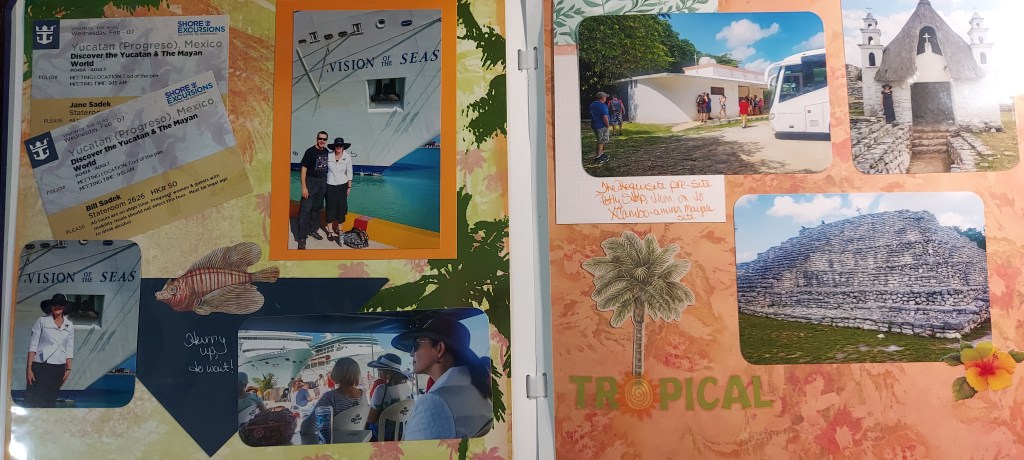
The two pages above are out of an album made during the pandemic, so that’s fairly recent and they are typical for my level of decoration. The photos and memorabilia are the stars and the other items just help tell the story. That’s how I do it.

Let’s pretend I just started scrapbooking and they are the first two pages I have done. To get started, I spent $75 to get the coverset, the pages and the adhesives, as I mentioned in an earlier post, but chances are you’d want more than 12 pages/24 sides, so let’s fill up the album with 36 pages/72 sides, which would take the total to $141. The only tools I bought to make these pages were a corner rounder, a personal trimmer and a 12 inch trimmer, which would have cost me about $85. I’m about $300 in, but I still need decorative items.

Decorative items have to be bought in packs. Let’s assume everything I needed for these two pages came out of one collection of decorative items, to make it simple. That would have been a printed paper pack, a pack of cardstock, a mat pack, a pack of stickers and a pack of embellishments. I would have spent about $50 to get all of that. However, the items you see on this two page would have only used about $4’s worth of that $50 or $2 a page. If life were simple, your $50 of decorations would easily cover 24 sides of paper, but you’d need $100 more to cover the other 48.

So, your first album would cost, $450. I can complete an album in about 24 hours, but as a newbie, it would probably take at least 3 times that, so more like 72 hours.

Those 72 Hours

I have been scrapbooking since my teens, which is over half a decade, and the hours I have spent doing it have been some of the favorites in my life. After your first album, you’ll get faster – maybe – if you want.

I have a sort of photographic memory of all of my supplies and I don’t spend much time in decision making. I’d rather have a completed page than a perfect page. I can complete 10 pages while my best friend does 2. That doesn’t make me better. It makes me different. It does however make it easier for me to do this as a business.

If you are are interested in scrapbooking as a hobby or craft, I am happy to support you in whatever ways you need from coaching to stickers. If you want to get faster, I will teach you my tricks. If you want to save money, I’ll teach you how to make the most of every inch of paper and every single sticker. And there are a world of CM resources out there to turn you into a scrapbooking artist.

While your first album would cost you $450, the next one would only be $315 – probably less if you are careful with your decorative supplies. You can join CM for about $50 and get a 10% discount on whatever you buy, plus $50 in credit for your first order. So, that first album would cost $405 and the next one $243, because your discount would go up. Do enough cropping and you get 40% off. CM has no quotas, so you can buy as much or as little as you want.

Of course, along the way, you’d want to buy more tools and you could turn into a paper addict like me, so while the cost of a single scrapbook would go down, your investment in scrapbooking would go up.

If this is exciting to you, then welcome to the world scrapbooking. You’re going to love it here. If it doesn’t then come back next week and we’ll talk about the economy of having me do your scrapbooks for you.

DFW Metroplex, Photo Organization, Photo Organization Coach, Photography, Scrapbooking

Getting Punchy

MEMORY KEEPING 101 – TOOL TIME FOR SCRAPBOOKERS

A Sampling of Punches and Border Makers

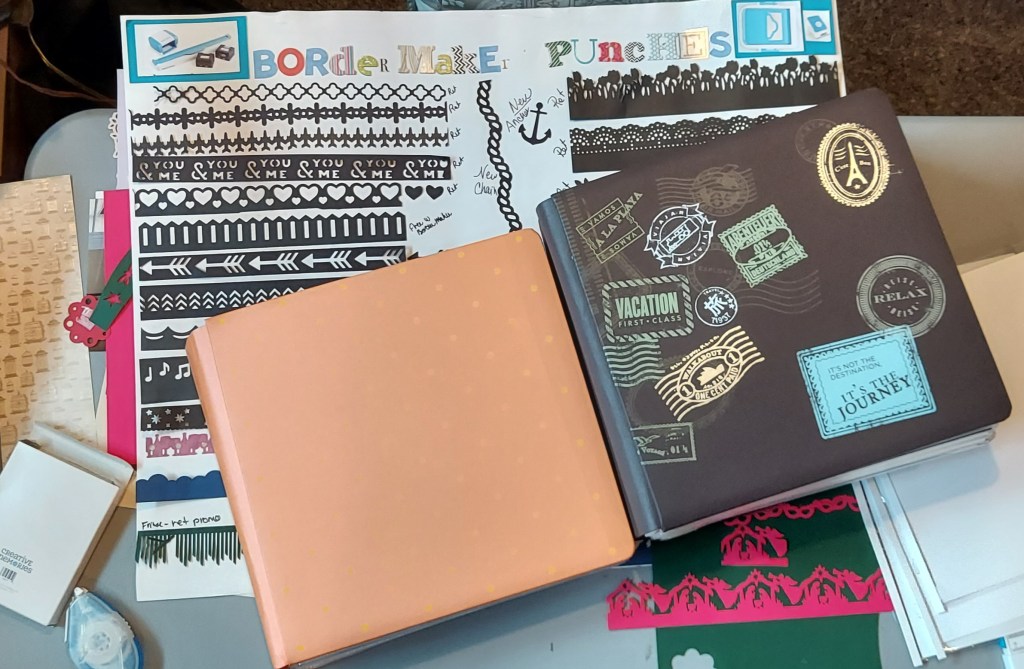
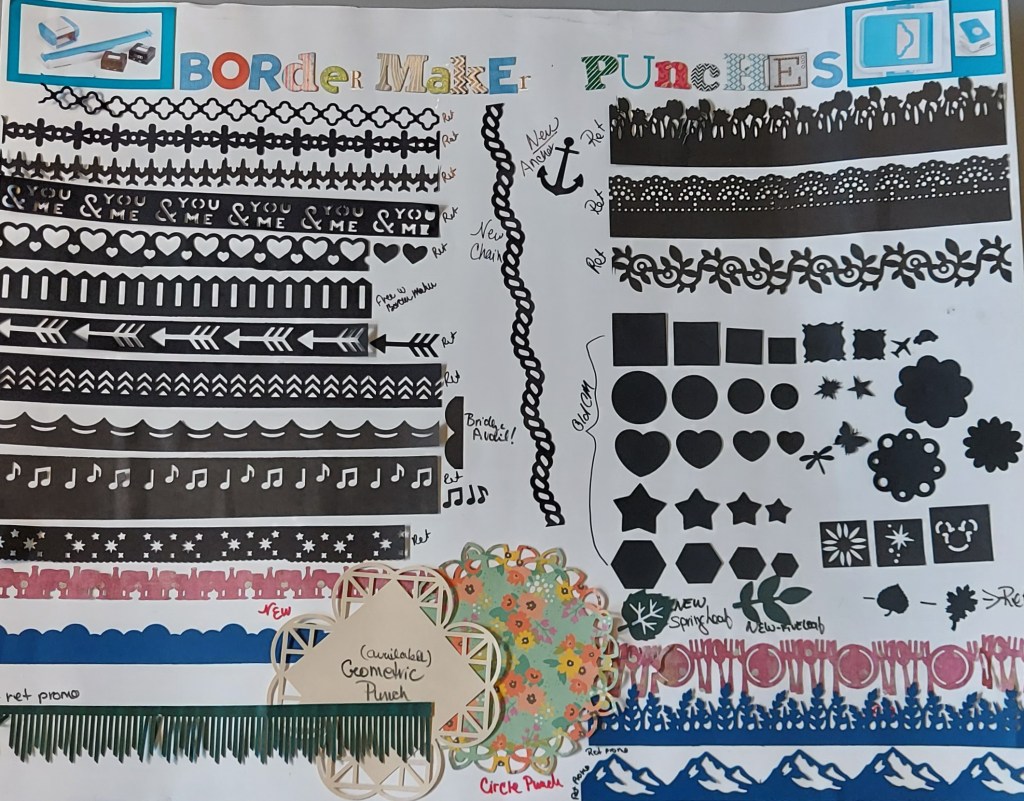
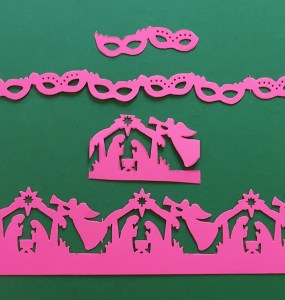
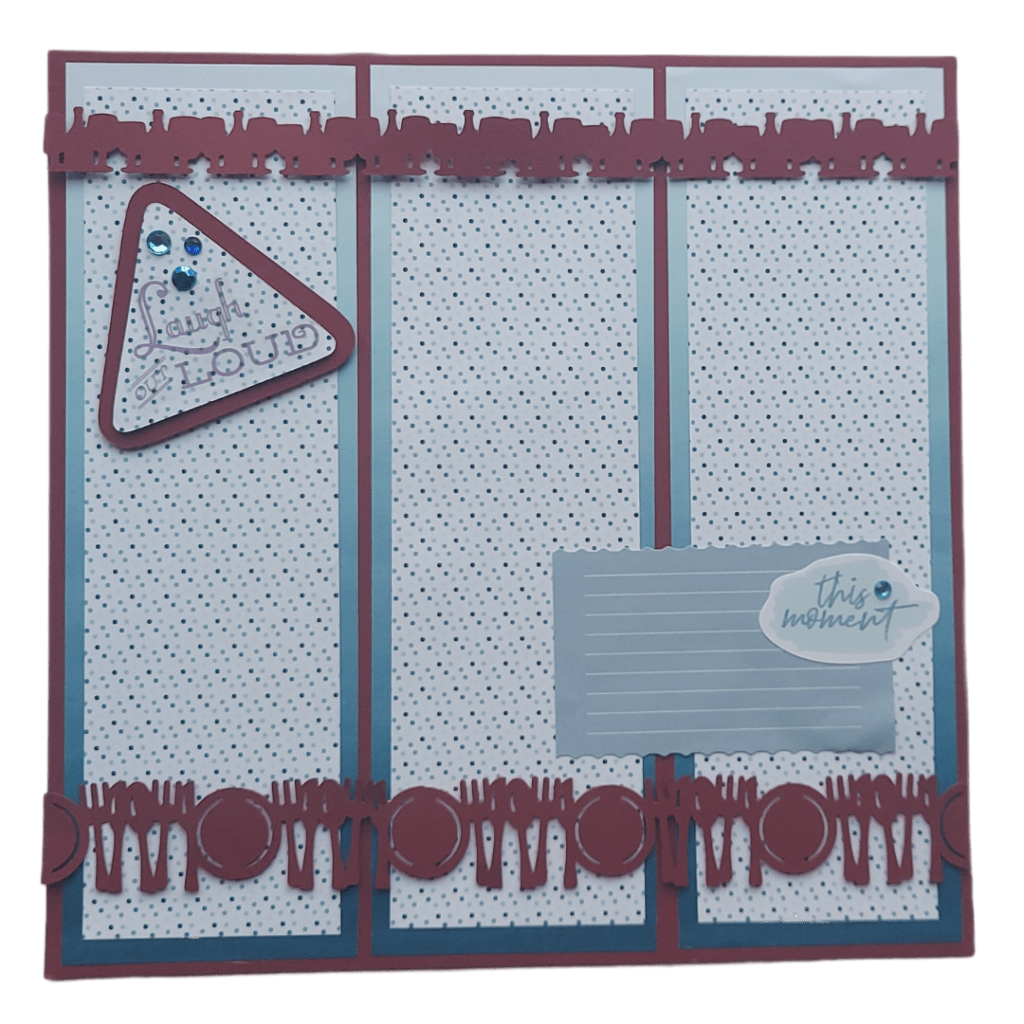
A couple of years ago I made the poster above to demonstrate the many shapes you could make with Creative Memories Punches and Border Maker. Some of these are no longer available, but they’ve also come up with all kinds of new ones. I always want every single one they introduce, but you soon learn to get a little picky.

Punches, Border Punches, Frame Punches and More

Punches are individual tools you can use to make anything from various sized circles to a variety of borders. However, each punch only makes one thing, be it a single shape or a certain pattern. The great thing is you can make them out of any color or pattern of paper you want to. Punches start at about $25 and go up to about $30, according to what the punch will do.

If it makes a single shape the punch is less expensive. The more you can do with with a punch, the more it costs. Some punches can stand alone on the page or make a border, like the Masquerade and Nativity border punches above. In the top picture of the poster, towards the bottom is a beige square. That’s one of the Frame Punches which will either make a border or the square you see above. Then there are the circle punches. They only do one thing and it requires a flipping the paper over in the middle of the process, but CM has only made a few circle punches and they are the most expensive. None are available at this time.

That’s the basic operation of punches, but if you are patient and you are given to a little experimentation there are all sorts of things you can do. Some croppers have figured out how to get some of the regular punches to do the same sort of thing as the specialized punches. Others use two punches and make a border with two shapes on it. These are the crafty people. You can spend all day on CMTV, the Creative Memories channel or on You Tube watching all the crazy things people figure out to do, but you’re not going to find me there. I just use the tools for what they were intended and never run out of ways to use them.

Border Maker System

Like the Custom Cutting System, the Border Maker System is a collection of tools you use together. With the Custom Cutting System, you get a mat and some blades to go along with several shapes and sizes of patterns. For the Border Maker, you get a two piece tool that works together to hold and cut your paper. Then there are a plethora of cartridges you can buy to use with the two piece tool.

While the punches have a tendency to sing, dance and serve hors d’oeuvres, all the border system does is make straight borders. The basic system is $35.50 and then the cartridges are $19.50 each. After your initial investment in the two piece tool, which does come with one cartridge, it is less expensive to buy the various shapes. I used to say that generally the Border Punches made wider strips than the Border Maker, but nowadays it’s hard to tell, just by looking, what tool made any given border.

Making Your Tools Work for Their Supper

Nothing in scrapbooking is in a vacuum. I’ve been traying to make it simple during these intro posts, but the more you learn about scrapbooking, the more there is to learn. There is more than one kind of page. There are several choices of adhesives and which one you use depends on what you’re sticking down and what you are sticking it to and what you want it to look like after it is stuck down.

When it comes to punches and borders, the same thing applies. There is absolutely nothing wrong with punching out one border and placing it directly on the page or the wallpaper. However, once you start working with them, you can get as crazy as you want to. Some punches only cut an edge off the paper, while others cut on both sides making a chain. You can use the edge punches on a wide strip of paper to make fancy strip cut on both sides. You can start stacking your strips and come up with completely new looks. Some crafty people make borders that are several layers thick, incorporating everything from letters to stickers and embellishments. About all I ever put together is 2-3 layers, but that’s me. You do you!

Obviously, you could go bankrupt buying punches and border maker cartridges, but they only represent a portion of the tools available to scrapbookers. There’s a corner punch which will create two different corners for your photos or mats. The 12 inch Trimmer has seven fancy blades to interchange with the straight blade. There’s a decorative trimmer to make your own wavy strips, a circle cutting for making infinite circle sizes and a zero centering ruler which is very helpful. I love the multi-purpose tool for scraping up things I’ve stuck down by accident and there’s a pointed end which I use for all kinds of tasks my fingers are too fat for. You need pens for journaling and there are two different scissors, both of which I use. And templates – did I mention them. Well, they can be used for several design jobs. Then there are sorting and storing tools which are really nice.

All this and you haven’t yet bought a single sticker or embellishment. Oh my! Have you begun to understand just how expensive it can be to get addicted to this hobby?

Next week, since you now have an idea what it costs to take up scrapbooking, let’s talk about the value of letting me do it for you.

DFW Metroplex, Photo Organization, Photo Organization Coach, Photography, Scrapbooking

Building a Page

MEMORY KEEPING 101 – IT ALL STARTS WITH YOUR STUFF

Gather the Photos and Memorabilia

Before I ever get to building a page, I’ve already done a lot of sorting. When possible I try to do things in chronological order, but that’s me doing personal albums. Your albums may have a completely different organizational system and that’s just fine. After you do this a while, you start to get a feel for how much will fit into an album, but even I can get surprised about how much will fit on a page.

I try to do two page spreads whenever possible. I tie the side-by-side pages together with matching or coordinating papers, but I start with the photos and memorabilia. I gather what I have for a particular day, event or subject and I spread them across the two pages to begin visualizing what the page will look like. Do I have enough to cover two pages or am I trying to cram too much on there? Is there a good balance between photos and memorabilia? Does the memorabilia tell the story or will I need to add captions, titles and journaling? Do I need all the photos or are some repetitive?

Then I begin to trim the photos I am going to use and as I do I start to think about what I’ve got in the way of papers and embellishments which will fit the theme and complement the photos. I place the trimmed photos on the page in the configurations I think work best without actually adhering them to the page. This sometimes hints at the papers and embellishments which will work best.

The hunt begins. Sometimes I know exactly what I want. Sometimes I spend a significant amount of time searching for the right pieces. It is a bit of a balancing game. Usually there’s either a paper or an embellishment that comes to mind when I am placing the photos on the page. I get that and then I start looking for what will go with it, but there is no rule about what piece to start with, because other times I have bought a particular set of stickers for a certain occasion and they are my starting point.

Let’s say it is the wallpaper which comes to mind first. I will find it and scoot it under the trimmed photos. Perhaps the next thing is a journaling box that needs to fit into a particular space. Each step I take I put it in place without adhering it, because as long as it’s not attached to the page I can continue to play with it until I get it right. The bottom layer is the wallpaper. Next is the mat or mats. The photos go on top of the mats. Then you have to work in the journaling boxes, stickers and other embellishments. When it’s all in place, then you stick it down with the appropriate adhesives.

There are variations on each item based on your unique style. I’m a speed demon, so usually one mat is all I will use, but I have seen beautiful pages where the photos have 2-3 mats layered behind them. I’m likely to slap the sticker right on the decorative paper, but some people gather multiple stickers together to make a collage. Crafty people use something called Peekaboo Pockets to create layers of photos which must be flipped over to see all of the images and decoration or they create messages which slide out of a pocket with a tab. You can use all of these or none of these. It’s fun to try things out and see what you enjoy doing, as well as which results you like best.

Simple Pages – Completed Albums

What you have to remember as you decide how heavily you will decorate the page is this: The more complex the pages are, the longer it is going to take you to finish your album. This is why the more creative among us sometimes have a hard time finishing a page, much less an album.

The final touches on any page are the embellishments. Hear me when I say you can be a very successful and creative scrapbooker without ever using an embellishment, especially if you have budget and time constraints. If your primary concern is to have completed albums to share with your family and friends, then the fewer embellishments you have the better.

At the same time, for many of us, the embellishments are the icing on the cake. Yes, the mission will always be the main thing, but we want our Punches and Border Makers, too. We love hanging out at the craft store looking for the perfect stickers. Even the boxes which we journal in can be an embellishment.

Don’t come back next week if you’re not interested in decorating tools and supplies. I’ve already walked you through the basics. You’ll invested about $300 and whenever you start a new album you’ll spend about another $75. The embellishments are the budget breakers. They are also the reason I buy so much paper. The embellishments help set the tone and the theme of the page without anyone reading a word of your captions or journaling.

If you’re at all like me, you will barely be able to wait to learn about all the tools and supplies available for scrapbookers. I hope you’ll join me next week.