Attractions, DESTINATIONS, TRAVEL, United States

Joyce Meyer’s Love Life Women’s Conference Words

Travel There – From God’s Mouth to Our Ears

If you read my last post about my dissatisfaction with the musical offerings at this conference, then you might expect me to pick apart the rest of it and you’d be wrong. I loved the messages delivered by the speakers: Joyce Meyer, Lisa Harper and Christine Caine.

Though I had been worn out by the drive and beat up by the music, when Joyce came to the stage she had words which were formed in her mind by the heart of God just for me. I had come looking for healing and encouragement. By the end of the first night’s teaching, I knew I had come to the right place.

Joyce started off in Genesis with our old friend, Abram. We all know his story. Abram had received great promises from God and things weren’t so bad, but they didn’t exactly match up to what God said there would be. “Then the Lord took Abram outside and said to him, “Look up…” She encouraged us to get outside our tent and look up.

She shared the difficult things in her life that she would change if she could, but reminded us, none of us can, no matter how much we may want to. However, she also guided us to Isaiah 45:3, “I will give you hidden treasures, riches stored in secret places, so that you may know that I am the LORD, the God of Israel, who summons you by name.” From one of her greatest challenges, Joyce eventually received and continues to receive great blessings. She encouraged us to get out of our tents and look up, so God could reveal those hidden treasures to us.

Joyce Meyers was talking to me. I’d been so busy in my tent I’d been failing to consider God’s many blessings in my life, because I was distracted by the drudgery and the challenges in the tent. By getting out of my tent and driving for two days I found a star-filled sky. My hope for hidden treasures, riches which were stored up for me, broke through and joy seeped once again into my heart.

Joyce’s Guests

Friday morning Joyce took the stage with her speaker friends and talked about the mistakes and hard places in life with them. I loved the format and it fleshed out what Joyce had said about getting outside our tents, looking up at the stars and being aware of the hidden treasures. The time was like a balm on my heart.

That afternoon, Lisa Harper taught us with humor and Scripture about our God of second chances. She reminded me that no matter how much I mess up, I have a God who can use my mess to to be blessing to others. Since I seem to have a lot of messes at my disposal, it’s nice to know God can even use our mistakes to His glory.

Christian Caine, with her lovely Aussie brogue took one of the shortest Scriptures in the Bible, “Remember Lot’s wife!” Luke 17:32 and turned it in to a battle cry against our post-Covid doldrums. No matter what your life was like before Covid – good or bad – Covid has come and gone. Lot’s wife looked back and was turned into a pillar of salt who lost both her past and her future. She urged us to embrace what was ahead and I walked out of the conference ready to do just that. I was out of my tent, looking at the stars.

Imagination Station

During one of the breaks I went down to see why people were standing in line in a certain part of the arena. There was an area called the Imagination Station and if that wasn’t it, it was something along that line.

The idea of it was to imagine something you wanted God to do for you and tell Him about it in a tangible way, by writing the thing you imagined on a strip of cloth and then tying it to a grid on the wall.

Confession, I am horrid at goal setting and vision boards are a craft to me, not an inspiration. I tend to have hopes, not tangible goals. I can set a goal for activities, but saying I am going to sell a certain amount of product or raise my profit X%. It’s beyond me. I can easily tell you places I want to go and things I would like to buy, but translating them into measurable goals, it just doesn’t happen.

For these reasons, I was a bit threatened by this exercise. I was tempted to walk right through the display area. Then I remembered. This was between God and me. There wasn’t going to be a quarterly review. I wasn’t going to be graded on it.

I got a strip, wrote three wishes on it and tied it on the grid. Then I walked through the rest of the display area and was encouraged by the verses displayed there. Especially this one, since being in my later 60’s could be construed as a reason to go sit quietly on the bench.

Now I can tell you how God works. I tied my wishes to the grid on the wall and while I fully believe that with God I can do anything, I was in no way sure my love of scrapbooking and my desire to pursue it more aggressively professionally had any interest to God.

I left the conference the next day and went on with my life. I thought from time to time about the strip I had tied to the grid, but I told myself, I left that in God’s hands, not going to worry about it. Within a week and a day, I had gotten an email, virtually out of the blue, from a potential customer who needed my scrapbooking assistance.

This new client was not magic. I had done the things I should. I am signed up as a consultant with both a traditional and a digital scrapbooking company. I have a website. I have social media to tell people I am a memory keeper. When I go to networking meetings, I mentioned it, even though Spot On Images, by necessity was the focus.. However, most days of my life all that goes unnoticed. That is until I turn one of my wishes over to God.

So that’s how Joyce and her guests impacted my life at the Love Life Conference in St. Louis and propelled us into selling SOI and making Memory Keeping my priority., but I hope you’ll come back next week, because we are going to play hooky during some of the conference’s sessions and I’d like you to come along.
Decorative Arts, DFW Metroplex, Gardens, Memory Keeping, Photo Organization, Photo Organization Coach, Photography, Scrapbooking, Shopping

Pre-Designed (But Flexible) Photo Projects

MEMORY KEEPING 101: DESIGN & PRINT PROJECTS

AutoPrint vs. Design & Print

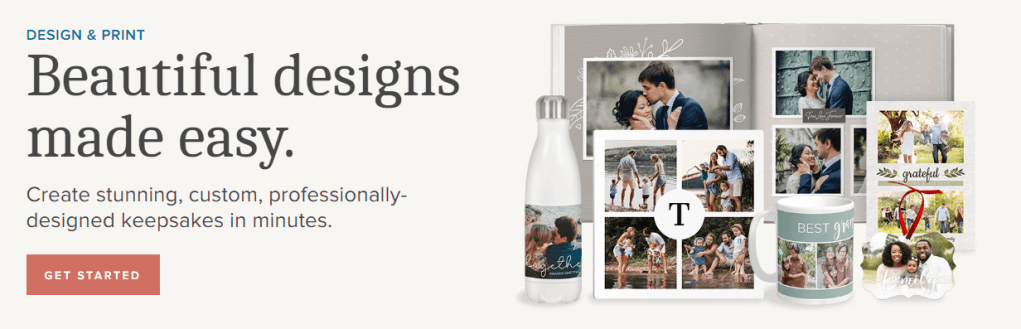
Last month I walked you through a couple of easy, peasy AutoPrint projects step-by-step. AutoPrint is what you want to use to create very quick projects. The layouts are very simple and while you can make some edits, the primary goal is done.

Design & Print is the next level of (shall we say) fussiness. You want more in the way of decoration and more opportunities to add your own touches, but you also want the heavy of lifting of design to have been done by someone else.

Available Projects

While AutoPrint and Design & Print offer many of the same projects for you to choose from, there are some differences. I have compared the AutoPrint Offerings with the Design & Print Options.

  • Photo Books (In AutoPrint you have all these choices with each photo boo. In Design & Print, options for size, binding and style depend on design chosen, but all of these can be found in various designs.)
    • Sizes 8X8 -12X12
    • Softbound & Hardbound
    • Standard & Layflat
  • Photo Gifts (Varies)
    • Coaster Sets (Both)
    • Tabletop Panels (Both)
    • Notebooks (AP Only)
    • Magnets (Both)
    • Ornaments (D&P Only)
    • Puzzles(D&P Only)
    • Blankets (D&P Only)
  • Drinkware (Varies)
    • Water Bottles (Both)
    • Photo Mugs (Both)
    • Frosted Glasses (D&P Only)
  • Wall Decor (D&P Only)
    • Canvas Prints
    • Metal Panels
  • Cards (D&P ONly)
  • Calendars (D&P Only)
  • Photo Prints (AP Only)
    • Glossy & Lustre
    • Sizes 4X6 – 11X14

Selecting Your Photos and Your Design

When you have a project you want to do in Design & Print, I suggest you first go to your albums and set up one for the project. Then add all the photos you want to include in your project into the album. It’s also a good idea to get them into the order you want them to be in the project. This will not only get you prepared for making the project, but it could help you decide which design to use.

Then it’s time to choose the design for your project. According to your point of view, this part is either your favorite thing about the project or your biggest headache.

If you like shopping online, this part is fun. You can go in and browse around, checking available options for size, style, material and etc.. You can put together your whole project and then decide you want to change the design or the layout. You’ll love it.

I’ll admit it makes me a little crazy. In prepping for this post, I went in to find a coaster set project to walk you through and hit a brick wall. Artisan is my favorite way to design in FOREVER because I like to start with a blank page, but many people find a blank page daunting. They want a design template. FOREVER offers three design options because different people like different things.

Let’s Make a Blanket

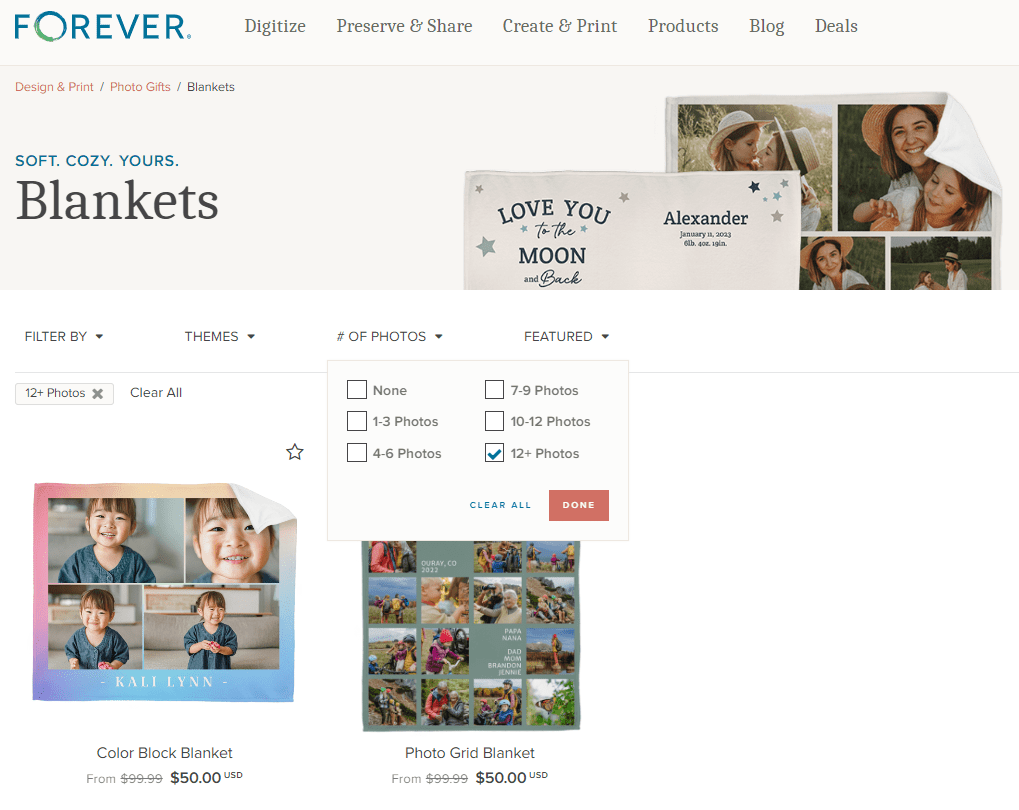
Since I’m definitely not in the mood for coasters, let’s make a blanket. I’ll use the photos I have tagged as Floral for the images on the blanket. On FOREVER I would hover over the “Create & Print” Tab and a selection box comes up offering AutoPrint, Design & Print and Digital Scrapbooking & Deign. Under Design & Print, Photo Gifts are in the center and Blankets are at the bottom of that list. Click “Blankets.”

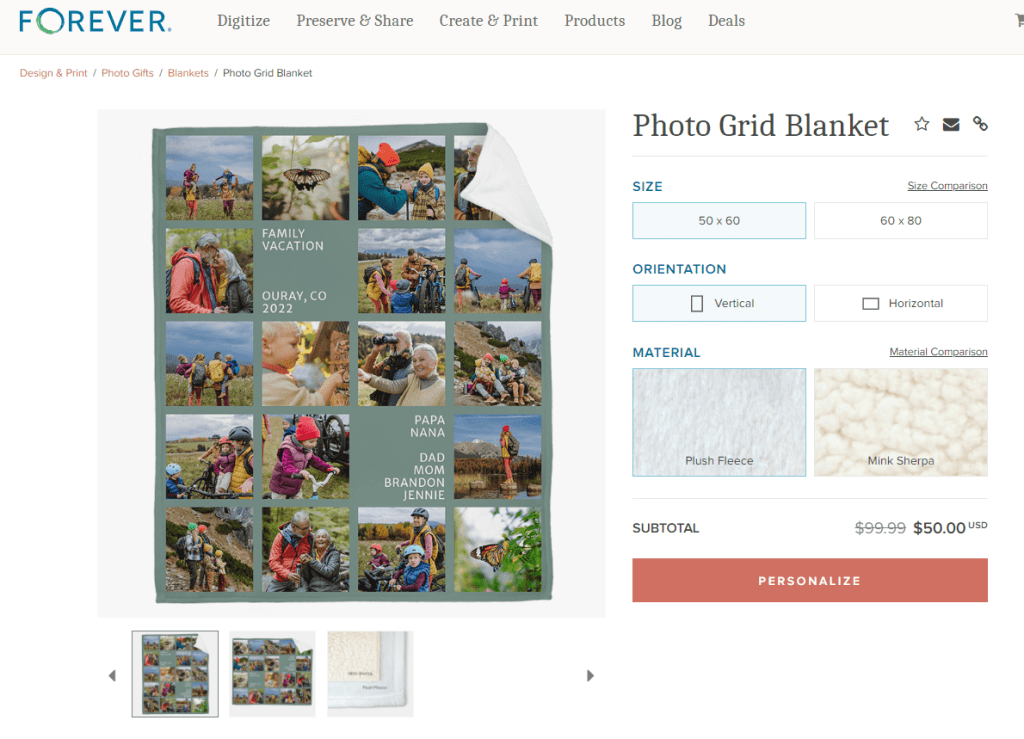
There are many, many design to choose from, but for this project I wanted to include as many floral photos as possible, so I used the “# Of Photos” filter to find the blanket designs which included the most images. I got two choices. (Ignore the pricing. The image I included shows the deals available on the day I wrote this post, not the day you are reading it)

When I clicked on the Photo Grid Blanket, here’s the screen I got. It advises me of all the options I have. There are two sizes, two orientations and two materials available to me and there is a big PERSONALIZE button. Let’s do that.

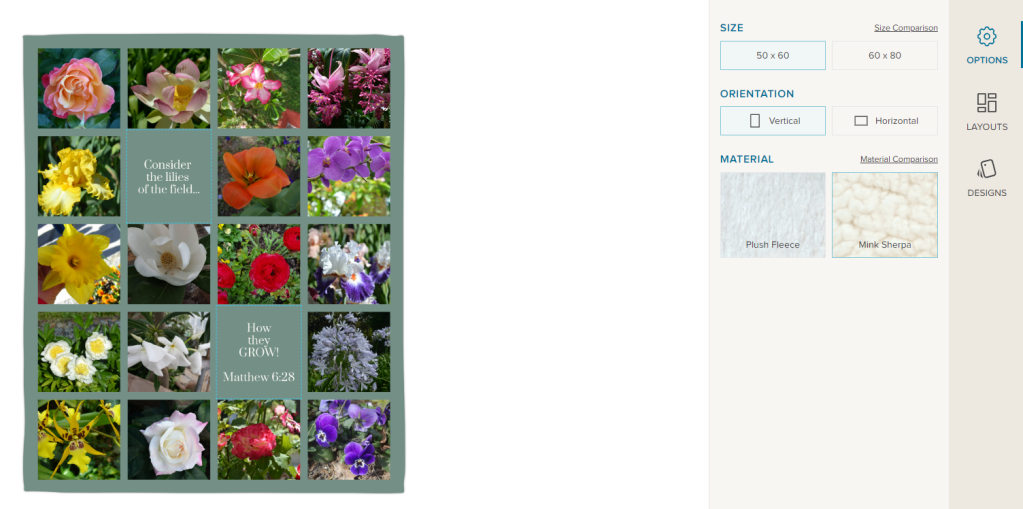
So, I went in and added a photo for each space and chose a Bible verse as my text. If I clicked on “Layouts,” the designer offered four options, but this was the one with the most spaces, so I chose it. I could still select my size, orientation and material. Then I could add it to my cart and order it!

I like this a lot, but honestly, I would prefer a design without text and I’d probably choose a different background color. And that’s why I love Artisan, but that lesson will be next month. Here’s the link to the project so you can take a look at it: https://www.forever.com/app/users/jane-sadek–1/containers/c7f1ebef-e74c-4069-9d00-0c75dfd7daf8/6ao6nbcgjnp7v0b3adq7j2lrt

ART, DESTINATIONS, Music, Performing Arts, Road Trips, TRAVEL, United States

Joyce Meyers and Love Life 2022 Music

TRAVEL THERE – LOOKING FOR THE BLESSING

The excitement inside America’s Dome was palpable. We were among the last few people showing up for the 7 PM opening session. We picked up our intro packet and stopped at the concession stand for something to eat. Minutes after we found seats the music started and I confess I was not ready for it.

Disclaimer – I am not a big fan of praise and worship music. I am on Team Hymnal. I don’t stand with my eyes closed and wave my hands in the air. If you do, that’s great, but it makes me think more about me than I do Him, so I don’t like to go there. Love Life was locked and loaded for praise and worship: Chris Tomlin, Tauren Wells, Phil Wickham and Brandon Lake. On Thursday night at 7 PM, the kickoff for the Joyce Meyers’ Love Life Women’s Conference, I was wrung out.

The musicians on the other hand were wound up. At 7 PM they blew on the stage and blew up the sound system. They were jumping and dancing and rocking and rolling, while I just needed to bow down. I knew they weren’t doing anything wrong, but for me, they weren’t exactly putting me in the right frame of mind for worship. For a few minutes I resented it and then the Lord made me aware of the fact that this was my problem, not theirs.

I bowed my head and asked for the power to worship, in spite of my preferences and my exhaustion. Almost as if I had communicated directly with the performers on stage, the atmosphere stilled. On the stage were Phil Wickham and Brandon Lake. Though I would still have preferred to turn the volume down, I could tell powerful worship was going on.

Too Much Music for This Old Woman

If I had one criticism of the Love Life Conference it would be that I felt there was entirely too much loud music. I’m probably one of three women out of the entire crowd that felt that way, but it was what I walked away with.

The opening ceremonies had been loud and frenetic. Then some crazy DJ guy would warm up the crowd before each session and you had to go early or you’d be sitting in a corner. Each performer got time during each session and then Friday night there was a concert. Needless to say, I did not go Friday night. It was just too much for this old lady. If some of that music had been quiet and peaceful, if there had been a hymn or two, if a lot of things, I might have been happier, but as it was I wished there had been a lot less music and a lot more teaching.

Is It Really Praise & Worship?

I have actually found a church in my area that sticks to traditional hymns and classical worship music for Sunday mornings. I love it. The lyrics are rich in Scripture, they profess the glories of God and the miracle of salvation. I feel worshipful and reverent as I join in with this music. I would welcome a couple of praise and worship choruses to round out our musical offerings, but I don’t see that happening.

I have also attended a whole lot of services with a praise and worship band. I watch others stirred to near frenzy while singing this music. Obviously, it moves them. I remain awkward and self conscious. I see band members who seem to only lack go-go boots and a cage to complete their performance. They’re up there waving their arms, shuffling their feet and sometimes thrusting their hips. That’s OK for Elvis in concert, but is it really worship?

I do not want to be Mrs. Morrison. During my teenaged years, occurring in the late sixties and early seventies, Mrs. Morrison was still giving lectures on the dangers of Rock and Roll. By then Rock and Roll was here to stay. I thought she was a nut case. Then during a service at what I call the Rock and Roll church, I understood why she was upset. Rock & Roll didn’t feel very worshipful to me.

I really wanted to be open-minded, but I knew I couldn’t worship when I was moments away from starting a Conga Line. As I have said before, if that does it for you, more power to you, but how about me? Are you as willing to spend time worshipping with traditional hymns and classical worship music for my sake? The resounding answer in modern churches is ‘NO!’

Since I was at the conference for spiritual renewal and what I was served was, for the most part, very loud Rock & Roll, I spent some time in quiet reflection. Had I become Mrs. Morrison?

My Conclusion

Music either honors God or it doesn’t. While I still might have turned the volume down, before the conference was over, I was a fan of Phil Wickham and Brandon Lake. Their music was all about the glories of God and the mercies of Our Savior. Their lyrics were right off the pages of Scripture.

To me, and I will confess this is my opinion, not a condemnation of the other singers, their music is not worshipful. To begin with it is very repetitive. The same words over and over and over. Matthew 6:7 says, “When ye pray, use not vain repetitions, as the heathen do: for they think that they shall be heard for their much speaking.” Along about the 20th time I say, “I love you Jesus,” it has lost all real meaning and is just sounds I am matching to notes.

It also seems very self centered to me. As I listened it focused on what the “worshipper” wanted to tell Jesus, not on the glories of God or the salvation of Christ and it had nothing to do with Scripture. “I love You, I worship You. I bow down. I lift my hands. I serve You. I need You.” As my mom used to say, “The emPHAsis seemed to be on the wrong sylLAble. “

So, if Joyce called me tomorrow and asked me what changes I would make, I’d tell her to cut down the time devoted to music, to bring traditional music to the stage and keep away from the vain repetitions. Someone else might tell you the music was the most meaningful part of the whole conference, but this is my blog, so I get to share my own opinion.

Come back next time and we’ll talk about what I did like. The preaching and teaching was powerful.

Accommodations, DESTINATIONS, Road Trips, TRAVEL, United States

On to St. Louis

Travel There-Getting There

Finished with the Clinton Library, we pointed Wayz to the Travel Lodge in St. Louis and hit I-30. As had been true the day before, trucks dominated the interstate. In fact, the last hour of the drive on Wednesday had been maddening. I was so glad to be off the road, even the potentially worst Days Inn in the world looked good.

Thursday started off in much the same way, with trucks all around us. The only improvement was we weren’t mired down in construction, at least most of the way. I couldn’t put the peddle to the medal though, because the trucks set the pace. Finally, when we were almost to Memphis, we turned onto I-55 and things improved. Once we made the corner, we made a pit stop for gas, the potty and a snack.

I roared up I-55 as fast as I dared and we got into St. Louis just in time for rush hour traffic. Just as had been true the day before, the last bit of our drive was the worst, but this time it wasn’t the trucks or construction. I’m convinced the engineers who designed the roadways in St. Louis must have been high on something!

The right lane was constantly an “exit only” lane, so staying in the next lane was life threatening. As people entered the expressway, they had to immediately get in the next lane, so they wouldn’t be forced to exit again.

They also love to build both entrance ramps and exit ramps on the left side of the road, so the left lane was no safe haven. And God help you if you entered on the left side and needed to exit on the right – which Wayz must have thought was a lot of fun, because it didn’t hesitate to offer that up as our route.

Because the hotels and motels in the downtown area cost hundreds of dollars a night, I just couldn’t bear to stay there. I booked a hotel about 10 miles from the convention center. I’m from Texas, so 10 miles is nothing and it really presented no real challenge – except that in coming from I-55, you had to navigate 255, 270 and 170 to get there.

Once we made it to the hotel, commuting back and forth to the conference was no big deal, but to tell the truth, after that little drive to the hotel nothing would have seemed like that big of a deal.

Arriving at the Travel Lodge, we knew we weren’t staying in the lap of luxury, but we pretty quickly knew it was going to be better than the night before. I’m so grateful Deb was with me, because to tell the truth, if I had been on my own, there was a good chance I would have laid on the bed and never climbed back in the car until the next day.

Since Deb was with me, we unloaded the car, moved ourselves into our room and headed back out for the trip downtown. The commute was easier than the road to the hotel had been, but as soon as we exited, we were in gridlock.

Instead of getting out of the car, laying down on the asphalt and having a good cry, I tried to negotiate the traffic according to the directions Deb was giving me. By some miracle we came to a garage that wasn’t very far from the convention center and the price was decent. It was undergoing some severe renovations, but we climbed up the ramps to a parking spot.

Now, when we discovered the poorly lit section of the garage we’d happened upon was the BROWN level, we thought they had probably gotten the name right – just think of something brown that stinks! At least it was easy to remember where we had parked.

The hard part was over. I’d driven 10 hours from my home to get there. Now I was going to walk into a convention center full of women who loved the Lord. No way that was going to be anything but wonderful.

Come back next week and I’ll tell you about the Love Life Conference. It was pretty darned amazing!

ART, DFW Metroplex, Libraries, Memory Keeping, Photo Organization, Photo Organization Coach, Photography, Scrapbooking

Can FOREVER Save That?

MEMORY KEEPING 101: THE FORMATS FOREVER CAN STORE

What Do You Have and What Do You Want?

There is one question I ask a lot and this is it! It applies to many steps in the Memory Keeping process, but in our digital world, wondering what formats can be saved on FOREVER is a pretty important one.

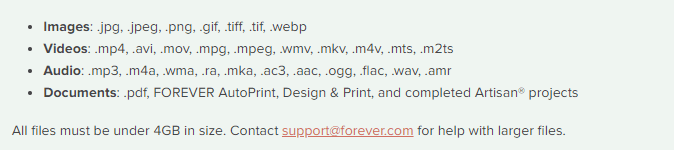
If you are a general consumer with photos, video and audio on your devices and computer, then FOREVER is going to save pretty much anything you want it to. Here’s a list of all the things FOREVER will save.

As you can see, this is a pretty comprehensive list. In fact, I don’t even know what some of those formats do. However, there are things FOREVER can’t save (yet), so let’s talk about those.

Raw Files

Many pro and hobbyist photographers take photos in Raw. This is a a generalized category which creates huge files for the purpose of file manipulation. When we were in the real estate photography business, our photographers would take their shots in raw on the HDR setting. This meant the files were huge and that basically they were in parts. Our guys would take multiple shots in a variety of exposures for each image, which would then be processed to create one data rich file for editing. The purpose was to manipulate light, so that we could take a picture of a room with the curtains open and get everything in the room and everything outside with perfect lighting. Various photographers use a variety of other methods to do the same thing, but this is the method we used and a lot of other photographers do, too.

The difficulty with this is that different cameras take different types of raw photos. Our Canon camera took .cr2 and the DGI drone took .dng. Your Nikon takes something else and other cameras will take another format. And this is why FOREVER has not yet embraced RAW in it’s suite of supported files, yet.

While FOREVER will not save all these raw files, most of the time the raw state is just a temporary destination for files which will become jpg’s. That’s what we did. General consumers don’t want to handle or store the huge, unedited files. We always converted our raw files to jpg’s as we processed the files for delivery. While FOREVER doesn’t store raw files, yet, it does realize that for some photographers, this capability is a high priority.

I have spoken with Dr. Nathan Bowers, the VP in charge of R&D and supporting these files is on the short list of development with FOREVER, but there are technical challenges associated with it. Nathan would have been happy to explain these details to me, but I wouldn’t have understood. If you would, then perhaps you should call him, but for the time being, suffice to say, FOREVER can’t store Raw files, but we’re working on it.

HEIC

Those who use and are familiar with Apple know they sort of like to be unique. If you have an Apple phone, then this is the format your photos are taken in. Not to worry! While FOREVER will not store your photos in HEIC, it will automatically convert them to .jpg as you upload them. For 99% of the population, that’s fine. They actually don’t care what extension is attached to their files, they just want to save them. There are some proponents of HEIC who want to keep their files in that format and unfortunately, at this time, FOREVER cannot save these files. I say “at this time,” because an ongoing desire at FOREVER is to never say no to any format. At this time it is not possible to store .heic on FOREVER, but that won’t be the answer forever.

Various Documents

Let me start this part of the conversation here. You can save PDF files on FOREVER. The document files on your computer are much like the raw files from a camera, because the type of file created depends on a variety of factors. That’s why PDF was created in the first place.

PDF stands for Portable Document Format. It was designed to make your files portable, whatever format they were created in. Converting most files to PDF is easy. You just change the extension to .pdf and viola, you have a PDF which can be stored on FOREVER.

So, will FOREVER store your documents? Absolutely! Just save them as jpg’s and upload.

APPS

When one of my friends bought FOREVER storage, the first thing they wanted to do was save everything on their Quickbooks. Well, for one thing, Quickbooks is already saved and backed up. Perhaps not to the extent of FOREVER, but certainly safer than the photos on your phone or the VHS tapes sitting on a shelf.

After a little discussion, I discovered that what she really needed was not the whole app, but the reconciliation she created each month. Easy peasy! The reconciliation was a PDF doc. Now she saves those to FOREVER and is perfectly happy.

The point is that while you cannot save a whole app, probably what you want to save is some document which is already in a format FOREVER can save.

Specialized Formats

The items I have covered so far in this post are the most common questions I hear, however the longer I do this, the more formats I discover. Did you know quilters have a specific format for saving their quilt patterns and genealogist have their own format? The list goes on.

If you have a specialty format that you’d like to save on FOREVER, please let them know. The development team prioritizes projects based on need and demand. I know quilters and genealogists have their own formats, because I’ve been on ZOOM calls where Dr. Bowers has mentioned these formats as items on his development list.

In the meantime, many of these formats can be converted to something like jpg or pdf, which can be saved. Or you can take a picture of the file and save the picture. It may not be the complete digital file, but it’s better than nothing, until it can be saved on FOREVER.

Summing Up

While FOREVER cannot save every type of file in the world, the list of things they can save is very comprehensive and most files can be saved with a simple conversion to PDF. FOREVER was designed for the specific purpose of memory keeping and it does that very well for the vast majority of formats in which people have captured their memories. If you have something in particular you need to save that isn’t on the list above, let’s talk. You might be closer than you realize to keeping your memories on FOREVER.

Architecture, ART, Attractions, Decorative Arts, DESTINATIONS, Libraries, Museums, Presidential, Road Trips, TRAVEL, United States

The William J. Clinton Presidential Library

TRAVEL THERE – ANOTHER PRIMARILY PRESIDENTIAL DESTINATION

If you follow my tags, you’ll find 19 posts about Primarily Presidential Destinations. I’ve got at least that many more on my wish list. The William J. Clinton Presidential Library was not on that list, but that’s only because I hadn’t really thought about it. I’d never been much of a fan and Little Rock was not someplace I was dying to go.

With Little Rock being about halfway between DFW and St. Louis it was a perfect stop over and I knew we’d have a few hours there on Thursday morning before we had to get on the road. I googled “Visit Little Rock” and the Library was one of the first attractions to come up. Then there was no question about it, fan or not, if it was a presidential library I was going.

Little Rock is a city under construction, but Wayz knew about it and threaded us through the detour signs. We arrived a few minutes before opening and caught up with our email and social media.

As I watched people park and head toward the building it wasn’t clear to me exactly where we were supposed to enter, because it’s one of those modern buildings where the entrance is fairly non-descript. In fact, you have to go under the building to enter it.


Women’s Voices, Women’s Votes, Women’s Rights

The ground floor is dominated by a glass-walled gift shop. You had to go through it to get to the special exhibition on the other side. The special exhibition was a series of quilts focused on women’s suffrage and and women’s rights.

The thought process of having a quilt exhibition was quite good. Quilting has always been a very female thing to do and in America women have used the quilts to document everything from family trees to stops on the Underground Railway. Quilts filled both the downstairs exhibition space and another gallery upstairs.

I found myself more interested in the modern process of quilts than I was their message. I guess I haven’t been paying enough attention at the State Fair of Texas Crafts Building. These weren’t the patchwork quilts I’ve admired during the rest of my life. Pictures were printed on the cloth and then over-sewn by machine. I’m not doubting the creativity and skill of the women who crafted these quilts, I’m just gonna be honest and say I like old-school quilts better.

Deb, the conversation starter, mentioned to someone we were headed to a women’s conference. Her new friend perked right up and wanted to know more. That was until Deb told her it was a Christian conference. Then all the perk deflated out and we were told to enjoy the exhibit. They’d obviously wished we were headed out to wear vagina caps or beat up some right to life advocates. In another gallery of the special exhibition Deb engaged the guards with a description of Allsopp & Chappele. They followed us around the gallery capturing information about the restaurant on their phones.

Touring the Permanent Exhibits

Even though I wasn’t a big fan of Bill, I was impressed by his Library. There’s all the usual obligatory Presidential Library stuff – memorabilia from his presidential campaigns, a replica of his Oval Office and an orientation theater. I was surprised to learn in the film how important his saxophone was to him and that it was almost the career path he chose. Would the world be a better place if Bill Clinton had been a professional sax player? In the film he said political activism won out over the saxophone, but I have a sneaky feeling that was due more to Hillary Rodham, who he met about that time, than it did the actual political activity.

One of my favorite parts was a timeline that dominated the second floor. It combined important achievements of his presidency with world events, so you are reminded of their historical setting. Around the timeline were alcoves focused on various themes of his presidency and letters from famous people were displayed, sometimes with Bill’s reply.

In comparison, in the George W. Bush Library, the first two galleries are given over to “No Child Left Behind” and 9-11. While Bush sees the education agenda as his crowning glory, I see it as his biggest failure. Any reminder of 9-11 is upsetting to those of us who lived through it. So by the time I get to the rest of the exhibits I’m not in the mood to celebrate his other successes. Points go to Mr. Clinton.

I will admit, Clinton accomplished many of his goals. My problem with him is that I see a direct correlation between what he “accomplished” and many of the troubles we have today. I believe his intentions were good and sincere, but like many good and sincere people, he didn’t look down the road and consider what the results of his good intentions would be.

And then there’s Monica Lewinski. I wondered if they’d even address it in the Library and I have to give them kudos for having the guts to do so. However, I found humor in the way they chose to present it. It wasn’t Bill admitting he’d sinned, it was some commentary over whether his actions were actually impeachable or not. Evasive into perpetuity. He’s not the only bad boy in the presidential line-up, but will any of us ever forget “I did not have sex with that woman,” and the blue dress. Oh, and the meditation on what the word “is” might actually mean.

The primary reason I am not a fan of Bill is that I disagreed with what he was trying to accomplish – no surprise! He’s a Democrat and I am a Republican. But the whole Sex in the Oval Office thing was an embarrassment to our nation and as always, the coverup was worse than the sin. When are our leaders going to learn to step up, confess their sins and move on. Instead we have to have months/years of investigations, which in the end just spend money we don’t have to promote the political careers of the incumbents. I am so tired of it!

The third floor was like dessert, because it contained the gifts to the Clintons from other world leaders and countries. The presidential gifts are always my very favorite thing to see. There was a table setting from one of their state dinners, something the libraries always seem to have and one of the Frist Lady’s evening gowns, another presidential library staple.

And speaking of the First Lady, I was very impressed by the low key role she played in the library. Of course she was there, including her efforts to fix health care, but her presence was not overpowering. I jokingly call Ronald Reagan’s library the Nancy Reagan Library, because I left knowing more about her than I did him. Her stamp is on every single exhibit. Not so with Hillary Rodham Clinton, who actually played a larger role in her husband’s career than Ms. Nancy did. Points go to Mrs. Clinton.

So, I enjoyed my visit to the William J. Clinton Presidential Library. I heartily recommend that you visit when you can – and of course, that you eat at Allsopp & Chapple, but don’t stay at Day’s End.

There are other activities on the campus of the Library, but we needed to get on down the road. The Love Life Conference would start that evening, so we needed to be in St. Louis in time to attend. Come back next week and we’ll be on the road again to St. Louis.

DFW Metroplex, Memory Keeping, Photo Organization, Photo Organization Coach, Photography, Scrapbooking

How to Get Your $20

MEMORY KEEPING 101: A LITTLE INCENTIVE TO GET STARTED

The $20 Welcome Coupon from FOREVER

I want you to discover FOREVER! I know I rave about it all the time, but I’m not sure you know how easy it is to get started. I probably also fail to tell you FOREVER has $20 waiting for you to sweeten the pot. Here’s how it works!

It Starts With My Link

FOREVER has assigned me a unique and specific link. They want you to sign up with an Ambassador you know. Someone who you feel comfortable with. They do not want to be an anonymous website like so many of web-based companies out there which assign you a number and talk to you through bots. They have a wonderful Customer Service staff and a great help page, but they want you to have a real live Ambassador of your very own.

This is my link: https://www.forever.com/ambassador/jane-sadek

If you prefer QR Codes, here you go:

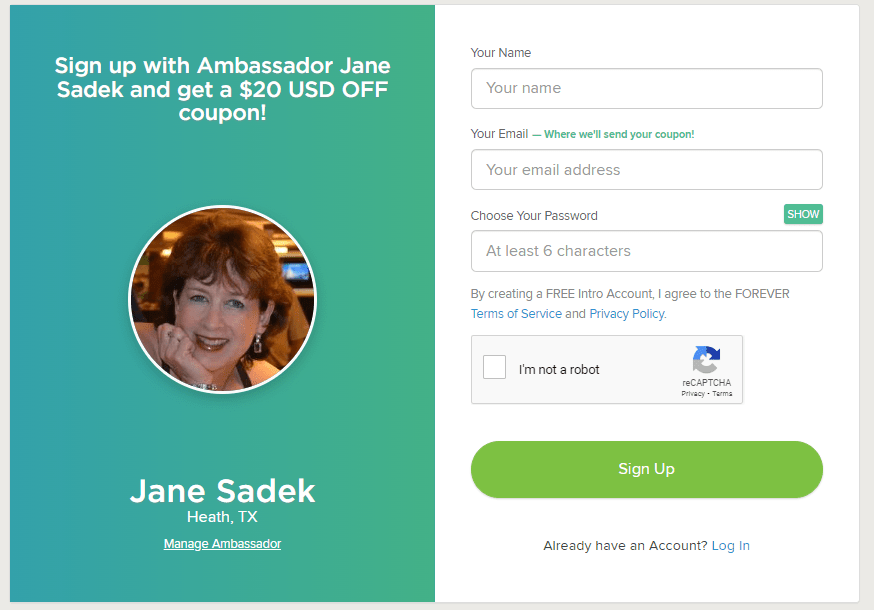
That link takes you to FOREVER. According to the device you use, you may immediately be asked to provide your email and create a password. It’s OK, it’s free. If it just takes you to the Home Page, click on Log In in the upper right hand corner and then under the green Log In button, there’s a link “Need an Account? Sign Up Free”. Click that and you will go here.

Fill it in and hit the Sign Up button. That’s it! Welcome to the wonderful world of FOREVER, but don’t stop there, because you need to claim your $20.

FOREVER Will Send You an Email

When your sign up is through, go to your email. If you don’t see an email from FOREVER then check all those spam folders. Confirm your email address and then FOREVER will send you your Welcome Coupon.

Twenty dollars is waiting for you. When you open the Welcome Coupon email I suggest you either print it out and/or save it someplace where you can find it again.

Near the bottom of that email is a code. That’s your $20. You’re going to want that when you make your first order. Many clients are ready to buy when they join. They cut and paste their code into their order and they are done. But I also have clients who aren’t ready to buy from the get go. That’s why I want you to print it out or save it somewhere you’ll be able to find it later.

In Fact, FOREVER Will Send You a Lot of Emails

So, one of the reasons FOREVER wants you to verify your email address is because like everyone else, they want to send you all their stuff – and that’s why you have an Ambassador. FOREVER stuff is great if you are about to start a bunch of projects, because the emails will keep you informed of all the great promotions which are going on. If you’re just sticking your toe in the water and aren’t interested in the stuff, when you get your first promo email, go to the bottom and click either “update your preferences” or “unsubscribe from this list.” Then you can tell them thanks, but no thanks – but wait until after you get your $20 coupon!!! I don’t want you to miss that.

Use That Coupon!!

First of all, you have 60 days to use that coupon. On Day 61, it will no longer be valid. So please find a way to use it within 60 days of signing up. The coupon will work with most things on FOREVER, with a few exceptions – gift cards, events, FOREVER Club memberships etc., but for merchandise, it’s all good.

Stack your deals!! Many, many, many companies are quick to send you a coupon, but then trying to use it is almost impossible, because you can’t use it with any other offers. That’s not so with FOREVER, except in very, very rare cases, which will be clearly marked. You can stack your $20 welcome coupon with all the deals on the Deals page, as well as with The FOREVER Club discount, which I would be happy to explain to you.

Get the best price! At the first of every month, FOREVER informs its Ambassadors about all the deals for the month. When you know what you want to buy, just give me a shout before you hit the buy button. I can let you know if you can get a better price by waiting a day or a week.

And that’s it! Twenty dollars towards your Memory Keeping project. You can also get $20 for referrals, but we’ll talk about that and The FOREVER Club another day!

DESTINATIONS, Restaurants & Bars, Road Trips, TRAVEL, United States

Breakfast in Chicago?

Photo by Julian Jagtenberg on Pexels.com

TRAVEL THERE – GOOGLE MISDIRECTION

Google had been very, very good to us on Wednesday night, so rather than spend an unnecessary moment at our horrible motel, finding out how they interpreted “breakfast included,” we googled “best breakfast downtown.” Apparently, overnight Google had forgotten where we were. We’d been researching restaurants with great ease the night before, but for some reason, it thought we wanted to go to Chicago for breakfast. You’ve got to love the SEO and algorithms that dreamed that up.

So, we tried again – “best breakfast downtown Little Rock.” It responded with Down Home, less than 10 minutes away. That was more like it, but it still wasn’t in downtown. We ended up backtracking a few exits and then when we got there, the restaurant wasn’t keeping its sites up-to-date, because the restaurant had a big McClard’s BBQ sign out front. “Down Home Catering” was further down and in smaller print.

At first, we weren’t sure whether they were closed for remodeling, because we thought the pick up trucks around the restaurant might belong to the construction crew. About that time we saw two great big old boys coming out rubbing their bellies in delight. We had arrived.

McClard’s BBQ / Down Home Restaurant and Catering

The restaurant was neat as a pin and you could tell everything was recently refreshed. The décor was early flea market with an emphasis on the USA, Hollywood and Christmas. We were led to a seat and given menus.

Our waitress was chatty. She and Deb discussed the sign, Google and the Christmas tree. In true flea market tradition, Deb’s coffee cup was a Christmas mug. The menu was fairly basic, nor surprises. We both got the same breakfast, but with different choices for meat and eggs. I like my eggs DONE, over well, hard enough to bounce on the floor and I told them to hold the gravy on my biscuit. Deb was over easy, she had bacon instead of sausage and she did want her gravy.

Our first reaction when the plates arrived was laughter. They serve toast with their biscuits. That cracked me up. Then I cracked into my egg and it was over easy, maybe more solid than Deb’s, but still runny. Our waitress picked my plate up before I could even say anything. It came back out in a few minutes over well, DONE. I was a happy camper.

The breakfasts were good and our conversation with the waitress continued. We told her where we were headed and I think she really wished she could just walk away and go with us. I wish we could have made that possible. Were I rich, I would have asked her what she made a week, written her a check for it, paid for her trip and the conference and squared her absence with her boss. That would be the best part of being rich – doing outrageous things for other people.

We also told her we were headed downtown to see the Clinton Library. It didn’t seem as if she was as excited about that. To tell the truth, I wasn’t either, but I sort of collect presidential libraries and homes. We were in Little Rock and it was too, so I wasn’t going to miss it. We paid our check and headed downtown.

Come back next week and visit the William J. Clinton presidential Library with us. I will admit is was better than I anticipated. You might be impressed enough to visit yourself, even if, like me, you aren’t a member of his fan club.

DESTINATIONS, Restaurants & Bars, Road Trips, TRAVEL, United States

Allsop & Chapple Restaurant & Bar

TRAVEL THERE AND EAT HERE!

I don’t care why you’re in Little Rock or what your budget is, you need to eat at Allsopp & Chapple. I’d love to tell you some great story about me researching restaurants in Little Rock and digging up this hidden gem, but the truth of it is that we googled it after we got there.

I wasn’t sure exactly what time we’d get away from DFW, so I didn’t want to be disappointed. If we ended up getting out of town late and just grabbed Mickey D’s along the way, I wanted to be happy about getting away, not feeling deprived by missing some great restaurant. So, we googled from the un-luxury of our room at Days Inn and lucked into one of our favorite meals ever.

Historical Significance

Allsopp & Chapple used to be the name of the premiere bookseller in the state of Arkansas. It’s located in Downtown Little Rock in the Rose Building, which was built in 1900 and is on the National Register of Historic Places. For six decades A&C was THE bookstore in Little Rock, indeed the entire state. Perhaps the young Bill Clinton, who lived in Little Rock up to 1964 bought a book from there. By the time he was governor, the bookstore was gone.

The Modern Version

Even though it was a Wednesday night, we decided to go ahead and make a reservation, which was a good thing. The place was hopping! Patrons at the bar chatted over bespoke cocktails and most every table in the room was full.

During our first visit, we didn’t know about the complimentary valet, but now you do, so let them park your car. Instead we parked in a nice multi-level lot which was all of $2 and walked to the restaurant, but it was less than 1/2 a block away.

The vibe is good. We were wearing our travel clothes and fit right in. Some people were in suits and dresses, obviously there after a work day, but a pair of jeans would not be out of place. Please don’t show up in your pajamas or your active wear. It’s not that casual.

The dining room and bar are both in the same room and it’s a cozy room. That’s why you make a reservation. The décor is sleek and modern without being cold, and there’s a nod of the head to its previous existence as a bookstore.

The menu is varied but not expansive. I hate when they hand you a book that you have to wade through to find something to eat. There was a little of anything, from soup and salad to steak and seafood, but the choices did not go on and on and on. The wine list is extensive, but not daunting. However, what caught our eye first was the Cocktail Menu.

I’m usually pretty boring when it comes to drinks. Wine, a margarita or a beer are my usual choices. I’m just not that crazy about most hard liquor drinks – no old-fashions, Manhattans, gimlets. martinis etc. They usually look expensive to me and when I get them, I wish I’d just ordered up the usual.

Deborah is the adventurous one of us. She can talk bitters and liqueurs with the best of them and she’s more willing to splurge. When she does, she’s usually happy she did.

This time the Cocktail Menu looked good to me and the prices were reasonable. It also nodded its head to the previous bookseller of six decades. I chose the Don Quixote, which was a blackberry margarita and Deb had Much Ado About Nothing, an old-fashion infused with vanilla and oranges. Both were great. I loved mine and Deb gave me a sip of hers, which was also good – almost like a spiked Dreamcicle.

Amazing Food

So, the drinks were good, the atmosphere was pleasant and the décor lovely, but what about the food? Pull out your list of superlatives and use them all. The food was out-of-this-world good. I had the pork chop, which was cooked to perfection and had a great sauce, but lets talk about the mashed sweet potatoes.

Roasted banana sweet potato mash! The banana and sweet potato were perfectly blended and very smooth. I’m guessing they also had cream and butter and other good stuff in there, but whatever they had in it, it was the best mashed sweet potatoes I had ever had.

Deborah, in the meantime had the Redfish, in Pontchartrain Sauce with fried okra. I had a bite of the redfish and it was delectable. I don’t interfere with anybody else’s fried okra, because I don’t want anyone trying to score some off of me.

We’d observed very generous pours in other wine glasses, so we changed to wine with the meal and were happy as, in my mom’s words, dead pigs in the sunshine. We were so full we didn’t even have a dessert.

The Return Trip

It was so good…how good was it? It was so good we went again as we went back through Little Rock on the way home. Now the restaurant’s area has several nice looking eateries in it, but my pork chop and the drinks had been so good, we only had one destination in mind when we hit Little Rock and that was Allsopp & Chappele.

This time we ventured to other cocktails and while I can’t remember the name of it, this time I had their version of a daiquiri. It was smaller than my blueberry margarita and a lot more potent. I could have drunk several, but I wouldn’t have been able to walk.

Deb did get the pork chop, but I think they’d cooked her longer than they had mine, so she was a little disappointed. Perhaps it was catering to the busy Saturday night crowd that kept the pork chop on the grill too long.

This time the Gouda Mac with Mushrooms looked good to me and I had it with grilled shrimp added. Warning, no one could eat all the mac & cheese with this dish. If you get it split it, but also get it with the shrimp. Very excellent! This time we did share a piece of ricotta cheesecake. It wasn’t Junior’s cheesecake, which we had loved in New York, but it was yummy.

Do not miss this restaurant when you go to or through Little Rock. It’s a great experience with stellar food. Come back next week and we’ll suggest a place to have breakfast.

DFW Metroplex, Memory Keeping, Photo Organization, Photo Organization Coach, Photography

Let’s Talk About the Library

MEMORY KEEPING 101: THE FOREVER LIBRARY, THAT IS

What’s a FOREVER Library?

OK, so FOREVER is a Digital Media resource that offers everything from Media Digitization to Video Streaming – but if you hang around me much, then you already know that.

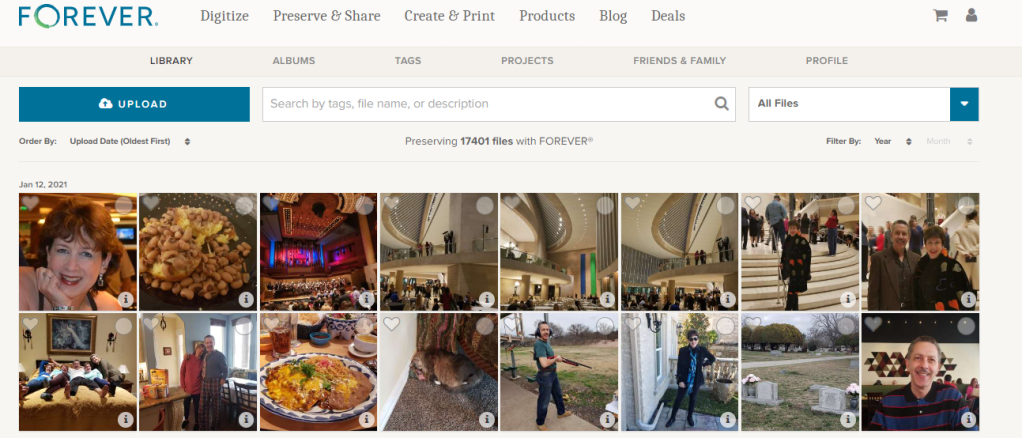
The FOREVER Library is the place where all the stuff you’ve uploaded to FOREVER hangs out. It’s not the only place. You also have albums, as well as tags for sorting and finding your photos, but the library is where everything is all at the same time. You can upload directly to the library or to your albums. It doesn’t matter.

What Can It Do?

Your library can do a lot of cool things for you, so I decided to take a few minutes to introduce you to it’s features. Obviously, the great big blue “upload” button is the one you’d use for adding photos from your computer to your storage. If you want to add photos from your phone, there’s a free app for that. If your media is hard copy, we need to talk about digitization. See last week.

Next to it is a search bar. The effectiveness of your search bar is directly related to the thoroughness of your curating. The more information you have about your photos in FOREVER, the more accurately you can search. A sampling of the search terms you could use would be dates, titles and tags, but whatever you’ve got, FOREVER will try to deliver something.

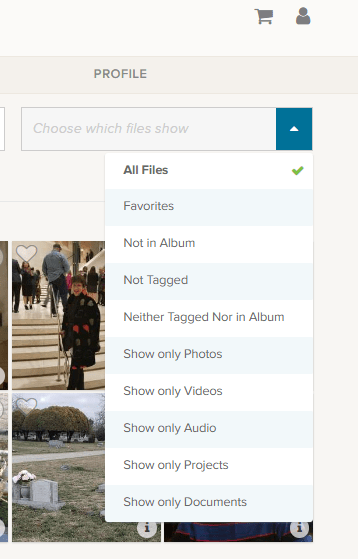
At the end of the upload and search area is a box that says “All Files”, but if you click the blue area you get these choices.

Obviously, All Files is all files. Favorites are photos you have marked with a heart. You can see an example of the heart on the left corner of the photo by the blue and white selection box.

The next are three very helpful choices as you begin to curate your images: “Not in Album,” “Not Tagged” and “Neither Tagged Nor in Album.” As you get your photos organized, labeled, tagged and such, the number of photos these choices will bring up will grow smaller.

I’m proud to say all but a handful of my photos are in Albums and all of those not in albums were taken in the last few days. I have my photos automatically added from my phone, by the app, when I take them. Then I delete them or add them to albums daily or weekly, according to the day and the week.

I’m working on the “Not Tagged”. Tagging is a great tool for searching. Some day I will have all the people and places tagged in every photos, so I can search by name or location to find any photo I want. So far, I have them all tagged as either Travel, At Home, Out & About, etc., but I have a long way to go. FOREVER recommends spending 15 minutes a day on this task and it’s a great idea.

Then there are a series of “Show Only” choices. With them you can see only photos, video or audio. You can also isolate documents in the collection. Projects are cool, because FOREVER keeps a copy of all the projects they do for you – the photobooks, photo gifts, greeting cards and such. These projects do not take up your storage space, but are always available to you.

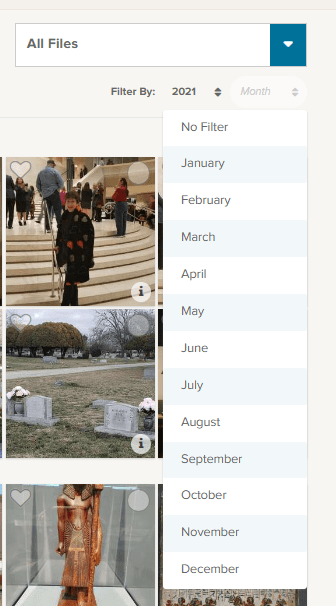
Under that selection box associated with “All Files” is a section where you can filter by both year and month. So, if you know you’re looking for the pictures of your husband’s 50th birthday, just select the year and the date of that celebration. In this image I chose 2021 for the year and have brought down the month selections.

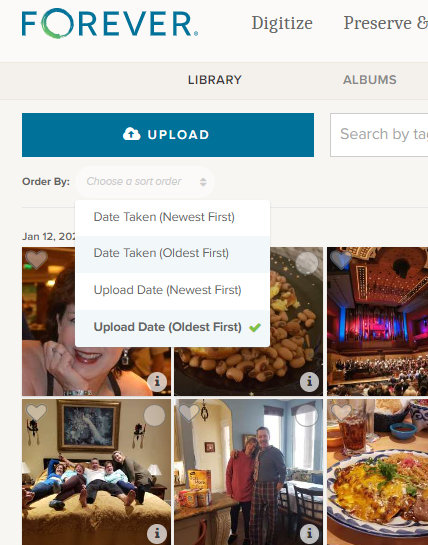
Moving to the other side, under the “upload” button, you find the “Order By” selections. I tend to leave it on Date Taken (Oldest First) because I think in chronological order, but you can reverse it and as for (Newest First) if you are looking for something taken recently.

Sometimes you aren’t as concerned with when it was taken as you are when it was uploaded and the next choices cover that.

Other Things to do in the Library

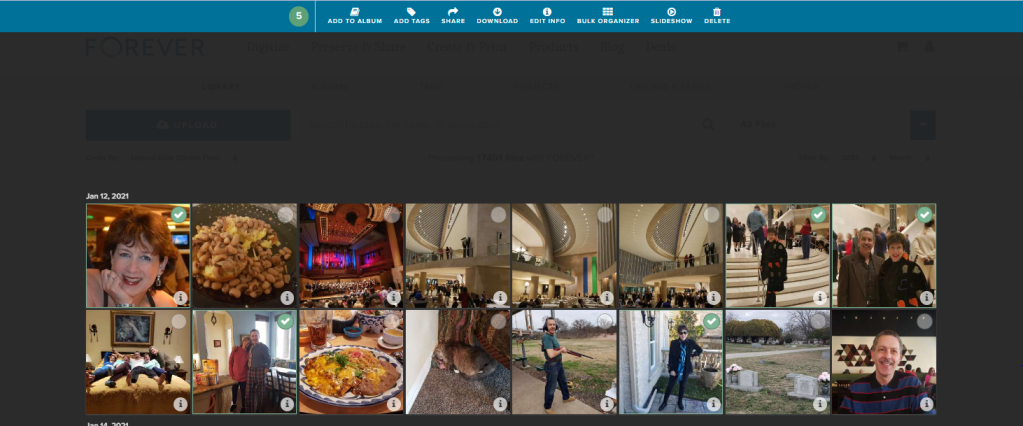
Returning to the picture at the top, you’ll notice that each individual photo has a heart and a circle at the top. The heart, as I mentioned above, allows you to mark your favorites and you can always choose to have the Library show those to you. The circle allows you to select images for curating. Let me show you.

On the main Library page, I checked a picture and the screen above opened up, giving me new choices. I went ahead and selected all the pictures I was in, on the first date available, but I could have chosen every picture of me in the library, all the pictures on that date or even just one photo at a time to work on.

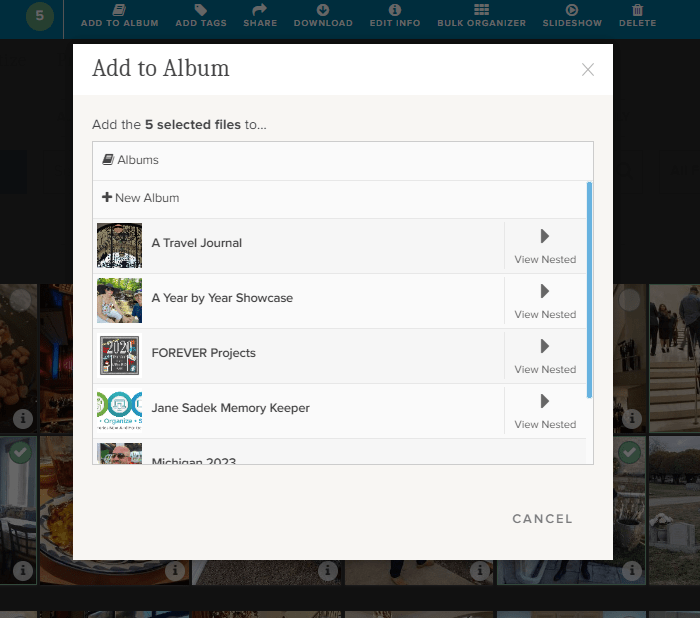
If I chose “Add to Album,” I would get this screen. It allows me to either set up a new album, add the selected photos to a top level album or with the “View Nested” arrow, I could actually add them to albums which are “nested” under the main album.

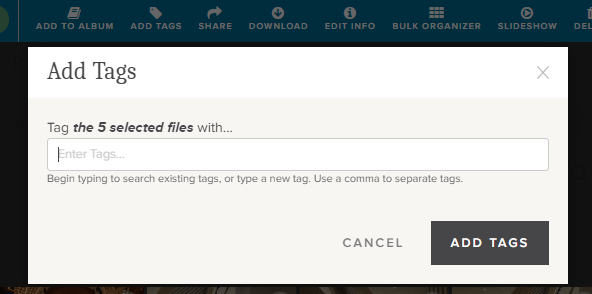
If I chose “Add Tags,” then I could add tags common to all five of those photos. Obviously, since I chose pictures of myself, I could tag them “Jane Sadek,” but you are allowed an unlimited number of tags, so people are only the beginning. And you can do more than one tag at a time, so if I had three ways of identifying all these photos, I would add all three tags. They could either be tags I had already created or I could create them using this tool.

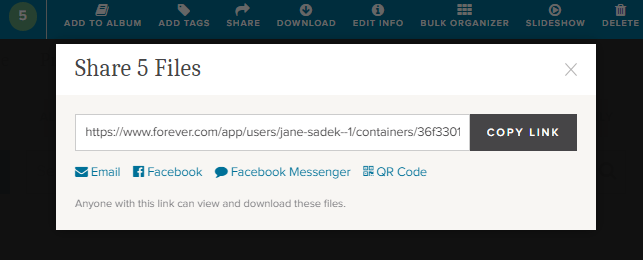
Also from the Library you can share photos with other people. You can select as many photos as you like and then either share the link which is created or create an email or a post or message for Facebook. You can even create a QR code. How cool is that!

There’s a “Download” button next and when you click it, you’ll be linked immediately to your browser. Select where you want the photos to be saved and save. You’ll have a copy of these photos on your computer.

The “Delete” button (at the far end) will bring up a screen which asks if you want to delete photos. If you do, it will put them in your FOREVER delete bin for 60 Days.

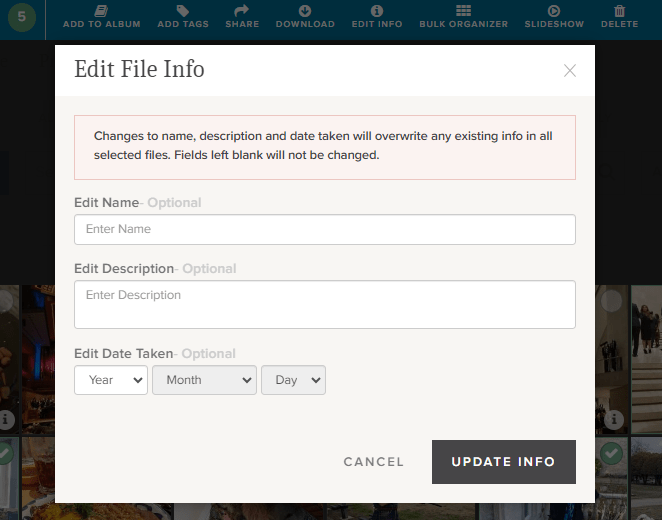
Now this is a good one. The “Edit Info” button allows you to change the basic information on a file. You know how photos come from your camera with vague names like IMG 36 or a string of numbers. Well, you can change it to a more specific title like Jane in Dallas 2021 or whatever name would be more useful.

You can also provide a description of the photo here. You could explain who Jane was, what she was doing in Dallas, what your relationship to her is – whatever you want. In fact, while the description boxes you run into with many programs have a 25 word or 100 character limit, this description can go on for as long as you’d like it to.

You can also edit or add a date. Sometimes our devices try hard to fill in blanks and provide a Date Taken which has no basis in reality.

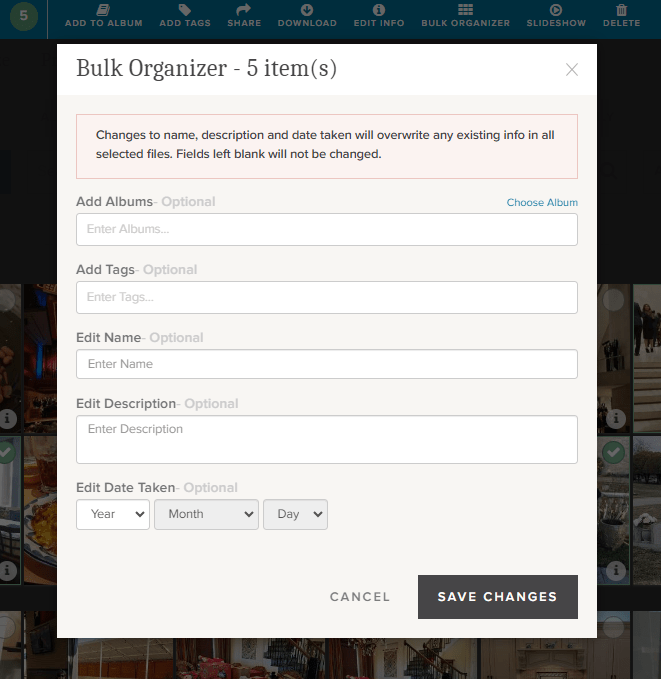
If you’re loading a whole bunch of photos to your storage, the Bulk Organizer could be your best friend. You could do the whole curating job in one fell swoop. You just have to remember that whatever you put here will override anything else you might have in the metadata.

You can make changes to all of these sections or just choose those you want.

One more choice. Perhaps you’d like to select a group of photos for a slideshow. Well, there’s a “Slideshow” button. It will autoplay whatever you’ve selected and you can even put it on “Loop” so you can play it continuously.

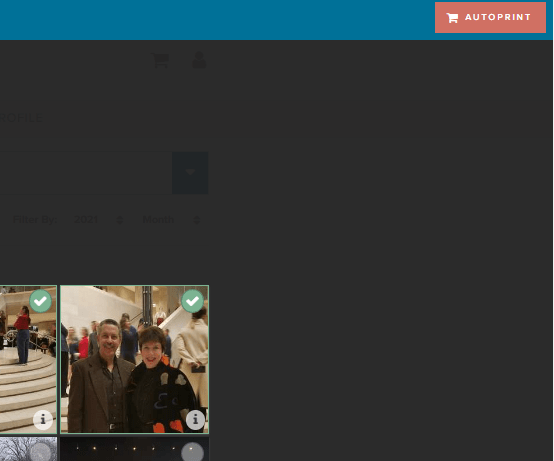
Well, there is one more thing you can do from this screen. You see that brick colored square that says “AUTOPRINT”? Well, this could be step one for your next print project. Just select all the images you want to include in a digital photobook, photogift or perhaps you’d just like to print some copies to share.

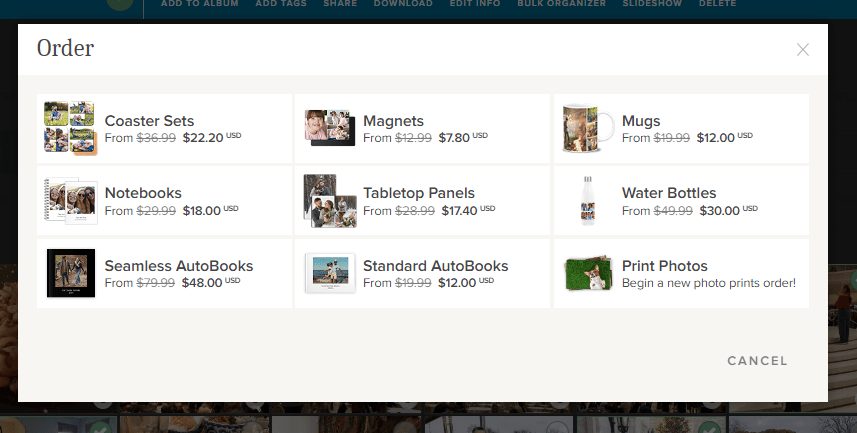
The AUTOPRINT buttons connects you directly with the various potential projects in Autoprint. That’s where FOREVER does most of the work, like magic. You select the images and the project. FOREVER will do the rest. You’ll be given the opportunity to do some minor editing, if you chose, then all you have to do is pay for it and select your delivery method and address. You can have custom projects ready in seconds!

Wrapping It All Up in the Library

Most of these same features are available in the FOREVER app, as well as on the website, as I have shown them here. You just find them in different places. Personally, I enjoy working on files in the Library when I’m at my desktop or using my laptop, but I’ve heard of people who curate their entire collection of media on their phone, sitting by the pool, drinking a cool adult beverage.

It’s up to you. If, while you are in the Library on your computer, you need a reminder about any particular images, just hover over the “i” in the bottom right of any images. A small black and white screen will pop up to show you what FOREVER knows.

And that’s all there is to it. I plan to write similar posts about Albums, Tagging and the App in the coming months, but next week we’re going to AutoPrint. Start thinking about a project you’d like to have completed quickly – like magic.