Memory Keeping 101: Togetherness for Digitization Value
Welcome to Group Box Digitization
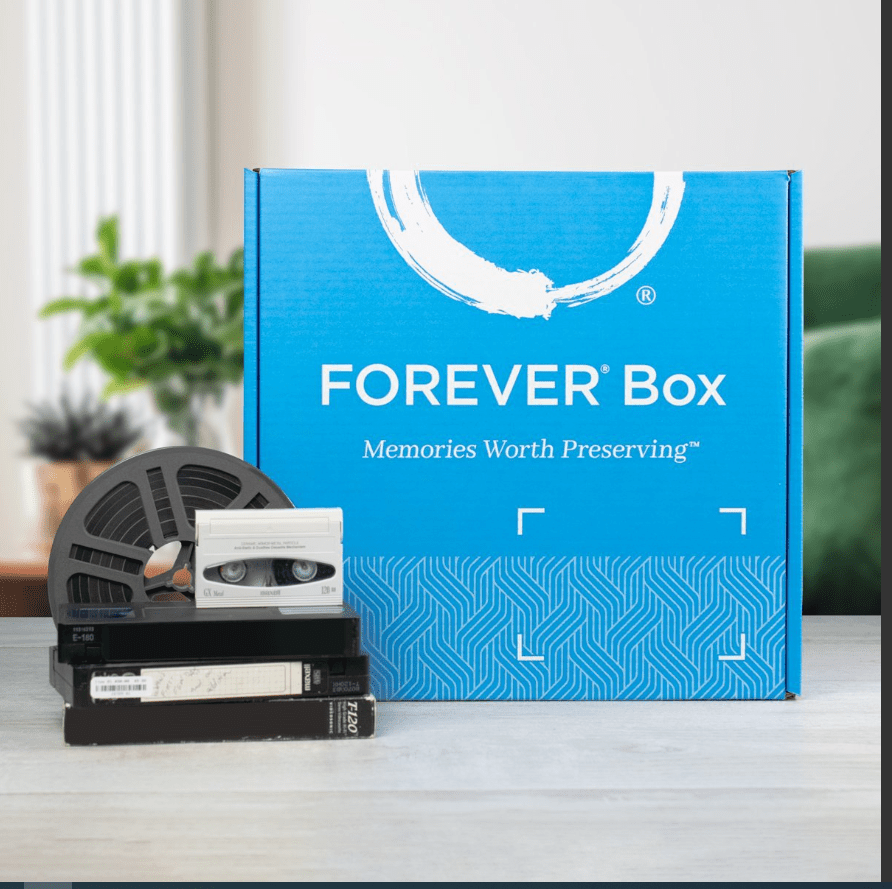
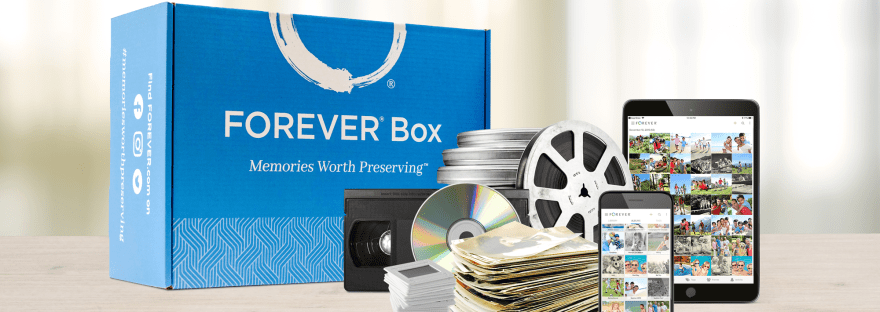
Group Box Digitization is a great way to try out FOREVER’s Digitization Process, with less expense and risk than ordering your own FOREVER Box. Though our Digitization Process is quite easy and safe, some people are intimidated. Joining FOREVER, verifying an email address, choosing a type of box, choosing a size of box and then ordering a box. It sounds like a lot to some people and for the budget-minded or skeptical, it might seem like too much of an expense or risk. Then there’s packing the box and sending it back to FOREVER. We do it every day, but if you never have, you might feel some hesitation.
See there are all those urban legends about digitization companies, most of which may have actually happened, but have nothing in the world to do with FOREVER. We don’t do any of the awful things to your media the other guys do. Turn-around time is quick, everything gets the white glove treatment, nothing is lost, nothing is destroyed by equipment etc. etc. etc., but if all you’ve heard are horror stories from customers of other media digitization companies, sending your treasures off to strangers is scary.
With a Group Box, you don’t pay a penny until your media arrives at FOREVER. I order the box and I pay for most of the shipping. A Group Box is actually a big box with four small individual boxes inside. Your individual box is smaller than a standard FOREVER box, so you don’t feel the pressure to load up the box to get your money’s worth. Send one thing and see what happens. Or load it up and enjoy the reduced shipping fees. It’s up to you.
All you have to do with a Group Box is get signed up for FOREVER and give me your stuff. When I receive the big box, I’ll pack your media and send it back. When the Group Box containing your media arrives at FOREVER, they’ll let you know. Only then will you be invoiced for the digitization and return shipping. Then sooner than you can imagine, you’ll receive notification that your digitized media is online. You can download it or even better, you can invest in FOREVER storage and have those memories ready to share for generations to come – even generations you’ll never know.
Try It! You’ll Like It!
My first Group Box was delivered to my house just the other day. I want to return it to FOREVER before Thanksgiving, so your digitization order will earn an entry in my Crazy Turkey Day Drawing for a $50 Gift Certificate and you can share your digitized memories around the Christmas tree!
For some clients, Group Boxes become a way of life. As soon as I send off their media in one Group Box, they start gathering what they want to send in the next one. For others, sampling Digitization with a Group Box was all the encouragement they needed to order their own Box and ship into high Memory Keeping gear. Maybe, the Group box is just big enough to hold the two or three items you wanted to get done and that’s all you’ll ever need.
Whatever your situation, the Group Box might be just the thing you need next for your Memory Keeping projects. Give me a call at 972-971-5263 and let’s get sgtarted!
OK, so FOREVER is a Digital Media resource that offers everything from Media Digitization to Video Streaming – but if you hang around me much, then you already know that.
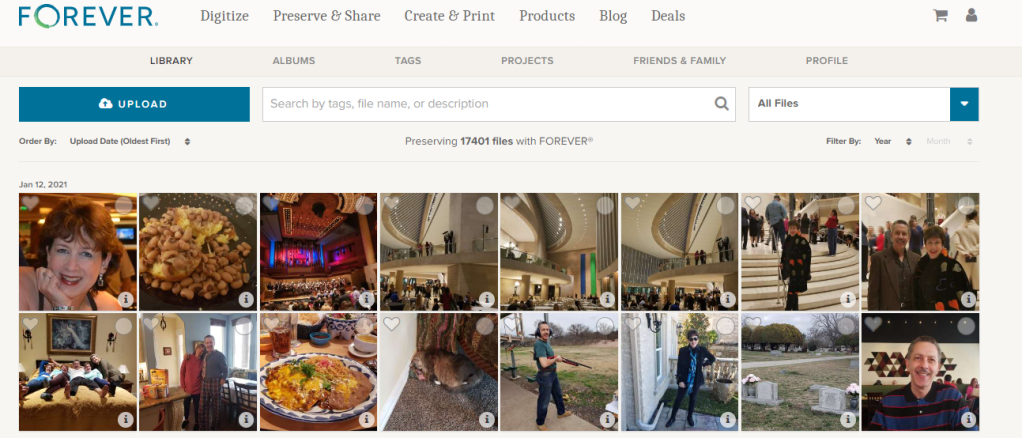
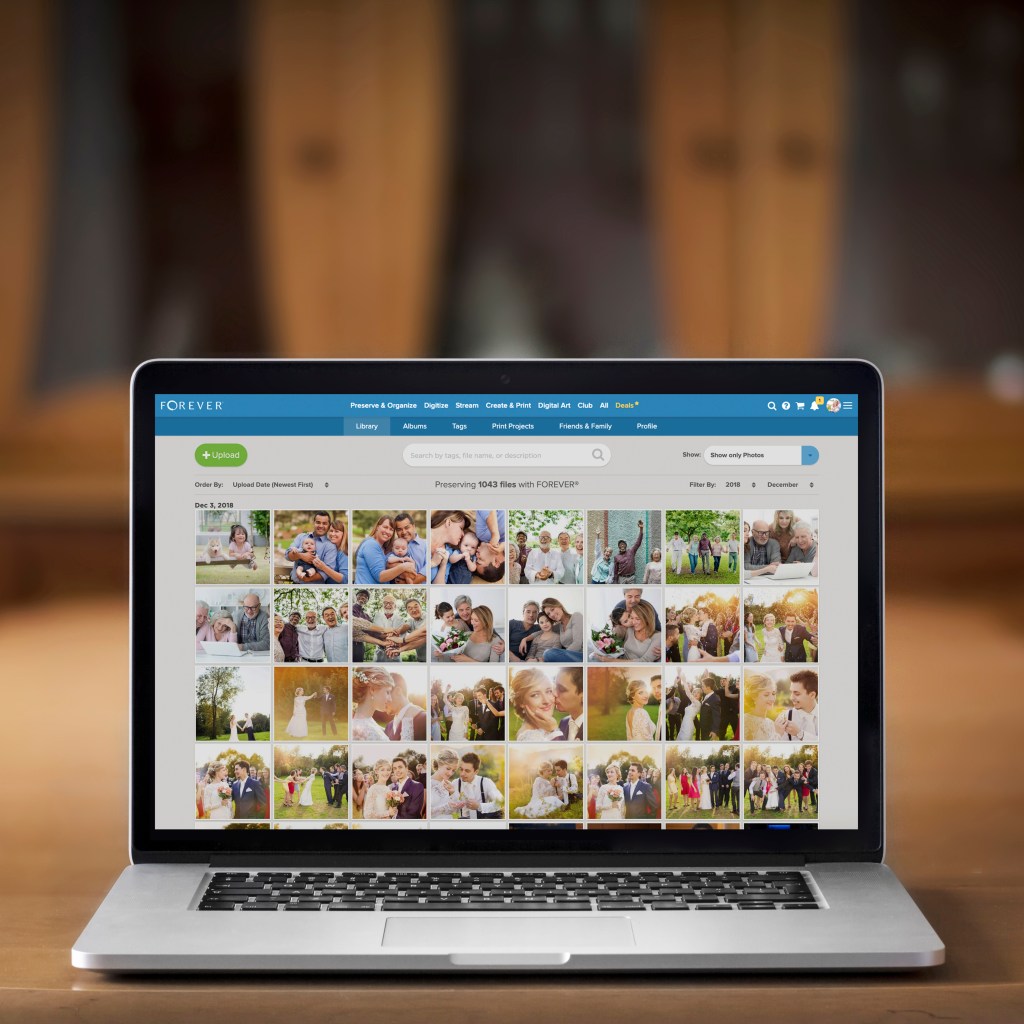
The FOREVER Library is the place where all the stuff you’ve uploaded to FOREVER hangs out. It’s not the only place. You also have albums, as well as tags for sorting and finding your photos, but the library is where everything is all at the same time. You can upload directly to the library or to your albums. It doesn’t matter.
What Can It Do?
Your library can do a lot of cool things for you, so I decided to take a few minutes to introduce you to it’s features. Obviously, the great big blue “upload” button is the one you’d use for adding photos from your computer to your storage. If you want to add photos from your phone, there’s a free app for that. If your media is hard copy, we need to talk about digitization. See last week.
Next to it is a search bar. The effectiveness of your search bar is directly related to the thoroughness of your curating. The more information you have about your photos in FOREVER, the more accurately you can search. A sampling of the search terms you could use would be dates, titles and tags, but whatever you’ve got, FOREVER will try to deliver something.
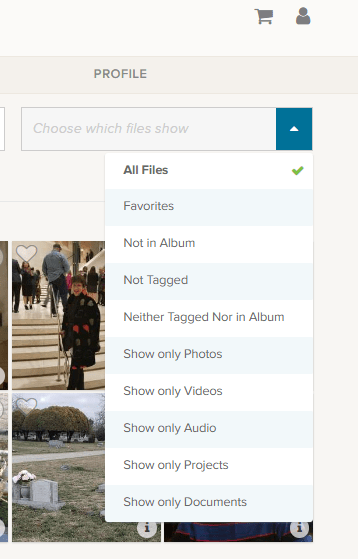
At the end of the upload and search area is a box that says “All Files”, but if you click the blue area you get these choices.
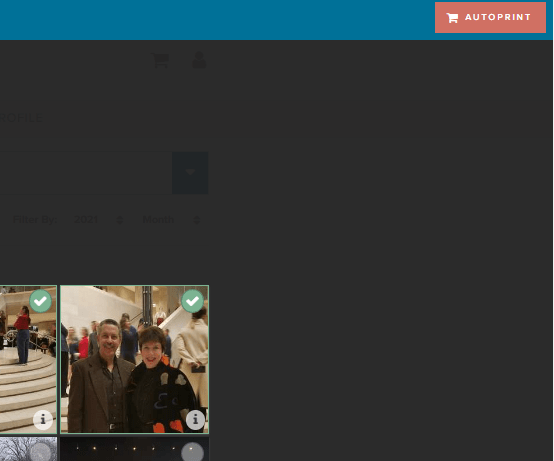
Obviously, All Files is all files. Favorites are photos you have marked with a heart. You can see an example of the heart on the left corner of the photo by the blue and white selection box.
The next are three very helpful choices as you begin to curate your images: “Not in Album,” “Not Tagged” and “Neither Tagged Nor in Album.” As you get your photos organized, labeled, tagged and such, the number of photos these choices will bring up will grow smaller.
I’m proud to say all but a handful of my photos are in Albums and all of those not in albums were taken in the last few days. I have my photos automatically added from my phone, by the app, when I take them. Then I delete them or add them to albums daily or weekly, according to the day and the week.
I’m working on the “Not Tagged”. Tagging is a great tool for searching. Some day I will have all the people and places tagged in every photos, so I can search by name or location to find any photo I want. So far, I have them all tagged as either Travel, At Home, Out & About, etc., but I have a long way to go. FOREVER recommends spending 15 minutes a day on this task and it’s a great idea.
Then there are a series of “Show Only” choices. With them you can see only photos, video or audio. You can also isolate documents in the collection. Projects are cool, because FOREVER keeps a copy of all the projects they do for you – the photobooks, photo gifts, greeting cards and such. These projects do not take up your storage space, but are always available to you.
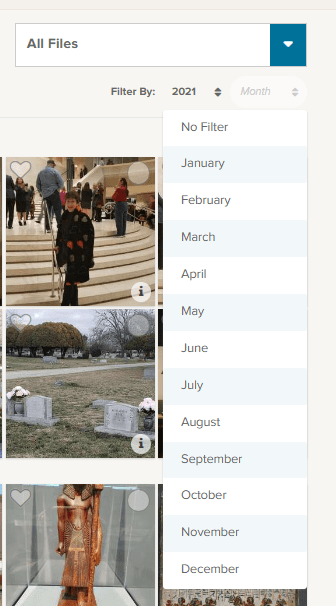
Under that selection box associated with “All Files” is a section where you can filter by both year and month. So, if you know you’re looking for the pictures of your husband’s 50th birthday, just select the year and the date of that celebration. In this image I chose 2021 for the year and have brought down the month selections.
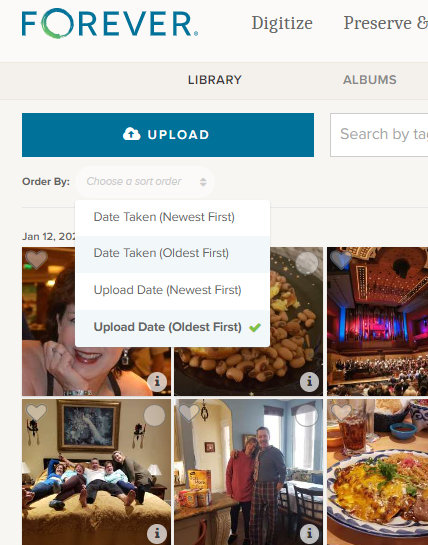
Moving to the other side, under the “upload” button, you find the “Order By” selections. I tend to leave it on Date Taken (Oldest First) because I think in chronological order, but you can reverse it and as for (Newest First) if you are looking for something taken recently.
Sometimes you aren’t as concerned with when it was taken as you are when it was uploaded and the next choices cover that.
Other Things to do in the Library
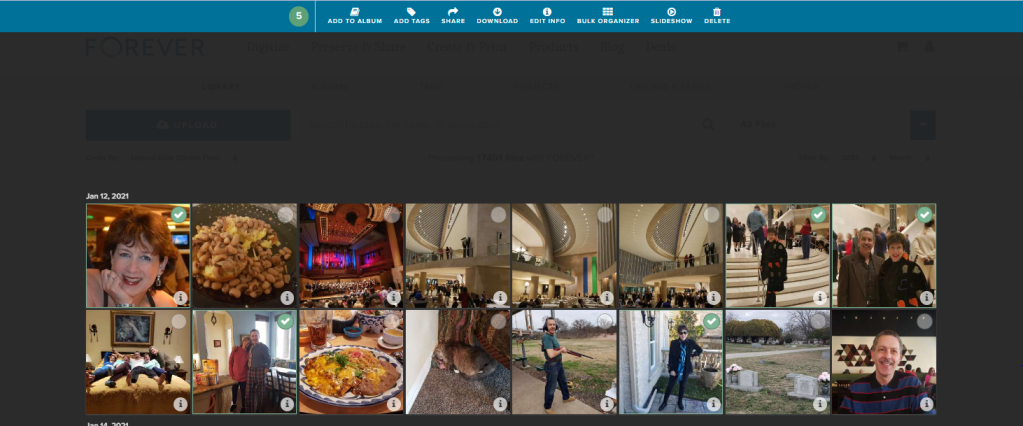
Returning to the picture at the top, you’ll notice that each individual photo has a heart and a circle at the top. The heart, as I mentioned above, allows you to mark your favorites and you can always choose to have the Library show those to you. The circle allows you to select images for curating. Let me show you.
On the main Library page, I checked a picture and the screen above opened up, giving me new choices. I went ahead and selected all the pictures I was in, on the first date available, but I could have chosen every picture of me in the library, all the pictures on that date or even just one photo at a time to work on.
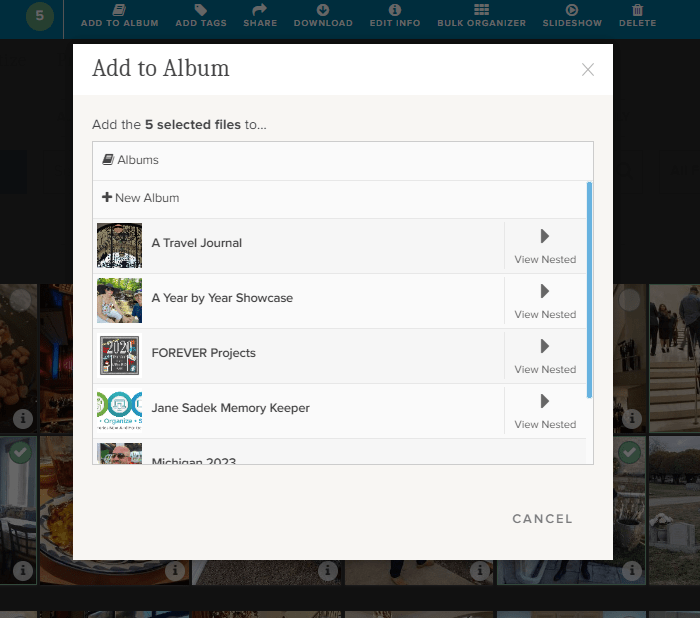
If I chose “Add to Album,” I would get this screen. It allows me to either set up a new album, add the selected photos to a top level album or with the “View Nested” arrow, I could actually add them to albums which are “nested” under the main album.
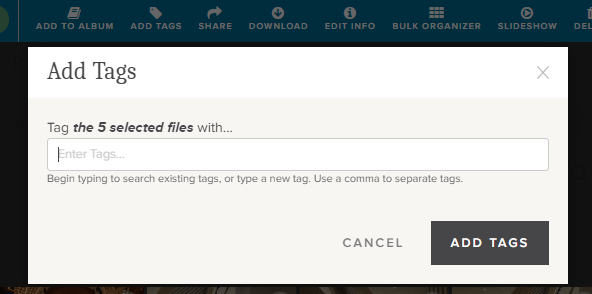
If I chose “Add Tags,” then I could add tags common to all five of those photos. Obviously, since I chose pictures of myself, I could tag them “Jane Sadek,” but you are allowed an unlimited number of tags, so people are only the beginning. And you can do more than one tag at a time, so if I had three ways of identifying all these photos, I would add all three tags. They could either be tags I had already created or I could create them using this tool.
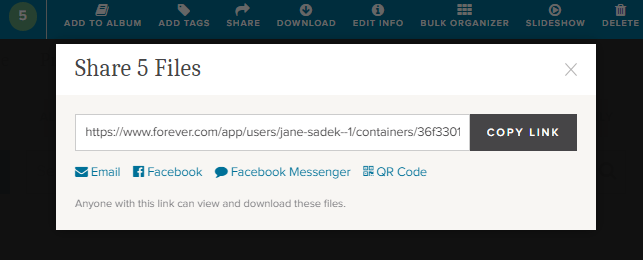
Also from the Library you can share photos with other people. You can select as many photos as you like and then either share the link which is created or create an email or a post or message for Facebook. You can even create a QR code. How cool is that!
There’s a “Download” button next and when you click it, you’ll be linked immediately to your browser. Select where you want the photos to be saved and save. You’ll have a copy of these photos on your computer.
The “Delete” button (at the far end) will bring up a screen which asks if you want to delete photos. If you do, it will put them in your FOREVER delete bin for 60 Days.
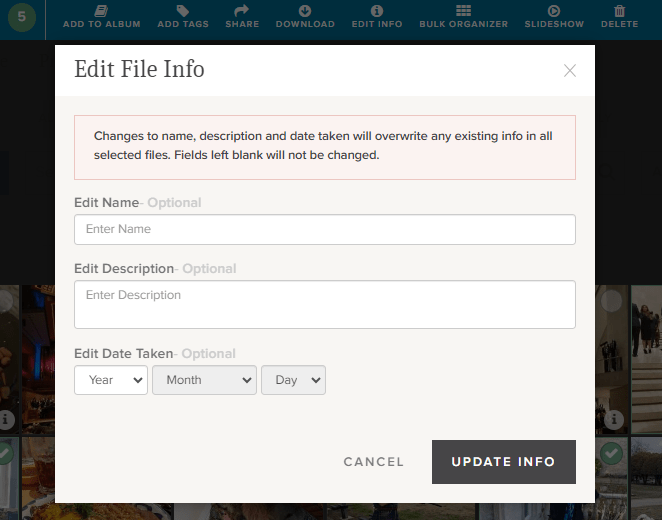
Now this is a good one. The “Edit Info” button allows you to change the basic information on a file. You know how photos come from your camera with vague names like IMG 36 or a string of numbers. Well, you can change it to a more specific title like Jane in Dallas 2021 or whatever name would be more useful.
You can also provide a description of the photo here. You could explain who Jane was, what she was doing in Dallas, what your relationship to her is – whatever you want. In fact, while the description boxes you run into with many programs have a 25 word or 100 character limit, this description can go on for as long as you’d like it to.
You can also edit or add a date. Sometimes our devices try hard to fill in blanks and provide a Date Taken which has no basis in reality.
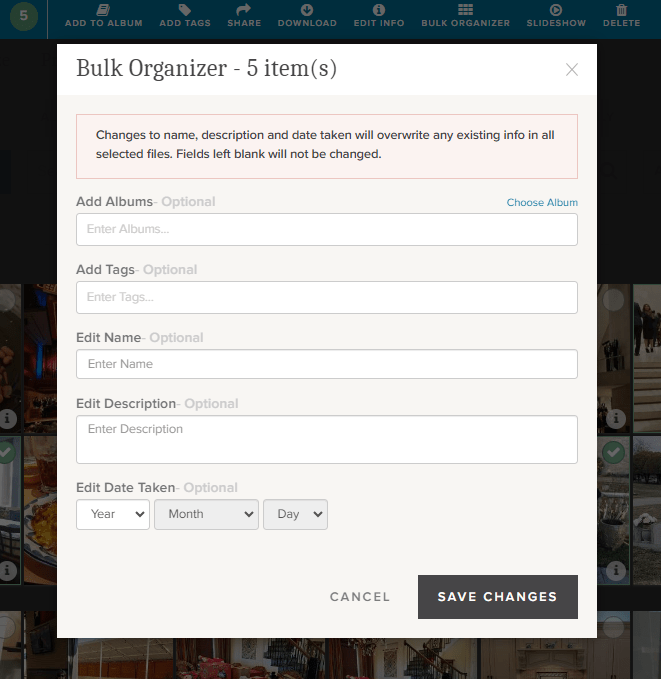
If you’re loading a whole bunch of photos to your storage, the Bulk Organizer could be your best friend. You could do the whole curating job in one fell swoop. You just have to remember that whatever you put here will override anything else you might have in the metadata.
You can make changes to all of these sections or just choose those you want.
One more choice. Perhaps you’d like to select a group of photos for a slideshow. Well, there’s a “Slideshow” button. It will autoplay whatever you’ve selected and you can even put it on “Loop” so you can play it continuously.
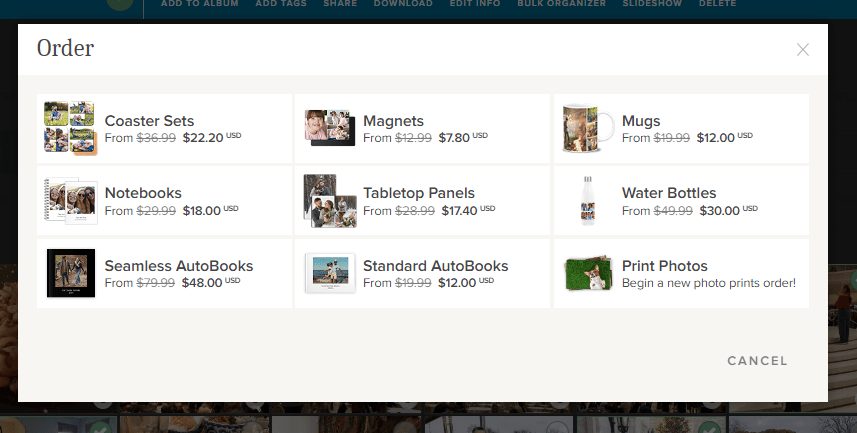
Well, there is one more thing you can do from this screen. You see that brick colored square that says “AUTOPRINT”? Well, this could be step one for your next print project. Just select all the images you want to include in a digital photobook, photogift or perhaps you’d just like to print some copies to share.
The AUTOPRINT buttons connects you directly with the various potential projects in Autoprint. That’s where FOREVER does most of the work, like magic. You select the images and the project. FOREVER will do the rest. You’ll be given the opportunity to do some minor editing, if you chose, then all you have to do is pay for it and select your delivery method and address. You can have custom projects ready in seconds!
Wrapping It All Up in the Library
Most of these same features are available in the FOREVER app, as well as on the website, as I have shown them here. You just find them in different places. Personally, I enjoy working on files in the Library when I’m at my desktop or using my laptop, but I’ve heard of people who curate their entire collection of media on their phone, sitting by the pool, drinking a cool adult beverage.
It’s up to you. If, while you are in the Library on your computer, you need a reminder about any particular images, just hover over the “i” in the bottom right of any images. A small black and white screen will pop up to show you what FOREVER knows.
And that’s all there is to it. I plan to write similar posts about Albums, Tagging and the App in the coming months, but next week we’re going to AutoPrint. Start thinking about a project you’d like to have completed quickly – like magic.
MEMORY KEEPING 101: FOREVER FOUNDER SHARES HIS WHY
What’s FOREVER?
FOREVER is not yet one of those companies everybody knows about, yet I think a day will come when it will be the go-to place for all things digital-memory-keeping. Until then it’s one of my missions in life to be sure people don’t lose their memories from lack of knowing about FOREVER.
You can’t be around me very long without finding out I care about your photos and have all the tools you need to preserve them for generations to come. That’s especially true if you read this blog.
Why FOREVER?
The founder of FOREVER recently took the time to share the reasons why he has devoted the rest of his life to this company. In this short (4:40 minutes) video he tells what led him to discover the need for the company and why he feels it is such an important tool for anyone and everyone to use.
No one could be more eloquent on this subject, so today, instead of writing a few more hundreds of words, I’m sharing this video. Please take the time to watch it. I think you’ll agree with me, the time has come for FOREVER.
Glen Meakem, Founder & CEO of FOREVER shares his why
So, what do you think? Are you ready to make FOREVER your memories’ home?
MEMORY KEEPING 101: THINK OF IT AS A RED CARPET FOR YOUR PHOTOS
What Do You Have & Where Do You Want It?
When I ask this question, most people have only the vaguest idea of where all their memories are and they really don’t have a really good idea of where they want them to be, but together we come up with a plan to find everything and get it someplace safe for generations to come.
When the bulk of their memories are on traditional media, like photographs, slides, video and such, the answer is easy. It has to be digitized! While there are a number of ways to go about getting from a pile under the bed to organized folders on FOREVER, it’s a pretty straight forward process.
If those memories are on their phone instead, well that’s easy, too. The FOREVER app can upload everything on your phone to your FOREVER storage while you sleep. Then if you like, it will continue to do so into perpetuity, so you never have to worry about losing your photos, even if you lose your phone, it gets stolen or if somebody runs over it.
When those photos are on a computer or hard drive, getting all of that organized on FOREVER was doable, but could be a long drawn out procedure. In truth, the bigger your mess was, the easier it was to transfer. If everything was carefully organized, there was not really any way to transfer all of that organization to FOREVER without doing it all over again. BUT NO MORE!
Valet Is Here!
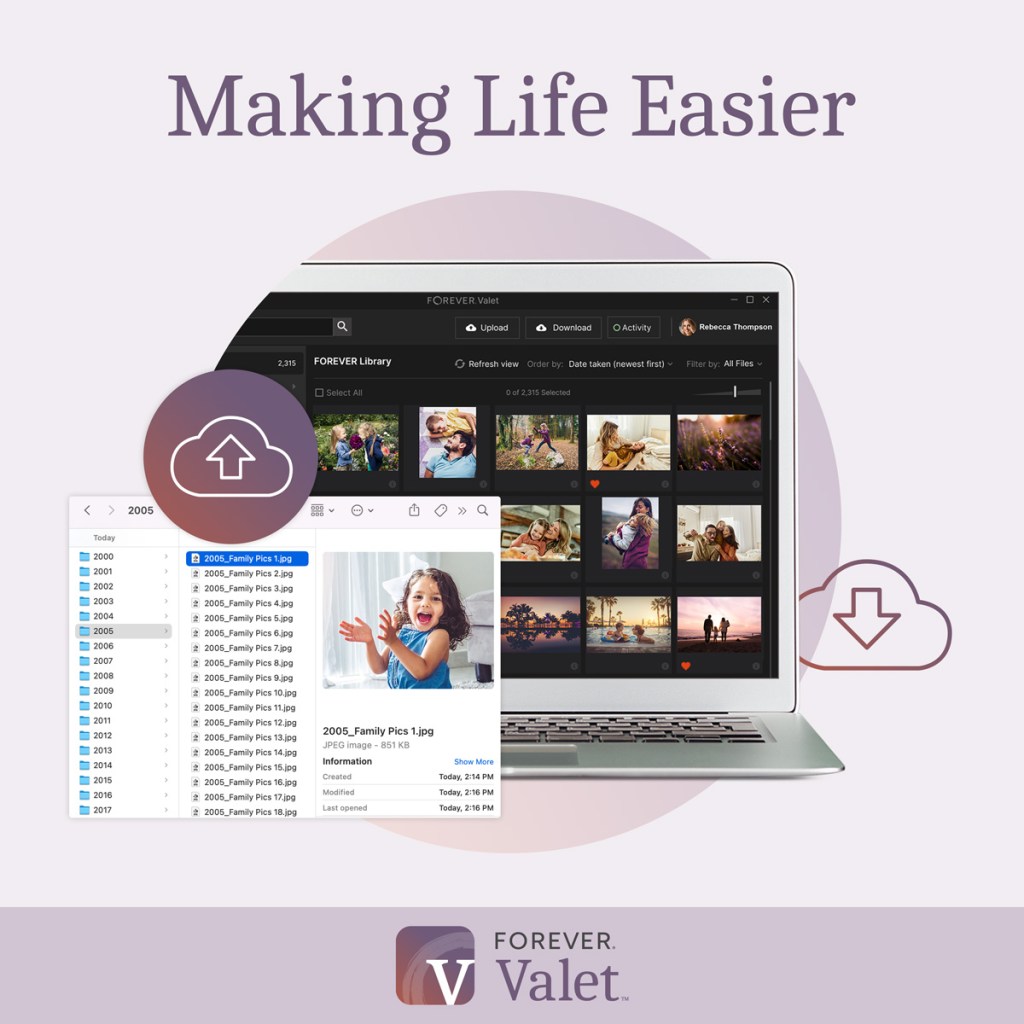
Valet is a magic carpet ride for your photos. Thousands and thousands of photos can be moved from your hard drive, computer or laptop, with a few clicks of a button. If your photos are nothing but a great big mess, that’s great news! With Valet, they can arrive in FOREVER in nice neat folders, sorted by year and date, with all the duplicates pulled out. However, if your photos and videos are already in nice neat little folders on your device, then FOREVER will just move the whole thing – organization and all into FOREVER – BAM! It’s done!!
What’s even better is that you get to decide what kind of Valet customer you want to be:
Free One Month Trial – If all you want to do is a one time upload from your computer to FOREVER, then this is the route for you. There is no limit to the number of photos you can upload to FOREVER (or download from FOREVER, for that matter), you just have to do it all in 30 days. You can use it to get photos off your computer, off your husband’s computer, off your parent’s computer or wherever. The Valet Trial is associated with your FOREVER account, not a particular device.
Yearly Subscription – If a month is not enough, then how about a year. For only $59.99 you can do all the things mentioned above, but instead of 30 days, you have a 365 of them. That’s pennies a day.
Professional Subscription – If for any reason you have access to more than one FOREVER account, then perhaps you’ll need the professional version. It was designed for professional organizers, but there are other applications as well – such as if you are part of a family, team or other group using FOREVER for a project. The professional subscription is $299.99.
Here’s the good news. You can use your Club Dollars to buy it and it qualifies for the Club Discount. How can you resist?
If Valet sounds like something you’d be interested in, let’s get together and talk about how it can help you. It’s a very exciting product!!
Most people in the world wouldn’t recognize this car, yet it’s one of the best there is. It also is not a Ford, Chevy or Chrysler. Companies and politicians hustle for name recognition, because when most of us are in a pinch, we go for what we know. But I ask you – is that the best way to make a decision? Not if you want a luxury sports car. And certainly not if you’re about to digitize your memories.
If someone would deliver this car to your home, would you quibble over what the label said? Chances are you wouldn’t. You’d just want to grab the keys and roll. If you can get the best digitization service for the same price as a mediocre one, wouldn’t you want the best? When it comes to Memory Keeping, there are a lot of names which might immediately come to mind, but does that mean they are the best or does it just mean they have the biggest advertising budget?
The digital memory keeping company I work with, Forever, is not a household name. When it comes to digitization, there is another company which is on the radio and TV all the time with their boxes. Most people would recognize their name, but I’m not going to say it. There’s also another company which promotes their boxes as being in the same league, but are they? (And what about that company you saw in a strip center or some guy in your networking group that turns your photos into video? Talk about not in the same league!)
So, when these other digitization box companies are more familiar to most households, why should you go with Forever? I’m glad you asked!
Level of Care
While we’re on the subject of cars, think about the Mercedes Benz AMG line. You may not even know it stands for Aufrecht, Melcher and Großaspach, but chances are you have a clue those letters mean you’re looking at a Mercedes Benz superior to those which don’t have that designation. Among the reasons it’s better is the tag which shows who built your car over a matter of days, as opposed to other cars which are built on an assembly line by multiple people.
When it comes to digitization, those other guys are one-and-done. They slap a video or film in the machine, run it through and move on to the next one. That’s not the case at Forever. Eric Napier, Forever’s Director of Digitization explains the difference, “FOREVER will run each tape or film 2-3 times to get the best capture possible, edit the dead spots, clean up the tracking, video and audio as much as possible. We also provide editing, batch color correction and photo repair services that other companies don’t offer.”
Sounds kind of like the difference in a MB AMG and a Ford Pickup doesn’t it. A Ford Pickup is a great vehicle. It’s just not made with the level of care of a MB AMG. And here’s where my analogy falls apart. Regardless of which vehicle you might want, most of us can’t afford an MB AMG, but we might squeeze together enough for the Ford Pickup. But if you could pay the same for both, which would you choose? (Yes, if you own a ranch or a farm, you’ll go for the pickup truck, but you know what I mean.)
In the world of digitization, the sticker price of our small digitization box is virtually the same as the one-and-doners – in fact, there was a two cent difference on the day I checked. Now which digitization box would you prefer? Prices are subject to change and there are different specials going on at any given time, but generally, you are going to find that FOREVER and those guys are going to be in the same ballpark price wise, but FOREVER will always be a world apart in the level of care they offer.
Where’s My Stuff?
On the front end of the service, all the box services look a lot alike. They ship you a box. You fill it and send it back to them. Then your stuff is digitized. Each service does things a little different. Some include bags, some don’t. Some use a list, while others use barcodes. PaTAYto, PaTAHto. It doesn’t really matter.
As I’ve already mentioned, the prices are pretty much the same, including the shipping, but here’s the difference. FOREVER’s shipping price includes sending your stuff back to you – theirs doesn’t. That means if you want any or all of your hard copy items back, you’re going to have to pay extra, if you can get them back at all.
So, shipping differences aside, where does your digitized content end up. Well, all the companies are happy to provide you with a DVD or thumb drive, but is that what you want? I can tell that’s what the other guys want you to have. That’s because they are building a book of business for the future. Just as DOSS, Fortran, VHS, floppy discs and Betamax have all gone obsolete, the day will come when those DVD’s and thumb drives are a thing of the past. They’re banking on being around to “digitize” you all over again. Not FOREVER.
We’re hoping you’ll buy your own little piece of the Cloud, so when obsolescence sets in, you can enjoy the promise FOREVER makes to you. They will reformat your images to whatever format comes along when jpg, png, mp4 and their friends are a thing of the past. Never heard of anything like that? That’s because nobody else offers it!
Now, those other guys offer a piece of the cloud, too, but all they are going to do is rent it to you. We’ve all gotten so used to paying for online services by the month or by the year that many people assume that’s what FOREVER is offering and wow, do our prices look ridiculous. Take a second look, those guys are offering to lend you a little space with all the compressing, deleting, sharing, mining and selling that’s comes with that. In this case, it’s FOREVER that’s one-and-done. You pay us once for storage and you’re done forever!!
Look What I Found!!
There’s yet another reason you’ll prefer FOREVER over everyone else. If you have a shoebox of snapshots and a few VHS tapes, anybody can do those. Maybe not as well as FOREVER, but they can do them. Now, what if what you want digitized is larger than 8.5X11 or it’s 16mm or audio or it’s a scrapbook or you’d like to get your DVD’s uploaded. Fuhgeddaboutit! If it’s not plain and simple (see “Level of Care”) they aren’t interested. See the more kinds of things you want to digitize the more kinds of equipment you need and your staff will have to be trained on them.
One of the members of my team told a story one evening. FOREVER called her to apologize, because they were going to be behind schedule delivering an order. The reason for the delay was the fact that the object was so obscure they didn’t have the right machine. Who else but FOREVER would find out what they needed, find the right thing and buy it – at no additional cost to the customer? Everybody else would just say, “Gee, I’m sorry,” but that’s because they are in the digitization business and FOREVER is in the memory keeping business. It’s just what we do!!
Get the Best for Your Memories
So, FOREVER is like an exotic sports car, but it costs about the same amount as that family sedan in your neighbor’s drive way. I’d be driving the MB AMG, wouldn’t you? The color of your digitization box does matter.
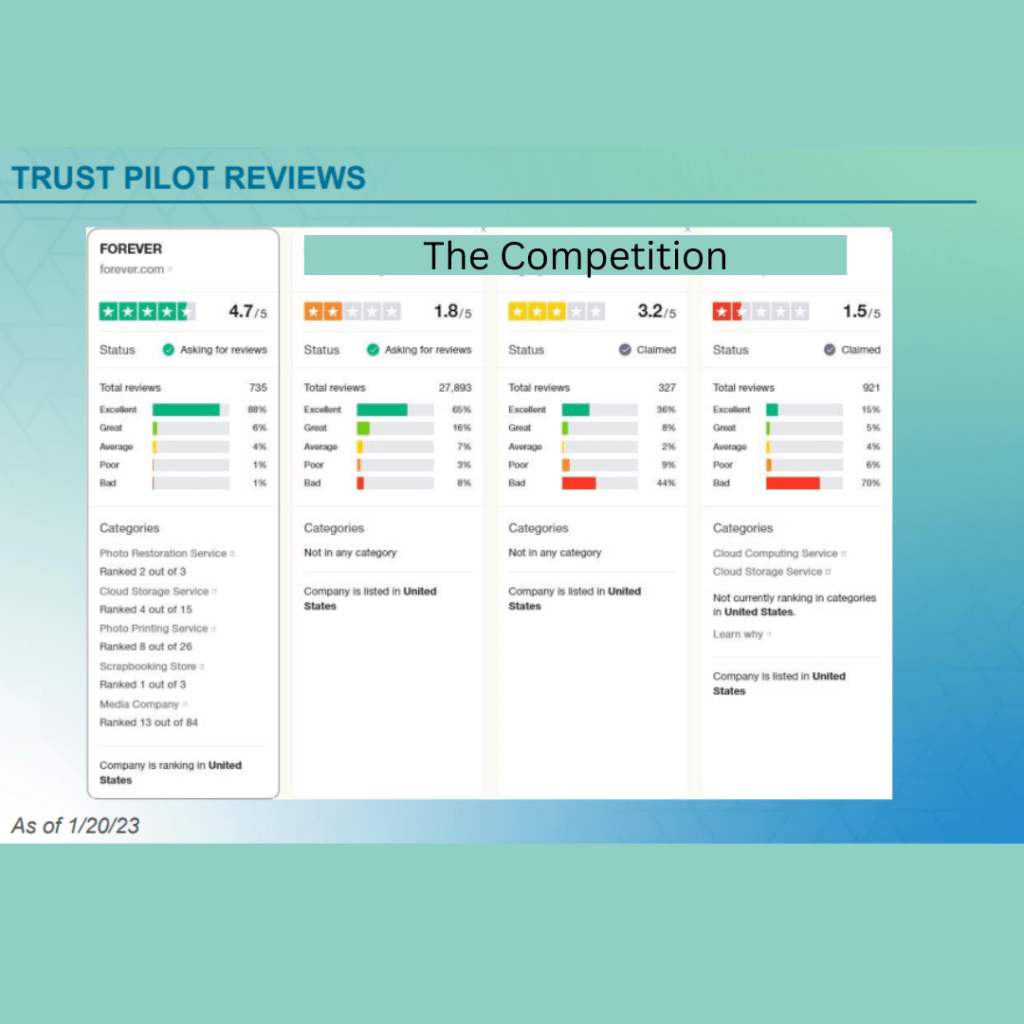
So, perhaps you’re still wondering about what I’ve said. Maybe you don’t think you can believe me. Well, how about Trust Pilot? Do you think you can trust them?
Here’s what they have to say about FOREVER and the competition. I’ve blanked out their names, so as to avoid finger pointing, but no one comes near to us.
Since the color of your box does matter, let me help you get the Blue FOREVER box for your digitization needs.
Thanks for coming by. Drop in next week for more NYC, more Memory Keeping 101 and another Weekend Report.
On Friday night I met some of my favorite people at a place which is destined to become one of my favorites, Rosini Vineyards. Friday night usually finds me safely tucked away at home, but this week I was invited to join a group of girls from my real estate world at Rosini’s, a couple of our favorite agents and some folks from the lending and title world. Names and stories will be forever a secret, but I can tell you about Rosini’s.
I have no idea why I haven’t been there before. I have been invited to several occasions hosted there, but I’ve always had more demanding things on my schedule. I added it to my list of things I wanted to do, but hadn’t gotten there, yet. Now I want to go every Friday. The thing is, the space is small and you need to make reservations and making reservations is one of my challenges. Hubby likes spontaneity and doing things by the seat of our pants. In his defense, when we do make plans ahead, something usually comes up and we’re scrambling to get to whatever plans we made.
Do plan on making a visit, however. Get out your phone and make a reservation, because it is so worth it. The ambiance is great, the food is good and so is the wine. They had a musician entertaining and he was smart enough to play in the background so there was good (and hysterical) conversation around the table.
I ordered a Charcuterie Board for us and it was both lovely and tasty. Most of my friends were sharing bottles, but I wanted to taste more than one wine. They don’t show it on the menu, but they also offer tastings. I’d hoped to be served a flight, but instead you have to keep going back to the bar to get the next taste. I didn’t buy up cases of anything to take home, but most of the selections I tried were quite nice.
Favorite Things on Saturday
I woke up early on Saturday (big surprise, right) and hit the scrapbooking studio (another big surprise). I’m doing my travel album for 2022 and the best news there is that there was travel. Covid kept us close to home. We weren’t afraid of the disease. We just didn’t want the hassle or the travel photos with of masks. I’d finished up New York and set out on our Club Med Sandpiper Bay trip and before the weekend was over, I had worked my way to St. Louis for Joyce Meyer.
But that was just the tip of my Memory Keeping iceberg. FOREVER was having their Family History Online Event. I wanted to watch it live, because if I didn’t, where else was I going to find three hours in my schedule. Some friends and customers were planning to come join me, but a variety of things got in the way. Still I hooked my laptop up to the TV and settled down for a wave of ideas.
There was a lot of good information there, but most of it really wasn’t applicable to my own memory keeping journey. I’m not a genealogy enthusiast, I no longer have an older generation to video and I haven’t quite embraced video as my own media. I get it. FOREVER’S Family Research Services are amazing and video freaks need their own streaming service. I’m not those people. At least not yet.
However, there was more. They walked through the digitization process and the advantages of their storage. They also dug deep into the Auto Print products, which are amazing, but just not in my thing. What I did walk away with was a new appreciation for QR codes. I’m always challenged by which photos and words to put on a Christmas Card. With QR codes, I can not only put a QR code which will lead to an entire file of photos (or a video), but I can actually add an audio file which would allow me to say what I wanted to say without having to fit all the words on the card. Watch this space later this year and see if I do it!
My ever faithful bestie did come by after her dance lesson for the final sessions of the Family History Online event and we shared a pizza. The information relit her desire for memory keeping which is the whole purpose of the event in the first place. It would be hard to get my fire to burn any brighter.
Amazing Sunday
Sunday was an orgy of things I love to do. It started with Bill and I visiting my next door neighbor’s church. She is very active at First United Methodist Heath. While attending church is one of my favorite things, church shopping is not, but that’s what we’re doing now – again.
FUMAH is a happening place. I thought their photo-focused Lenten activities were genius and they have an active Women’s Group. There were several other things I really liked about it, but it’s not exactly the right fit for me. It’s a little on the liturgical side of things and the sermon was expository and topical, rather than exegesis. The music was lovely and they mix contemporary with traditional music, but they also broadcast the words on the wall without any music. I hate trying to follow some song I don’t know without being able to look at the music. I know this is the direction most churches are going, both in teaching style and music, but I’m looking for the unicorn.
From there we went for coffee and Bill wanted to try Dunkin Donuts. We both get tired of Starbucks, but Dunkin is not the answer. They don’t have a coffee fixing place. They just add the sugar and cream themselves, but not to Bill’s taste. The hot chocolate was a mix and they don’t have low fat or skim milk. However, the conversation was great and I did love my sausage and cheese kolache.
Next up was a visit to the Dallas Museum of Art and a stroll around Klyde Warren Park. We’d almost gone to the museum last Sunday, but had gotten distracted wandering around Deep Ellum and Uptown. Probably a good thing, because a new exhibition was opening and it might have been crowded.
I’m a member of the museum at the Ambassador level, but I’m not much of an Ambassador, because they’ve gone digital and I never know what’s going on. There was a time when my mailbox was full of all kinds of invitations and magazines from the museum. I loved it – but now everything comes to my email and email is just a lot of noise. They send me too much, so I just delete most of it and then when I want to know something, I have to go looking for it. If a subject line does catch my eye, then I have to print it out and it’s going to be in black and while and then it’s going to get lost on my desk, because it looks like everything else. So, the DMA & I aren’t really friends anymore.
Anyway, I did go and for some reason, they wanted to scan my membership card when I came in. I wonder what they scan if you aren’t a member. Then I had to go stand in line to get my tickets to the new exhibition. That is one good benefit of membership. I can take several people a day to the museum and get them into the exhibition free. You should call me and I’ll take you to this new exhibit, it’s gorgeous.
The name of the exhibit is Saints, Sinners, Lovers, and Fools: 300 Years of Flemish Masterworks. While I loved the art, I thought the first half title was hyperbolic. There are images related to all those nouns in the exhibit, but it is Flemish Masterworks, so there is no scandal. To my disappointment, the information on the wall is fairly sketchy and they have no audio tour or QR codes for more information. So, if you are not a fan of classical artworks, you’re going to have a hard time connecting the title to the artwork. You’ll be strolling through quickly and heading somewhere else.
However, if, like me, you love to see gorgeous figurative art from the past, you’re gonna love this one. Breathtaking altarpieces, intriguing portraits and even some vanitas. We went through it, double back to see it again and then enjoyed the third view also. After a quick stop in the gift shop we headed out to the park.
It seems there have been changes every time I go – probably because I don’t visit it often enough, but they’ve actually added new fountains at one end and upgraded the playground at the other. There are still lots of food trucks, but the restaurant is now Mi Cocina. Our visit was leisurely, but we didn’t really linger very much, because NorthPark was up next.
I love NorthPark. I wish I had a life that allowed me to go every day. I want to shop all the stores, look at all the plants and art and eat at all the places. Bill never wants to go, because it’s impossible to find a parking spot, but this time was different. They have reserved parking for low-e and hybrid cars. Bill has a hybrid. We parked next to a handicapped space and were right in front of an entrance.
I had a birthday gift card to spend and I wanted to go to Pandora. I upgraded my basic bracelet, because the arthritis in my thumbs just didn’t like the one I had. Now, I can get it off and on easy peasy. It will get a lot more wear. Their new thing is rose gold, but thank you, I’ll stick with my silver.
We enjoyed our stroll through NorthPark, especially the kid’s art they had on display in front of Macy’s, but I was dismayed to discover few things are where they used to be. It’s a big game of fruit basket turnover and while I didn’t recognize many of the new players, I fear some of my favorites my be out of the game, because something called Blue Nile is going up in the Brighton spot and I can’t find Brighton on the directory.
I came home from NorthPark very happy with my weekend. Next week we’ll have more New York, more Memory Keeping and another Weekend Report. Please come back to see me!!
MEMORY KEEPING 101 – STORING AND CURATING YOUR PHOTOS ON FOREVER
Why Forever?
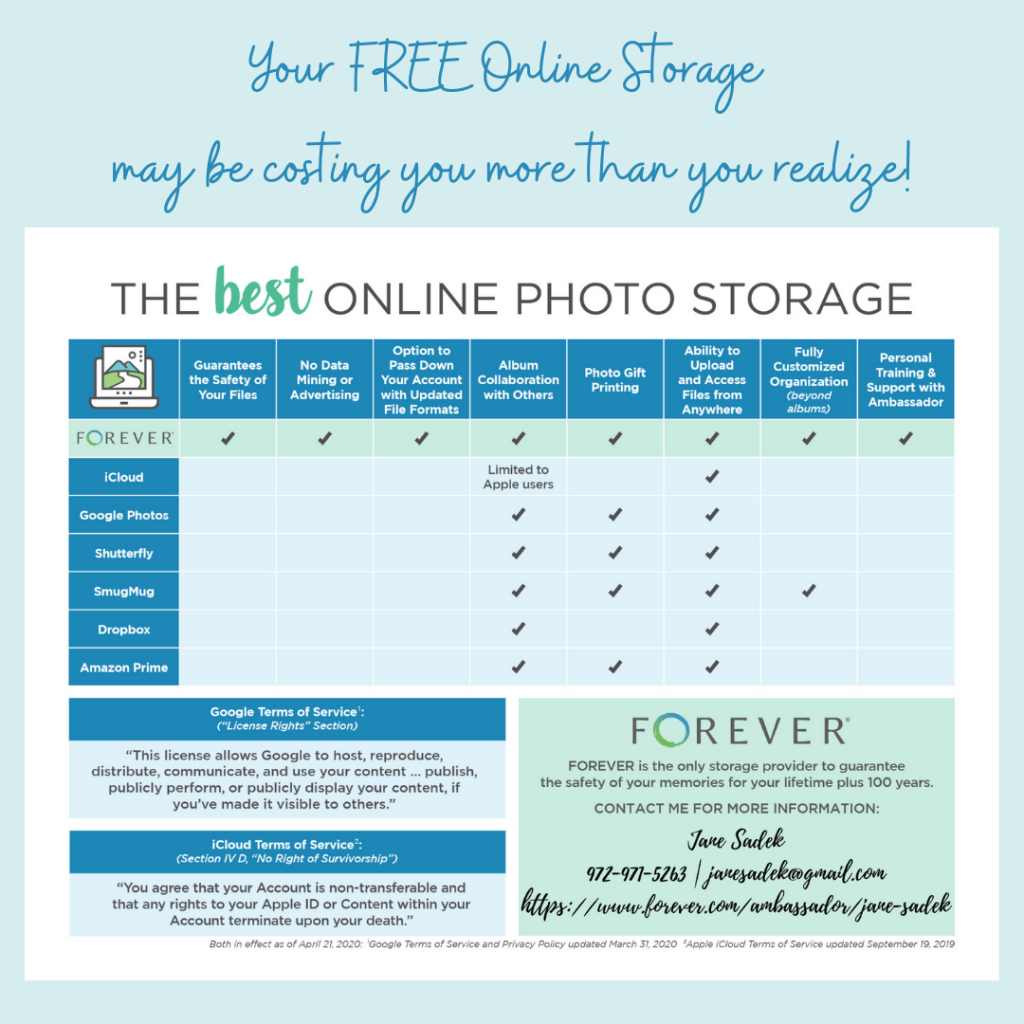
Back in November I introduced you to Forever Storage and the reasons I think it is best way to store your photos online. If you would like to review that post, click here, but here’s a chart that spells it out.
Perhaps the best part of a Forever account is that you buy your storage rather than rent it. Think about the difference in a landlord and a tenant. With other storage systems, your photos are merely tenants on someone else’s property. The landlord makes the rules. The landlord has a right to enter the property. The landlord is responsible for maintenance and you’re screwed if they don’t do it. If the landlord changes the rules, you either have to live with it or you’re stuck with the new rules. The list goes on.
At Forever, you own the property your photos are stored on. You make the rules about your photos. No one can go in there without your permission. No one can change the rules without your permission. You can do as much or as little as you like with your photos. It’s yours.
When you’re renting space for your photos, if you don’t make your rent payment, you lose access to your photos and what’s more, they don’t even have a plan for you to pass on your space, even if you want to. At Forever, you buy your space, so it belongs to you and whoever comes along after you.
Fully Customized Organization
I’ve used a lot of different online storage products in my life and while they will give you all the space in the world for a small monthly fee, your options for setting up your library are always limited. When I first started using Forever, I didn’t even know how to appreciate the flexibility I was given. It took me a while to create a system that worked for me, because it’s not just a matter of fill in the blanks.
It didn’t take long for me to get the hang of it and now I love it. Forever keeps a library of everything you upload to the site and with a few query words you can get to exactly what you want, You also get to set up whatever albums you want and then nest albums under there to as many levels as you want. Each album you access quickly tells you how many photos are in that album and how many nested albums you have within that album.
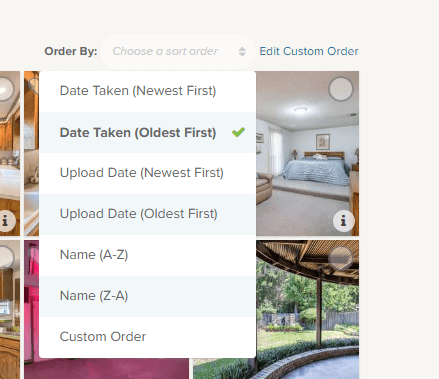
Within any album, you get to chose the order you want them in and if none of the automatic choices work, you can create your own.
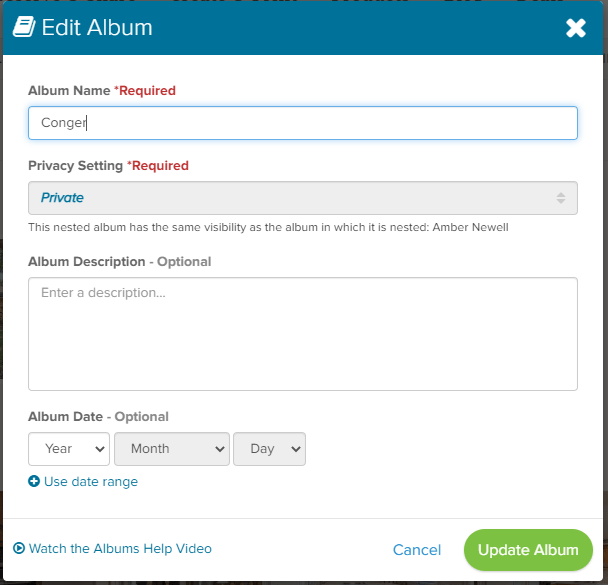
As you set up your albums and nested albums, you can create a name for them and then you can fully describe what the album is about and if you want, put a date or date range on it.
Tagging is a breeze, but that’s only the beginning of the ways you can identify your photos with Forever.
Most online photo storage picks up information from your metadata and you’re stuck with whatever is there. Not with Forever. You have total control.
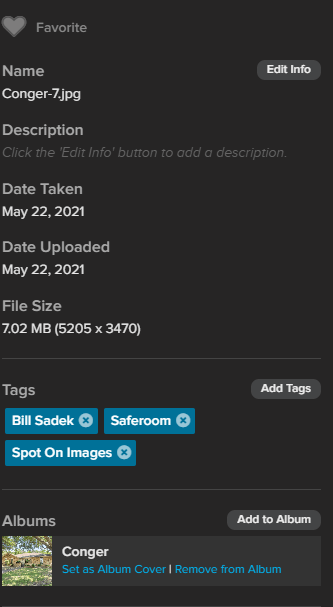
Just because it was Conger-7 wherever you got it from doesn’t mean it has to stay that. If the date taken is really just the date you uploaded it, you can change it to the real date.
Want that photo to be in other albums? That’s easy and it doesn’t take up more of your storage to do that.
And the description? None of that 25 words or 100 character stuff. Tell the whole story. Don’t want to key it in, fine, go to the app and use voice to tell the story. You’re not going to run out of space.
Sharing
While Forever will stay out of your storage and diligently protect it from others who shouldn’t be in there, it’s got all kinds of ways to share your images when you want to do so. You can share a single shot or an entire album or even your whole account. You can also set a level of sharing for the top level of each album. You might have some items you want to stay private, just for you. Friends and Family could have their own level of access to other albums. Then you could even have public items you opened up to whoever wanted to see them, so it’s great for all kinds of applications like teams, schools or other groups.
There are other ways to give the people you want access to your files. You can collaborate with others in you albums and decide what level of collaboration you want them to have. You can set up a manager and allow them to act as you if you want. You can also designate who you want to have access and control of your files and which files after you. Try that with icloud!
Auto Uploading
Have you ever wished that every photo you took on your phone or added to Facebook could be captured permanently somewhere so you never have to worry about losing them? Forever can do that. Or you can do one or the other of them. Up to you!
So What’s the Bad News?
If you’ve been using a free service or have been paying $1.99 per month for 100 gigabytes of storage, the bad news at Forever is sticker shock. The first time you hear how much 100 GB of storage costs at Forever it is going to be a difficult pill to swallow.
I must be honest with you. While I love Forever storage, I have to admit I don’t like all the rigmarole it takes to figure out how much you have to pay. On the day in November I wrote this post, with all the various deals and discounts available, you could get 100 GB of storage for $387.98 or something close to that (according to how you stacked the deals). However, the retail price for 100 GB of storage is $1000. I think that’s crazy, but someone smarter than me dreamed up this pricing and if you’ve ever shopped at Macy’s or Kohl’s, it will seem familiar. (This dress is $400, but today with a coupon you can get it for $19.99.)
So, while $387.98 is a lot, it’s really not fair to compare it with the $1.99 a month at Google, for instance. Google can rent that space for that price, because they owe you nothing in the way of privacy or security. They also know they will be able to make money off your photos with data mining and advertising. If they lose all your pictures, that’s OK. They can compress your photos anytime they want, so they will take up less space. If they want to delete your photos, all they have to do is send you an email and if you miss it, that’s tough. They also have your permission to use it for whatever else they want to.
On the other hand – all you will ever pay for your Forever storage is $387.98. After 16 years, when you’ve paid Google that much (if they don’t raise the price, which they most likely will) you’ll still have to go on paying something every month and if your kids take over the account, then they will have to keep paying as will your grandkids, great grandkids or whoever of your decedents is still around – if Google is still around. Remember VCRs? Which reminds me, that you Forever account will be upgraded for free to whatever formats come around after .jpg or whatever has disappeared.
Chances are at this point I have confused you more than I have helped you, so give me a call and lets review this. Whenever you decide you want to purchase your storage, I will research the deals at the time and make sure you get the best of them.
Come back next week and we’ll dig beyond mere storage and see what else Forever has to offer.
TRAVEL HERE – NCFCA AT DBU, AT MY DESK & TAKING DOWN THE TREE
National Christian Forensics and Communications Association
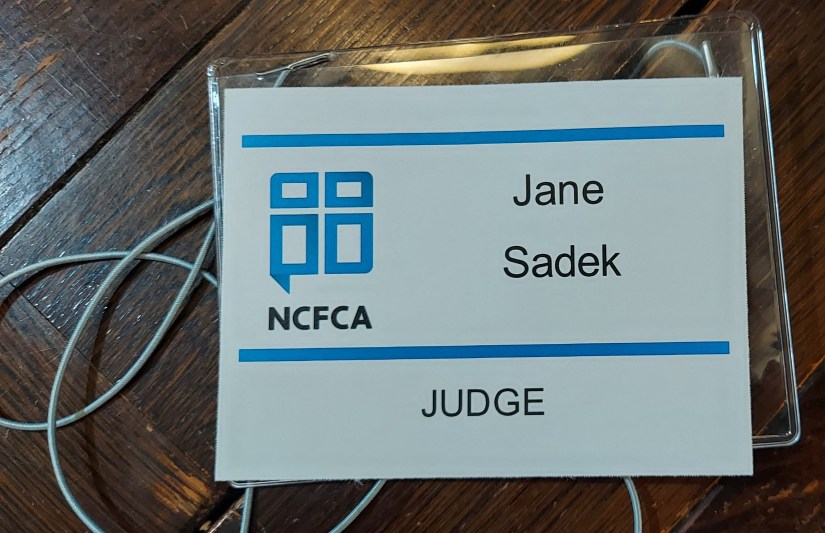
Once upon a time, before there was a Spot On Images and we lived in Dallas, I used to attend Dallas Christian Writers Guild. Somehow that ended up taking me to Denton for a group of writers I can’t remember the name of. While I was never able to sell my novel, I did make some great friends. One of them, Rachel, invited me to judge at a speech tournament. By then, I’d figured out the market was focused on paranormal young adult fiction and wasn’t interested in a simple romance at a retirement center. I’d also moved to Wylie.
Rachel suggested I give judging a whirl. The tournament was going to be in Wylie at a church almost around the corner from our rental. She had no idea I’d been on the speech team at Bryan Adams High School. NCFCA, to which her children belonged, just needed community judges. She thought I’d be good at it, because she’d observed me critique the works of my fellow writers. I was flattered at the time and agreed to do it.
Now, I’ve got to admit. These kids blew me away. I’d belonged to the National Forensics League back in the late 60/early 70’s. My fondest memories of the time was a trip to a Houston tournament in Jimmy Johnson’s red Impala convertible. After our sponsor threatened our lives if we went to Galveston, we, of course, snuck out and went to Galveston. It was 10 minutes on the beach and we had to head back, but the exhilaration of the outing stays with me, even today.
The home-schooled members of NCFCA are dead serious about their craft, unlike us crazy public school kids, who just wanted a reason to get away from home. Don’t get me wrong, we had some really great people on the speech squad, who would walk away with all the trophies, but most of us were just there for a good time. NCFCA members are all there to compete!
Anyway, I loved the experience and have continued to volunteer every time I can. We moved to Rockwall and I discovered many of the families in the church participated in NCFCA, but that’s really not my primary motivator. I really just love the kids and love the experience of the speech tournaments. If you are the least bit intrigued by it, I think you should follow the link above and give it a try. They have a tournament over in Ft. Worth in March. I’d love to have someone to carpool with.
Last weekend they had a tournament at Dallas Baptist University and even though I was fighting with allergies, I went ahead and judged, because I love it so. I was not disappointed. It took the whole day. I judged four events and the commute was substantial, but I loved it.
Bill was not amused. I left the house at 8am and got home after 9:30 pm. The allergy symptoms I had been fighting were winning the battle and I was miserable, but my faith in the upcoming generation was renewed. I have hope things are going to be better in the world when these guys take over. Come with me in March and let’s help the next generation blossom!
Digital Photobook Project
If you read this blog at all, you know I’m all about scrapbooking and I have a business devoted to it, but I also offer digital solutions. I booked a new digital assignment which needed a quick turnaround, so I was afraid starting it from scratch would take too long. I decided to create the photobook from one of the gorgeous templates Forever has on their site, but that was totally new to me, because I usually create photobooks from scratch in Artisan. As if that weren’t challenging enough, I also decided to use the album planner in the Historian program.
I had assumed there was some sort of integration between the Historian album planner and the photobook templates on the Forever site. What is it they say? “Don’t never assume nothing.” Yes, I found the album planner to be a great tool, but it would have been an even better tool if I could have clicked a few buttons and automatically populated the template.
My other challenge had to do with saving the template in some format which would let me stop somewhere along the way. I knew there had to be a way, because few people can sit down and do a whole album in one sitting. After exhausting all the methods which made sense to me and losing a couple of starts, I had to call customer service for some help. I am happy to report in a few minutes I had talked to someone very knowledgeable who had all the answers I needed. The solution was easy, just not intuitive.
I finished the photobook and got it ready for my client to proof. However, I do have several integration innovations to suggest to Forever. The photobook templates are lovely, the Historian album planner is a great tool and Artisan is an amazing scrapbooking program. However, these three products need to be able to shake one another’s hand. Integration of their products is one of the big jobs at Forever, but Job One is always the security of the online storage. What might seem simple or apparent as a product feature isn’t going to happen until the Forever engineers are 100% certain it won’t compromise the storage. So while I might fuss a little bit, I’m happy Forever does things the way they do.
Taking Down the Tree
Client’s rush order out of the way, the Christmas tree standing in my living room was the next challenge. I usually go to church on Sunday mornings, but this week I was just too puny to do so. Yet, I was also feeling too good to sit on the sofa and vegetate, so I started the job. I gave it a good three hours and got about two thirds of the way through before I ran out of steam.
Then my bestie came over and we indulged in one of our favorite comfort foods, chicken pot pie! Later Bill dragged me to Olive Garden for dinner. He had a plan to maximize his monetary investment while feeding both of us. Good job Bill. We may be eating Olive Garden to go orders and leftovers all week, but you proved just how much food you could get for under $50!
The Christmas tree project was Job One for me on Monday. It’s time to get over the holidays and get back to real life. Come back next week for more adventures of Jane. Wednesday is Travel Talk and we’ll be talking about some Southwest challenges which happened long before the recent meltdown and Thursday we’re talking about what it costs to build a scrapbooking page. Looking forward to chatting with you!


 jane sadek