
Memory Keeping, Photo Organization, Photo Organization Coach, Photography, Scrapbooking

The Backbone of FOREVER Storage

MEMORY PRESERVATION: LEARNING THE BASICS OF FOREVER STORAGE – The Gallery

FOREVER’s Main Menu

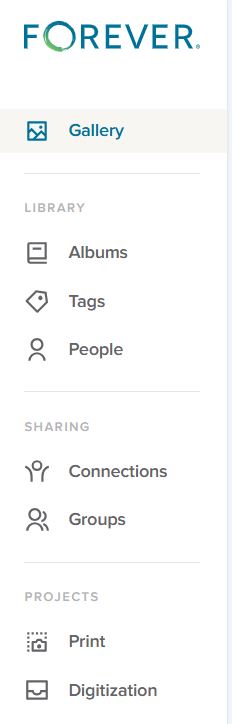
The menu you see on the right is the basic menu of your FOREVER Storage. Whenever you are in your personal storage account, this is what you will see on the left hand side. Some of the terms may seem familiar to you from other websites you’ve been on and chances are the uses are similar, but let’s make sure they actually mean what you think, because originally I assumed I did, and I was wrong.

The Gallery

In FOREVER land, all of your photos, videos and documents live in your Gallery. You have other tools like Albums, Tags and People to organize your access to these images, but the images don’t actually go there. They stay in the Gallery.

I didn’t understand that at first. I thought the Gallery was a place and Albums were a place and I didn’t need the items in two places. So, after I uploaded the first photos and put them in an Album, I deleted them from the Gallery. WRONG! Then I had an empty Gallery and an empty Album.

Thankfully, the Delete Bin stores deleted items for 30 days. I restored those I’d deleted to the Gallery, added them back into the Album and realized I’d learned an important lesson. Galleries on other sites work the same way, but I wasn’t familiar with them, because the only place I’d stored photos in the past was on my computer.

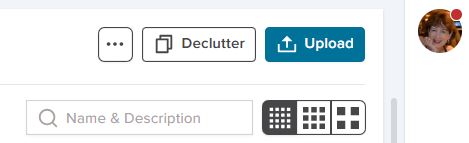
Images are added to the Gallery in two ways. In the upper right hand corner of the Gallery page is a blue Upload button to add images manually or the images can come there through the free FOREVER app, which can be set to automatically synch with Storage. Whether images are added manually or automatically, the Gallery will automatically sort them by the Date Uploaded (Newest First).

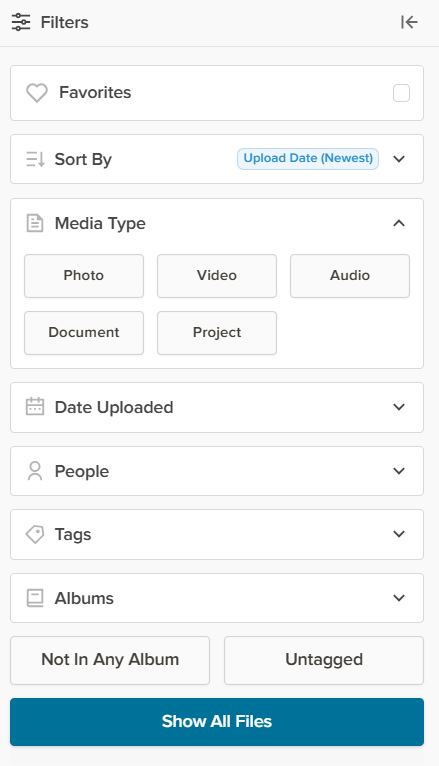
Beneath the word Gallery on the left side of the page (next to the Main Menu) there’s a Filter button and it will open up the Filter Menu, (illustrated below) which allows sorting by a wide variety of values.

The Favorites button will hide all images which have not been selected as a Favorite. Any image can be made a Favorite by double clicking the image to open the Lightbox and once there clicking the heart in the top row.

The Sort By button tells FOREVER how you want to see the images in your Gallery. As mentioned the automatic choice is Date Uploaded (Newest First). The other choices are Date Uploaded (Oldest First), Date Taken (Newest First), Date Taken (Oldest First), Names (A-Z), Names (Z-A), and File Size (Largest) or File Size (Smallest). At first you may wonder why they have so many choices. In part, that’s because people have different preferences, but the more I use my account, the happier I am FOREVER gives me so many choices.

Sorting by Media Types shows only one type of media at a time and the selections are Photo, Video, Audio, Document and Project. Date Taken allows you to pick a Date Range, from 2 days to whatever you need. People, obviously allows only images of the person you choose to show, but you will have to have set up people albums to select them from (which we’ll talk about another time). Tags works the same way as the People filter, but with Tags rather than People. Albums works like People and Tags with the Albums you set up.

The bottom two buttons – Not In Any Album and Not Tagged – are my favorites, because I try to keep my images organized in Albums with Tags. With those buttons I can quickly see how far behind I am, because it will show me just those images I need to work on.

Now, the real magic happens when you start getting fancy. You can mix & match the filters, choose more than one person, pick a date range and more – all at once. The more you narrow it down, the fewer images you see.

We’re almost through, but before I finish, I wanted to show you these last few buttons on the Gallery Page.

The box with the three buttons let’s you View a Slideshow. Now you can see why the filters can be so great. You could select just the images from a vacation you just had, hit the slideshow button, sit back and enjoy. The box will also give you automatic access to the delete bin, if you need it.

Declutter is something for another day, but it’s a great tool, and I’ve already told you how to use the Upload button.

The search bar allows you to search by text for a photo. Let’s say you know you had several photos you named “Bob’s Graduation”, but you weren’t sure exactly what album they were in. Just type “Bob’s Graduation” in the box and it will find the images.

That bar with the dots in them selects the size of the images in the Gallery. The more dots, the smaller the images. The less dots the larger. You’ll love that the thumbprints show the full image with orientation, not just some sliver or portion.

Memory Keeping, Photo Organization, Photo Organization Coach, Photography, Scrapbooking

Three Ways to Create #2

MEMORY SHARING: THREE WAYS TO CREATE PROJECTS #2

The Many Templates of Create & Print

Last week we navigated to the AutoBook Section of the FOREVER site. The first options shown (unless you’ve used the filter) will be AutoBooks. You select the photos and AI does the rest. This this feature is not unique to FOREVER, but you’ll find it easy to use and the resulting photo books are gorgeous.

Today we’ll once again go to Create & Print and select Photo Books, but this time we’ll skip the AutoBooks and look at all the template options. As with all Create & Print, you can choose your photos from your device or from your FOREVER storage. These beautifully designed photo book templates offer many cover choices and go from minimal page decor to fancy. I’m guessing you’ll be overwhelmed, so let’s start with the filter!

The Filter

Once you consider book size, cover selection and all the other options you have with FOREVER’s Create & Print Templates, you have literally thousands of choices to use for your project.

The FILTER BY Button addresses the basics. What size do you want your photo book to be? Will it be a Standard book or Deluxe Seamless? Will it be a Hardback or Soft Cover album? You can even let FOREVER know if you’re looking for a particular color palette or Black & White.

THEMES tells FOREVER what style of book you’re looking for. Classic, Modern or Rustic? Are you remembering a wedding, travel or holidays? These are just a few and you can mix and match. Perhaps you want a classic theme for a holiday wedding. Just check the boxes which apply to your project.

Next is another style question: # OF PHOTOS per page. Maybe you’ve got a series of school portraits and you want to put one on each page. Maybe you want more than one photo on the page, but you’re still looking for simple elegance. Few Photos would be your choice. Maybe you’ve just gotten back from the cruise of a lifetime and you have hundreds of photos for every port. You might be interested in Many Photos.

The final button is FEATURED. If you leave it at that, it will show you the default page – the way FOREVER decided to display the choices. However, click on it and it will toggle between Most Popular and Most Recent. Most Popular shows what most people select when they’ve used the filters you have. Most Recent shows you the newest designs in FOREVER.

Personalize

When you click PERSONALIZE after choosing the basic parameters of your photo book, you’ll be taken to the template of the book. First, you’ll customize the cover design with your colors, your fonts and your photos. Then page by page, you choose! FOREVER has selected a template for each page and if you’re in a hurry, maybe you just want to load your pictures using the page templates they selected. However, you can also choose a template from the 100 or so available page templates, each differing in style, number of photos, title and journal box. There’s also the option to add a QR code linked to a FOREVER file. You won’t have that option with the fish and the fly.

Once you’ve chosen a template with the number of photos you want to include on a page, you customize any Titles with your own words and fonts. Same with the journaling boxes. Do it your way!

If You Find the Templates Limiting…

Create & Print Templates are designed to make the creation of a photo book easy, but some of us want more control, because we just can’t be satisfied. We like a page template, but we’d like it better if it had a larger journaling box or no title or we need one more photo on it. Or maybe you just feel like you’d like to have a little more decoration on the page. Guess what! You’re not a Create & Print customer. You’re looking for Artisan 6, just like I was. Come back next week and let me tell you about my addiction.

FOREVER's Front Door
Memory Keeping, Photo Organization, Photo Organization Coach, Scrapbooking

Beginning at the Beginning

FOREVER's Front Door
Here’s where to start

MEMORY PRESERVATION: SUPPORT BEGINS ON THE VERY FIRST PAGE

FOREVER’s Front Door

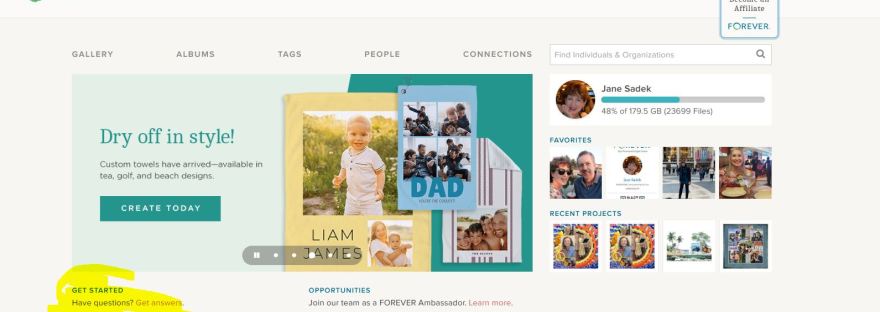
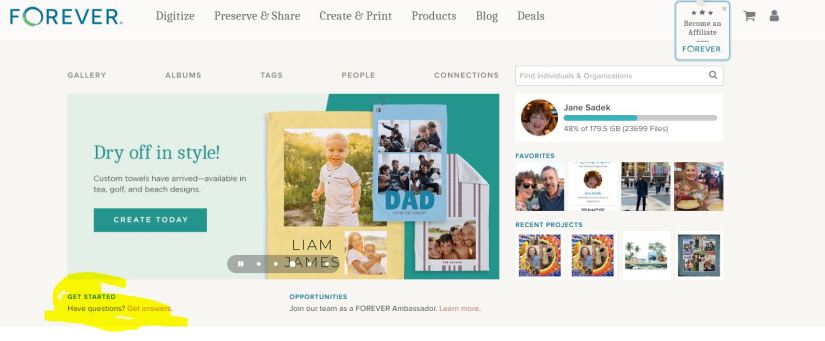
What you see above is the first page of the FOREVER website. The top row (Digitize, Preserve & Share, Create & Print, Products, Blog & Deals) are links to other pages on their website. Further along they invite you to a career with FOREVER, offer a shopping cart and then there’s the avatar which you can hover over to take you to various places in your FOREVER account.

You do have a FOREVER account, right. It’s free and they give you 2GB’s of storage so you can play around with things AND when you join, you get a $20 off coupon (if you verify your email address). So, if you haven’t joined, here’s the link: https://www.forever.com/ambassador/jane-sadek .

As you get to know FOREVER, you’ll find out that everything is hyper-connected. You can get to pretty much anything you want to get to on their site or yours with just a click, maybe two, and usually, because all of us are wired differently, there’s more than one way to get there.

For example, there are a couple of ways to get from FOREVER’s front door to the pages of your account. One way was the avatar on the top row. The second row is direct links to various parts of your account (GALLERY, ALBUMS, TAGS, PEOPLE & CONNECTIONS). (Then there’s a search bar to help you find other FOREVER people. Just type in their name and see if they are on FOREVER also. We’ll talk about Connections and Groups, later. I just wanted you to know what that was.)

Below the links to your pages, there’s a slideshow to show you some highlights of things to come. The one you see in the image above introduces FOREVER’s new towels. Yes, you can make personalized beach towels, sport towels and tea towels! That’s just the latest thing FOREVER has introduced.

GET STARTED

Now we’re where I wanted you to go. See, how under the slideshow I’ve highlighted “GET STARTED | Have Questions? Get answers.” Well, “Get answers” is a live link which will take you to the page I’ve inserted below. Let’s see what’s there.

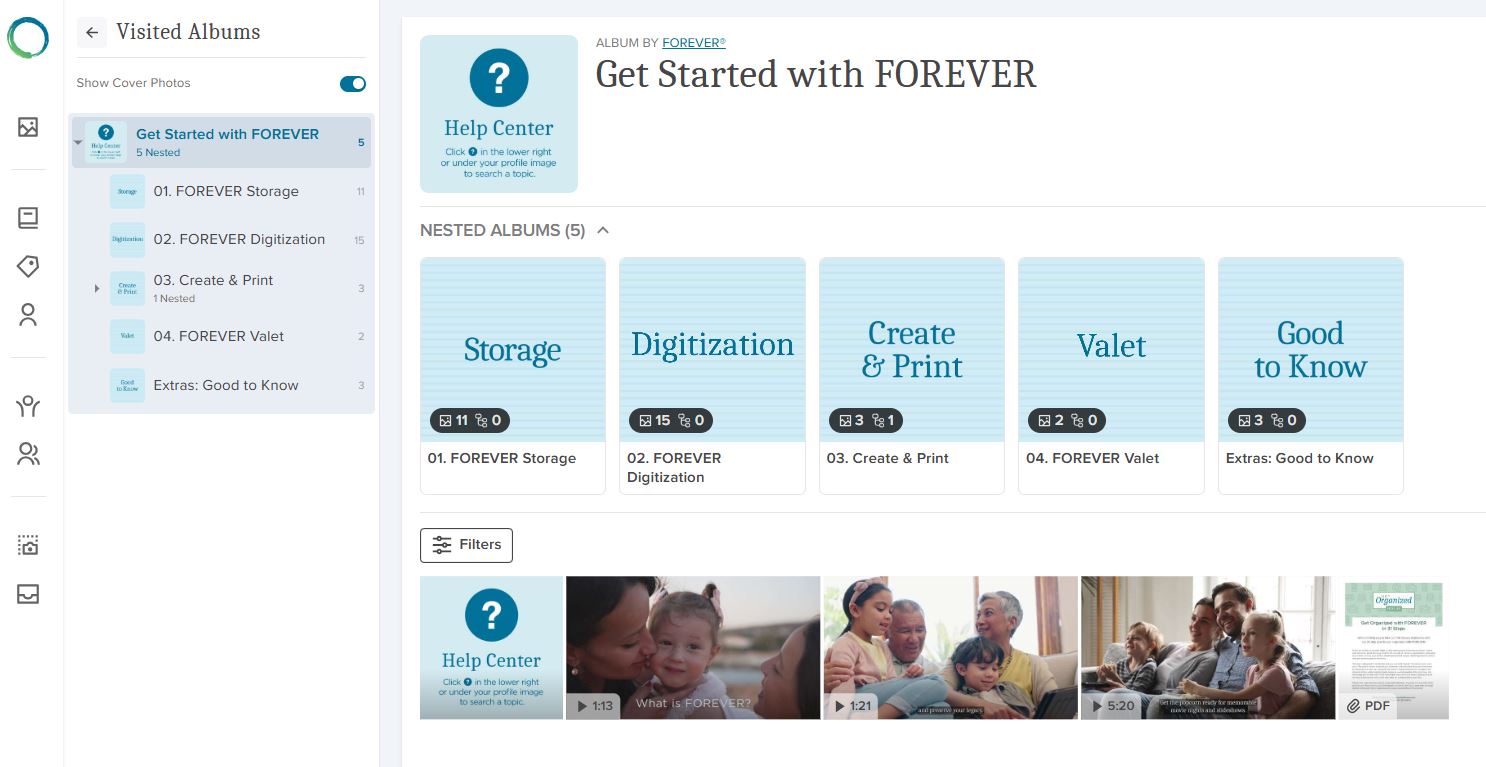
Remember how I told you FOREVER always offers several ways to get around, well here’s proof. On the far left is a column of icons. The green and blue FOREVER Circle will take you back to FOREVER’s home page. The rest of them take you to places in your storage. From below the FOREVER circle down, they take you to Your Gallery, Your Albums, Your Tags, Your People, Your Connections, Your Groups, Your Print Projects and Your Digitization Projects.

Screenshot of FOREVER's Get Started Page
Videos for Everything FOREVER

Next to that you have a small block next to a large block. The small block are short cuts to the items you see in the big block. You can reach those sections of the site by clicking the shortcut or one of the files in the large block. Whichever way you go, you’ll keep the first column and the small block on the right for navigation and you’ll find nested files under that. These “files” in FOREVER are called albums.

This section of FOREVER’s website is a sort of hybrid. If you had gone to the top row choices, that would have taken you into FOREVER’s site and from those pages, you would have to go back to the main page to get to your pages. If you had instead chosen the second row, you would be in your site and according to which section you were in, it might look like this three row configuration or only the two blocks on the right. The bottom line is that wherever you are, getting to the rest of it is easy.

SO THEN, WHAT DO WE HAVE HERE?

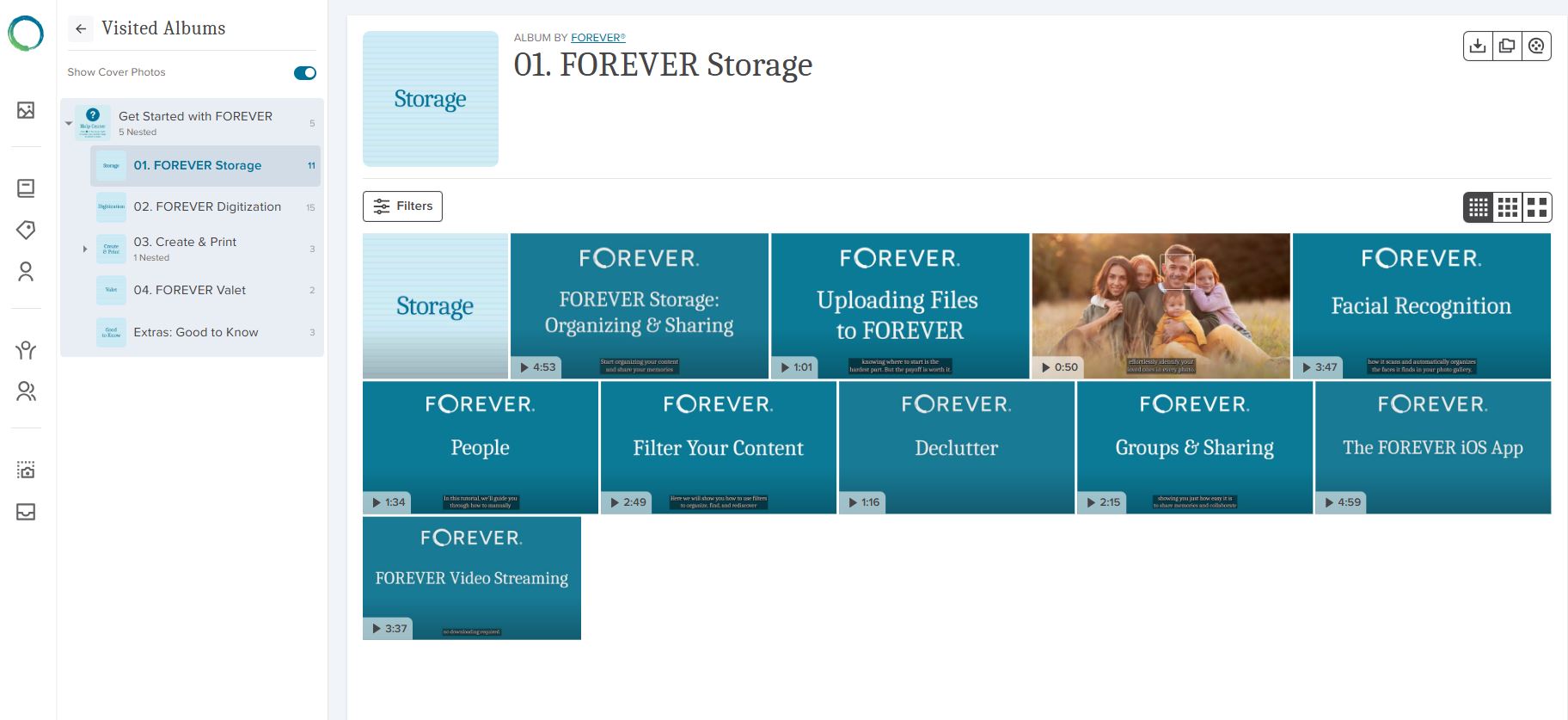
All that leads me to why we are here. The albums you see in the big block contain videos about using FOREVER. You can go directly to the album holding the videos related to what you want to know about. If, for instance, you clicked on “Storage”, you’d see the page I have inserted below. As you can see, most of these items have a small arrow and a time stamp in the lower left hand corner. That tells you they are videos. The items without a stamp will be simple images.

A Screenshot of the Storage Album in FOREVER's Website
Great Training Videos at your fingertips!

DIGGING DEEPER

If you click on the arrow in the corner of the video, it will play the video, because the actual FOREVER site has video streaming. If you hover over the video, a box appears which you can click. That allows you to copy or download a video. That functionality is there, because in your own storage you might not have video streaming, so you’d need to download a video to watch it. Autoplay is a great reason to add video streaming to your account and some day we’ll talk about that (or you can go to FOREVER now and watch the video you see in the image above!).

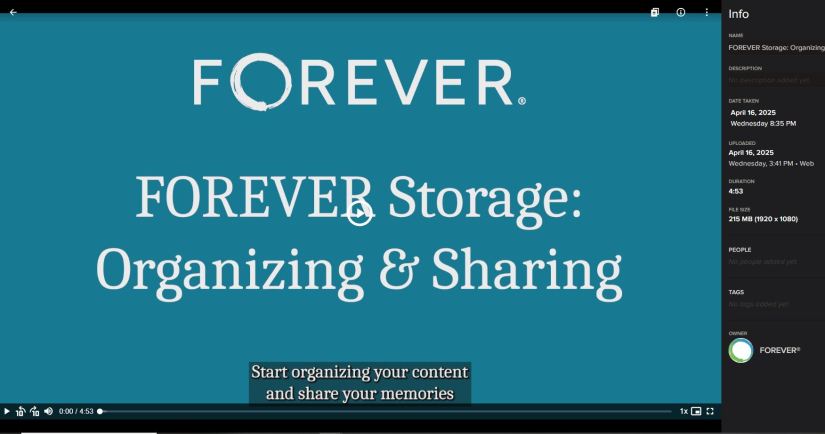
If instead you clicked on the item, it would take you into the light box I’ve inserted below. You could play the video from the video bar at the bottom and it also has an Info box. That tells you more information about the video and we’ll discuss the light box further in another blog, but I wanted to point it out, because just as FOREVER has a light box for the items in it’s albums, your albums will also have light boxes.

Screenshot of a FOREVER lightbox

And that’s that. Next week I will begin walking you through FOREVER storage or if you prefer, you could go watch the videos yourself at your convenience. Friday we’ll be making something fun for Memory Sharing and Monday we’ll be on the road, Memory Making! Stay with me!

ART, Attractions, DESTINATIONS, Memory Keeping, Museums, Road Trips, TRAVEL, United States

LACMA

MEMORY MAKING: LOS ANGELES COUNTY MUSEUM OF ART

Finally, But Not Quite

I lived in California for six years and made a few visits to LA every year. We moved back to Texas and have been back to LA several times. I had LACMA on my list every time, but never got there. There were always other things at the top of the list and I loved seeing those wonderful sights, but LACMA was not one of them. This trip it was at the top of the list and my poor husband was reminded of it frequently.

After our scheduled days with family, we waved goodbye and headed off to LACMA. That’s the finally part. The not quite part was the massive construction project they had going on. I had the opportunity to see mere snippets of the many works of the LACMA and I am so happy I went. However, there’s a lot more to see than was available for viewing, so LACMA went right back to the top of my LA list.

The Modern Part of Our Visit

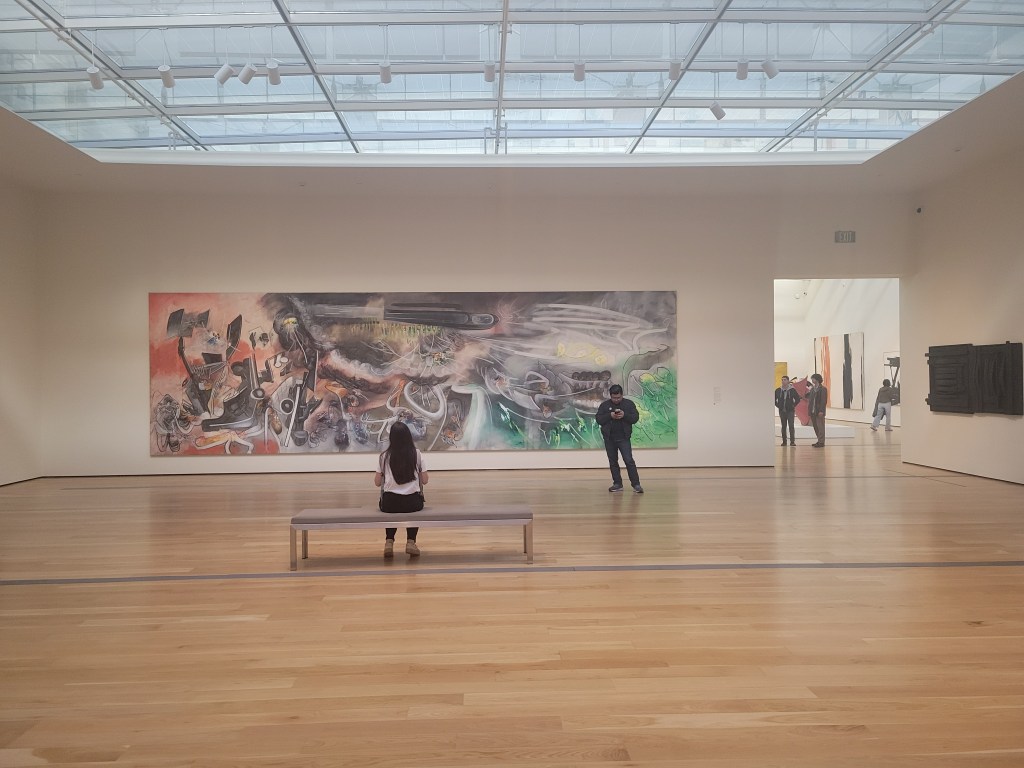
So the red and glass building at the top of this post is BCAM, “the centerpiece” of LACMA (according to LACMA). We weren’t enchanted, but then we aren’t big fans of Contemporary Art. We listen to the lectures and look at the art, trying to appreciate it, but give us European Renaissance any day, or Impressionists, or Decorative Arts, or well, you understand. We killed most of an hour over there and at least 15 minutes of that was spent on a “is that all there is” re-tour of the facility.

The Other Part of the Museum

Then we stepped next door at the Resnick Pavilion which contained a “Highlights” collection and there we were perfectly happy for a whole lot longer. There was one gallery with a sort of one-of-each approach to the collection. One painting, one sculpture, one vase, one gemstone etc. etc. etc. I could have stayed there all day.

There was also a mural being painted in real time and an exhibition about it. This was California, so they had some lame-woke-liberal (IMHO) excuse for the mural which made me roll my eyes, but I did love watching the artists paint.

Then we wandered into the Arabic art section. Adored it. They had a room set up in which I could imagining several turban-headed men lounging on the sofas, smoking hookahs and watching belly dancers. The belly dancers are probably more imagination than I should have applied, but it was great. We spent a lot of time in that gallery, too. Fascinating stuff. One might wonder why Arabic art got a whole gallery, while the highlights were so parsimonious, but it is their museum, not mine.

It was time to hit the road and head towards Huntington Beach. As we left, I looked longingly at the David Geffen Galleries, under construction across the plaza, and promised myself I’d be back.

There were giant animal head sculptures along the plaza. I imagined them starting to talk, as if I were on a strange planet with Captain Kirk. Then I remembered Gobekli Tepe. One of my favorite ruminations is imagining future archeologist digging up some of our monuments and surmising who we had been. Would they recognize this as a museum or would they think the collection of animal heads were a tribute to our gods.

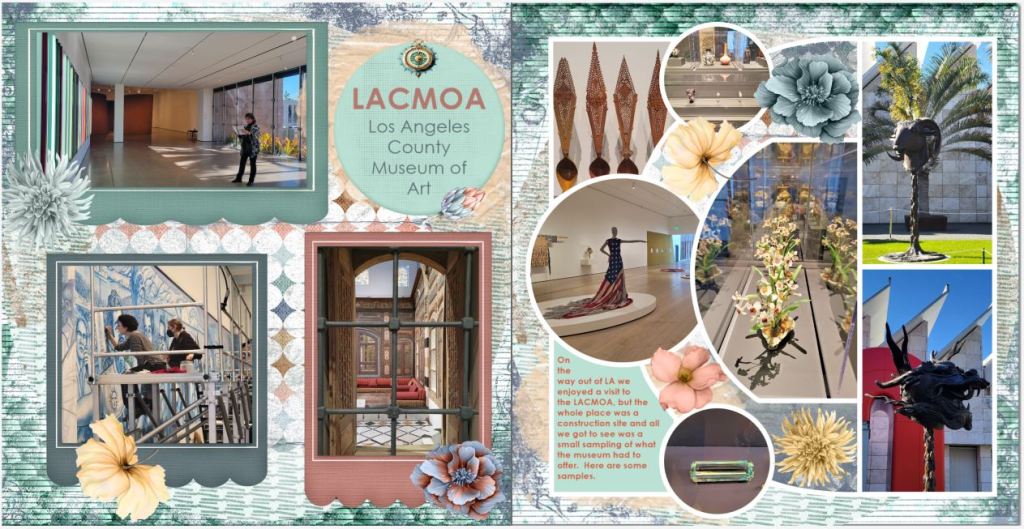
Anyway, I hope you’ll visit on Wednesday and Friday for Memory Keeping and Memory Sharing. In the meantime, here are the pages I created in Artisan to sum up our visit.

Memory Keeping, Photo Organization, Photo Organization Coach, Photography, Scrapbooking

Three Ways to Create #1

MEMORY SHARING: THREE WAYS TO DESIGN PROJECTS #1

AutoBook

The easiest way to create a photo book with FOREVER is AutoBook and it’s quite magical. Whether you store your images on FOREVER or somewhere else, once you have chosen the photos you want to include, you just click your way to Create & Print on the FOREVER website and select Photo Books. Decide which AutoBook format you want, choose your parameters and then hit Personalize.

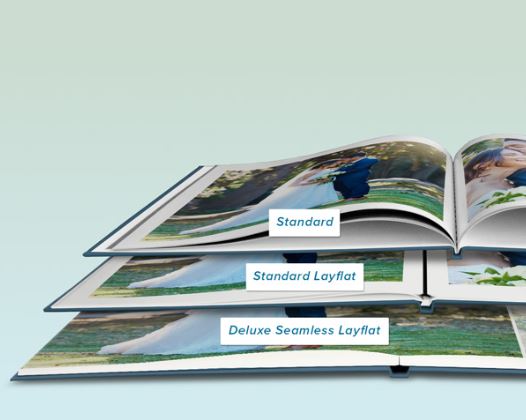
There are two AutoBook formats: Standard & Seamless. Standard means there will be a seam between the pages and Seamless means there won’t be. Within the Standard format there are two choices – Standard and Standard Layflat. Standard is like any other book, the pages go into a sort of valley and it is the most economical. With Seamless Layflat the valley is eliminated with a little trick which lifts the valleys between the pages and adds a think black line. It’s more labor intensive to create, so it costs a little more Seamless is more expensive because along with the necessary technology, you’ve also got thicker pages. I use standard most of the time and Deluxe Seamless for special creations, but some people only design in Standard Layflat. It’s a matter of preference and budget.

Once you choose a format, you choose a size -8X8, 10X10, 11X8.5 or 12X12 – and then the cover, hard or soft cover. Each size and cover has it’s benefits, from economy to durability, it’s up to you. Since most of the albums I’ve created over the years have traditional 12X12 Creative Memories coversets, I’m used to the 12X12 format and usually get the hard cover. However, some albums I want to be a little more economical or lighter weight, so I will go one of the other routes. I have a client that creates a 8X8 album every month. Other clients want something malleable for their kids or lighter weight for older family members.

Once you make those choices click Personalize. Then click Add Photos and navigate to your images, whether that’s on your device or in your storage. Once you add your photos, the magic begins and in seconds the magic of AI distributes your photos on the pages and you’re ready to print, if you like. Or, if you’d like to edit the pages, add some captions or backgrounds – that’s up to you.

Other AI Assisted Choices

There’s another book called the The Big Picture which also uses the AutoBook technology, but it has a very specific use. We’ll talk about it some day when we’re discussing the digitization of scrapbook pages.

But the AutoPrint magic of AutoBooks extends to many of the other Create & Print projects, so don’t hesitate to shop around the store. With most of the items in the Create & Print store, primarily with the exception of Photo Book Templates and Calendars, once you’ve selected your photos, you’re seconds away from printing.

Need more control? Then you’ll want to check out the Photo Book Templates and perhaps Artisan 6.

Need someone to do it for you? Yep, that’s me. Give me access to your files or photos and I will do it all for you. It’s my favorite thing to do!

DESTINATIONS, Memory Keeping, Photo Organization, Photo Organization Coach, Photography, Scrapbooking, United States

One More FOREVER Thing Before Moving On

MEMORY PRESERVATION: IT’S A MULTI-GENERATIONAL THING

Good Concepts, But How Do They Do That?

For the last couple of weeks I’ve been sharing the differences in preserving memories with FOREVER and the rest of cloud providers. The bottom line is that you OWN your storage and so you get to decide what happens with it, because Memory Preservation is a multi-generational thing.

As to how they plan to do what they promise, you may not realize the company is already13 years old. What’s more it has a very steady and manageable growth plan that is working well. When you buy storage from FOREVER, a small part of your money goes into the cost of setting up your personal cloud, but the rest of it is poured into a trust which is set up to maintain that cloud into perpetuity.

The rest of the products and services FOREVER offers go to the bottom line, just like any other company, but the assumption is that the majority of their customers own a personal cloud with FOREVER and enjoy a relationship with the company that enhances all their other Memory Keeping activities.

The Way It Works

With such an out-of-the-box premise for the creation of the company, they went right ahead and did everything else differently, also. FOREVER does not advertise and that’s why you don’t find them when you google the products and services they offer. You don’t see ads in magazines or hear them on the radio. In fact, you may have never heard of them before and that’s OK, up to a certain point.

Instead of relying on traditional marketing, FOREVER is an e-commerce site with a team of independent contractors who spread the word and help support the clientele. However, this is not some pyramid scheme or multi-level marketing. Some of the contractors do choose to build their business by building a team and FOREVER has a model for that, but “recruiting” is not required for success with FOREVER. Many of FOREVER’s very successful independent contractors never recruit a soul – like me. For us, FOREVER is just integrated into a larger purpose. Some examples are professional photographers, organizers and genealogists. We’re busy offering our specialized services to our customers and we don’t have time to manage a team, nor do we want to.

What some people don’t want to admit is that they stick to the fish or the fly, because they hate those networking businesses. You know what I’m talking about. Kitchen Gadget Companies that want you to have a party to get free product. Skin Care Reps who want you to join their team to get a discount. Jewelry Salespeople who contact you at the end of the month desperate to meet some number. Guess what! I hate them to! I’m a scrapbooking artist and a memory keeping coach, not a salesperson. I don’t have time for that.

Mine is a service business. I create custom scrapbooks and photo books for people who want them, but want someone else to do them. I also consult with people who want to get their memory media under control, whether they want to do it themselves or hire me to do it. In providing these services I recommend two vendors – FOREVER & Creative Memories. I don’t have a team. I don’t want one. My business model is based on my own personal skills and preferences. Yes, I am a sole proprietor, so I also have to do my marketing, but that’s just how small business is.

So this is my Memory Keeping company. These are the vendors I trust and feel comfortable recommending to my customers. I’d love for you to learn more about my unique business. Can we talk?

Memory Keeping, Photo Organization, Photography, Scrapbooking

New, New, New

SHARING MEMORIES: NEW IN CREATE & PRINT

Choose from 100 Fonts

I think FOREVER is wonderful, but that doesn’t mean I don’t have a wish list. You know like, “I wish I had a better choice of fonts for some of my projects.” I’m a font enthusiast, second only to my role as a paper fanatic. It’s one of the reasons I usually run to Artisan for my projects rather than use Create & Print, when using Create & Print would be a lot quicker. Artisan is an easy choice for me – I own it and I know it – but not for everyone.

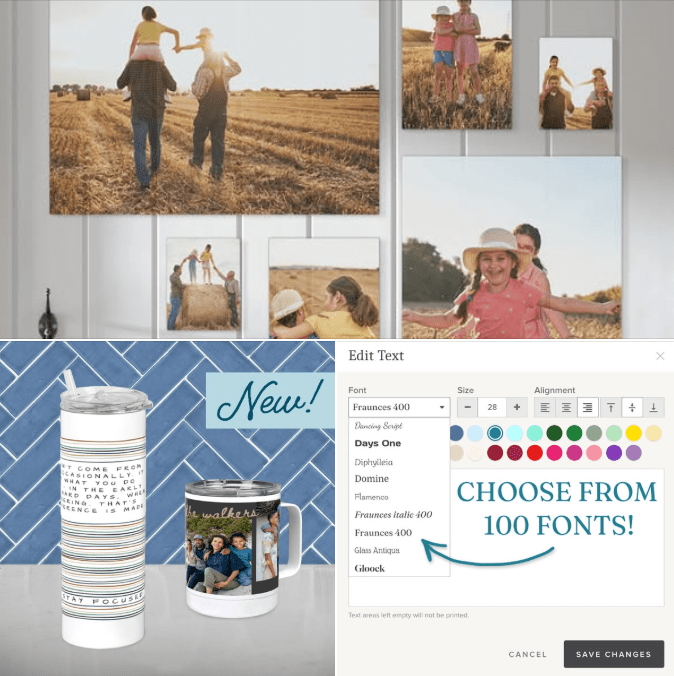
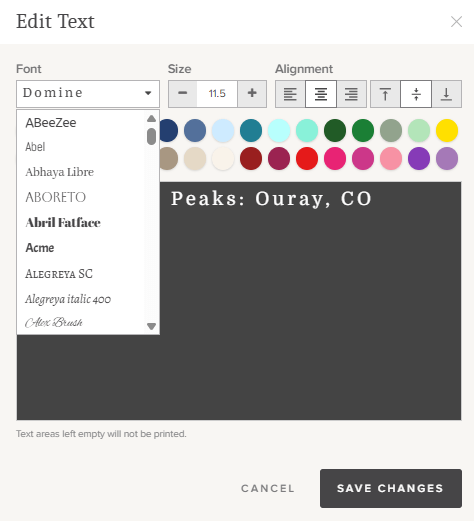
If lack of font choices is the reason you’ve continued to use the other guys, then that reason is no longer valid! EVERY FOREVER Create & Print Project now has a choice of 100 Fonts. After looking at the choices, now I’m wishing Artisan had all the font choices Create & Print does!

Check out a project you might want to create. You can see how easy our process is and you don’t have to pay anything to create the project, only when you hit the print button. https://www.forever.com/ambassador/jane-sadek/create-and-print/

New Drinkware Sizes

Were they reading my mind, or what? I have enjoyed the 40 ounce tumbler I created last year. I loved the handle, the cover and the way it fit in my car’s cup holder, but my husband thought it was entirely too big. Surprise!! There’s a new tumbler in town. This slim sweetheart is 20 ounces, keeps hot or cold beverages the right temperature for hours and comes with a well-designed lid and reusable straw!

But FOREVER did not stop there. Do you want a thermal coffee mug? Well then, you’re in luck, because that format is also available.

More Wall Art Sizes

And finally, they’ve extended the number of sizes for wall art – both canvas and metal products. Canvas Prints now come 8×8, 8×10, 11×14, 16×20, 20×24, 12×36, 20×30, and 24×36 inch sizes, in vertical and horizontal options. Metal Panels come in 8×10, 12×12, 12×18, 16×20, and 24×36 inch sizes, also in vertical and horizontal options.

If you’ve been thinking of creating a gallery wall, but weren’t sure how to go about it, then you need to see this new post on the FOREVER Blog.

I was so excited to hear about these new innovations and I thought you might want to know about them while they were available with a special discount through the end of the month. Yes, you got that right! You can get these new products (and all 100 fonts) at very special pricing. Wall decor, including all the new sizes, is 50% off and all drinkware, including the new 10 oz cup and mug, is 40% off. You can get the new fonts on special deals like 50% off standard greeting cards, photo gifts, notebooks & planners, 40% off foil greeting cards and 35% off everything else.

Memory Keeping, Photo Organization, Photo Organization Coach, Photography, Scrapbooking

What You Don’t Know Can Hurt You! Part II

MEMORY PRESERVATION: THE PROBLEM WITH FREE

Another Thing You Probably Didn’t Realize!

Last week I discussed secure cloud storage, data mining and advertising. This week I’m going to discuss the most important thing that sets FOREVER apart from it’s competition and basically, that’s why it’s called FOREVER.

Cloud Storage You Own Rather Than Rent

As I discussed last week, some companies provide free storage and the rest charge you a small (or not so small) fee monthly or annually, like rent. They are giving you a license to use their cloud, but they accept no responsibilities for it and they let you know they are going to data mine your account, while getting paid to advertise to you. If you are using their service for free, they will outline the circumstances in which your account will be shut down and they are not required to inform you about it. Some do, but in the end, if you don’t take action, your images will be deleted. It’s a lot more simple if you are paying rent (fees, maintenance, whatever they call it), because when you don’t, they delete your account.

At FOREVER you pay for storage up front with a one time payment or a 24 month payment plan and then its yours outright. You will not continue to pay a monthly or annual fee to maintain it. Your heirs will not have to take up your payments or pay any transfer fees. If you get dementia, get sick, go broke or die, you descendants not going to lose access to your space on the cloud (unless you want to bar them) and your images will be safe for whoever you would like to get them.

What you want FOREVER to do with those images if and when you aren’t managing them, for whatever reason, is up to you. There’s a way to set up everything up so your heirs get immediate access or you can make everything public or…well, there’s several options and one of them will suit your needs.

But What About That “Updated File Formats” Thing?

Updated File Formats are the icing on the cake and something no one else even mentions. Remember floppy discs? There was a time when floppy discs were state of the art. Now they’re useless (unless you get them digitized by FOREVER).

Well, a day is coming (and it won’t be long) when the same thing will be true of jpg, mp4, pdf and the rest of the alphabet soup What’s going to happen with your images if they are on Google Photos or Dropbox in the new soup? You don’t know, do you?

That’s something FOREVER cloud owners don’t have to worry about. When jpg goes the way of the floppy disc, then FOREVER is going to update your images to whatever the new thing is.

Remember not so long ago when Apple came up with the HEIC format? It was just one of their many ploys over the years to not play well with others. Almost immediately, FOREVER created a work around, so Apple customers would have seamless use of their FOREVER account and just recently, that work around became full integration.

I don’t know what the new alphabet soup will be. Will HEIC become the new jpg? Or is something else being developed somewhere else? It really doesn’t matter if you have FOREVER storage, because FOREVER’s got you covered!

A Few Final Footnotes

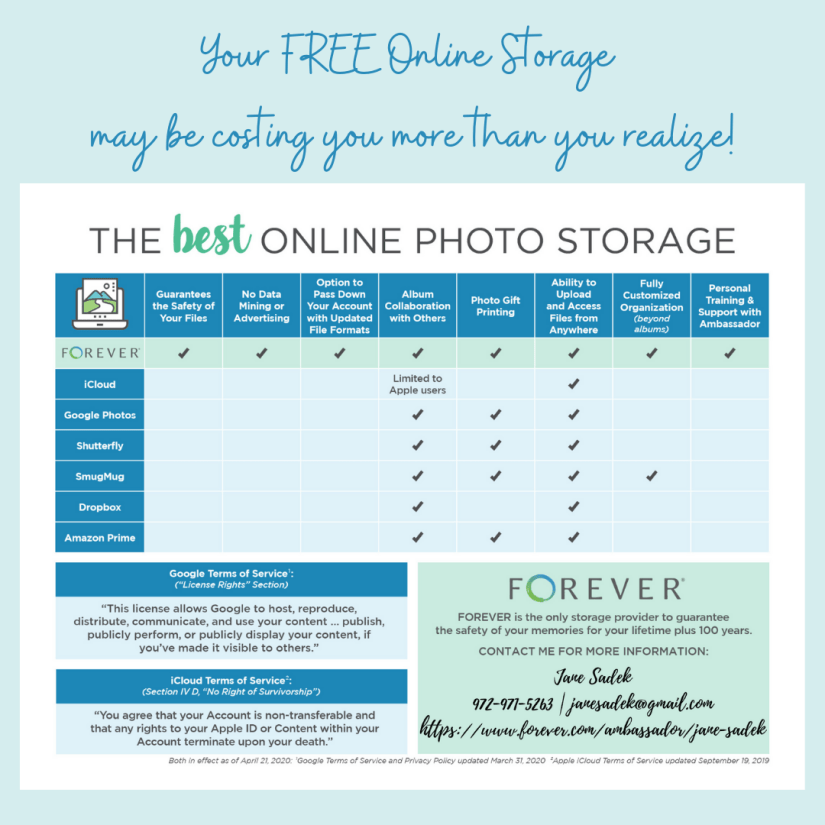
See those quotes in the lower left hand corner of the image above. Those were taken directly from the terms you agreed to when you signed up with Google and Apple. Apple has made some slight changes in their survivorship wording, but the effect is the same – you no pay, you no play.

The Google terms still apply. Share one photo from your account and Google owns everything. You’ve probably read something similar posted on Facebook. People tell you to copy and paste the post to protect yourself. These terms do apply to Facebook, the only difference being that by posting it on the social site you have shared it, so they own everything. You can copy or paste that post as much as you want it makes absolutely no difference at all. Tell your friends. I’ve been trying to nip it in the bud from the day it appeared, but the urban legend is bigger than the truth, even though the urban legend is a lie.

Memory Keeping, Photo Organization, Photo Organization Coach, Photography, Scrapbooking

If You Print It, You Must Ship It!

MEMORY SHARING: HOW DO YOU WANT THAT DELIVERED?

Plus Shipping? Yuck!

In our wonderful new age of online shopping, shipping is just a way of life, but there are things that you can do to control shipping costs. From monthly free shipping deals, to annual unlimited shipping, FOREVER offers a variety of ways for you to save on this necessary expenditure.

First, a Word About Shipping Deadlines

Last week, I ordered one of the new tea towels from FOREVER and selected Economy Shipping, because there was no rush. I just thought the were cute and wanted one for myself. FOREVER said it would be delivered in 14-17 days. I got it in 7.

Most of the time when you order from FOREVER, whether it is a photo gift, a photo book or digitization, your shipping will be faster than a speeding bullet and it is very easy to get used to that kind of service. However, if you are ordering with a hard deadline DO NOT DEPEND ON THE BULLET.

While it is true that most of the time you will get your package much sooner than you’ve been told, things can happen, especially at peak times – and you might not realize it’s a peak time. Obviously, shipping is insane around the winter holidays. Believe what they tell you the delivery date will be and add a few days around it for weather, strikes and such.

However, there might be peak times you don’t even recognize. You may not have anyone graduating or getting married, but stationary orders can slow down in April and May. Not only are lots of other people getting married and graduating, but pixels 2 Pages Annual Virtual Party is wrapping up and hundreds of women around the US are ordering their recently completed photo books. That’s just one example, but be aware. You’re going to get it as fast as they can make it and get it to you, but in different seasons that can be at different speeds.

“Normal” Shipping Times

“Normal” is a dangerous word, but if I ordered a set of coasters today, Economy is promised in 14-17 days. Standard narrows that down to 12-13 days. Expedited moves it up to 10 days and Rush will put it on my doorstep in 7 days.

As I said, believe what they say and be happy if it gets there earlier. Don’t think back to something you once ordered Economy and got in 7 days. I don’t want you to be disappointed.

CLUB Weekend Deals

Members of the FOREVER CLUB are very special! They invest monthly in FOREVER and FOREVER doesn’t take that lightly. The member may designate their investment to go towards a specific use (like payment plans, memberships and such) or they could be saving up for a big ticket item like video streaming or they could just want to tuck away a little bit every month, so they can buy something they want without spending new money.

That’s what I did with the tea towel. My CLUB dollars are designated to pay my pixels 2 Pages membership, but my level of membership is a little higher than the monthly membership fee, so each month I tuck away a few extra dollars for little splurges, like the tea towel!

FOREVER says thanks for this in a number of ways. They give all CLUB Members a 5% discount on most things available from FOREVER (with a very few exceptions) and every quarter they award some free storage. They also get special deals of all sorts, a FB page and a quarterly Zoom call with the Founder of FOREVER.

Another way they say thank you is the monthly CLUB Weekend, with contests, deals and free shipping. If a CLUB member hits a certain dollar amount (net after deals) of print products then they can have free Economy shipping or half price Standard shipping.

Even if you are not a CLUB member, then you can still win on CLUB Weekend, because you too can get free Economy shipping or half price Standard shipping. You’ll just have to reach a higher dollar amount.

Want to know when it will be CLUB weekend, so you can plan the delivery of your projects? It’s the third weekend of every month. Count on it!

Premiere Shipping

Shopper know thyself. Some people actually order lots and lots of print projects and it’s amazing how quickly those shipping costs can add up. I order a lot from FOREVER, but much of it is downloadable. Still halfway through the year, I’ve spent about $102 on shipping. Even were I to double that in the last half of the year, Premiere Shipping would not be a deal for me.

However, it might be a deal for you. You pay $430 a year and during that year, all Economy and Standard shipping is free, for both print and digitization. You can start your year anytime and it lasts for 12 months.

Anyway, those are the tools FOREVER offers to help you control your shipping costs. If you ship a lot, they can be real lifesavers.

Memory Keeping, Photo Organization, Photo Organization Coach, Photography, Scrapbooking

Happy Birthday to the CLUB!

MEMORY KEEPING: MAKING THE MOST OF THE CLUB

Making a Memory Keeping Promise to Yourself

I have never talked to anyone who said, “I have no interest in memories.” I talk to a lot of people who are misguided or haphazard in their methodology of preserving their memories, but everyone wants to be able to share their images in some way. I also talk to people with a great desire to save, organize and share their memories, who keep putting it off anyway. They say – this summer, next winter, when my children are older, when I retire, when the wedding is over, when I get back from vacation, when I have more time, when I have more money,…you get the idea.

I say, “Make a commitment to yourself to get started,” and the CLUB can be that way. Any project needs tools and for Memory Keeping most people need to begin with some Storage and perhaps some Digitization. So the first thing they ask is, “How much is Storage and/or Digitization?” Then the excuses begin.

I should answer their question with another one, “What’s your budget for getting started? Do you have $30 a month to devote to this?” That’s what the CLUB can do for you. It takes your $30 every month (or $60 or $120 or whatever in intervals of $30) and helps you get your memories, saved organized and shared.

How does it help? Well, the CLUB is your Memory Keeping savings account and you earn lots of interest! Every penny you put into the CLUB remains yours, because there is no fee, and your dollars never expire, so it’s a great way to save up for what you want. But there’s more!! Your membership gets you 5% off everything you buy and it’s stackable with most deals FOREVER offers. Let’s say Digitization is 40%. Then as a CLUB member, your discount would be 45%, it’s that easy.

Another amazing feature of the CLUB is free storage which is added to your account every quarter. Say you join at $30. I did, back in 2021. Since then I’ve gotten 9 GB of free storage, which translates into approximately 1350-4500 stored photos (according to the size of my images).

The Happy Birthday Bonus

I’m taking the time to explain this to you now, because if you join this month (or add to your current membership), there’s a Bonus Double Storage Award. The quarterly award for a $30 membership is half a GB, but in September you’d get a whole GB. For $60, you get 1 GB quarterly, but in September you’d get 2. And with $120 you’d usually get 2, which with this deal would get you 4! Amazing!

So, How Much Should You Invest?

That’s a good question and it depends both on what you can afford and what you want to accomplish. FOREVER has created a couple of handouts to help you decide.

The first shows examples of four CLUB membership levels and how you could use them if your goal was to have Storage and Video Streaming. It includes how much per GB you’d end up paying for your storage and how much you’d have left in your CLUB account at the end of the month to spend or save towards other items you want.

The second is actually a worksheet for you to plug in the items you’d like to invest in and figure out the level of membership that would get you to where you’d like to be.

Join The CLUB and Start Saving Now

At FOREVER, belonging is a tool for you, not an income source for the company. How many things do you pay for on a monthly basis, just for the privilege of belonging, but you get virtually nothing back or perhaps they offer some package of gifts you can’t use unless you already spend a certain amount with them? Yes, I know it’s infuriating.

FOREVER is different in every way. It’s free to join FOREVER and you immediately get 2GB of storage FREE – that’s $50 worth of storage by the way. You also get a $20 Welcome Coupon which you can use on your first purchase for pretty much anything. You also get a free app for your phone so you can synch it with your FOREVER account.

If you go ahead and join the CLUB when you join FOREVER (which you should) you’ll also get a 5% discount on whatever you buy from the very first transaction. You can use the dollars you invest immediately or save them for something big. The third month you belong, you’ll get your storage bonus. There’s a whole list of other benefits you may or may not need.

Here’s another bonus for CLUB members. By using your CLUB dollars to purchase products on FOREVER’s payment plan, you avoid paying a lot of interest on your credit card. If you use your credit card to buy 10GB of Storage outright and you carry a balance on your account, you will pay interest on that purchase from day one. If instead, you use your Bronze Club Dollars, you’ll only add $30 to your credit card balance each month, making it much easier to pay off or pay down.

I have a Bronze Membership. It covers my monthly pixels 2 Pages membership. Another friend has a Bronze Memberships to pay for a storage plan and her p2P membership. Someone else pays for a video streaming plan out of her membership. What will you get with your CLUB membership?