


MEMORY SHARING: THREE WAYS TO DESIGN PROJECTS #1
AutoBook
The easiest way to create a photo book with FOREVER is AutoBook and it’s quite magical. Whether you store your images on FOREVER or somewhere else, once you have chosen the photos you want to include, you just click your way to Create & Print on the FOREVER website and select Photo Books. Decide which AutoBook format you want, choose your parameters and then hit Personalize.
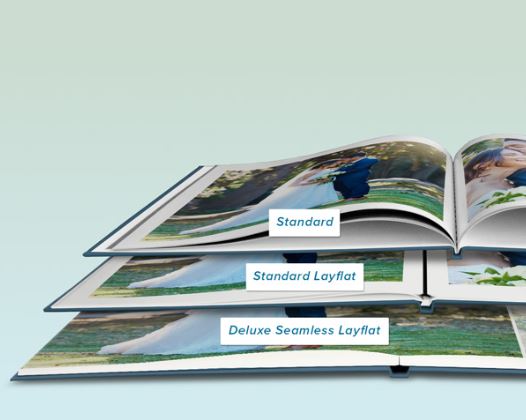
There are two AutoBook formats: Standard & Seamless. Standard means there will be a seam between the pages and Seamless means there won’t be. Within the Standard format there are two choices – Standard and Standard Layflat. Standard is like any other book, the pages go into a sort of valley and it is the most economical. With Seamless Layflat the valley is eliminated with a little trick which lifts the valleys between the pages and adds a think black line. It’s more labor intensive to create, so it costs a little more Seamless is more expensive because along with the necessary technology, you’ve also got thicker pages. I use standard most of the time and Deluxe Seamless for special creations, but some people only design in Standard Layflat. It’s a matter of preference and budget.
Once you choose a format, you choose a size -8X8, 10X10, 11X8.5 or 12X12 – and then the cover, hard or soft cover. Each size and cover has it’s benefits, from economy to durability, it’s up to you. Since most of the albums I’ve created over the years have traditional 12X12 Creative Memories coversets, I’m used to the 12X12 format and usually get the hard cover. However, some albums I want to be a little more economical or lighter weight, so I will go one of the other routes. I have a client that creates a 8X8 album every month. Other clients want something malleable for their kids or lighter weight for older family members.
Once you make those choices click Personalize. Then click Add Photos and navigate to your images, whether that’s on your device or in your storage. Once you add your photos, the magic begins and in seconds the magic of AI distributes your photos on the pages and you’re ready to print, if you like. Or, if you’d like to edit the pages, add some captions or backgrounds – that’s up to you.
Other AI Assisted Choices
There’s another book called the The Big Picture which also uses the AutoBook technology, but it has a very specific use. We’ll talk about it some day when we’re discussing the digitization of scrapbook pages.
But the AutoPrint magic of AutoBooks extends to many of the other Create & Print projects, so don’t hesitate to shop around the store. With most of the items in the Create & Print store, primarily with the exception of Photo Book Templates and Calendars, once you’ve selected your photos, you’re seconds away from printing.
Need more control? Then you’ll want to check out the Photo Book Templates and perhaps Artisan 6.
Need someone to do it for you? Yep, that’s me. Give me access to your files or photos and I will do it all for you. It’s my favorite thing to do!


 jane sadek